Coaching institutes run on test reviews, faculty meetings and parent calls
An exam-prep institute has its own rhythm. The weekly test on Sunday, then the test analysis meeting on Monday where subject teachers go through batch averages, weak chapters and students who dropped. The weekly faculty meeting, usually Saturday afternoon, with the academic head, subject heads, senior faculty, the student counsellor and the batch coordinator, covering syllabus coverage, timetable changes, faculty leave and parent escalations. The monthly PTM. And a daily stream of parent calls to the front office, half of them about one test result.
Parent escalations are where the trouble lives. A parent calls about their daughter's chemistry marks, and the counsellor brings it to Saturday's meeting. The chemistry teacher says "I'll take her doubts after Tuesday's class." The counsellor says "I'll update the parent." Both mean it. Then a mock test, a holiday and two substitute lectures later, nobody can say whether the parent was ever called back.
Ordinary minutes don't help much here. A teacher writes "parent concerns discussed" and moves on. What you need is a list of action items with owners and dates, the kind of list at the centre of guides such as UC Berkeley's page on agendas and action items and Umbrex's note on effective meeting follow-up. In a coaching institute, it also has to say which parent is waiting.
Three weeks, one batch, one promise that slipped
An illustrative case. Shikhar Academy prepares about 1,800 students for JEE and NEET across two branches in Indore, with 64 faculty and around 110 staff in total. Mr Jain is the director, Dr Meenal the academic head, Rahul heads physics, Sana teaches chemistry, Deepak is the student counsellor and Kiran coordinates batches.
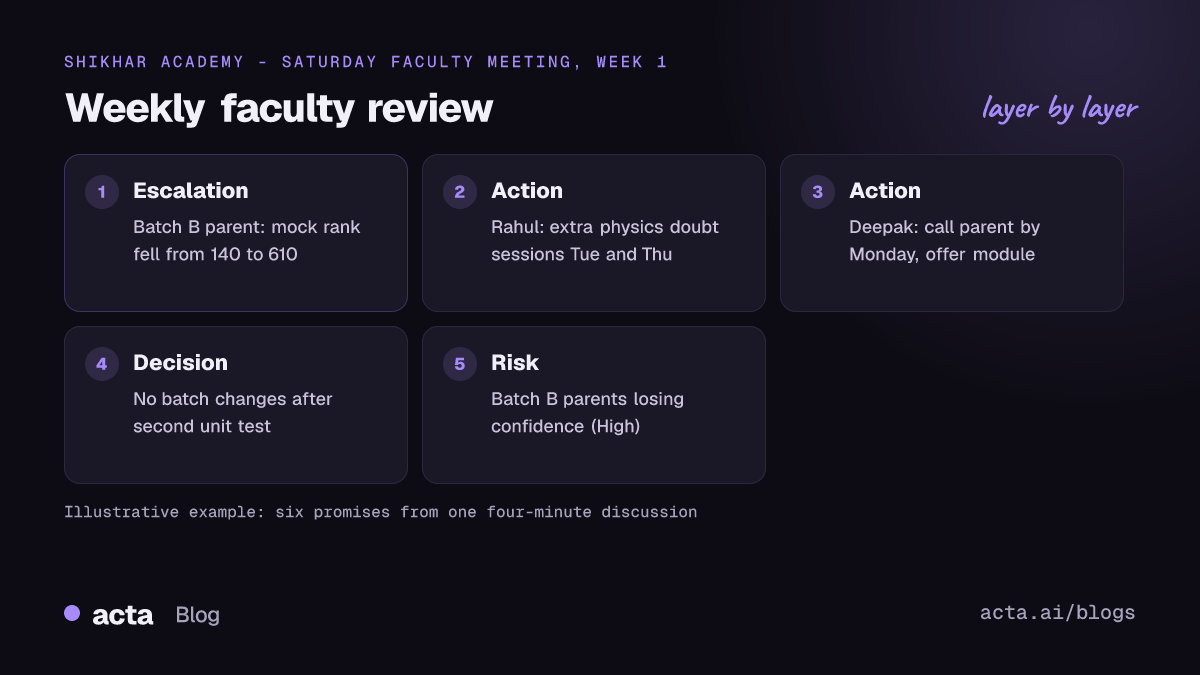
Week 1, Saturday faculty meeting. Deepak reports an escalation. A parent of a Target 2027 Batch B student says his son's rank in the last mock fell from 140 to 610 since physics changed teachers mid-term, and asks for a batch change or a partial refund. Rahul offers two extra doubt sessions a week for Batch B, Tuesday and Thursday at 5 pm. Dr Meenal says no batch changes after the second unit test, but the student can join the weekend revision module. Deepak will call the parent by Monday. Kiran will send Batch B the revised timetable.
Week 2. Tuesday's doubt session happens. Thursday's is cancelled because of the Diwali holiday schedule. Deepak calls the parent on Wednesday, not Monday, and mentions the doubt sessions but not the revision module. Kiran's timetable goes out without the Thursday session on it.
Week 3. The parent writes in the Batch B parents' WhatsApp group that "nothing changed". Three more parents call the front office about the same batch. On Saturday, Dr Meenal asks what was promised to the first parent. Rahul thinks the sessions continued. Deepak thinks the module was offered. Nobody is sure.
No one dropped the ball on purpose. Six promises came out of one four-minute discussion, and none of them had anywhere to live except people's memories and a WhatsApp chat.
Templates shape coaching institute faculty meeting notes around parents
Acta writes standard notes for every recorded meeting, including decisions and action items with owners. Three built-in templates in the Education group fit an institute directly: Faculty meeting for the weekly meeting, Parent-teacher meeting for PTMs and one-to-one parent calls, and Student advising for counsellor sessions with students. The report templates guide explains how they run after each meeting.
For the Saturday meeting, a custom template (custom templates are part of Pro) puts parent escalations in their own table. Under Templates, click "Create template", choose "Built-in" and start from Faculty meeting:
Template name: Weekly faculty review
What should this report do? For the coaching institute's weekly faculty meeting: test results by batch, syllabus coverage, faculty changes, every parent escalation with the promise made, and actions.
1. Test analysis (Table: Batch, Subject, Average, Concern)
2. Syllabus coverage (Table: Batch, Subject, Planned chapter, Reached chapter)
3. Parent escalations (Table: Batch, Issue, What we promised, Owner, Parent hears back by)
4. Faculty changes and leave (Bullets)
5. Actions (Checklist: task, owner, due date)
Extra instructions: Refer to students by batch, not full name. Write "Not discussed" if a section is empty.
Set it to "Only matching meetings" and run "Test on a past meeting" first. In Shikhar's week 1 report, the Parent escalations row would read: Target 2027 Batch B, rank drop after physics teacher change, promised extra doubt sessions Tue and Thu plus weekend revision module, owner Deepak, parent hears back by Monday. Then tick "Share with my team" so the second branch's academic coordinator runs the same report.
A per-person action list keeps parent promises from slipping
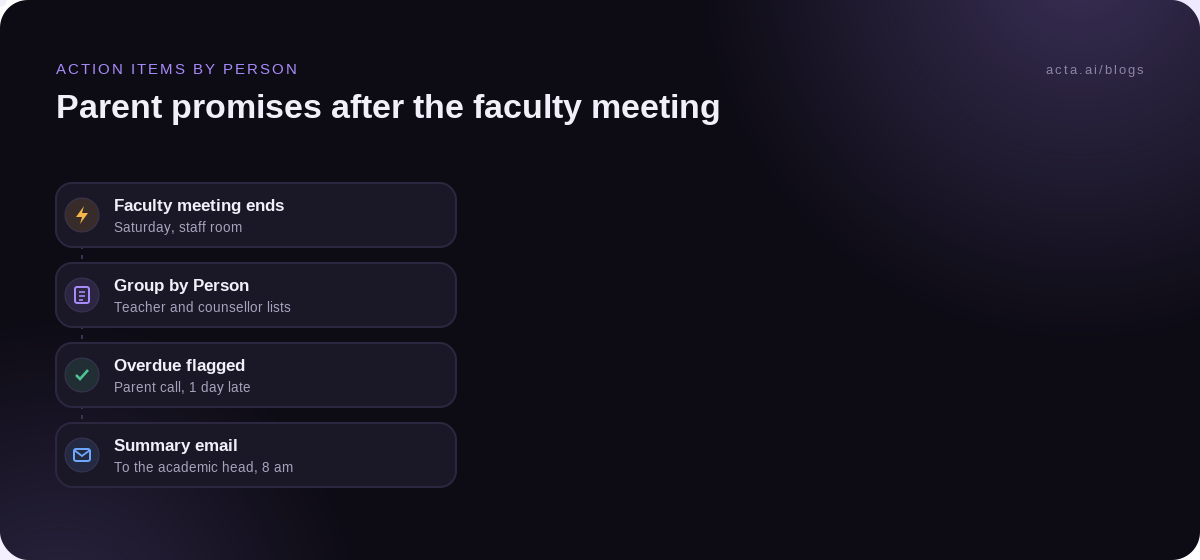
Each recorded meeting feeds the academic head's tracker at My meetings > Outcomes > Action items. Switch Group by to Person, and each teacher and counsellor gets one block across all the meetings Dr Meenal recorded or that were shared with her. Here's Shikhar's list on the Monday of week 2:
| Owner | Action item | Status pill | Comment |
|---|
| Deepak | Call Batch B parent about rank drop and options | Overdue 1 day | None |
| Deepak | Offer weekend revision module to the student | Due today | None |
| Rahul | Extra doubt session, Batch B physics, Thursday 5 pm | Due in 3 days | "Thursday is a holiday, move to Friday?" |
| Kiran | Send revised Batch B timetable with doubt sessions | Due tomorrow | None |
| Sana | Share chemistry worksheet for weak chapters | Done | "Shared in batch group" |
The tiles across the top, Open, Overdue, Due this week and Done, are also filters. The search box finds every action mentioning "Batch B" across months. Rahul's comment is the line that would have saved week 2: a question about the holiday, visible to everyone, right next to the promise.
Use two features to keep it moving. First, Auto follow-up: turn on "Send daily follow-ups", choose Weekdays at 8 am, and for "Who gets it" pick "Me, a summary of everyone's items", so Dr Meenal gets one email across all owners. If teachers prefer their own list, switch to "Each owner, their own items" with Due or overdue. Reminders stop by themselves when every item is done. Second, the Follow-up email button on each meeting card writes an email draft from that meeting, which Kiran can send to faculty after Saturday's meeting.
The habit that matters: start each faculty meeting with the Overdue tile, grouped by person, before test analysis. It takes five minutes and changes what people promise, because they know the list comes back next Saturday. For more on the people side, our post on holding people accountable without micromanaging is worth a read.
Policy decisions, batch risks and quick answers
Decision log
Dr Meenal's Decision log (Outcomes > Decision log) holds the policy calls that counsellors need to repeat consistently. Example: "No batch changes after the second unit test; offer the weekend revision module instead." Status Active, decided by Dr Meenal, owner Deepak, discussed in 2 meetings. If the director later allows batch changes for one branch, it becomes Changed with "Was:" and the date, and the history keeps both quotes. The Changed or reversed tile is worth a look before every PTM.
Risk Registry
In the Risk Registry tab: Risk "Batch B parents losing confidence after mid-term physics teacher change; refund requests possible", Impact High, Owner Mr Jain, Date end of month, Mitigation Agreed "Parents' meeting for Batch B with Rahul and Dr Meenal", Status Mitigating. When three more parents call in week 3 and it comes up again, the row is tagged "Getting worse".
OneChat
Before the Batch B parents' meeting, Dr Meenal asks OneChat: "What did we promise Batch B parents since the physics teacher change, and what's still open?" The answer lists the doubt sessions (one held, one moved), the revision module (not yet offered) and the timetable (sent without Thursday), with Found in pointing to the week 1 faculty meeting and the week 2 test analysis. The OneChat guide covers how to ask across meetings.
An Agent Builder recipe drafts parent replies for approval
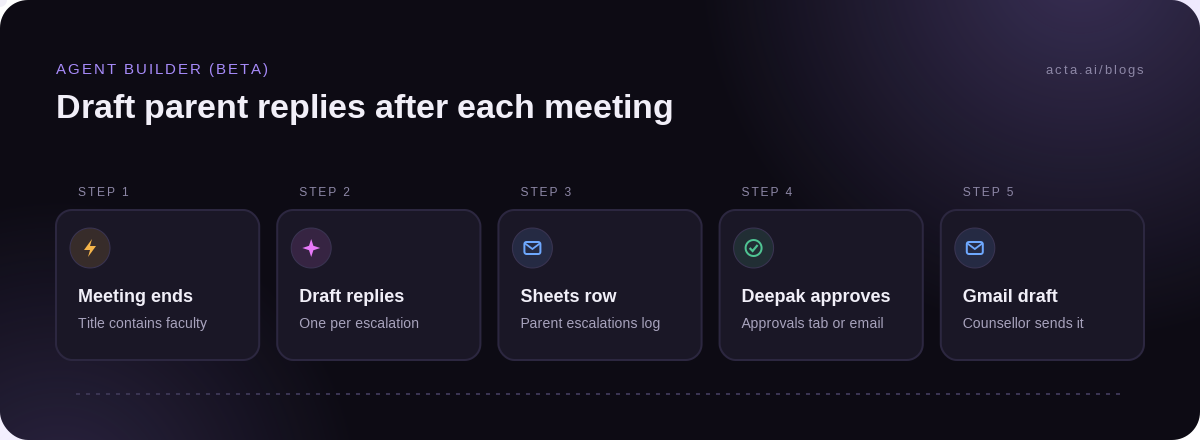
Counsellors spend evenings writing the same kind of message: what we discussed about your child, what we're doing, when you'll hear next. Agent Builder (beta) can draft those after each faculty meeting, while the counsellor stays in charge of what's sent:
- In Agent Builder, click "New agent" and start from blank.
- Trigger: When a meeting ends, filter title contains "faculty".
- Acta data: this meeting's action items and the Weekly faculty review report.
- AI: "From the Parent escalations table, write one short, polite reply per parent: what the institute agreed, who will do it, and when they'll hear next. No marks or ranks of other students."
- For each reply: Action, Google Sheets, add a row to the "Parent escalations" sheet (batch, issue, promise, owner, reply-by date).
- Human approval: Deepak approves each draft, from the Approvals tab or from the email buttons.
- Action: Gmail, draft reply in Deepak's inbox, so he adds the parent's address and sends it himself. Teams that trust the wording can switch to "send" later.
- Click Test, then Run test on last Saturday's meeting. Read every draft. Then Turn on.
If Deepak doesn't approve within 24 hours, nothing is created. For WhatsApp-only parents, Deepak can copy the approved text across. The test-and-turn-on guide shows the testing screen.
Bring faculty on board in two weeks
In a 110-person institute, two to five people record: the academic head, the counsellor, and perhaps branch coordinators. Subject teachers mostly read. The Saturday faculty meeting is in a staff room, so record it on the academic head's phone with the mobile app. For parent calls on Zoom, Meet or WhatsApp, the desktop app records from the counsellor's computer without a bot. Tell faculty that the meeting is recorded and why, and tell parents at the start of a recorded call; our post on recording consent and what to tell participants has wording. Don't record students, who are often minors, without your institute's own policy and their guardians' agreement.
Week 1. Day 1: Dr Meenal creates the workspace. Days 1 to 5: she records the faculty meeting and the test analysis meeting; Deepak records his parent calls. Day 4: build the Weekly faculty review template and test it. Day 6: the first faculty meeting that opens with the Overdue list.
Week 2. Day 8: invite Rahul, Sana and Kiran from Settings > Workspace. Day 9: agree that faculty and test analysis meetings are shared with "Everyone in" the workspace, while parent calls stay private unless needed. Day 10: turn on Auto follow-up. Day 12: build the parent-reply agent and test it on two meetings. Day 13: review together what closed and what didn't.
Mistakes to avoid: turning reminders on for every teacher in week one, before owner names come out right; letting promises go unsaid ("we'll look into it" has no owner); and sending AI-drafted replies to parents without reading them. Acta records the meetings, keeps the per-person list and drafts the follow-up; your faculty still decide what to promise. See the Acta for coaching institutes page for an overview.
Frequently asked questions
What should be on a coaching institute's weekly faculty meeting agenda?
Overdue actions first, then test analysis by batch, syllabus coverage against plan, faculty leave and substitutions, parent escalations and the actions arising. Keep parent escalations as a fixed agenda item with owners and dates. Close by reading back every promise made to a parent, so the notes and the teachers agree.
How do we track parent complaints until they're resolved?
Give each complaint an owner, a promised step and a date the parent hears back, and review the overdue ones weekly. Close an item only once the parent has been told what happened. A shared sheet of escalations, filled automatically after each faculty meeting, gives the director a running view without extra typing.
Can teachers see their own action items?
Owners can receive daily follow-up emails listing their own items, and the Follow-up email button drafts an email you can send after the meeting. To open shared meetings or ask OneChat, a teacher needs to be invited to the workspace, which uses a seat. Most institutes add the academic head and batch coordinators who run or read the meetings, and let other teachers get their items by email.
Is it a good idea to record calls with parents?
It helps settle disagreements about what was promised, but tell the parent at the start and explain why. Consent rules vary by country and state, so treat this as general information, not legal advice. Keep other students' details out of the call, and store recordings only as long as your institute's policy allows.
What does it cost a coaching institute?
Acta Pro is $8 per seat per month billed monthly, or $72 per seat per year, and every teacher or coordinator in the workspace takes one seat, paid by the workspace owner. The 15-day trial includes the Outcomes views, the Risk Registry and OneChat. Custom templates are part of Pro, so test the built-in Faculty meeting template during the trial.
Change how your next faculty meeting ends
The fastest improvement comes from the last five minutes of Saturday's meeting, not the first.
- Name the owner: every parent escalation leaves the room with one person's name on it.
- Set the reply date: "parent hears back by" goes on every escalation, not just "follow up".
- Read the promises back: the counsellor reads each one aloud before the meeting closes.
- Open with Overdue: next Saturday starts with the per-person overdue list.
- Draft, then approve: let the agent draft parent replies; the counsellor sends them.
Try it on your next faculty meeting with a 15-day trial, and record online parent calls with the desktop app or the Chrome extension.