Actionable AI insights from meetings are findings that name an owner, a next step, a date and the moment in the call they came from. Most AI summaries stop short of that. The resources below close the gap: built-in recaps in Teams, Meet and Zoom, dedicated meeting assistants, decision and follow-through frameworks, research on where summaries fail, and build-it-yourself guides for teams with engineers.
I've grouped 12 resources by what they're good for, with one line on why each earns its place. You don't need all of them. Most teams need one capture tool, one framework and one weekly habit. This list is less useful if you only run a few meetings a month; a notebook and a ten-minute follow-up will do.
Key takeaways
- Test any AI insight with four questions: who owns it, what's the next step, by when, and where in the meeting did it come from?
- Start with the recap your meeting platform already includes before buying anything, and note what it misses.
- Cross-meeting questions ("what did we promise this customer since June?") are where dedicated tools beat built-in recaps.
- Insights without a source quote can't be trusted. Ask for timestamps or transcript links on every claim.
- Run a weekly 15-minute review of open actions and decisions; tools only surface insights, people close them.
Table of contents
- Actionable AI insights from meetings have an owner, a date and a source
- Built-in platform recaps are the cheapest place to start
- Dedicated meeting assistants add cross-meeting answers
- Simple frameworks turn notes into decisions people act on
- Research and standards keep AI insights honest
- Build-it-yourself guides suit teams with engineers
- A weekly loop turns insights into finished work
- Frequently asked questions
- Pick your starting set of resources
Actionable AI insights from meetings have an owner, a date and a source
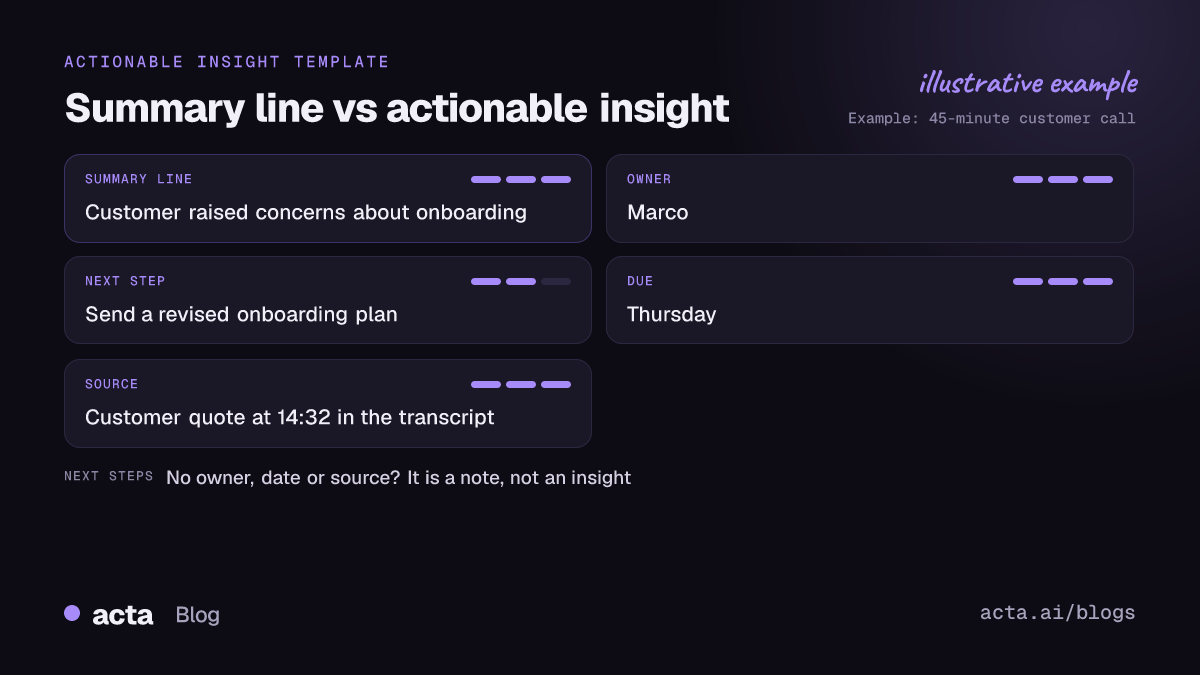
Compare two lines from the same 45-minute customer call. "The customer raised concerns about onboarding" is an observation. "Marco to send the customer a revised onboarding plan by Thursday; they said the current two-week setup is the reason they haven't rolled out to the Berlin office (14:32)" is an actionable insight. Someone knows what to do, by when, and can check the exact words.
That's the standard to hold every resource on this list to: actionable AI insights from meetings are ones someone can act on without asking a follow-up question. A tool or method that produces the first kind of line is producing a summary, which is fine for people who missed the meeting but doesn't move work forward. We've written more on replacing vague summaries with actions if your current notes feel like the first example.
Three kinds of insight are worth extracting from most meetings:
- Actions: owner, task, due date.
- Decisions: what was decided, by whom, and what it replaces.
- Signals: risks, objections, promises to customers, repeated complaints across calls.
Built-in platform recaps are the cheapest place to start
If your company already pays for Microsoft 365, Google Workspace or Zoom, you may have AI recaps switched off or unused. Try them for two weeks before evaluating anything else, and write down what they miss.
- 1. Microsoft Teams intelligent recap. Useful because it sits where Teams users already are: Microsoft's meeting recap support article explains AI notes and suggested tasks, which need a transcript and a Teams Premium or Microsoft 365 Copilot license (as of November 2026; check the article for current coverage).
- 2. Google Meet "Take notes for me". Good for Workspace teams: the notes land in a Google Doc with a "Suggested next steps" section at the end, as described in Google's Meet help page. It needs a Workspace edition that includes the feature.
- 3. Zoom AI Companion meeting summary. If your company lives in Zoom, start here. The summary lists topics and next steps after the meeting, and the host can edit and share it. Check Zoom's own support pages for which plans include it.
Where they fall short: each one sees only its own platform's meetings, and none is built to answer questions across months of calls. If half your customer calls happen on the customer's Zoom and your internal meetings run on Teams, you end up with insights split across two systems.
Dedicated meeting assistants add cross-meeting answers
The step up from built-in recaps is a meeting assistant that records across platforms and keeps everything in one searchable place. These are the capabilities worth paying for, as resources in their own right:
- 4. Cross-platform capture. This is what gets insights from Zoom, Meet, Teams and in-person meetings into one place. Look for both a bot option and a way to record without one; a browser extension or desktop app helps where bots aren't allowed. Before recording anything, read the consent rules for recording meetings.
- 5. Questions across meetings, with sources. The best insights are patterns: the same objection in five sales calls, or a deadline that slipped three standups in a row. Our post on tracking decisions and commitments across meetings explains how this works under the hood.
- 6. Automations after the call. An insight sitting on a summary page isn't done yet. Pushing action items to Jira or a CRM, or posting decisions to a channel, closes the loop. See meeting automation workflows for examples.
For a side-by-side of tools in this category, the round-up of AI tools for meeting decisions and action items compares the main options.
Simple frameworks turn notes into decisions people act on
No tool fixes a team that doesn't agree what counts as a decision. These approaches cost nothing and make any AI output more useful.
- 7. A decision log with RACI. It records who decided, who was consulted and what changed, so nobody relitigates it next month. Template and example in decision log and RACI from meetings. For change boards, these IT meeting minutes templates record approvals and conditions the same way.
- 8. The "owner, date, source" rule. A one-line quality check: reject any action item without all three. Teams that adopt it find their AI summaries look worse at first, because the gaps become visible. That's the point.
- 9. A weekly follow-through check. Most action items die between meetings, not in them. The reasons are covered in why action items don't get done.
Research and standards keep AI insights honest
Actionable insights are only useful if they're right. These two resources explain where AI summaries go wrong and what to check.
- 10. The QMSum paper. Useful because it shows why answering a specific question about a long meeting is harder than writing a general summary. The authors of QMSum built a benchmark of query-based meeting summaries and found long, query-focused meeting summarization remained hard for the models they tested. It's from 2021, so models have moved on, but the failure modes (missing the relevant part of a long transcript) still show up.
- 11. NIST's Generative AI Profile. A sober checklist for any team rolling out AI insights at work. NIST's AI 600-1 profile names confabulation (confident but false output) as one of the risks specific to generative AI. For meeting insights, the practical defense is a source link on every claim, which our post on verifiable citations from meeting transcripts covers.
Build-it-yourself guides suit teams with engineers
If you have engineers and sensitive meetings, building a narrow pipeline yourself can make sense. It's more work than most people expect, mostly in evaluation and permissions.
- 12. RAG over meeting transcripts. Retrieval with citations is the core of any "ask your meetings" system. Start with building RAG over meeting transcripts and documents, and plan for an open-source model if the data can't leave your servers.
My honest advice: build only if the meetings are too sensitive for a vendor or your workflow is truly unusual. Otherwise the build-and-maintain cost usually outweighs a subscription.
A weekly loop turns insights into finished work
The tools above surface actionable AI insights from meetings. People still have to close them. A loop that works for most teams:
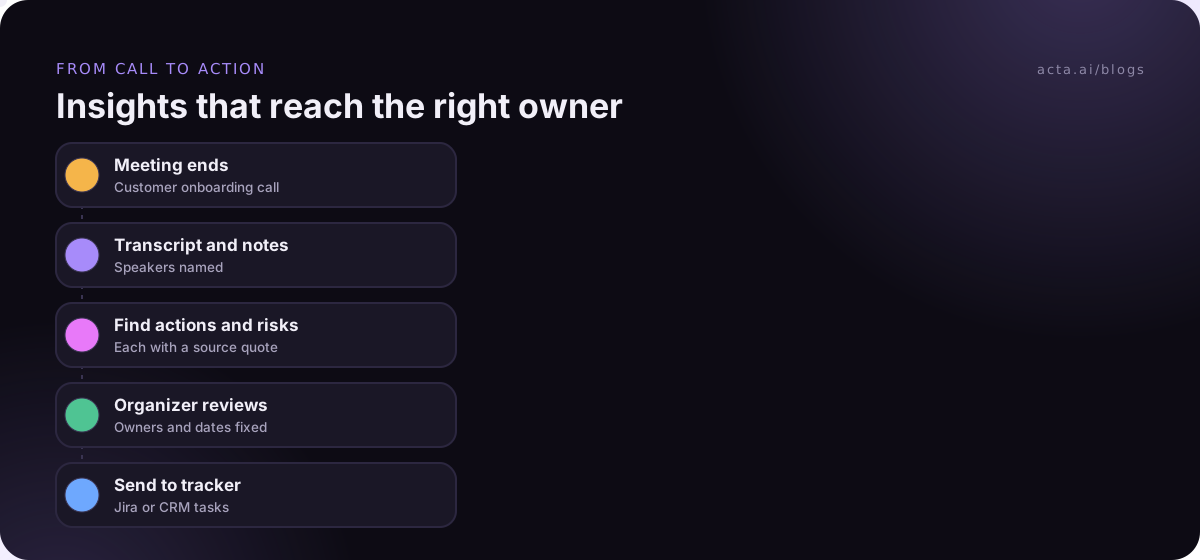
- After each meeting: the organizer spends five minutes checking the AI's action items for owner, date and source, and fixes or deletes the rest.
- Same day: approved actions go to the system people already use (Jira, Asana, the CRM), not a separate notes page.
- Weekly, 15 minutes: the team lead reviews open actions and decisions from the week. Anything overdue gets a new date or gets dropped explicitly.
- Monthly: ask one cross-meeting question ("which customer requests came up more than twice?") and decide whether to act on the answer.
Acta is one tool built for this loop. It records Zoom, Google Meet and Teams with a bot or from the desktop app, writes decisions and action items with owners, answers questions across meetings with sources through OneChat, and its Agent Builder can send approved items to Jira, HubSpot or Salesforce. The built-in recaps above are a fine place to start if you don't need cross-meeting answers.
Frequently asked questions
What makes an AI meeting insight actionable?
It names an owner, a concrete next step and a due date, and it links back to the moment in the transcript it came from. Without an owner nobody acts; without a date it drifts; without a source nobody can check it. "Concerns about pricing" is an observation, not an insight.
Are AI meeting summaries accurate enough to act on?
Often, but not blindly. Summaries can miss context or state things confidently that weren't said. Check action items and decisions against the transcript before they go to customers or into a project plan, and prefer tools that show the source quote for each claim.
Do I need a separate tool if Teams or Meet already summarizes meetings?
Not necessarily. Built-in recaps work well if all your meetings happen on one platform and you mainly need per-meeting notes. A dedicated assistant earns its cost when meetings span platforms, when you need answers across many meetings, or when you want actions sent to other systems automatically.
How do you get insights across many meetings, not just one?
You need all the transcripts in one searchable place and a way to ask questions with cited answers. Meeting assistants with cross-meeting Q&A do this; so does a retrieval system you build yourself. Either way, ask specific questions with a time range for the most reliable answers.
Who should review AI action items before they're shared?
The meeting organizer, or whoever owns the outcome. It takes about five minutes per meeting. They confirm owners, add missing dates and delete items that weren't actually agreed, which matters most when the summary goes to customers.
Pick your starting set of resources
Don't adopt all twelve. Pick one from each group and run them for a month:
- Choose a capture tool: your platform's built-in recap, or a meeting assistant if your calls span platforms.
- Set the quality rule: every action needs an owner, a date and a source, or it gets fixed.
- Start a decision log: one page per team, updated after decision meetings.
- Book the weekly review: 15 minutes, open actions and overdue items only.
- Ask one cross-meeting question a month: and act on the answer or explicitly drop it.
To capture meetings without adding a bot, try the Acta desktop app on the 15-day free trial.