Video jobs are decided across five meetings, not one
On paper the PPM, the pre-production meeting, is where the job gets locked. Agency, client, director, producer and DOP go through the treatment, locations, casting, wardrobe, schedule and deliverables, and everyone leaves with the same plan. In practice the PPM is the start of the deciding, not the end.
After it come the client calls: the marketing head who wants a different location, the brand team who hates the second-choice casting. Then the recce debrief, where the location manager reports that the rooftop has a 6 am access rule. Then the shoot day itself, with a call-time huddle in the morning and a wrap conversation at night, where the director, the agency creative and the client rep make calls that nobody writes down because the crew is packing. Finally the edit reviews, V1, V2 and the final, where the client sees the result of every one of those choices at once.
Project managers have a name for the discipline this needs. The PMBOK Guide's process Perform Integrated Change Control covers reviewing every change request, approving or rejecting it, and communicating the decision; MPUG's explainer on integrated change control walks through the same cycle. Production houses rarely run a formal change board, and they don't need one. They need the record.
A dropped drone shot nearly cost a third revision round
An illustrative case. Northlight Films is a 34-person production house in Dubai. In September it shot a 60-second launch film and three cutdowns for a property developer's new marina tower, booked through the developer's ad agency. Budget: AED 420,000, including two rounds of revisions; further rounds at AED 9,500 each, agreed on the contract call.
At the PPM on 2 September, the plan was a sunrise shoot on the tower's rooftop with a drone reveal of the marina, a family of four as talent, a neutral wardrobe palette, and English voiceover with Arabic subtitles. On 9 September the client's marketing head, Rania, asked on a call to move the shoot to a studio with an LED backdrop to save on permits. Northlight's producer, Leila Haddad, rebooked the studio. On 11 September the developer's CEO saw the moodboard and wanted the rooftop back. Leila cancelled the studio and paid a fee.
On shoot day, 16 September, the wind on the roof was above what the drone operator would fly in. At the wrap, director Omar Saleh proposed dropping the drone reveal and picking up two extra ground-level angles. The agency's creative lead and the client's on-set rep, Sara, agreed out loud. Nobody emailed anyone.
At the V2 review on 30 September, Rania asked where the drone shot from the PPM was and called the missing shot a defect, which meant the third round should be free and a reshoot was on the table. Northlight had a decision made in a wrap conversation by people who weren't on the review call. Without a record, the house eats the round. With one, Leila plays the moment Sara said "yes, lose the drone, the ground angles work" and the third round is billed.
The Decision log keeps production meeting notes for video agencies honest
Acta records each meeting, writes a transcript with speaker names and pulls out decisions. The cross-meeting view lives in My meetings > Outcomes > Decision log. It's per person: Leila's log is built from the meetings she recorded and the ones Omar and the line producer shared with the workspace. If the shoot-day wrap stays on Omar's phone, unshared, it won't be in Leila's log. Make sharing the default before the first job.
One decision, many meetings
Acta merges duplicates, so the shoot location appears as one decision with its whole history, not four scattered notes. On 30 September Leila's card for it would read:
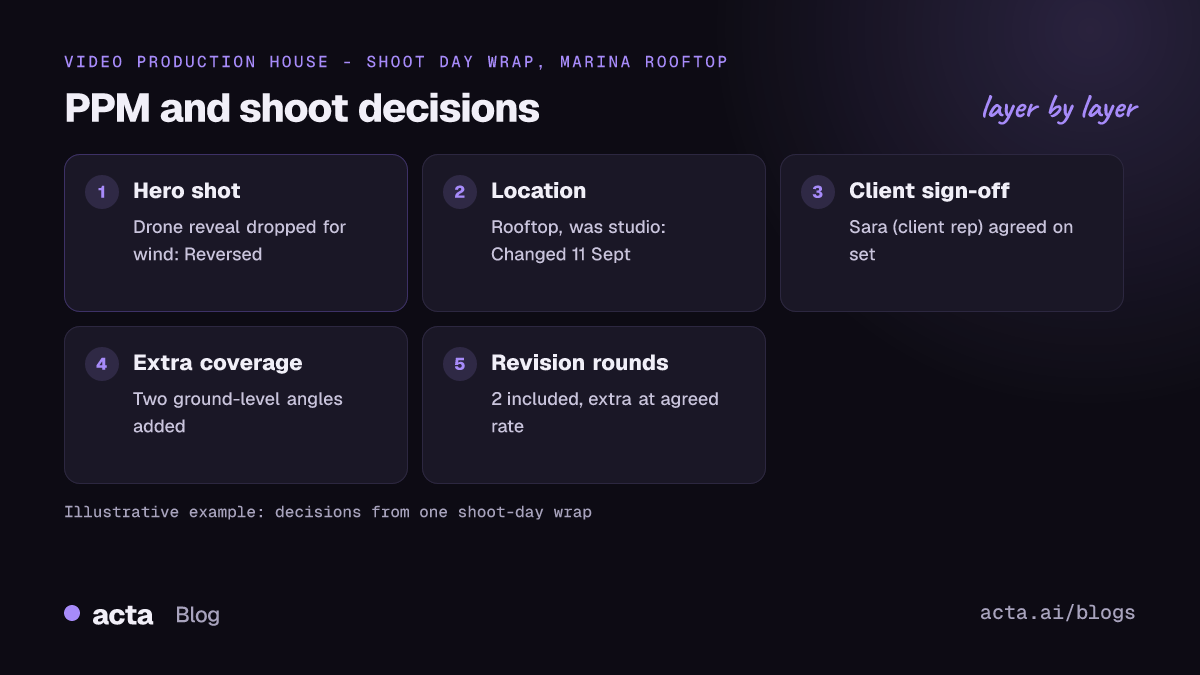
Hero shot: drone reveal of the marina from the rooftop · Status: Reversed · Decided by: Omar Saleh · Owner: Leila Haddad · Discussed in 3 meetings
History: first raised, PPM, 2 Sept ("We open on the drone, rising over the marina at sunrise") · confirmed, client call, 11 Sept · reversed, shoot day wrap, 16 Sept (Sara: "Yes, lose the drone, the ground angles work")
Each history line has a play button that opens the recording at that moment. That's the evidence. The location decision would show as Changed, with the line "Was: studio with LED backdrop · changed 11 Sept".
The four tiles and when to look at them
| Tile | What it shows | When a producer checks it |
|---|
| Decisions | All decisions in your meetings | Before writing the call sheet |
| Need follow-through | Decisions whose actions are behind or missing | Every morning in pre-production |
| Changed or reversed | Anything that moved since it was first agreed | Before every edit review |
| Done | Decisions carried out | At wrap and at delivery |
Use Group by: Topic during pre-production to see locations, talent and wardrobe together; switch to Person and pick the client's marketing head to see every decision attributed to her. If Acta has joined two separate decisions, "Not the same decision?" splits them. If a note isn't a decision at all, mark it "Not a decision" and it's hidden.
Export it for the change order
Export CSV downloads acta-decision-log.csv with columns for decision, status, topic, decided by, owner, first and last discussed, meetings, actions and the previous version. Leila filters to the marina job and attaches it to the invoice for the third round, with the AED 9,500 rate from the contract call in the same file. A decision log template in a spreadsheet would have the same columns; the difference is that nobody had to fill this one in on a shoot day.
Action items, risks and OneChat fill in around the decisions
Decisions carry most of the weight in production, but the other views catch the work around them.
Action items, under Outcomes, list every task with owner and due date across meetings. A row from the recce debrief:
Send revised call sheet with 5:15 rooftop call time and building access contact · Owner: Faisal (line producer) · Due 14 Sept · Done
Linked actions also appear on the decision card as "X of Y done", so the location decision shows whether permits, call sheet and catering moved with it.
The Risk Registry tab collects risks raised in meetings:
Risk: Wind on rooftop may exceed drone operator's limit at sunrise · Mitigation: Agreed, shoot two ground-level alternatives for the reveal · Owner: Omar Saleh · Date: 16 Sept · Impact: Medium · Status: Closed
Raised at the recce, mitigated on the day. That row is also part of the defence: the risk was known and the fallback agreed before the shoot.
In OneChat, Leila asks across all the job's meetings:
Q: Who agreed to drop the drone shot, and was anyone from the client there?
A: Omar proposed dropping it at the shoot-day wrap on 16 September because of wind. The agency's creative lead agreed, and Sara, the client's on-set representative, said "yes, lose the drone, the ground angles work". Found in: Shoot day wrap, 16 Sept.
OneChat can add an answer to the Decision log if a decision was missed. The OneChat help page covers scope and sources.
A PPM and shoot template records who signed off
Three built-in templates fit parts of a production house's week: Contract negotiation for scope and fee calls, Project status for the weekly internal production meeting, and Campaign review for the post-delivery debrief with the client. For PPMs, client calls and shoot-day huddles, build a custom one in Templates (available on paid plans; the custom templates guide walks through it):
Name: PPM and shoot decisions · When: Only matching meetings
What should this report do? For pre-production meetings, client calls, recce debriefs and shoot-day huddles on video productions: record every creative and logistics decision, who on the client side agreed, what changed since the last meeting, and how many revision rounds are used.
Sections: 1. Decisions (Table: Item | Decision | Decided by | Client sign-off). 2. Changed since last meeting (Table: Item | Was | Now | Who asked). 3. Locations, permits and access (Bullets). 4. Talent and wardrobe (Bullets). 5. Revision rounds (Paragraph: which round this is and how many remain under the contract). 6. To do before the next meeting (Checklist).
Extra instructions: Quote the client's exact words when they approve or reject something.
The "Client sign-off" column is the point. Where nobody from the client spoke, Acta writes "Not discussed" instead of assuming agreement, which tells you which decisions still need an email.
A change-note agent tells the client every time a decision moves
The record protects you after the fact. Better still is telling the client in writing at the time. Acta's Agent Builder can do that, with you approving each note. Agent Builder (beta) is in the trial and in Pro; its agents act as you.
- Click "New agent" and name it "Change note to client".
- Trigger: Event in a connected app, Acta, "decision made or changed". Add an "Only when" condition so it runs for decisions from meetings with the job name in the title.
- AI step: "Write a three-line change note: what was decided or changed, what it replaced, who agreed. If it mentions revisions, reshoots or extra days, add: 'This may affect cost; we'll confirm separately.'"
- Human approval: the producer approves or rejects in the Approvals tab, or from the email buttons. With no answer in 24 hours, nothing is sent.
- Action: Gmail sends the note to the agency producer and the client contact.
- Action: Slack message with the same note to the job's internal channel so the crew sees it.
- Run Test on the PPM recording; emails are only shown during a test. Then Turn on.
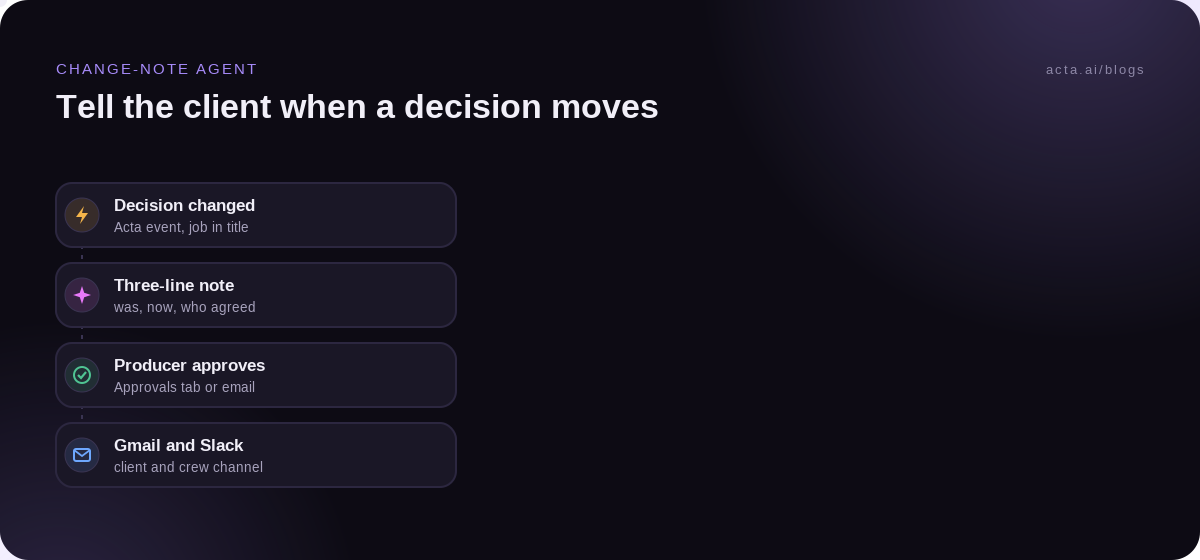
Had this run on 16 September, Rania would have had a note that evening saying the drone reveal was dropped for wind, with Sara named as agreeing. The V2 argument wouldn't have happened. The approvals guide explains how approval emails work.
Roll it out on one live job, then the whole slate
Who records what
- Client calls and PPMs on Zoom, Meet or Teams: the producer, with the notetaker bot, or the Chrome extension when the call runs in the browser and a bot would feel intrusive.
- In-person PPMs and the shoot-day huddle and wrap: the producer or first AD, on the Acta mobile app. Never during takes.
- Weekly internal production meeting: the head of production.
Clients should know. Say it at the start, and put a line in the PPM invite; our AI notetaker disclosure templates for clients give wording, and the recording consent guide covers the general rules.
Two weeks
- Days 1-2: Owner creates the workspace and invites producers, the head of production and directors under Settings > Workspace.
- Days 3-5: Pick one job in pre-production. Record the PPM and every client call; share each meeting with everyone in the workspace.
- Days 6-8: Build the PPM template and run it on the PPM with "Test on a past meeting". Fix the decision table until it names client sign-offs correctly.
- Days 9-11: Shoot days. Record huddle and wrap. Check Changed or reversed each evening.
- Days 12-14: Turn on the change-note agent in test, then live for the edit reviews.
Where houses go wrong
They record the client calls but not the wrap, which is where the expensive decisions happen. They let the director keep his meetings private. And they treat the log as an internal weapon, pulled out only in disputes; send change notes as you go and you'll rarely need it. If decisions are drifting more broadly, how to track decisions made in meetings is a good companion read.
Frequently asked questions
What should a production meeting record for a video shoot include?
Creative decisions with who made them and who on the client side agreed, locations with permits and access times, talent and wardrobe choices, the schedule and call times, changes since the last meeting, and the revision round count. Quote the client's words when they sign off on a change, because a paraphrase rarely survives a dispute about a final cut.
Is a decision log template in a spreadsheet good enough?
It works if someone fills it in after every meeting, including the shoot-day wrap. That is the weak point: the person who should update it is packing kit. A log built from recordings fills itself, links each decision to the moment it was said and exports to CSV when you need a spreadsheet for the client.
How do we prove a client approved a change on set?
Record the conversation where it was agreed, usually the wrap or a quick huddle, with the client's representative present and aware of the recording. In Acta the decision's history includes the quote and a play button for that moment. Then send a written change note the same day so the approval doesn't rest on a recording alone.
Can the whole production team see one shared decision log?
Not as one shared register. Each person has their own Decision log built from the meetings they recorded or that were shared with them in the workspace. If every producer and director shares job meetings with the workspace, each person's log covers the same meetings, and the producer's log becomes the reference for that job.
Does this work for agencies that also do post-production only?
Yes, and the decisions are simpler: edit reviews and client feedback calls. Record each V1, V2 and final review, run a template that lists requested changes and who asked for them, and count revision rounds. The Decision log shows which notes were reversed between rounds, which is where most post-production disputes start.
Set up your decision record before the next PPM
One job is enough to see whether this holds up. Before your next PPM:
- Share by default: producers and directors share every job meeting with the workspace.
- Record the wrap: the shoot-day decisions that cost money are made there.
- Add a sign-off column: the template names who on the client side agreed.
- Check one tile: Changed or reversed, before every edit review.
- Send change notes: an agent drafts them, the producer approves.
Add the Chrome extension for browser client calls and run one job through the 15-day free trial. See how production houses set it up on Acta for media production houses.