A good PRD template has six parts: the problem, who it's for, goals with success metrics, requirements, what's out of scope, and open questions. Beyond that, the right PRD template depends on the work. A one-pager suits a small feature, a full PRD suits a cross-team launch, and AI features and APIs need extra sections. Below are 8 copy-ready templates and when to use each.
Copy the one that matches the size and risk of what you're building, delete the sections you don't need, and fill it in with your team rather than for them. If you're building a two-day tweak, none of these are worth it. Write a ticket instead.
Key takeaways
- Every PRD template needs the same core: problem, users, success metrics, requirements, out of scope, open questions.
- Match length to risk: one page for a small feature, 4 to 8 pages for a launch that touches several teams.
- AI features need two extra sections: evaluation criteria and what happens when the model is wrong.
- Write the "out of scope" list early. It prevents more arguments than any other section.
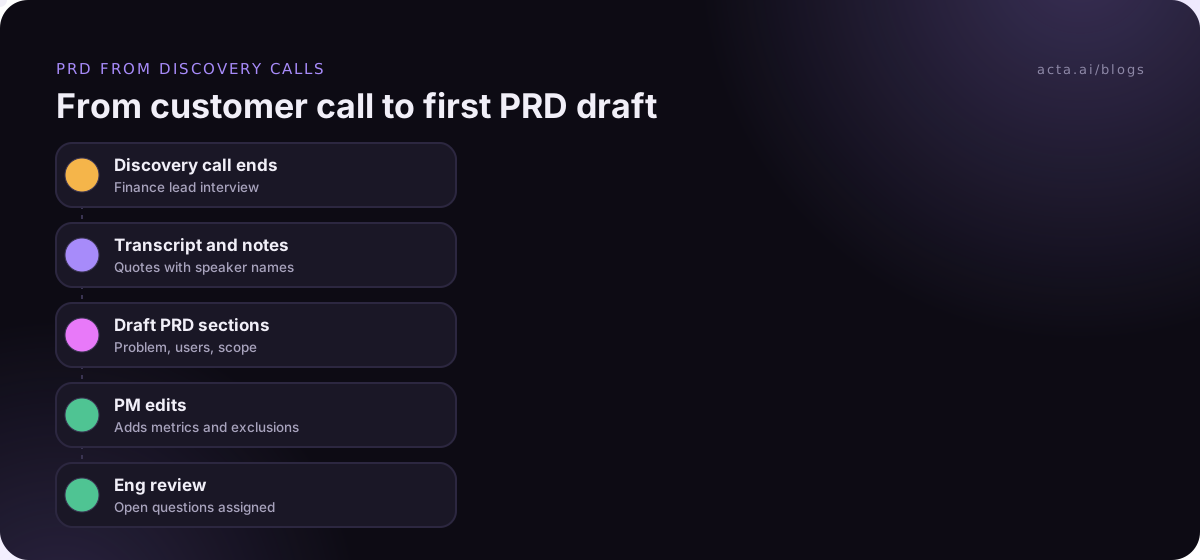
- Draft from what was said in discovery and planning meetings, then have engineering and design edit it.
Table of contents
- Every PRD template shares six core sections
- Short PRD templates fit small features and early ideas
- A full PRD template fits cross-team launches
- AI features, APIs and experiments need their own sections
- The PR-FAQ works before you have a PRD
- Pick the template by risk, not by habit
- Most PRDs fail on scope and stale decisions
- Frequently asked questions
- Choose the right PRD template for your team
Every PRD template shares six core sections
A product requirements document explains why something is being built and what it must do, without dictating how engineers build it. Atlassian's guide to writing a PRD lists goals, assumptions, user stories, design and clearly stated out-of-scope items, and warns against a product owner writing requirements without the team. That matches what I've seen work: the PRD is a shared agreement, not a spec handed down.
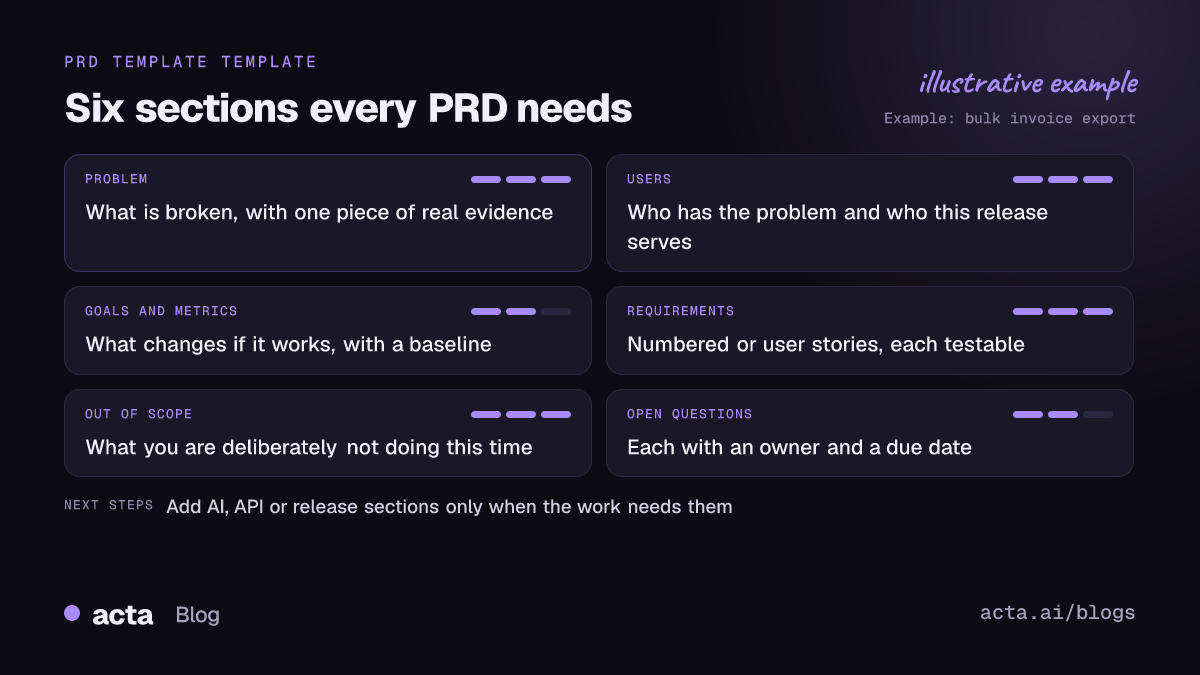
Strip any template down and you'll find these six parts:
- Problem: what's broken or missing, with evidence (a quote, a support ticket count you actually have, a lost deal).
- Users: who has the problem, and which of them this release serves.
- Goals and success metrics: what changes if this works, and how you'll measure it.
- Requirements: user stories or numbered requirements, each testable.
- Out of scope: what you're deliberately not doing this time.
- Open questions: with an owner and a date for each answer.
Everything else (timeline, design links, dependencies, launch plan) is optional and depends on the template.
Short PRD templates fit small features and early ideas
Most PRDs I see are too long for the work they describe. For anything one team can ship in a few weeks, start here.
1. The one-page PRD
When to use it: a contained feature, one team, low risk. Also good as the first draft of something bigger.
Title / owner / status / target release
Problem: [one paragraph, with one piece of evidence]
Who it's for: [primary user]
Success looks like: [one or two metrics, with the current baseline]
Requirements: 1. ... 2. ... 3. ...
Out of scope: [bullets]
Open questions: [question, owner, due date]
Here's that template filled in for a fictional feature:
Bulk export of invoices / owner: Dana / status: draft / target: Q1 release
Problem: Finance users at larger accounts export invoices one by one before month-end close. In three customer calls in October, two finance leads said this takes them most of a day.
Who it's for: Finance admins on accounts with more than 50 invoices a month.
Success looks like: Month-end export done in one action; support tickets tagged "export" drop over the next two quarters.
Requirements: 1. Select invoices by date range and status. 2. Export as CSV and PDF zip. 3. Email a download link when the export is ready.
Out of scope: Scheduled exports. Custom column mapping.
Open questions: Maximum export size? (Marco, engineering, by 14 Jan)
2. The lean (hypothesis) PRD
When to use it: you aren't sure the problem is real or the solution is right, and you want the team to treat the work as a test.
We believe [user] has this problem: [problem]
We'll know we're right when [observable signal]
Smallest thing we can ship to test it: [scope]
Requirements for that test: [3-5 items]
Not now: [everything you're tempted to add]
Decision date: [when you'll decide to expand, change or stop]
3. The enhancement PRD
When to use it: changing an existing feature. The key addition is a "today vs after" section so reviewers see exactly what changes.
Feature: [name and link to the original PRD]
Today: [how it works now, with screenshots]
After: [how it will work]
Why now: [evidence]
Who is affected: [users, plus any integrations or reports that depend on current behavior]
Migration / rollout: [flag, gradual rollout, communication]
Out of scope / open questions
A full PRD template fits cross-team launches
4. The full PRD
When to use it: several teams, external dependencies, a launch date someone has promised. Expect 4 to 8 pages. If it gets longer, split it into a parent PRD and child PRDs.
1. Overview: owner, team, stakeholders, status, target release, links
2. Background and problem: evidence, customer quotes, what happens if we do nothing
3. Goals and non-goals
4. Success metrics: metric, baseline, target, how measured
5. Users and use cases: personas, key journeys
6. Requirements: numbered, with priority (must / should / could) and acceptance criteria
7. Design: links to flows and prototypes
8. Dependencies and risks: other teams, vendors, legal, security
9. Release plan: phases, feature flags, beta group
10. Out of scope
11. Open questions and decision log: question, owner, answer, date
The decision log at the bottom is the part teams skip and later regret. When someone asks in month three why the export cap is 10,000 rows, the answer should be there with a date, not in someone's memory. If those decisions happen on calls, a decision log built from meetings saves you the reconstruction.
AI features, APIs and experiments need their own sections
5. The AI feature PRD
When to use it: anything where a model generates, classifies or decides. Standard templates miss the fact that the output will sometimes be wrong. NIST's Generative AI Profile calls confident but false output "confabulation" and lists it among the main risks, so plan for it in the requirements, not after launch.
Core six sections, plus:
Task definition: input, expected output, examples of good and bad output
Evaluation: test set (size, source), how quality is scored, minimum bar to ship
Failure handling: what the user sees when the model is unsure or wrong; how they correct it
Human review: which outputs need approval before they reach a customer
Data: what data the model sees, retention, what must never be sent
Cost and latency limits
6. The API or platform PRD
When to use it: your users are developers or other internal teams. Write the contract first.
Consumers: who calls it and why
Use cases: 3-5 concrete calls a consumer will make
Contract: endpoints or events, request and response examples, errors
Non-functional requirements: rate limits, latency, availability
Versioning and deprecation policy
Docs and examples needed at launch
7. The experiment brief
When to use it: growth and pricing tests where the "requirement" is really a question.
Hypothesis: If we [change], then [metric] will [move] because [reason].
Variants: control and test, with screenshots
Audience and sample: who sees it, for how long
Primary metric and guardrail metrics
Decision rule: what result means ship, iterate or stop
The PR-FAQ works before you have a PRD
8. The press release and FAQ
When to use it: a new product or a big bet, before anyone writes requirements. It's Amazon's "working backwards" approach, described in an excerpt from the book Working Backwards: you write the launch announcement first, then answer the hard questions.
Headline: [product] lets [customer] [benefit]
Problem paragraph: the customer's pain in their words
Solution paragraph: what it does, simply
Customer quote (made up, clearly) and how to get started
External FAQ: price, availability, what it doesn't do
Internal FAQ: cost to build, risks, why us, why now, what we'd stop doing
If the press release is dull or the internal FAQ has no good answers, you've saved yourself months. If it survives, it becomes the background section of the full PRD.
Pick the template by risk, not by habit
Teams tend to pick one PRD template and use it for everything. That's how you end up with nine-page documents for a button change. Use this instead:
| Situation | Template | Typical length |
|---|---|---|
| Small feature, one team | One-page PRD | 1 page |
| Unproven problem | Lean PRD | 1 page |
| Change to existing feature | Enhancement PRD | 1-2 pages |
| Cross-team launch | Full PRD | 4-8 pages |
| Model-driven feature | AI feature PRD | 2-4 pages |
| Developer-facing work | API PRD | 2-5 pages |
| Growth or pricing test | Experiment brief | 1 page |
| New product idea | PR-FAQ | 2-6 pages |
For the writing process itself, from first interview to sign-off, see how to write a product requirements document. For individual requirement wording (user stories, acceptance criteria, non-functional requirements), the companion post on product requirements examples goes line by line.
Most PRDs fail on scope and stale decisions
A PRD template won't save a PRD from these, so watch for them:
- Solution in the problem section. "Users need a bulk export button" is a solution. "Finance spends a day exporting invoices" is a problem.
- Metrics with no baseline. "Improve retention" can't be checked. Write the current number, or write that you don't know it yet.
- No out-of-scope list. Every unwritten exclusion becomes a stakeholder's assumption.
- Decisions made in meetings that never reach the doc. The PRD says one thing, the last planning call agreed another, and engineering builds the old version.
- Written alone. If design and engineering only see it at review, expect a rewrite.
That fourth one is the most common in my experience. Requirements change on calls: a customer interview, a design review, a sprint planning session. Recording those (with consent, see what to tell participants) means the PRD can be updated from what was actually agreed. If bot notetakers aren't allowed on customer calls, a desktop app can record from your own machine.
Acta has a PRD draft among its 40 report templates: it writes a first draft from your product meetings, which you then edit into whichever template above fits. The PRD drafts from product meetings post shows an example, and the product and engineering page covers the Jira side.
Frequently asked questions
What should a PRD template include?
At minimum: the problem with evidence, the target users, goals with measurable success metrics, numbered or user-story requirements, an out-of-scope list and open questions with owners. Larger templates add design links, dependencies, risks, a release plan and a decision log. Keep only the sections your project actually needs.
How long should a PRD be?
As short as the risk allows. One page is enough for most single-team features. A cross-team launch often needs four to eight pages. If yours passes ten, split it into a parent document and smaller child PRDs for each workstream so people actually read them.
What is the difference between a PRD and an MRD?
A market requirements document (MRD) describes the market opportunity: who the buyers are, what they need and why it's worth pursuing. A PRD describes what the product must do to meet that need. In many teams today the MRD content lives in the PRD's background section.
Is a PRD still useful in agile teams?
Yes, if it stays short and alive. Agile teams use the PRD to agree on problem, goals and scope, then break requirements into backlog items. The mistake is treating it as a contract frozen at kickoff; update it when decisions change during sprints. The agile PRD template post has blocks built for that.
Who writes the PRD?
Usually the product manager owns it, but design, engineering and often support or sales contribute. Ownership means keeping it current and resolving open questions, not writing every line alone.
Choose the right PRD template for your team
Before you copy a template into your wiki, run through this:
- Size the work: one team and a few weeks gets a one-pager; several teams gets the full PRD.
- Flag special risk: add the AI or API sections when a model or an external contract is involved.
- Write the exclusions first: agree the out-of-scope list before the requirements.
- Assign every open question: owner and date, or it isn't a question, it's a wish.
- Keep it current: update the PRD within a day of any meeting that changes a decision.
To capture those product meetings without a bot, try the Acta desktop app on the 15-day free trial.