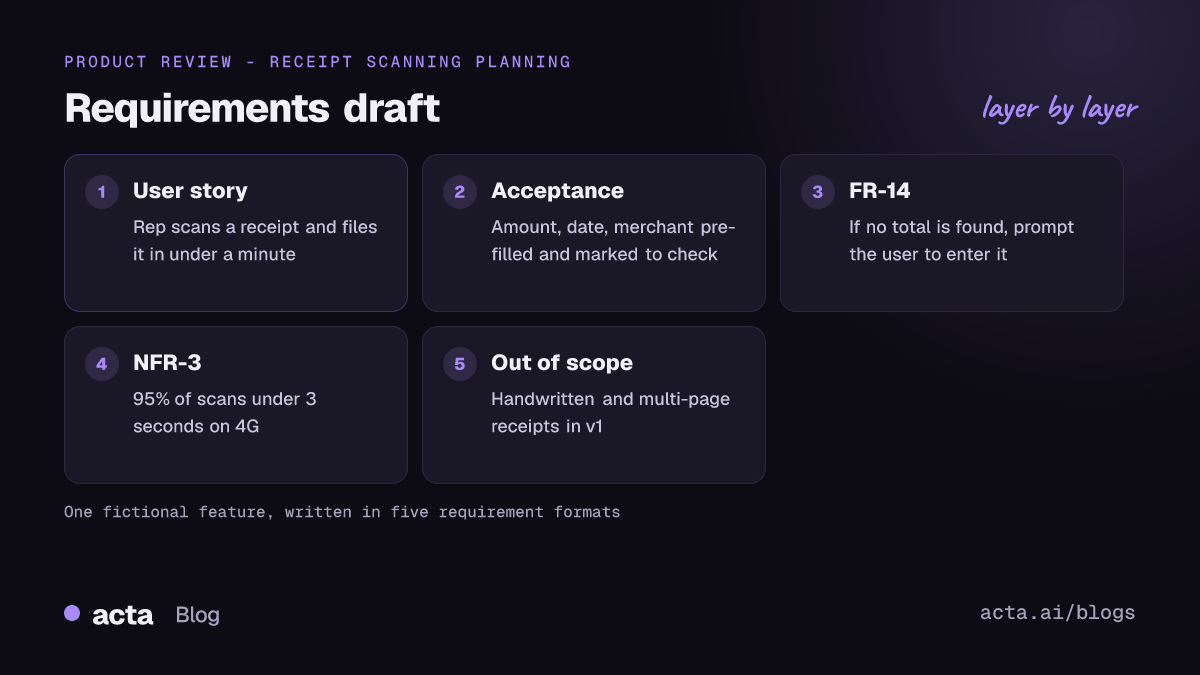
Good product requirements examples share one trait: someone who wasn't in the planning meeting can read them and build the right thing. Below are nine copy-ready examples covering user stories, acceptance criteria, functional requirements, non-functional requirements, constraints and a one-page PRD summary, each with a note on when to use it. They all describe the same fictional feature, so you can see how the formats fit together.
The running example is an expense app called Tallyway adding receipt scanning on mobile. Swap in your own feature and the patterns still hold. If you need the whole document rather than individual requirements, our guide on how to write a product requirements document walks through it step by step.
Key takeaways
- Use a user story for the why, acceptance criteria for the done, and a numbered requirement for anything engineering or QA will test line by line.
- Every non-functional requirement needs a number and a condition ("95% of scans under 3 seconds on 4G"), or nobody can tell whether it's met.
- Write one behaviour per requirement. If a sentence has "and" joining two system responses, split it.
- Include an explicit out-of-scope list. It prevents more arguments than any other section of a PRD.
Table of contents
- Product requirements examples by type, at a glance
- User stories capture who needs what, and why
- Acceptance criteria make a requirement testable
- Functional requirements in EARS remove the guesswork
- Non-functional requirements need a number
- Constraints and out-of-scope lines stop scope creep
- A one-page PRD summary ties the pieces together
- Weak requirements share the same few flaws
- Frequently asked questions
- Choose the right requirement format for each feature
Product requirements examples by type, at a glance
Most PRDs mix four or five requirement formats. Each answers a different question for a different reader, which is why one format never covers everything. Atlassian's guide to creating a product requirements document recommends keeping the PRD lean and linking out to user stories rather than stuffing every detail into one page, and that's the approach these examples follow.
| Format | Answers | Main reader |
|---|---|---|
| User story | Who needs this and why? | Whole team |
| Acceptance criteria | How do we know it's done? | Engineering, QA |
| Functional requirement | What exactly must the system do? | Engineering, QA |
| Non-functional requirement | How fast, safe, accessible? | Engineering, ops |
| Constraint / out of scope | What are we not doing? | Everyone, especially sales |
User stories capture who needs what, and why
User stories are the most familiar format and the most abused. A good one names a real role, a specific action and a benefit the role actually cares about. These user story examples show both the classic shape and an alternative.
Example 1: Classic user story
As a field sales rep who submits expenses from my phone, I want to photograph a receipt and have the amount, date and merchant filled in, so that I can file an expense in under a minute between client visits.
When to use it: for any feature with a clear user and goal. It's the default for backlog items and the first thing to write in a PRD's requirements section.
Example 2: Job story
When I've just paid for a client lunch and I'm walking back to the car, I want to capture the receipt before I lose it, so I don't have to dig through my bag at the end of the month.
When to use it: when the situation matters more than the role. Job stories work well for mobile features, where context (one hand free, poor signal, in a hurry) drives the design. I use them when two different roles hit the same moment.
Acceptance criteria make a requirement testable
A story without acceptance criteria is an invitation to argue at sprint review. The two acceptance criteria examples below cover the main styles: a scenario format QA can automate, and a plain checklist.
Example 3: Given / When / Then scenario
Scenario: Receipt fields are filled from a clear photo
Given I am signed in on the mobile app
And I have started a new expense
When I photograph a printed receipt in good light
Then the amount, currency, date and merchant fields are pre-filled
And each pre-filled field is marked "Check this" until I confirm it
When to use it: when your team writes automated tests in a behaviour-driven style, or when the behaviour depends on a sequence of steps. The Given/When/Then structure comes from the Gherkin language used by tools like Cucumber, so QA can often turn it straight into a test.
Example 4: Checklist acceptance criteria
Done when:
1. Scanning works for JPEG and PNG photos taken in the app and photos picked from the gallery.
2. If no amount is found, the amount field stays empty and shows "Enter amount".
3. The original receipt image is attached to the expense and viewable by the approver.
4. Scanning is available on iOS and Android at launch.
When to use it: for smaller stories, UI changes, or teams that don't automate acceptance tests. Faster to write, and fine as long as every line is something a tester can check with a yes or no.
Functional requirements in EARS remove the guesswork
Numbered functional requirements are the "shall" statements engineering and QA trace through the build. The EARS pattern (Easy Approach to Requirements Syntax) is a tidy way to write them. It came out of Rolls-Royce aero-engine work and uses keywords like WHEN, WHILE and IF/THEN to separate triggers, states and failure handling; the EARS overview lists the patterns.
Example 5: Event-driven and unwanted-behaviour requirements
FR-12: When the user captures a receipt photo, the app shall extract the total amount, currency, date and merchant name.
FR-13: While the device is offline, the app shall save captured receipts locally and queue them for extraction.
FR-14: If extraction fails to find a total amount, then the app shall leave the amount field empty and prompt the user to enter it.
When to use it: for behaviour with conditions and edge cases, regulated products, or any feature where a misread requirement is expensive. Overkill for a button colour change. One system response per line keeps each requirement testable on its own.
Non-functional requirements need a number
"The app should be fast" isn't a requirement. Non-functional requirements describe quality: speed, reliability, security, accessibility. These non-functional requirements examples each include a measurable target and the conditions it applies under.
Example 6: Performance requirement
NFR-3: For 95% of scans, extracted fields shall appear within 3 seconds of the photo being taken, measured on a mid-range Android phone over a 4G connection.
When to use it: whenever users will notice slowness. The percentile and the test device matter as much as the number; without them, a developer on office Wi-Fi with a flagship phone will always pass.
Example 7: Accessibility requirement
NFR-7: The scan screen shall meet WCAG 2.2 Level AA. The capture button and every field's "Check this" control shall have a target size of at least 24 by 24 CSS pixels, and all extracted fields shall be announced by VoiceOver and TalkBack.
When to use it: for any user-facing screen. Pointing at a named standard beats writing your own rules. The 24 by 24 pixel minimum comes from the Target Size (Minimum) criterion that the W3C added in WCAG 2.2.
Constraints and out-of-scope lines stop scope creep
Constraints are the limits you're building inside: platforms, budgets, legal rules, dependencies. Out-of-scope lines are decisions to not build something yet. Both save time later, because they answer the question before someone asks it in a meeting.
Example 8: Constraints and out of scope
Constraints: Must use the existing OCR vendor contract; no new vendor review before Q2. Receipt images must be stored in the same region as the customer's account data.
Out of scope for v1: handwritten receipts, multi-page receipts, splitting one receipt across two expenses, and scanning from the web app. We'll revisit handwritten receipts after four weeks of usage data.
When to use it: in every PRD. The "we'll revisit" line is the important bit; it tells stakeholders the request was heard, which makes "not now" easier to accept.
A one-page PRD summary ties the pieces together
The examples above are the detail. A PRD example also needs a short header that anyone, including the VP who reads only the first screen, can understand in 30 seconds.
Example 9: PRD summary block
Feature: Receipt scanning on mobile
Owner: Priya (PM). Engineering lead: Marco. Design: Dana.
Problem: Field reps file expenses late because typing receipts on a phone is slow; finance chases about one in five reports at month end.
Goal: Reps can file a receipt expense in under a minute from their phone.
Success metric: Median time from photo to submitted expense under 60 seconds, eight weeks after launch.
Requirements: Stories 1-2, FR-12 to FR-14, NFR-3, NFR-7. Out of scope: see list.
Open questions: Do approvers need to see the confidence of each extracted field?
When to use it: at the top of every PRD, and as the description of the Jira epic. The "one in five" figure here is invented for the example; in a real PRD, use your own data and say where it came from.
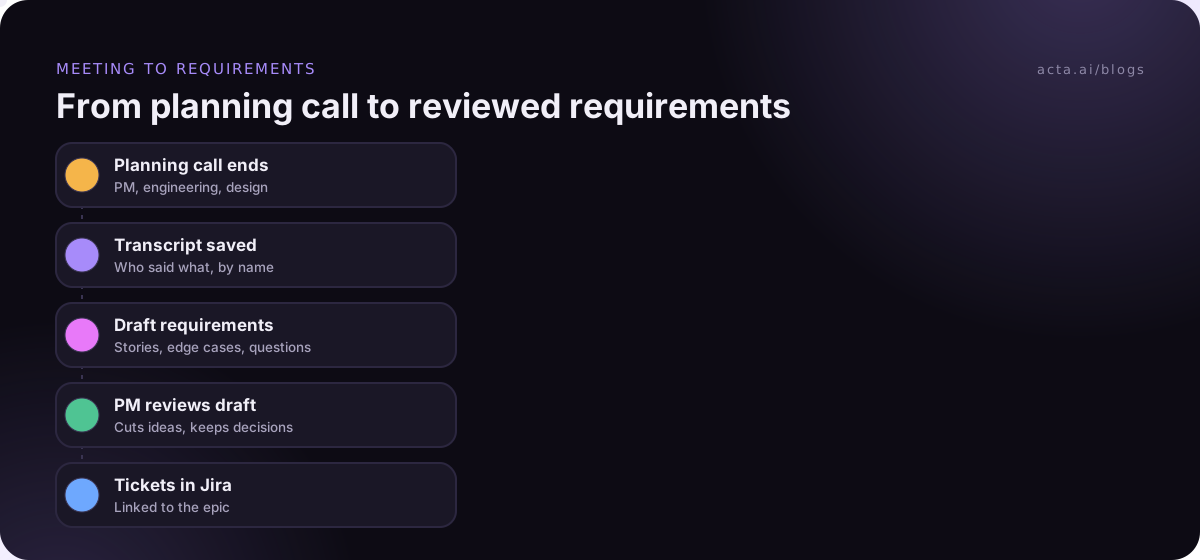
Most of these details surface in conversation first: a customer call where a rep explains the car-park moment, a planning meeting where engineering flags the offline case. Here's how that turns into a draft without retyping everything.
Weak requirements share the same few flaws
When I review a PRD, the same problems turn up again and again. Here's a before-and-after for the most common one.
Before: The scanner should be accurate and easy to use, and should support all receipt types.
After: FR-12 (above), NFR-3 (above), and handwritten receipts listed as out of scope for v1.
- Adjectives instead of numbers. "Fast", "easy" and "accurate" can't be tested. Replace each with a measurable target or delete it.
- Two behaviours in one line. "The app shall scan and categorise the receipt" will pass half its test. Split it.
- Solutions disguised as requirements. "Add a dropdown for currency" is a design decision. The requirement is that the currency is correct.
- No owner for open questions. Every open question gets a name and a date.
- Requirements that only live in someone's head. If the edge case came up in a meeting and nobody wrote it down, it'll come up again in QA.
That last one is where meeting notes earn their keep. With consent from everyone in the room (see what to tell participants before you record), record product reviews and customer calls, then pull requirements from the transcript. If a meeting bot feels heavy for an internal session, Acta's desktop app records from your own computer instead.
Acta has a PRD report template among its report templates that drafts requirements and open questions from a product meeting, and it can send tickets to Jira. Our post on PRD drafts written from product meetings shows the output. Treat it as a first draft: the PM still decides what's a requirement and what was just an idea someone said out loud.
Frequently asked questions
What are examples of product requirements?
Common product requirements examples include user stories ("As a rep, I want to scan a receipt so I can file expenses faster"), acceptance criteria, numbered functional requirements ("When the user captures a photo, the app shall extract the total"), non-functional targets like response time or accessibility level, and constraints such as platforms or vendors you must use.
What is the difference between functional and non-functional requirements?
Functional requirements describe what the system does: behaviours, inputs and outputs, such as extracting a receipt total. Non-functional requirements describe how well it does it: speed, reliability, security, accessibility. A useful test is that functional requirements pass or fail on behaviour, while non-functional ones pass or fail on a measured number.
How detailed should acceptance criteria be?
Detailed enough that a tester can mark each line pass or fail without asking the PM. Three to six criteria per story is typical. If you need more than eight, the story is probably too big and should be split. Cover the main path, the most likely failure and any rule that would surprise a new developer.
Should a PRD include user stories or numbered requirements?
Often both. User stories explain who benefits and why, which keeps the team focused on the outcome. Numbered requirements give engineering and QA precise, traceable statements. Small teams can get by with stories plus acceptance criteria; regulated or safety-sensitive products usually need numbered requirements as well.
Can AI write product requirements from meetings?
It can draft them. An AI meeting assistant can pull stated needs, edge cases and open questions out of a transcript into a structured draft, which saves retyping. It can't decide priority or scope, and it will sometimes record an offhand idea as a requirement, so a product manager should review every line before it reaches the backlog.
Choose the right requirement format for each feature
You don't need every format on every feature. Match the format to the risk and to who has to read it.
- Start with the story: write one user or job story so everyone agrees on the outcome.
- Add testable criteria: use Given/When/Then if QA automates, a checklist if not.
- Number the risky parts: use EARS-style "shall" statements for edge cases, offline states and failure handling.
- Put numbers on quality: every non-functional requirement gets a target, a percentile and a test condition.
- Close the scope: finish with constraints and an out-of-scope list, including when you'll revisit each item.
Want requirement drafts from your next planning call? Record it with the Acta desktop app and see what comes back during the 15-day free trial.