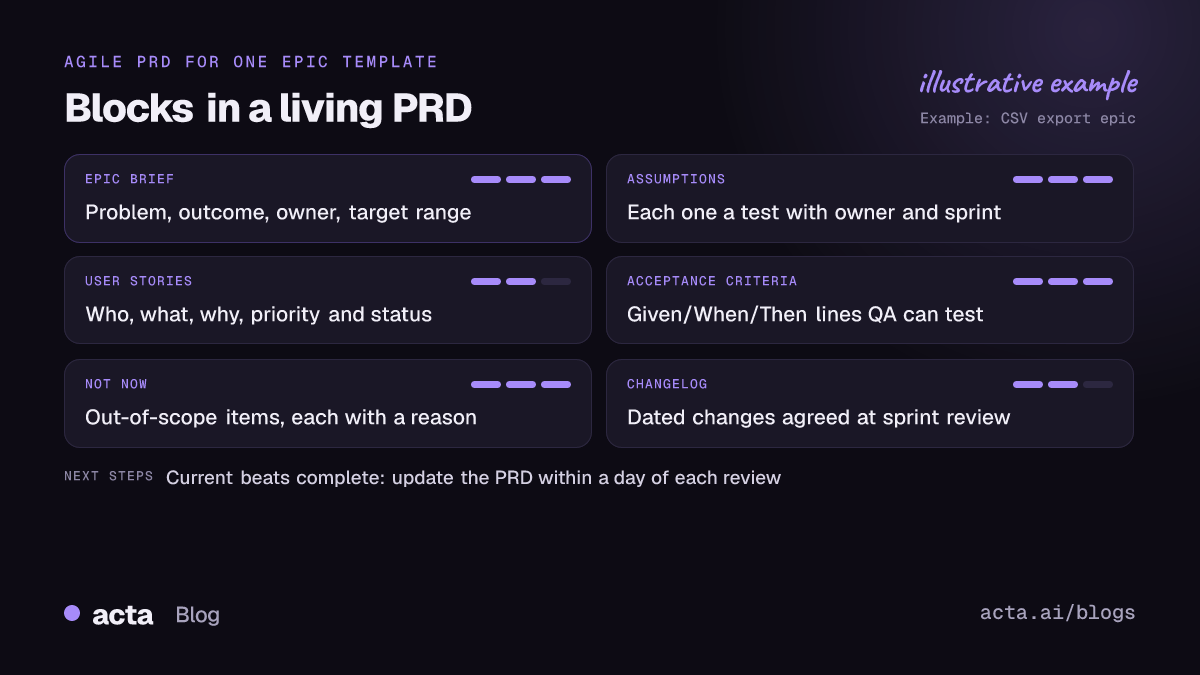
An agile PRD template is a short, living document for one epic: the problem, the outcome you want, a list of user stories with acceptance criteria, what's out of scope for now, and a changelog. It isn't signed off once. The product owner updates it every sprint as stories get split, cut or learned from. Below are eight blocks you can copy, each with when to use it.
This guide is for product owners and engineering leads on Scrum or Kanban teams who still need a written spec but hate the 20-page kind. If you're in a regulated setting where requirements need formal approval before build, use these blocks inside your approved document rather than instead of it.
Key takeaways
- Write one agile PRD per epic, not per release, and keep it to one to three screens.
- Express requirements as user stories with Given/When/Then acceptance criteria that QA can test directly.
- Keep a "Not now" list next to the stories; it stops scope creeping in through sprint review.
- Add a dated changelog and update it after every sprint review, in under ten minutes.
- Treat open assumptions as spikes with an owner and a sprint, not as text in a paragraph.
Table of contents
- An agile PRD template trades completeness for currency
- Three blocks frame the epic
- Three blocks turn the epic into buildable stories
- Two blocks keep the PRD alive between sprints
- Use different blocks at each point in the epic
- Agile PRDs go wrong in predictable ways
- Sprint review is where the PRD gets updated
- Frequently asked questions
- Set up your agile PRD template
An agile PRD template trades completeness for currency
A classic product requirements document tries to describe everything before anyone writes code. An agile PRD accepts that you'll learn things in sprint two that change sprint four, so it aims to be current rather than complete. Atlassian's guide to creating a product requirements document makes the same point: agile PRDs focus on shared understanding and customer needs, avoid overly detailed specs, and act as a landing page for everything related to an epic.
In practice that means three differences from a waterfall spec. Requirements are written as user stories, not "the system shall" statements. Detail arrives just in time, when a story is about to enter a sprint. And the document has an owner who edits it every sprint, with a visible history of what changed and why.
If you need the full, from-scratch method, our sibling guide on how to write a product requirements document walks through it. This post is the copy-paste kit for teams already running sprints.
Three blocks frame the epic
Block 1: the epic brief
Epic: [Name and ticket link]
Problem: [Who struggles with what, and the evidence: tickets, interviews, churn notes.]
Outcome: [What changes for the user when this ships. One measurable signal.]
Product owner: [One name] Tech lead: [One name]
Target: [Sprint or quarter, written as a range, not a date]
When to use it: always, at the top. If you can't fill in the problem and outcome lines, the epic isn't ready for refinement.
Block 2: the assumptions and spikes list
A1 | Users export weekly, not daily | Test: check usage logs | Owner: Dana | Sprint 14
A2 | The reporting service can handle large exports | Test: two-day spike | Owner: Marco | Sprint 14
A3 | Admins want to restrict exports | Test: ask five admins on calls | Owner: Priya | Sprint 15
When to use it: any epic where you're guessing about users or technology. Writing each assumption as a test with an owner and a sprint turns "we think" into work the team can plan.
Block 3: the not-now list
Not in this epic:
PDF export (asked for, but CSV covers most requests; revisit after launch)
Scheduled exports (needs the notification service first)
Per-field export permissions (no customer has asked yet)
When to use it: every agile PRD. Put a reason next to each item. Without reasons, the list gets reopened in every sprint review.
Three blocks turn the epic into buildable stories
Block 4: the user story list
S1 | As a team admin, I want to export all meeting notes as CSV so that I can audit them in a spreadsheet | Must | Ready
S2 | As a team admin, I want to filter the export by date range so that files stay small | Should | Refining
S3 | As a member, I want to export only my own notes so that I can keep a personal archive | Later | Not started
When to use it: the core of every agile PRD. The format is the three-part who, what and why that Mike Cohn explains in why the three-part user story template works. Keep the "so that" part; it's the line engineers use to make good trade-offs when the story turns out harder than expected.
Block 5: acceptance criteria in Given/When/Then
S1 acceptance criteria
Given I am a team admin, when I click Export and choose CSV, then a file downloads with one row per meeting.
Given a meeting has no action items, when it is exported, then the action items column is empty, not missing.
Given I am not an admin, when I open the export menu, then the "All notes" option is not shown.
When to use it: for every story marked Must or Should before it enters a sprint. Martin Fowler describes Given When Then as a style for specifying behavior through examples, and it works because QA can test each line and the developer knows when to stop.
Block 6: the story map slice
Release 1 (walking skeleton): S1 only, CSV, admins, no filters
Release 2: S2 date filters, large-export handling from spike A2
Release 3: S3 member exports, if A3 says admins don't object
When to use it: epics that take more than two sprints. A slice shows what ships together, so stakeholders stop asking "when is all of it done?"
Two blocks keep the PRD alive between sprints
Block 7: definition of done for the epic
[ ] All Must stories meet their acceptance criteria in staging
[ ] Help article updated and support briefed
[ ] Usage tracking added for the outcome signal
[ ] Not-now list reviewed with the product owner
When to use it: when the team's standard definition of done covers stories but not the epic. Keep it to four or five lines that someone can actually check.
Block 8: the sprint changelog
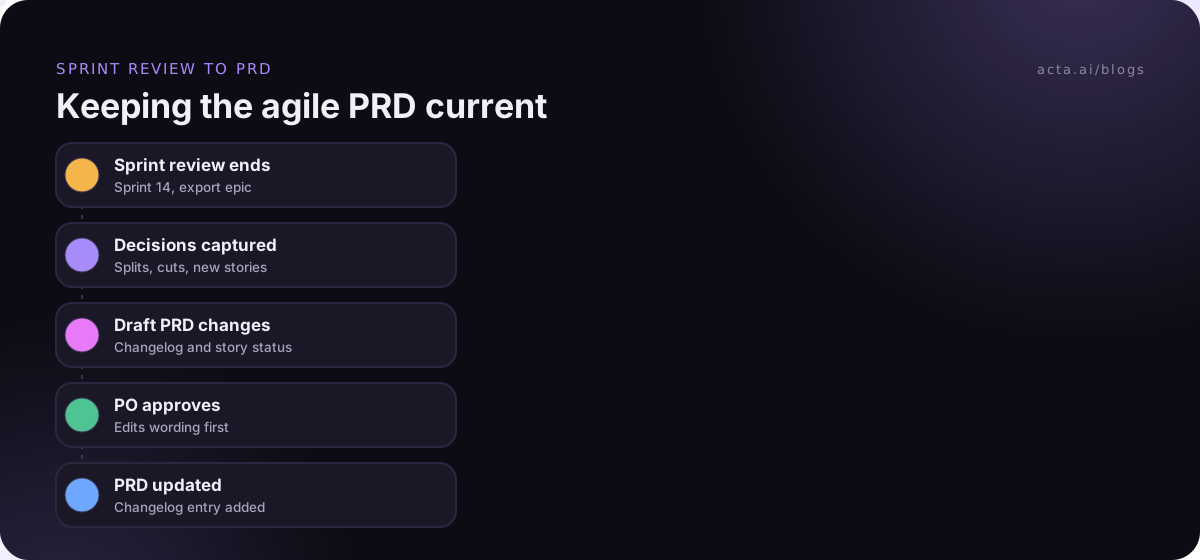
Sprint 14 review | Split S2 into date filter and size limit | Reason: spike A2 showed large exports time out | Agreed by Marco and Priya
Sprint 13 review | Moved PDF export to not-now | Reason: customers asked mainly for CSV | Agreed by Priya
When to use it: from the first sprint review onward. This block is the difference between a living document and a stale one. A new engineer can read it in two minutes and understand why the spec looks the way it does.
Use different blocks at each point in the epic
Not every block is needed on day one. Here's when each earns its place.
| Point in the epic | Blocks to fill | Who updates |
|---|---|---|
| Before refinement | 1, 2, 3 | Product owner |
| Refinement | 4, 5, 6 | PO with tech lead and QA |
| Each sprint review | 8, plus edits to 3 and 4 | Product owner |
| Before release | 7 | Tech lead |
Atlassian also publishes a product requirements template for Confluence with sections for assumptions, user stories, UX design and scoping. If you're on Confluence, start there and paste in Blocks 3 and 8, which it doesn't emphasize. On Notion, our Notion PRD template examples show how to hold these blocks in a database.
Agile PRDs go wrong in predictable ways
- Stories without the "so that". "As an admin, I want CSV export" tells engineering nothing about what matters if CSV turns out hard.
- Acceptance criteria written after the sprint starts. Then they describe what was built rather than what was needed.
- The PRD mirrors the backlog. Don't copy every ticket into the document. Link the epic and keep only stories that explain the shape of the work.
- No changelog. Without one, people can't tell a deliberate change from an outdated line, so they stop trusting the whole page.
- Agile as an excuse for no doc. "We're agile" doesn't mean nothing is written. It means less is written up front, and more is written as you learn.
Sprint review is where the PRD gets updated
Most changes to an agile PRD template get decided out loud. Sprint review, refinement and the occasional Slack huddle are where stories get split and scope moves. If nobody writes it down, the PRD is out of date by Monday.
Give the product owner ten minutes after each review to update the changelog, the not-now list and story status. Some teams record review and refinement sessions so the PO can check exact wording later; if you do, tell the team and any customers on the call, and see our guide to recording meetings with consent. For browser calls in Google Meet or Teams, a Chrome extension recorder avoids adding a bot to the call. Our retrospective guide covers the other meeting where the process itself, not the product, gets fixed.
Where Acta fits
Acta records sprint reviews and product calls and writes the decisions and action items with owners, which is most of what goes into Block 8. Its PRD report, covered in PRD drafts from product meetings, gives you a first draft to edit, and the Jira integration can turn agreed items into tickets. The product owner still decides what changes in the spec.
Frequently asked questions
What is the difference between an agile PRD and a traditional PRD?
A traditional PRD tries to specify everything before development and is approved once. An agile PRD covers one epic, writes requirements as user stories with acceptance criteria, adds detail just before a story enters a sprint, and is updated every sprint with a changelog. It's shorter, owned by the product owner and expected to change.
Do agile teams still need a PRD?
Most do, for anything bigger than a few stories. The backlog shows what to build next, but not why, what's out of scope or what the team already decided. A short agile PRD holds that context in one place, so new people, designers and support can catch up without sitting through every refinement session.
How detailed should acceptance criteria be in an agile PRD template?
Detailed enough that QA can test each line and a developer knows when the story is done. Three to six Given/When/Then lines per story is typical. Cover the main path, one or two edge cases and any permission rules. If you need more than eight lines, the story is probably too big and should be split.
Who owns the agile PRD?
The product owner or product manager for the epic. Others contribute: the tech lead writes spikes and constraints, QA helps with acceptance criteria, design links the current files. But one person updates the changelog and status after each sprint review, so there is always a single answer to "is this page current?"
Set up your agile PRD template
You can have this running before your next refinement session. Settle these five points first.
- Define the scope: one PRD per epic, linked from the epic ticket.
- Pick the blocks: 1, 3, 4, 5 and 8 at minimum; add 2, 6 and 7 for epics longer than two sprints.
- Agree the story format: who, what and why, plus Given/When/Then criteria before a story is Ready.
- Name the owner: the product owner updates the changelog within a day of each sprint review.
- Set a staleness check: any PRD unchanged for two sprints gets reviewed at the next refinement.
If your reviews happen in Google Meet or Teams in the browser, the Acta Chrome extension can capture the decisions for your changelog; start with the 15-day free trial.