Quick answer: Good one on one meeting notes cover five things: wins since last time, blockers, feedback in both directions, career and growth, and follow-ups with an owner and a date. Keep them short, keep one running document per person, and start each 1:1 by checking last time's follow-ups. The template below is ready to copy.
Most managers I know take 1:1 notes for a month, then stop. Not because they stop caring, but because the notes end up scattered across a notebook, three Google Docs and a Slack DM to themselves. Then in month four your report says "I mentioned this in March" and you have no idea whether they did.
So this post is two things. First, a plain template for one on one meeting notes you can copy today. Second, a way to keep the running record without writing it yourself, if you'd rather spend the meeting listening.
What should one on one meeting notes include?
Here's what I'd capture, roughly in the order the conversation usually goes:
- Wins. What went well since last time. Write it down; it's gold at review time, and nobody remembers February's wins in December.
- Blockers. What's stuck, and what they need from you. Be specific: "waiting on legal for the vendor contract" not "some delays".
- Feedback, both ways. What you told them, and what they told you. The second half is the one managers forget to write down.
- Career and growth. Not every week. But when it comes up, note it, because "I'd like to lead a project next quarter" is the kind of thing that quietly disappears.
- Follow-ups. Who's doing what by when. Yours as well as theirs.
What to skip: a transcript of the status update. If you need project status, that belongs in the project tracker or the team meeting. A 1:1 that's mostly status is a missed chance, and HBR's piece on making the most of your one-on-one meetings makes the same point: these meetings work best when the employee's concerns drive the agenda, not the manager's.

A 1:1 meeting template you can copy
Paste this into a doc, one doc per person, newest meeting at the top:
1:1 with [name], [date]
Last time's follow-ups: [done / not done / dropped, one line each]
Their topics: [what they wanted to talk about, in their words]
Wins: [1-3 bullets]
Blockers and what they need from me: [bullets]
Feedback I gave: [one line]
Feedback I got: [one line]
Career / growth: [only if it came up]
Follow-ups: [Name: task by date]
If you've used a meeting minutes template before, notice what's missing here: attendees, agenda numbers, motions. A 1:1 isn't a committee. Two things about this template. "Their topics" comes before yours on purpose. And "Last time's follow-ups" sits at the very top, because the fastest way to lose a report's trust is to promise something in a 1:1 and never mention it again.
What about a one-on-one meeting agenda?
The template doubles as a one-on-one meeting agenda if you share it before the meeting and let your report fill in "Their topics". HBR's short tip on getting more out of one-on-ones with your direct reports suggests a recurring slot and a shared agenda, and I'd agree. A shared doc they can add to during the week beats a list you invent five minutes before the call.
What should you actually write in 1:1 notes?
If you're not sure what to write in 1:1 notes, the honest answer is less than you think. A few rules I'd use:
- Write facts and quotes, not judgments. "Said the on-call rota is wearing her out" is useful later. "Seems disengaged" isn't, and it's not something you'd want them to read.
- Write as if they'll read it. Because ideally they will. Shared notes mean you both agree on what was said.
- One line per follow-up, with a name and a date. "Look into training budget" has no owner. "Me: ask finance about the conference budget by Fri 20th" does.
- Keep sensitive stuff out of shared docs. Health, family, anything they told you in confidence. If you need to remember it, remember it.
How do you keep a running record of 1:1 notes automatically?
The template works. The problem is you, at 4:55, between a 1:1 and a budget review, not filling it in. Here's how I'd automate it with Acta.
Step 1: let Acta write the notes
Acta has a 1:1 check-in report template. After the meeting, it writes up the conversation in a 1:1 shape, and like every Acta meeting you also get the action items with owners and due dates. You can pick the template yourself, or let Acta choose it automatically from the conversation.
Step 2: add each 1:1 to a running record
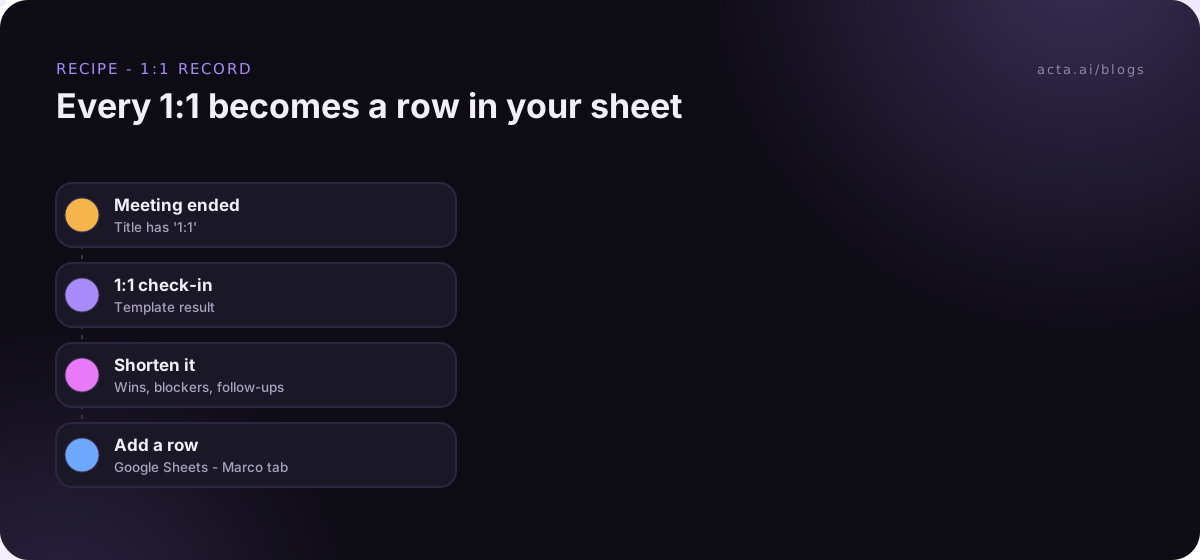
This is where Acta Agent Builder (new) comes in. An agent is one trigger and a few steps:
- Trigger: Meeting ended, with a "title contains" filter of "1:1". It fires when the summary is ready.
- Acta data: meeting template result. Pull the 1:1 check-in result for that meeting.
- AI step. Turn it into a few short fields: date, wins, blockers, follow-ups.
- Google Sheets: add row. One sheet, one tab per person, one row per 1:1.
If you'd rather keep the record in Notion, there's no built-in Notion action, but the MCP tool step can call a Notion MCP server to add the page. A sheet is simpler, and I'd start there. Scanning six months of 1:1s in one tab is quick, and that's exactly what you want before a performance review.
Step 3: get last time's open items before the next 1:1
This is the bit that makes the biggest difference. A second agent:
- Trigger: Before a meeting starts, set to 30 minutes before. You can set anything from 1 to 1,440 minutes, and the trigger knows who the attendees are. Follow it with an If/else step so it only carries on for meetings with "1:1" in the title.
- Acta data: action items by owner. Pull the open and overdue action items for you and for your report.
- AI step. Write a short list: what's still open from last time, and what's overdue.
- Slack: message to a person. Send it to yourself as a DM.
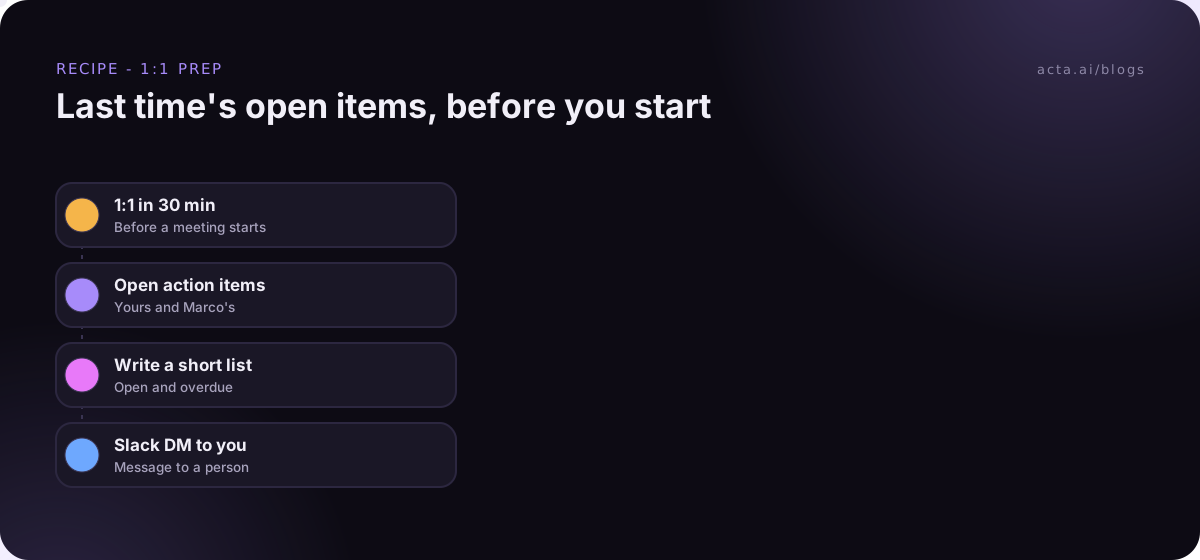
So at 2:30 you get a DM: "1:1 with Marco at 3. Still open: you owe him an answer on the conference budget. He owes the onboarding doc draft (due Friday, not done). Overdue: rota change, owner you." That's your first five minutes of the meeting, sorted.
Both agents can be built by describing them in plain words; the AI drafts the agent and lists what you still need to fill in, like the sheet or the Slack account. Run "Check setup" and a test run before turning them on. Test runs show what would be sent without actually sending it.
Do you need to tell your report the 1:1 is recorded?
Yes, always. Recording someone needs their consent where the law requires it, and in a 1:1 it's also just basic trust. Ask the first time ("I'd like Acta to take notes so I can actually listen. OK with you?"), and make it clear they can say no or ask to skip it for a particular conversation. Our guide on recording meetings with AI and what to tell participants covers the legal side.
Two practical points:
- In Acta, people only see meetings they have access to. Your 1:1s don't show up for the rest of the team.
- Keep 1:1s out of any shared Slack meeting recap or team-wide automation. Use title filters that only match the meetings you mean. "1:1" in a filter won't match "Team sync", but "sync" would match far too much.
Some conversations shouldn't be recorded at all: a difficult personal situation, a complaint about a colleague. Use your judgement and don't record those.
What do managers get wrong with 1:1 notes?
We see a few patterns:
- Notes that are all status. Pages of project updates, nothing about the person.
- Follow-ups that never come back. Written down, never checked. The pre-meeting DM fixes this more than anything else, and if you want the bigger picture, see how to track action items across meetings.
- Writing it all up afterwards. If you're typing for twenty minutes after every 1:1, you'll stop by week six. Write three lines, or let something else write them.
- Skipping the 1:1 when things are busy. HBR's podcast episode with Steven Rogelberg covers cadence; he found weekly works best, with every two weeks next. Moving one is fine. Cancelling three in a row tells people where they rank.
- Only the manager's notes. If your report keeps their own notes too, compare them now and then. The differences are interesting.
And if you want to look back across months of 1:1s (say, "what did Marco raise about on-call this year?"), OneChat answers questions across all your meetings with sources. That's often quicker than scrolling a sheet. For more on that, see our post on the 1:1 check-in report in Acta, or the general guide on how to take meeting notes.
Frequently asked questions
How long should one on one meeting notes be?
Short. Half a page per meeting is plenty. If it's longer, it's probably status updates that belong somewhere else.
Should I share 1:1 notes with my report?
Yes, in most cases. Shared notes mean you both agree on what was said and who owes what. Keep anything confidential out of the shared doc.
Is there a 1:1 notes template in Acta?
Yes, the 1:1 check-in report template. Acta can also pick it automatically when it recognises the conversation as a 1:1.
Can Acta add my 1:1 notes to Notion?
Not with a built-in action. You can use the MCP tool step with a Notion MCP server, or add rows to Google Sheets instead.
Can I get a reminder of open items before each 1:1?
Yes. Use the "Before a meeting starts" trigger, pull open action items for both of you, and send yourself a Slack DM.
Want to try it with your next round of 1:1s? See the Acta agents or start a free 15-day trial.