Quick answer: To choose meeting notes software, test it on your own meetings rather than reading feature lists. Check seven things: how it records (bot, bot-free or in person), transcript and speaker accuracy, action items with owners and dates, search across meetings, integrations you already use, privacy and access control, and the pricing model. Then trial two or three tools for one week.
There are plenty of ranked lists of meeting note takers, including our own top 10 AI note taker tools and our guide to the best meeting notes software for executives and enterprise teams. This post is different. It covers how to choose meeting notes software with a buyer's checklist: the questions to ask any vendor, the red flags to watch for, and a short plan to compare a shortlist in a week.
If you are new to the category, start with what an AI notes taker is and how it works, then come back here.
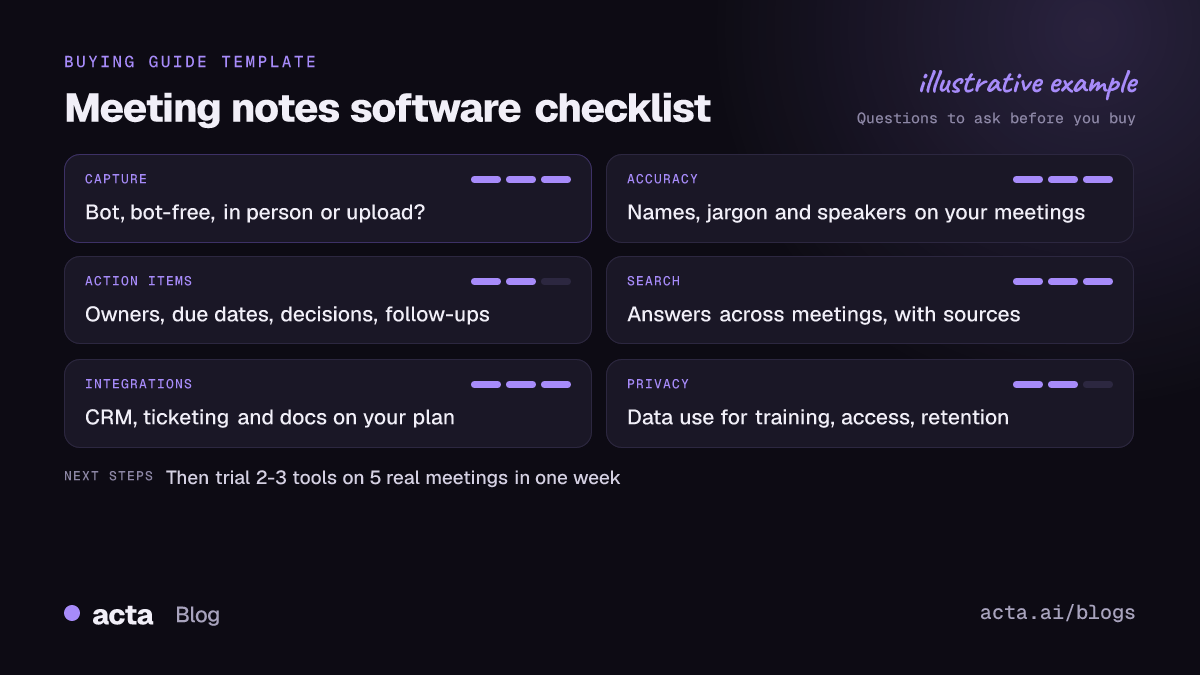
What should meeting notes software actually do for you?
Before comparing tools, write down the job. Most teams want some mix of:
- Not having to take notes while talking.
- A searchable record of what was said, by whom.
- Action items that get done, not just listed.
- Decisions people can find later.
- Notes that land in the systems you already use (CRM, ticketing, docs).
Rank these for your team. A sales team cares about CRM updates; a product team cares about tickets; a manager running 1:1s cares about follow-ups. The ranking tells you which checklist questions matter most.
How does it record your meetings?
This is the first filter, because a tool that can't capture your meetings is no use however good its summaries are. Ask:
- Does it use a meeting bot? A bot joins the call as a participant. It is visible, which helps with transparency, but some customers and some organisations don't allow bots.
- Can it record without a bot? Bot-free options usually mean a desktop app or browser extension that records your computer's audio. Our comparison of AI notetakers without a bot covers this in detail.
- Does it handle in-person meetings? If half your meetings happen in a room, you need a phone app or a way to upload recordings.
- Which platforms? Check Zoom, Google Meet and Microsoft Teams separately, plus any others you use.
- Do your platform settings allow it? Built-in recording often depends on admin settings and plan. Microsoft's Teams recording and transcription overview describes how admins can allow or block recording and require participants to consent, and Google's help page on recording a Google Meet meeting lists which Workspace editions include recording and who can start it. Check these before you assume built-in notes will cover you.
Whatever the method, recording people needs consent where the law requires it. Read our guide to recording meetings with AI: consent, privacy and what to tell participants before rolling out any tool.
How accurate are the transcript and speaker labels?
Every vendor says its transcripts are accurate. Don't take a percentage on a website as proof; test it. Things to check in your trial:
- Names and jargon. Product names, customer names and acronyms are where transcripts usually fail.
- Accents and languages your team actually uses.
- Speaker labels. Does it get "who said what" right when people interrupt each other or several people share one room microphone?
- Summary faithfulness. Pick three statements in the summary and find them in the transcript. If the summary says something nobody said, that's a red flag.
Does it turn meetings into action items with owners?
A summary you read once is pleasant. Action items that someone owns are what change outcomes. Ask:
- Are action items extracted with an owner and a due date, or just a bullet list?
- Can you see open items across meetings, not one meeting at a time?
- Does it track decisions separately, so you can see what was decided and when it changed?
- Can it draft the follow-up email for you?
- Are there templates for your meeting types (sales discovery, 1:1s, board meetings, product reviews), and does it pick the right one?
Can you search and ask questions across all your meetings?
The value of meeting notes software grows with the archive. Six months in, you will want to ask "what did the customer say about pricing in March?" or "when did we decide to drop that feature?". Test:
- Keyword search across all meetings.
- Asking questions in plain English and getting an answer with links to the source meeting, so you can check it.
- Whether answers respect permissions (people should only see meetings they have access to).
- Whether you can reach your meetings from assistants you already use, such as ChatGPT or Claude.
Which integrations matter for meeting notes software?
List the three systems where notes need to end up, then check each one specifically. Typical questions:
- CRM: does it push notes or structured fields to Salesforce, HubSpot or whatever you use, and on which plan?
- Ticketing: can engineering action items become Jira tickets?
- Docs: can you send reports to Notion, Confluence or Google Drive, or export to PDF, Word or Markdown?
- Calendar: does it connect to your calendar so you don't have to add it to each meeting?
Ask whether an integration is native or relies on a third-party automation tool, and whether it is included in the plan you are considering.
What should you ask about privacy, data use and access control?
Meeting recordings contain customer details, HR conversations and plans. Ask every vendor, in writing:
- Training: is my data used to train AI models? Is that the default, and can I opt out?
- Access: who in my organisation can see which meetings? Can I restrict sensitive meetings?
- Retention and deletion: how long are recordings kept, and can I delete them?
- Sharing: what happens when someone shares a meeting link outside the company?
- Documentation: what security and compliance documents can they provide, and do those documents cover the plan you're buying?
Don't assume a tool you buy is compliant just because it is popular. In the UK, for example, the ICO's guidance on data protection and monitoring workers tells employers they cannot assume monitoring tools they buy comply with data protection law and must check. If you work in the EU or UK, our GDPR checklist for AI note takers goes further.
How is meeting notes software priced?
Prices change often, so check each vendor's pricing page on the day you buy. What matters more is the pricing model:
- Per seat: does everyone who reads notes need a paid seat, or only people who record?
- Limits: are there caps on minutes, meetings, storage or AI questions?
- Feature gating: which plan includes CRM integrations, templates and admin controls? These are often the features you need most.
- Free tier or free trial: is the trial long enough to test real meetings, and does it include the features you'll actually use?
To judge whether the cost is worth it after you buy, see how to measure the ROI of AI meeting tools.
What are the red flags when buying meeting notes software?
- Accuracy claims you can't reproduce on your own meetings.
- Summaries that include things nobody said.
- No clear answer on whether your data trains AI models.
- Everyone in the company can see every meeting by default, with no way to restrict it.
- The integration you need is only on a much higher plan, or "coming soon".
- No easy way to tell participants they are being recorded.
- No export, so your notes are stuck if you leave.
How do you trial 2-3 tools in one week?
A short, structured trial beats weeks of demos. Here is a plan:
- Day 1: shortlist and set up. Pick two or three tools that pass the recording-method filter. Connect calendars and tell your colleagues what you're testing and why.
- Days 1-2: pick test meetings. Choose five real meetings of different types: an internal team meeting, a customer or external call, a 1:1, a meeting with jargon-heavy discussion, and an in-person meeting if you have them. Get consent from participants.
- Days 2-4: record the same meetings. Where policy and consent allow, capture the same meetings in each tool so you compare like for like.
- Day 5: score each tool. For each meeting, score transcript accuracy on names and jargon, speaker labels, summary faithfulness, and action items (did it catch them, with the right owner and date?).
- Day 6: test the archive and integrations. Ask each tool three questions across all five meetings, and check the answers against the transcripts. Push one set of notes into your CRM, ticketing tool or docs.
- Day 7: check privacy and price. Get written answers to the privacy questions above, confirm the plan and price you'd need, and pick a winner.
Where Acta fits, and when to pick something else
Acta covers each capture method on this checklist: a meeting bot that joins Zoom, Google Meet and Microsoft Teams from your calendar; a bot-free desktop app for Windows and Mac and a Chrome extension; mobile apps for in-person meetings; and uploaded recordings. It produces transcripts with speakers, summaries, action items with owners and due dates, a decisions log and follow-up email drafts. OneChat answers questions across all your meetings with sources, and 40 report templates (MEDDPICC, BANT, 1:1s, board minutes, PRDs and more) can be picked automatically from the conversation. Reports can go to Salesforce, HubSpot or Zoho (on a paid plan), Jira, Confluence, Notion and Google Drive, or be exported to PDF, Word and Markdown. People only see meetings they have access to, and Acta does not use customer data to train AI models. See all Acta features.
Pick something else if you only need a transcript of the occasional call and don't care about action items or search across meetings, or if your company has standardised on a platform's built-in notes and is happy with them. Acta also does not record phone calls; for calls you'd record on your phone and upload the audio.
Frequently asked questions
What is the most important feature in meeting notes software?
The capture method comes first, because the tool must be able to record the meetings you actually have. After that, action items with owners and search across meetings usually matter more than summary style.
Should I choose a bot or a bot-free note taker?
A bot is visible to everyone, which helps transparency, but some people and organisations block bots. Bot-free tools record from your device, so you need to tell participants yourself. Some tools, including Acta, offer both.
How do I test transcript accuracy?
Record the same real meetings in each tool and compare names, jargon and speaker labels against what was said. Check a few summary points against the transcript too.
How long should a meeting notes software trial take?
One focused week with five varied meetings is usually enough to compare two or three tools. Make sure the trial includes the features and integrations you plan to pay for.
Do I need consent to use meeting notes software?
Recording people needs consent where the law requires it, and telling everyone is good practice anyway. Our guide to AI meeting recording and consent explains what to say.
Want to run Acta through this checklist? Start a free 15-day trial.