Guides & How-tos 9 min read
How to Scale Training and Inference With Accelerate and Optimum
A practical guide to Accelerate, Optimum, Optimum Neuron and TPUs: what each library does, the code you change, how to pick hardware and how to check the results.
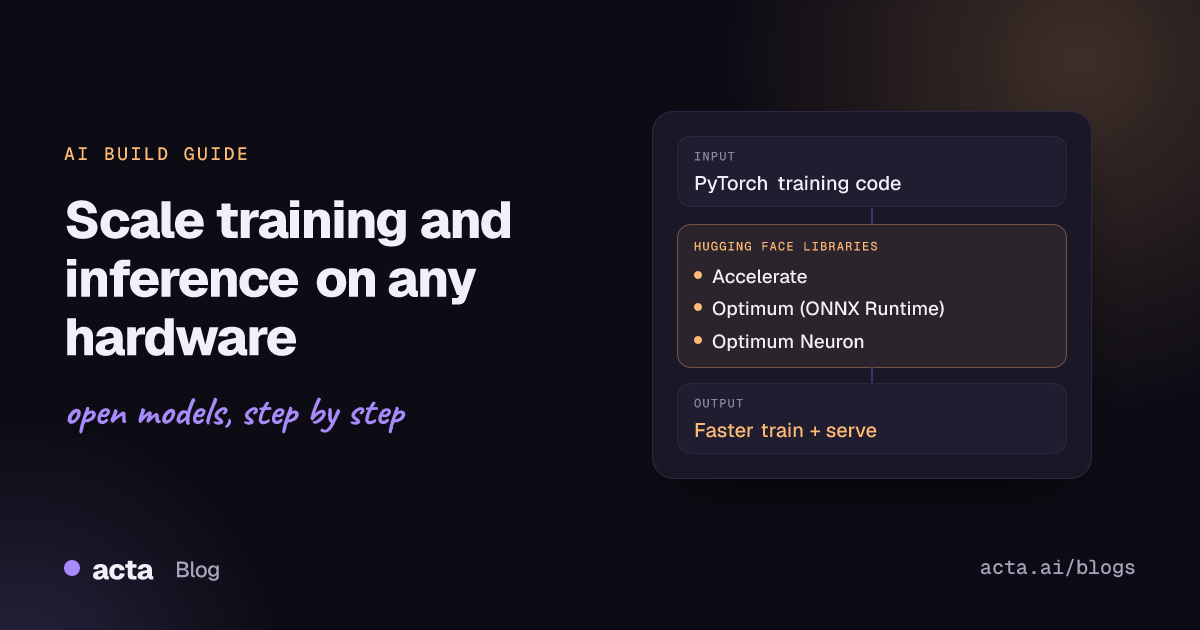
Quick answer: To scale PyTorch training, wrap your loop with Hugging Face Accelerate and launch it with accelerate launch on multiple GPUs, TPUs, FSDP or DeepSpeed. For faster inference, export models with Optimum (ONNX Runtime). On AWS Trainium and Inferentia, use Optimum Neuron. On Google TPUs, Optimum TPU is archived, so use Accelerate for training and vLLM's tpu-inference for serving.
Most fine-tuning projects start on one GPU. Then the dataset grows, the model grows, or the serving bill grows, and the same code has to run on eight GPUs, a TPU pod or an AWS Trainium instance. The Hugging Face TRAINING & OPTIMIZATION libraries covered here handle that move without rewriting your model code.
This guide explains what Accelerate, Optimum, Optimum Neuron and Optimum TPU each do, how to choose hardware, and what code you actually change. All code follows the current READMEs on GitHub.
What problem do these libraries solve?
Distributed training and hardware-specific inference involve a lot of boilerplate: process groups, device placement, gradient synchronisation, mixed precision, sharding configs, graph compilation and export formats. Each accelerator vendor has its own stack. Without a layer in between, your training script ends up tied to one machine type.
- Accelerate (GitHub) lets one raw PyTorch training loop run on CPU, a single GPU, multiple GPUs across nodes, or TPU, with fp16, bf16 or fp8 mixed precision, and plugs in DeepSpeed, FSDP and Megatron-LM.
- Optimum (GitHub) is an extension of Transformers with performance tools for specific hardware. Its ONNX export and ONNX Runtime integration now live in optimum-onnx; other packages cover OpenVINO, TensorRT-LLM, AMD, Intel Gaudi and more.
- Optimum Neuron (GitHub) is the interface between Transformers and AWS Trainium and Inferentia, with drop-in trainer and model classes.
- Optimum TPU (GitHub) targeted Google Cloud TPUs. The repository was archived in January 2026 and its README points to tpu-inference for inference and Accelerate for training.
How do they work?
Data parallelism and sharding
Plain data parallelism keeps a full copy of the model on every device and splits the batches. It is simple and fast, but each device must hold the weights, gradients and optimizer states. Sharded approaches remove that duplication. DeepSpeed's ZeRO (ZeRO paper) partitions optimizer states, gradients and parameters across devices in stages. PyTorch FSDP (FSDP paper) does the same natively in PyTorch. Accelerate exposes both through accelerate config, and its FSDP guide covers the sharding options.
Mixed precision
Training in bf16 or fp16 halves the bytes per activation and weight compared with fp32 and uses the tensor cores of modern accelerators. Accelerate switches this on with one flag; fp8 is available through NVIDIA Transformer Engine or MS-AMP.
Graph export and compilation
Inference speedups usually come from turning a dynamic PyTorch model into an optimized graph. Optimum exports to ONNX and runs it with ONNX Runtime through ORTModelForXXX classes that mirror AutoModelForXXX. AWS Neuron and TPUs go further: models are compiled for static input shapes (batch size, sequence length) before they run, so the first run is slow and later runs reuse the compiled graph.
When should you use them (and when not)?
- Use Accelerate when you write your own PyTorch training loop and want it to run anywhere. The README is clear about the reverse: if you do not want to write a training loop, use a higher-level library. The README notes that Transformers uses Accelerate as the backend for its PyTorch side, so the
Traineralready builds on it. - Use Optimum with ONNX Runtime when you serve encoder models, small LLMs or vision models on CPU or modest GPUs and want lower latency without changing your pipeline code. For large LLM serving on GPUs, a dedicated server such as vLLM or TGI is usually the better fit.
- Use Optimum Neuron when your team runs on AWS and has access to trn1 or inf2 capacity, and the model architecture is supported.
- For TPUs, do not start a new project on Optimum TPU. Use Accelerate (see the Training on TPUs guide) and vLLM with tpu-inference for serving.
- Skip all of this if your model trains in reasonable time on one GPU. Scaling adds failure modes; add it when the job is too slow or does not fit.
How do you scale training and inference, step by step?
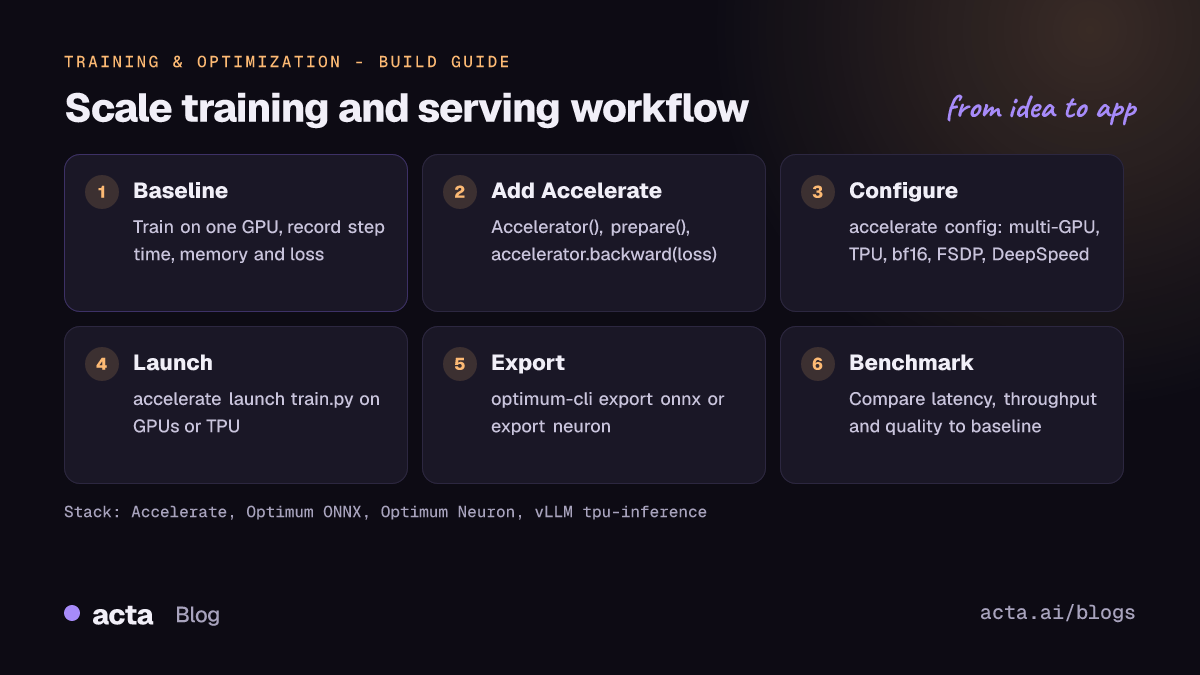
- Get a single-device baseline. Run a short training job on one GPU and record step time, memory and loss. Everything after is compared against this.
- Add Accelerate to the loop. Create an
Accelerator, pass model, optimizer and dataloader throughaccelerator.prepare, and replaceloss.backward()withaccelerator.backward(loss). - Configure the hardware. Run
accelerate configand choose multi-GPU, TPU, mixed precision, FSDP or DeepSpeed. The answers are saved in a config file. - Launch. Use
accelerate launch train.py, or for exampleaccelerate launch --multi_gpu --num_processes 2 train.py. - Export for serving. Export the checkpoint with
optimum-cli export onnxfor ONNX Runtime, oroptimum-cli export neuronfor Inferentia and Trainium. - Benchmark and compare. Measure latency, throughput and output quality against the PyTorch baseline before switching traffic.
Example 1: an Accelerate training loop
This follows the second example in the Accelerate README, where Accelerate also handles device placement. my_dataset is a placeholder for your own dataset.
import torch
import torch.nn.functional as F
from datasets import load_dataset
from accelerate import Accelerator

accelerator = Accelerator()

model = torch.nn.Transformer()
optimizer = torch.optim.Adam(model.parameters())

dataset = load_dataset('my_dataset')
data = torch.utils.data.DataLoader(dataset, shuffle=True)

model, optimizer, data = accelerator.prepare(model, optimizer, data)

model.train()
for epoch in range(10):
    for source, targets in data:
        optimizer.zero_grad()
        output = model(source)
        loss = F.cross_entropy(output, targets)
        accelerator.backward(loss)
        optimizer.step()

# Run once: accelerate config
# Then:     accelerate launch my_script.py
For DeepSpeed, nothing in the loop changes: choose it in accelerate config, or, as the README shows, create DeepSpeedPlugin(zero_stage=2, gradient_accumulation_steps=2) and pass it as Accelerator(mixed_precision='fp16', deepspeed_plugin=deepspeed_plugin). In notebooks (for example on a Colab or Kaggle TPU), wrap the loop in a function and call notebook_launcher(training_function).
Example 2: ONNX Runtime inference with Optimum
This follows the optimum-onnx README. It loads a pre-exported ONNX build of meta-llama/Llama-3.2-1B from onnx-community/Llama-3.2-1B. The Llama model is gated under the Llama 3.2 Community License, so accept the terms on its page first.
# pip install "optimum-onnx[onnxruntime]"
# Export your own model: optimum-cli export onnx --model meta-llama/Llama-3.2-1B onnx_llama/
from transformers import AutoTokenizer, pipeline
from optimum.onnxruntime import ORTModelForCausalLM

model = ORTModelForCausalLM.from_pretrained("onnx-community/Llama-3.2-1B", subfolder="onnx")  # ONNX checkpoint
tokenizer = AutoTokenizer.from_pretrained("meta-llama/Llama-3.2-1B")

pipe = pipeline("text-generation", model=model, tokenizer=tokenizer)
result = pipe("He never went out without a book under his arm")
The export guide lists the --optimize levels (O1 to O4) and quantization options.
Example 3: compile and run a model on AWS Inferentia or Trainium
This follows the Optimum Neuron README. Install the Neuron driver and tools first, then pip install --upgrade-strategy eager optimum-neuron[neuronx].
# Compile with static shapes, casting matmul ops to bf16:
# optimum-cli export neuron \
#   --model distilbert-base-uncased-finetuned-sst-2-english \
#   --batch_size 1 --sequence_length 32 \
#   --auto_cast matmul --auto_cast_type bf16 \
#   distilbert_base_uncased_finetuned_sst2_english_neuron/
from transformers import AutoTokenizer
from optimum.neuron import NeuronModelForSequenceClassification

model = NeuronModelForSequenceClassification.from_pretrained("distilbert_base_uncased_finetuned_sst2_english_neuron")
tokenizer = AutoTokenizer.from_pretrained("distilbert-base-uncased-finetuned-sst-2-english")
inputs = tokenizer("Hamilton is considered to be the best musical of past years.", return_tensors="pt")

logits = model(**inputs).logits
print(model.config.id2label[logits.argmax().item()])
For training on Trainium, the same README fine-tunes Qwen/Qwen3-1.7B on the Dolly dataset with NeuronTrainingArguments (for example tensor_parallel_size=8), NeuronModelForCausalLM and NeuronSFTTrainer, launched with torchrun --nproc_per_node 32. An optional neuron_parallel_compile pass precompiles the graphs. The quickstart walks through it.
How do you choose hardware, and what does it cost?
We do not quote prices here: cloud pricing changes often and varies by region and commitment. Check the current price pages of your provider and compare cost per training run or per million generated tokens, not cost per hour.
- NVIDIA GPUs have the widest support. Every library in this guide works there, and Accelerate needs no code changes beyond the loop above. Start here unless you have a reason not to.
- AWS Trainium and Inferentia need models compiled ahead of time for fixed shapes. The Optimum Neuron README lists trn1 and inf2. Its vLLM plugin guide stated at the time of writing that Trn2 is not yet supported by the plugin, so check the current docs if you plan to use Trn2.
- Google TPUs also compile graphs, and Accelerate warns that the first step is slow while the graph is built and cached. The Optimum TPU README listed v5e and v6e for inference and v5e for tested fine-tuning. For new serving work, the vLLM TPU documentation is the current path.
- CPUs are a valid inference target for small models when combined with ONNX Runtime or OpenVINO through Optimum.
Memory matters more than raw speed when choosing a strategy. If the model, gradients and optimizer states fit on one device, plain data parallelism is the simplest choice. If they do not, use FSDP or DeepSpeed ZeRO to shard them, or tensor parallelism as in the Neuron example.
How do you evaluate the result?
- Training speed: step time and samples per second per device, compared with your single-device baseline. Scaling efficiency is throughput on N devices divided by N times the single-device throughput.
- Training correctness: the loss curve should closely track the baseline when the effective batch size (per-device batch times devices times gradient accumulation) is the same.
- Inference latency and throughput: measure p50 and p95 latency and tokens or requests per second at realistic batch sizes, including the first request after a cold start.
- Output quality: exports, mixed precision and quantization can change outputs. Optimum's ONNX exporter validates outputs against the PyTorch reference within a tolerance; also run your task metrics (accuracy, F1, ROUGE or an LLM eval suite) on both versions. The Lighteval and Safetensors guide covers LLM evaluation.
Pitfalls and tips
- Print and save from one process. Every process runs your script. Guard logging and checkpointing so only the main process writes, and call
accelerator.wait_for_everyone()andaccelerator.unwrap_model(model)before saving, as the README shows. - Gradient accumulation with DeepSpeed must be declared up front in the plugin or config.
- Recompilation on TPU and Neuron. Changing shapes triggers a new compile. Pad to fixed lengths and keep batch sizes constant.
- Experimental features. The Accelerate README still marks DeepSpeed, FSDP and Megatron-LM support as experimental. Pin library versions in production jobs.
- ONNX Runtime packages. Do not install
onnxruntimeandonnxruntime-gputogether; the optimum-onnx README says to uninstallonnxruntimebefore installing the GPU extra. - Archived projects. Optimum TPU is read-only. Old blog posts and notebooks that use it still work for reference but will not get fixes.
- Licences. Gated models like Llama 3.2 need accepted terms before export or compilation scripts can download them.
Where to get help
- The Accelerate category on the Hugging Face forum for configuration and launch questions.
- Accelerate GitHub issues and Optimum Neuron GitHub issues for bugs, with your library versions and a minimal reproduction.
- The tpu-inference repository for TPU serving questions.
- Related guides in this series: fine-tuning on one GPU with PEFT and bitsandbytes and reinforcement learning with TRL and OpenEnv. To build an app on top, see building a text generation app with open LLMs.
Frequently asked questions
Do I need Accelerate if I use the Transformers Trainer?
Not directly. The Accelerate README notes that it is the backend for the PyTorch side of Transformers, so the Trainer already uses it. You can still use accelerate config and accelerate launch to run Trainer scripts on several devices.
Should I pick FSDP or DeepSpeed?
Both shard model state to fit larger models. FSDP is native to PyTorch; DeepSpeed offers ZeRO stages and its own options. Accelerate supports both through the same config flow, and its concept guide on FSDP and DeepSpeed compares them. Try the one your team already knows first.
Is Optimum TPU still the way to use TPUs?
No. The repository was archived in January 2026. Its README recommends Accelerate for training and vLLM's tpu-inference for inference.
Does ONNX export always make inference faster?
Not always. Gains depend on the model, hardware and batch size. Benchmark the exported model against PyTorch on your own traffic and check that outputs still match.
Found this useful? Share it with your team.