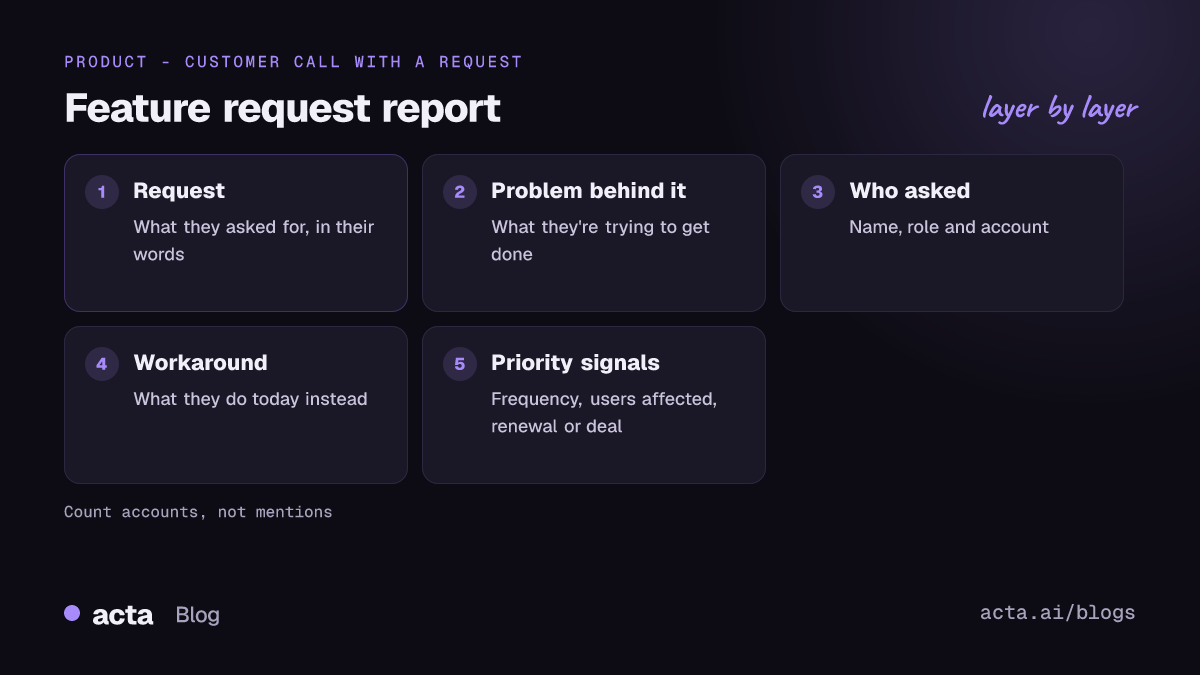
A good feature request template records five things for every request: what the customer asked for, the problem behind it, who asked (name, role, account), the workaround they use today, and the signals that tell you how much it matters, such as a blocked renewal or a daily task. Capture it from the call itself, in the customer's words, then dedupe and route it weekly. Below is a template you can copy and a filled-in example.
Use Cases 11 min read
Feature Request Template: Capture Requests From Customer Calls
Capture feature requests from customer calls in one format: the problem behind each ask, who asked, the workaround and priority signals, then dedupe and route them weekly.
By Sarma BKP, Founder & CEO, Acta · Updated
This is for product managers, customer success leads and founders who hear requests on calls and lose most of them in Slack threads and half-written CRM notes. It assumes requests come mainly from conversations, not from an in-app form. If you already run a feedback portal with voting, keep it; this covers the part a portal misses, which is the context people only say out loud.
Key takeaways
- Record the problem behind each request, not just the request. "Export to CSV" is a solution; "finance re-types our numbers every Monday" is the problem.
- Always capture who asked, their role and the account. Ten requests from one champion are not ten customers.
- Write the current workaround. If it's painful and weekly, that's a priority signal on its own.
- Track what the rep or CSM promised on the call as a checklist with an owner, so nobody says "it's on the roadmap" by accident.
- Dedupe and route once a week. Daily triage burns PM time; monthly lets requests go stale.
Table of contents
- A feature request template captures the problem, not just the ask
- What customers ask for is evidence, not a spec
- Six steps take a request from call to backlog
- Build this as a custom template in Acta
- A filled-in example from a renewal call
- Route requests by signal strength, not by who shouted
- Five mistakes turn feature request tracking into noise
- Frequently asked questions
- Set up your feature request process this week
A feature request template captures the problem, not just the ask
Most customer feature requests arrive pre-solved. The customer has already imagined the button, the integration or the report, and that's what they describe. That's useful, because it tells you what they think would help. It's also incomplete, because the solution they picked is limited by what they know about your product and its constraints.
So a feature request form or template needs more than a "Request" field. These are the fields I'd keep:
- Request: what they asked for, in their words.
- Problem behind it: what they're trying to get done and what goes wrong today.
- Who asked: name, role and account. A request from a daily user differs from one from the buyer who never logs in.
- Current workaround: what they do instead. Spreadsheets, manual re-entry, a competitor's tool.
- Priority signals: how often the problem happens, how many people it affects, whether it's tied to a renewal, expansion or deadline.
- Commitments made: anything your side promised on the call.
That's a product feedback template, really. It works for requests from sales calls, CS check-ins, QBRs and support escalations, which is the point: one format, whatever meeting it came from.
What customers ask for is evidence, not a spec
Nielsen Norman Group's long-standing advice is blunt: in its article First Rule of Usability? Don't Listen to Users, it argues that what people say about their own behaviour is unreliable, and so are their predictions about what they'll do. Its short video Don't Listen to the Customers makes the same case: watch what people do rather than build what they say. That doesn't mean ignoring requests. It means treating them as evidence about a problem, then checking the problem.
The jobs-to-be-done idea points the same way. Clayton Christensen and co-authors argued in Harvard Business Review that customers often can't articulate the job they're trying to get done, and that jobs have social and emotional sides as well as functional ones; Innosight hosts a summary of Know your customers' "Jobs to be done". In a call, that sounds like "my boss asks for this every Monday and I look slow" sitting behind "can you add a weekly report?"
The practical consequence for your template: give "problem behind it" as much room as "request", and keep quotes. When the request reaches a PM three weeks later, the quote is what lets them tell a nice-to-have from a real job. It's also why voice of the customer programmes that only count requests tend to over-build the loudest asks.
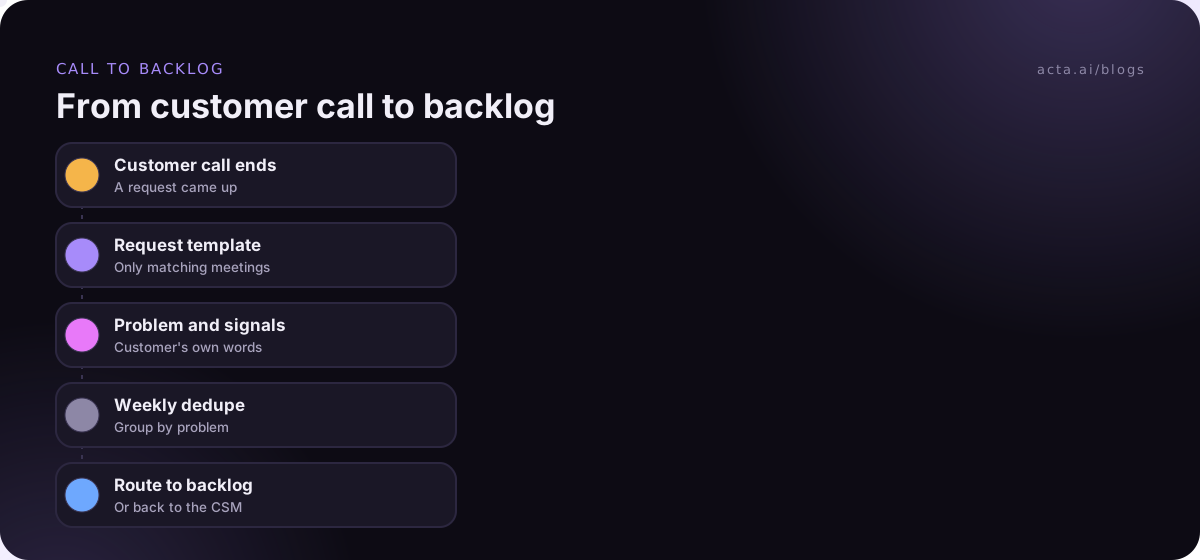
Six steps take a request from call to backlog
Here's the process I'd set up for a team of five to fifty customer-facing people:
- Agree what counts. A feature request is a change to how the product works. Bugs go to support; how-to questions go to docs. Put a "Not feature requests" section in the template so they're caught but separated.
- Capture on the call. Run the same template on every customer call that mentions a request, so nobody has to remember to write it up.
- Check the problem. If the template shows "Problem behind it: Not discussed", that's a prompt for the CSM to ask on the next touchpoint.
- Dedupe weekly. One person, one hour a week, merges requests that describe the same problem, even when the solutions asked for differ.
- Score with signals. Count accounts, not mentions. Note renewals and deals tied to the request.
- Close the loop. When something ships or is declined, the CSM tells the customers who asked. The "who asked" field makes that possible.
Step 6 is the one most teams skip, and it's the one customers remember.
Build this as a custom template in Acta
If your customer calls are recorded, a custom template pulls requests out of every call in the same format. Custom templates are a paid-plan feature; the 15-day free trial doesn't include them. Full details are in the custom templates help article.
- In the Acta dashboard, go to Templates, pick My templates and click + Create template.
- Name it "Feature requests". Under Start from, choose Blank so you can add the sections below exactly, or Built-in and pick Ticket suggestions if you'd rather adapt something close.
- In What should this report do?, write: "For customer calls where the customer asks for a new feature or a change to the product: list each request with the problem behind it, who asked, their current workaround, signals of how much it matters, and anything we promised."
- Add the sections and formats below, in this order.
- Add extra instructions: "Use the customer's own words for requests and problems. Do not say whether we will build it."
- Under When should Acta use it?, choose Only matching meetings. Calls without a request are left alone.
- Use Test on a past meeting and Run on this meeting on a call where you know a request came up. Nothing is saved or sent. Adjust and Save.
- Turn on Share with my team so sales and CS can switch it on too. Only you can edit it.
Sections and formats to copy:
1. Requests raised - Table: Request | Problem behind it | Who asked (name, role) | Customer's words
2. Current workarounds - Bullets
3. Priority signals - Table: Signal | What was said | Who said it
4. Account context - Bullets: team using it, renewal or expansion if mentioned, competitors mentioned
5. Commitments made on the call - Checklist (task, owner, due date)
6. Not feature requests - Bullets: bugs and how-to questions raised, for support
Six sections is enough. You can have up to 12, but every extra section is one more thing a PM skims past. Each report also gets an "In short" summary, a confidence rating and key quotes, and writes "Not discussed" rather than inventing a problem the customer never described. Browse the built-in report templates if you want to see how others are laid out first.
A filled-in example from a renewal call
This illustration shows the template run on a 30-minute renewal call. The names are invented.
In short: Brightline Logistics asked for scheduled exports and approval routing. The export request is tied to their finance team's Monday reporting and was raised as a renewal concern. Confidence: high.
Requests raised: Scheduled CSV export | Finance re-types weekly numbers into their reporting pack | Priya Nair, Ops Manager | "Every Monday someone copies forty rows by hand." Approval step before sending invoices | Two people sent the same invoice twice last month | Marco Bell, Finance Lead | "We need a second pair of eyes, that's all."
Current workarounds: Manual copy into a spreadsheet each Monday. A shared calendar reminder to check invoices.
Priority signals: Frequency | "Every Monday" | Priya. Renewal | "This is on my list for the renewal conversation" | Marco. Users affected | Not discussed.
Account context: Finance and operations teams use it. Renewal mentioned for Q1.
Commitments made on the call: Share whether export is planned | Dana (CSM) | Next Friday. Send the current export how-to | Dana | Today.
Not feature requests: Date filter resets on refresh (bug, for support).
Key quote: "I don't need it fancy, I need Monday to stop being Monday."
Notice the commitment. Dana promised to say whether export is planned, not that it would be built. That distinction is what the checklist protects.
Route requests by signal strength, not by who shouted
How to prioritize feature requests is a bigger topic than one post, but the template gives you the inputs. Group the week's requests by problem, then look at three columns: how many accounts, how often the problem bites, and whether money is attached (renewal, expansion, a deal). A problem that hits five accounts weekly beats one that hit one large account once, even if the large account was louder.
Then route. Strong, well-understood problems go to the backlog as a draft ticket; the guide on creating Jira tickets from customer calls covers that step, and the Jira integration help page shows the setup. Unclear problems go back to the CSM with a question. Declined requests still get logged, with a reason, so the next PM doesn't re-litigate them. Requests that make the cut usually land in refinement; the sibling post on a sprint planning meeting template picks up from there. If you're turning a cluster of requests into a spec, see the product requirements examples.
Where Acta fits: it records customer calls, runs this template only on the calls that match, and puts the report in the meeting's Templates tab with Copy, Download and Push to CRM, so requests sit next to the account. OneChat can also answer "which accounts asked for scheduled exports?" across meetings, with sources. If bots are awkward with customers, the Chrome extension records Meet, Teams in the browser and the Zoom web client without one.
Five mistakes turn feature request tracking into noise
- Logging solutions only. Without the problem, the backlog fills with near-duplicates nobody can merge.
- Counting mentions instead of accounts. The champion who asks on every call skews the tally.
- No owner on promises. "We'll look into it" with no name becomes "you said it was coming" at renewal.
- Mixing bugs with requests. Bugs need a fix date; requests need a decision. Keep them in separate sections.
- Never closing the loop. Customers stop telling you things when nothing ever comes back.
Recording customer calls needs consent; tell customers and check the rules for where they are. The guide on whether it's legal to record meetings with AI covers the basics. Agencies dealing with the same problem from the client side may find client feedback tracking for agencies useful.
Frequently asked questions
What should a feature request template include?
Include the request in the customer's words, the problem behind it, who asked with role and account, the current workaround, priority signals such as frequency, users affected and any renewal or deal tied to it, and any commitments made on the call with an owner. Keep bugs and how-to questions in a separate section.
How do you collect customer feature requests from calls?
Use one template on every customer call where a request comes up, whether sales, success or support. Record calls with consent and run the template on the recording, or fill it in straight after. Then have one person merge duplicates weekly by problem, not by the solution asked for.
How do you prioritize feature requests?
Group requests by the underlying problem, then weigh how many accounts raise it, how often it happens, how painful the workaround is, and whether revenue is attached. Count accounts rather than mentions. Strategy still decides; the signals tell you which problems are real and how widespread they are.
Is a feature request form better than capturing requests from calls?
They catch different things. A feature request form gets structured input from customers who bother to fill it in. Calls catch the context customers only say out loud: the workaround, who's frustrated, the renewal pressure. Most teams benefit from both, merged into one list.
Should feature requests go straight into Jira?
Not raw. Dump every request into Jira and the backlog becomes unreadable. Keep requests in a separate list, dedupe and score them weekly, and only create a ticket when a problem is understood and accepted. Link the ticket back to the accounts that asked so you can close the loop.
Set up your feature request process this week
You can get a working version running in a few days. Start small and tighten it once requests start flowing.
- Define a request: agree with support and sales what counts as a feature request versus a bug or question.
- Fix the template: request, problem, who asked, workaround, signals, commitments, and a section for non-requests.
- Name a triager: one person merges and scores requests every week.
- Route with reasons: backlog, back to CSM with a question, or declined with a logged reason.
- Close the loop: tell the customers who asked when something ships or is declined.
For customer calls in the Zoom or Teams desktop apps, Acta's desktop app records without a bot, and the pricing page shows which plans include custom templates.
Found this useful? Share it with your team.