FM companies run three meetings that matter to the client
The monthly client review (some contracts call it the SLA review meeting or the performance review) with the client's admin head, sometimes their procurement person, and on your side the account manager, the site manager and the technical lead. The weekly operations meeting inside your company, where area managers go through manpower, attendance, PPM (planned preventive maintenance) completion and consumables. And the escalation call, which nobody schedules: a chiller trips at 2 pm on a Friday, or a CEO finds a dirty washroom, and the client wants someone on the phone in ten minutes.
The client review carries the money. Many FM contracts tie part of the invoice to facility management KPIs such as complaint closure time, PPM adherence and attendance. "This has been raised twice already" is the start of a deduction.
What goes wrong is rarely the work. It is the gap between what the account manager says in the room and what reaches the supervisor who rosters the shift. Minutes, if anyone writes them, arrive days later with no owners, and the client has notes when you don't.
One missed washroom shift nearly cost a contract
Here's an illustrative example. Meridian Facility Services (invented) runs 18 sites around Hyderabad with about 420 people on its rolls: tech parks, a private hospital, two malls and a handful of corporate offices. Its biggest account is a six-tower IT park we'll call Northgate, worth roughly 11 lakh rupees a month.
At the September review, Northgate's admin head, Kavya, raised three complaints. Washrooms in Tower C were dirty by 3 pm on most days. The diesel generator PPM report for August hadn't been shared. And the pantry on the fourth floor of Tower A had cockroaches again, two weeks after a pest control treatment. Meridian's account manager, Suresh, answered each one calmly. The site manager, Ravi, would add a second housekeeper on the 11-to-7 shift in Tower C. The technical lead, Anil, would send the DG PPM report by Friday. The pest control partner would re-treat the pantry within seven days, and Ravi would share photos.
Ravi went back to the site and found two absentees that week, so the extra housekeeper went to cover Tower E instead. Anil sent the PPM report to Suresh, who meant to forward it and didn't. The pest control re-treatment happened, but no photos went to Kavya. Nobody lied; no promise had a visible status.
The October review opened with Kavya reading out the same three complaints from her own notes. She then pointed to the SLA clause that allows a 2% deduction when a complaint recurs, which on this contract is about 22,000 rupees a month. The renewal in January suddenly looked shaky.
Now replay September with the meeting recorded. Within minutes of the call ending, Suresh has three action items with owners and dates. Ravi gets a daily email listing his open items. By day 9, the Tower C item shows "Overdue 2 days" in Suresh's tracker, he calls Ravi, and they move a housekeeper from the Tower E relief pool. The PPM report goes out on Monday with a one-line apology. The October review starts with "all three closed, here's the evidence", and that is a very different hour.
A facility management client review meeting needs its own template
Beyond the standard notes (summary, decisions, action items with owners), Acta runs report templates. Two built-in ones from Acta's 40 templates by role fit FM well: Customer QBR for the client-facing review and KPI review for your internal weekly operations meeting. An FM review has its own shape, though, so write a custom one.
Custom templates are built under Templates with "+ Create template", up to 12 sections, each with a format: Paragraph, Bullets, Checklist (task, owner, due date) or Table with up to 6 named columns. They are part of the paid plan, not the trial, and you can tick "Share with my team" so every account manager runs the same one. The custom templates guide covers the builder. Here's the one Meridian would use:
Template name: FM client review
What should this report do? For monthly client reviews of a facility management contract: SLA performance, complaints raised by the client, what we committed to, and anything that could lead to a penalty or escalation.
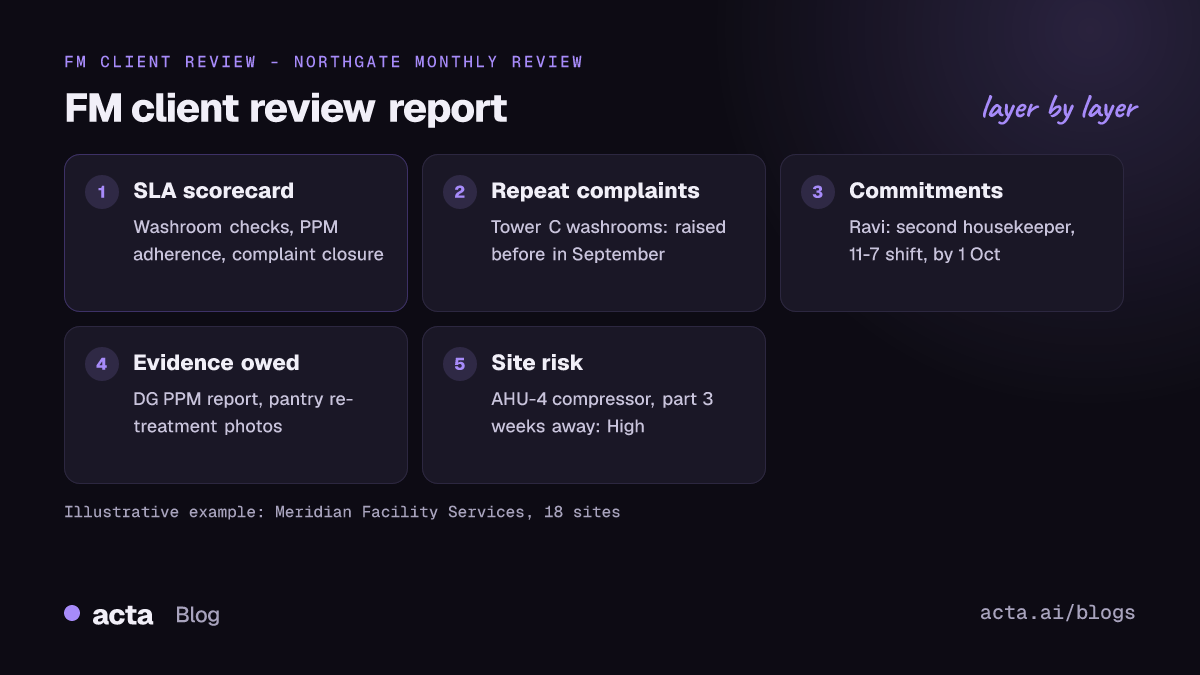
1. SLA scorecard (Table: Service | Target | Reported this month | Client comment)
2. Complaints raised in this meeting (Table: Location | Complaint | First raised | Raised before?)
3. Commitments to the client (Checklist: task, owner, due date)
4. Penalty or escalation signals (Bullets, quote the client's words)
5. Evidence the client asked for (Bullets: reports, photos, logs)
6. Next review date and attendees (Paragraph)
When should Acta use it? Only matching meetings.
"Raised before?" flags repeat complaints, the thing a client uses against you; "Only matching meetings" keeps it out of internal huddles. Before you rely on it, use "Test on a past meeting" on last month's review and read what it writes.
The action tracker is where SLA promises live or die
Every recorded meeting has its own list of action items. The useful part for an account manager is the cross-meeting view: My meetings > Outcomes > Action items. It pulls the items from all the meetings you recorded or that teammates shared with you in the workspace, with tiles for Open, Overdue, Due this week and Done. You can group by Meeting (one card per client review, with an "X of Y done" bar) or by Person, which is the view to open before you call a site manager.
Here is what Suresh's tracker would show on 9 October, grouped by Person, for the September Northgate review:
| Action item | Owner | Status | Comment |
|---|
| Add second housekeeper, Tower C, 11-7 shift | Ravi | Overdue 2 days | Two absentees, relief sent to Tower E |
| Send August DG PPM report to Kavya | Anil | Overdue 4 days | Sent to Suresh, not forwarded |
| Pantry re-treatment, Tower A level 4, share photos | Ravi | Due today | Treatment done 3 Oct, photos pending |
| Revise housekeeping deployment plan for Tower C | Suresh | Done | Shared with Kavya 5 Oct |
Treat this as your action item tracker for teams, not a personal to-do list. Comments on each row keep the reason with the item, so when the client asks "why was it late?" the answer is already written. Tick "Mark as done" only when the evidence has reached the client, not when the work is finished on site. That one rule fixes most of Meridian's September problem.
Then switch on Auto follow-up. It sends a daily email of open items, and you choose who gets it: each owner their own items, you a summary of everyone's, or all participants. For FM, pick "Each owner, their own items", Weekdays at 8:30, "Due or overdue", and stop after 30 days so it covers the whole month to the next review. It is off until you turn it on, and it stops on its own once every item is done. The action item detection guide explains how items and owners are picked out of what was said.
On day 15, filter to Overdue and group by Meeting: eighteen client cards, and in a minute you see which accounts are drifting.
Decisions, risks and questions sit next to the actions
Actions are the focus for FM, but three other views earn their place. All of them are per person: each one is built from the meetings that person recorded or that colleagues shared with them in the workspace. Suresh's decision log is Suresh's; the operations head sees the same entries only if those reviews are shared with the workspace.
Decision log
Under Outcomes > Decision log, decisions are merged across meetings with statuses Active, Changed, Reversed or Done. A filled example from Suresh's log:
- Decision: Tower C washroom checks move from every two hours to hourly between 11 am and 4 pm.
- Status: Active. Decided by: Kavya. Owner: Ravi.
- History: first raised 12 Sep ("by three o'clock it's unusable"), confirmed 10 Oct. Actions: 1 of 2 done.
The "Need follow-through" tile flags decisions whose actions are slipping, which is useful before a review.
Risk Registry
The Risk Registry tab lists risks raised across your meetings with Mitigation, Owner, Date, Impact and Status. A row Meridian would see: Risk: AHU-4 compressor in Tower B making noise, replacement part three weeks away. Mitigation: hire a standby unit if it trips (Agreed, 10 Oct). Owner: Anil. Impact: High. Status: Mitigating. Another, flagged "High · no owner": the night technician working alone in the Tower B plant room with no check-in call. The UK HSE's guidance for employers on lone working describes a lone worker as someone working without close or direct supervision and expects the employer to assess and control that risk, which is a fair standard to hold your own sites to even outside the UK.
OneChat
OneChat answers questions across all your meetings and shows where each answer came from. Before the November review, Suresh asks: "What did we promise Northgate in the last three reviews, and what's still open?" The answer lists seven commitments, two still open (the pantry photos and a revised pest control schedule), each with "Found in" links to the September and October reviews at the exact moment. The OneChat help page has more example questions.
An agent can draft the client recap before anyone asks
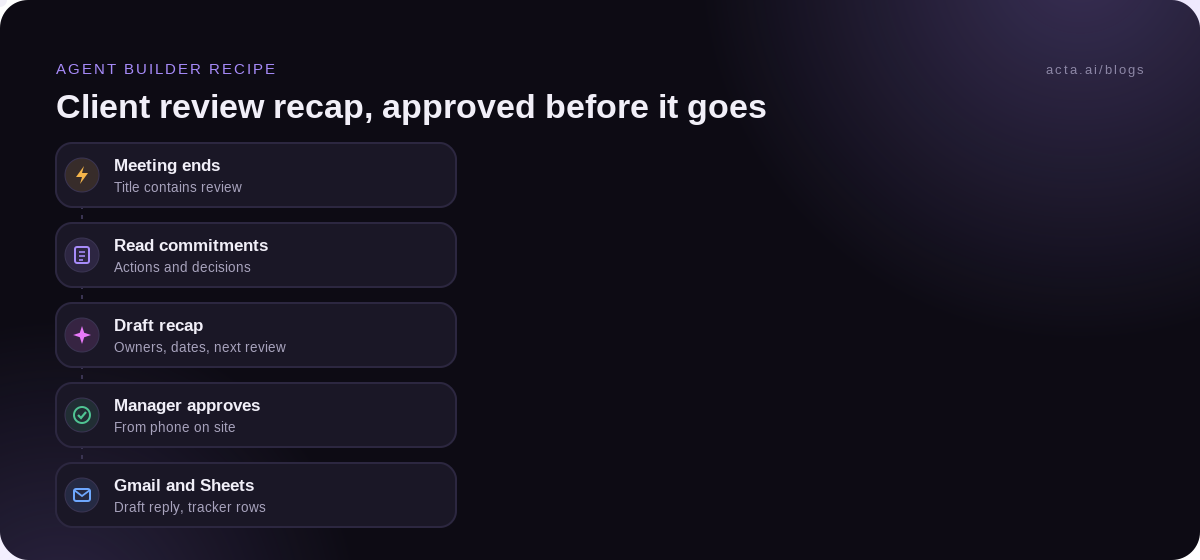
With Agent Builder (beta) you can set that up once and approve each email before it goes. Here is a recipe a manager can build in an afternoon:
- Open Agent Builder, click "New agent", and pick the trigger When a meeting ends, with the filter "title contains review".
- Add an Acta data step that reads that meeting's action items and decisions.
- Add an AI step with the instruction: "Write a short recap to the client: what we agreed, each commitment with owner and date, and the next review date. Plain sentences, no marketing language."
- Add a Human approval step and tick "Also email me Approve and Reject buttons", so the account manager can approve from a phone on site.
- Add a Gmail action to create a draft reply to the client's thread, or send it once you trust the output.
- Add a Google Sheets action that adds one row per commitment to your SLA tracker sheet (Client, Item, Owner, Due).
- Click Test and Run test on last month's review. Nothing is sent during a test. Then Turn on.
If nobody approves within 24 hours, nothing is sent, which is the right default for anything a client will read. The approvals guide explains the Approvals tab. For more ideas, see 10 meeting automation workflows.
Roll it out across 18 sites in two weeks
In a 20-to-200-person FM company, only a handful of people need to be in the workspace: account managers and the operations head. Each workspace member uses a seat (Pro is $8 per seat a month, or $72 a year), and the Outcomes views, the Risk Registry and OneChat are included in the 15-day trial and in Pro. Site supervisors stay outside the workspace and still receive follow-up emails, so they need no seat.
Who records what. Account managers record client reviews and escalation calls. The operations head records the weekly operations meeting. Most clients run reviews on Teams; if your account managers use the Teams desktop app, the Acta desktop app records the meeting sound and their microphone without a bot joining. In-person reviews at the client's office work with the mobile app on the table. Tell the client you're recording; the recording consent guide covers what to say.
Sharing. Each person's meetings are private by default. Create a workspace, invite people from Settings, and have account managers share each client review with "Everyone in" the workspace so the operations head can see the actions in their own tracker and ask OneChat about them. The team setup guide covers roles.
- Days 1-3: Owner sets up the workspace, invites three account managers and the operations head, writes the FM client review template.
- Days 4-7: Those three record every review and escalation call. Each evening, check owners and dates; fix any "Unassigned" items.
- Days 8-10: Turn on Auto follow-up for client reviews. Run the template on two past meetings and adjust sections.
- Days 11-14: Add the remaining account managers, share the template with the team, build the recap agent and test it.
Mistakes to avoid: recording every toolbox talk (nobody reads them), letting items sit without a due date, marking items done before the client has the evidence, and keeping reviews private so the operations head's tracker stays empty. Whoever chairs reviews should read Knowledge at Wharton on good and bad meetings and how to end a meeting with clear owners and deadlines.
Frequently asked questions
What should a facility management client review meeting cover?
Cover SLA performance against each target, complaints raised since the last review and whether any are repeats, PPM completion, manpower against the deployment plan, open commitments from last time, and upcoming work such as audits or shutdowns. End by reading back every new commitment with an owner and date, so both sides leave with the same list.
Can site supervisors see their action items without an Acta seat?
Yes, through Auto follow-up. When the meeting owner turns it on and chooses "Each owner, their own items", Acta emails each owner a daily list of their open items until they're done or the stop date passes. Supervisors can unsubscribe. Seats are for people in your workspace, and every member uses one whether they record or only read.
Is the decision log shared across the whole company?
No. The Decision log, the Action items view and the Risk Registry are built per person from the meetings they recorded or that were shared with them. To give an operations head a full picture, account managers share client reviews with the workspace, and those meetings then feed the operations head's own views.
How do we handle clients who don't want a bot in the call?
Use a recorder that runs on your own computer. Acta's desktop app records Zoom and Teams desktop meetings, and its Chrome extension records Google Meet, Teams in the browser and the Zoom web client, with no bot joining. Still tell the client the meeting is being recorded and why.
Which FM meetings are worth recording first?
Start with monthly client reviews and escalation calls, because that is where money is promised away. Add the internal weekly operations meeting next. Skip daily site huddles and toolbox talks at first; they generate lots of small items that site supervisors already handle on the floor.
Decide what your next review will prove
Next time a client reads out last month's complaints, read out the closure dates. Before your next round of reviews:
- Pick three accounts: start with the clients most likely to raise penalties or retender.
- Write the template: include a "raised before?" column so repeat complaints can't hide.
- Close the loop on day 15: filter the tracker to Overdue and call each owner.
- Share every review: so the operations head's tracker and OneChat cover all 18 sites.
- Approve the recap: let the agent draft it and send it the same afternoon.
Install the desktop app before next month's reviews and run your first three on the 15-day free trial.