Enterprise AI agents are software that take actions inside business systems (updating records, routing tickets, drafting documents) under company identity, permissions and audit. For most large organisations, the right platform is the one built into the system you already run: Copilot Studio for Microsoft 365, Agentforce for Salesforce, ServiceNow for IT workflows. Cloud build platforms suit teams with developers, and specialist agents suit single jobs.
This round-up compares eight options as of November 2026, with what each is best for, the pricing model and the catches. It's written for IT, ops and team leads choosing where agents will run. If you're a small business looking at no-code tools, our broader AI agents for business round-up is a better starting point.
Key takeaways
- Pick by system of record first. An agent that lives where your data and permissions already are needs far less integration and security review.
- Almost every platform now bills by consumption (credits, actions or compute), so budget for usage, not just seats, and set spending caps from day one.
- Insist on four controls before production: agent identity, scoped permissions, human approval for risky actions, and an audit log.
- Run a two-week pilot on one narrow workflow with a measurable outcome before signing any multi-year commitment.
Table of contents
- Enterprise AI agents fall into three camps
- Eight enterprise AI agent platforms side by side
- Suite agents work best inside the system you already run
- Build platforms suit teams with developers and their own stack
- Specialist agents cover one job well
- Governance decides which agents survive the pilot
- Run a two-week pilot before you sign
- Frequently asked questions
- Pick an enterprise agent platform with this checklist
Enterprise AI agents fall into three camps
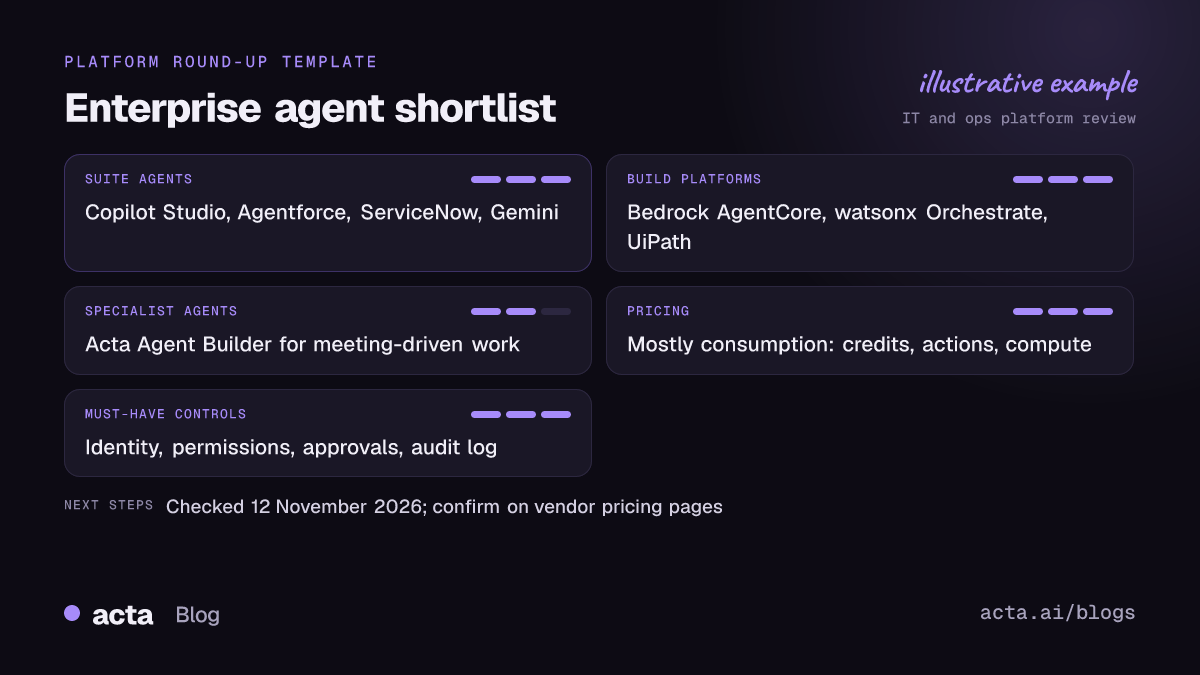
Vendor pages make every product sound like it does everything. In practice the enterprise AI agent platforms on the market sort into three groups, and knowing which group you need cuts the shortlist in half.
Suite agents come with a platform you already pay for: Microsoft, Salesforce, ServiceNow, Google. They inherit that platform's data, users and permissions, which is their biggest advantage. They're weaker once a workflow leaves the suite.
Build platforms give developers the runtime, tool connections and identity plumbing to build their own agents: AWS, IBM, UiPath. More control, more work. You'll want engineers who own it.
Specialist agents do one category of job, such as meeting follow-up, support triage or code review. They're quicker to deploy and narrower by design; these domain agent use cases show what that looks like team by team. Plenty of companies end up with one or two suites plus a few specialists. That's fine as long as governance is consistent across them. For a reality check on where agentic AI is actually landing in companies, see what's actually happening with AI agents in the enterprise.
Eight enterprise AI agent platforms side by side
| Platform | Best for | Pricing model | Public price? |
|---|---|---|---|
| Microsoft Copilot Studio | Microsoft 365 organisations | Copilot Credits, pay-as-you-go or packs | Yes |
| Salesforce Agentforce | Sales and service on Salesforce | Flex Credits per action | Yes |
| ServiceNow AI Agents | IT, HR and service workflows | Edition plus usage | Quote |
| Google Gemini Enterprise | Google Cloud and Workspace shops | Per user, plus pay-as-you-go | Yes |
| Amazon Bedrock AgentCore | Developers building on AWS | Consumption per component | Yes |
| IBM watsonx Orchestrate | Orchestrating agents across many systems | Subscription tiers | Entry tier |
| UiPath (Agent Builder, Maestro) | Companies already running RPA | Plan plus runs and units | Partly |
| Acta Agent Builder | Workflows triggered by meetings | Per seat | Yes |
Checked on 12 November 2026; confirm on each vendor's pricing page.
One platform you might expect here is missing on purpose. OpenAI's AgentKit announcement now carries an update saying the company is winding down Agent Builder and Evals, so I wouldn't start a new enterprise build on that visual builder today.
Suite agents work best inside the system you already run
Microsoft Copilot Studio
Best for: organisations standardised on Microsoft 365, Teams and Dynamics. Pros: agents sit inside Teams and Microsoft 365 apps where people already work, and use Microsoft's identity and admin controls. Low-code builder for business teams, with Power Platform connectors for other systems. Cons: credit-based billing takes effort to forecast; agents outside the Microsoft estate need connectors and their own reviews. Price: billed in Copilot Credits, either pay-as-you-go through a linked Azure subscription or prepaid capacity packs. Check Microsoft's page for current rates.
Salesforce Agentforce
Best for: sales, service and commerce teams whose data already lives in Salesforce. Pros: agents act on CRM records with existing sharing rules; prebuilt agents for service and sales tasks; strong fit when your process is already modelled in Salesforce. Cons: value drops quickly for work that happens outside Salesforce; per-action billing means busy agents get expensive. Price: Salesforce's Flex Credits announcement set a standard action at 20 credits ($0.10). Regional list prices differ, so confirm with Salesforce.
ServiceNow AI Agents
Best for: IT service management, HR service delivery and customer service already run on ServiceNow. Pros: agents work inside existing ticket workflows and approval chains, which is where most IT and HR requests already go. Cons: AI capabilities sit in higher editions, and pricing is negotiated rather than published, so budgeting takes a sales cycle. Price: quote-based; ask for consumption terms in writing.
Google Gemini Enterprise
Best for: companies on Google Workspace and Google Cloud that want one front door for agents and search across company data. Pros: combines prebuilt agents with a place to build and share your own. Google's post on flexible billing and cost controls describes a pay-as-you-go option alongside per-user plans, plus spending limits that pause agent activity when a project hits its cap. Cons: it's a Google Cloud product, separate from older Workspace add-ons with similar names, which confuses procurement. Price: per-user subscriptions plus usage-based billing; check Google Cloud for current tiers.
Build platforms suit teams with developers and their own stack
Amazon Bedrock AgentCore
Best for: engineering teams building custom agents on AWS, with whichever framework and model they prefer. Pros: separate managed pieces for runtime, tool gateway, identity, memory and observability, so you use only what you need. Cons: it's infrastructure, not a finished product; someone has to build and run the agent. Price: consumption-based per component. AWS's AgentCore pricing page notes no extra Identity charge when used through Runtime or Gateway; model inference is billed separately under Bedrock.
IBM watsonx Orchestrate
Best for: large organisations that need one layer to coordinate agents and automations across many existing systems. Pros: an agents and tools catalog, prebuilt agents in the higher tier, and orchestration across the systems you connect. Cons: the higher tiers are quote-based; most value shows up only once several systems are connected. Price: IBM's watsonx Orchestrate page lists a 30-day free trial and an entry paid tier starting at $530 per month.
UiPath Agent Builder and Maestro
Best for: companies already running UiPath robots that want agents to handle the judgement steps between automations. Pros: agents, robots and people in one orchestrated process; good fit for long, rules-heavy back-office work. Cons: licensing mixes several unit types, and the enterprise tier needs a sales conversation. Price: UiPath's Maestro documentation says building, testing and evaluating are free, plans include a monthly allotment of runs, and extra runs are billed per run; enterprise pricing is through sales.
Specialist agents cover one job well
Acta Agent Builder
Best for: teams whose work starts in meetings, such as sales follow-up, CRM updates, Jira tickets from engineering calls, or client recaps. Pros: agents trigger when a meeting ends and work from the transcript, decisions and action items, with approval steps before anything is sent. Connects to Salesforce, HubSpot, Zoho, Jira, Confluence, Notion and Google Drive. Cons: it's not a general agent platform and won't run your IT tickets or back-office processes; if the trigger isn't a conversation, look elsewhere. Price: Pro is $8 per seat per month billed monthly, or $72 per year billed annually, with a 15-day free trial.
A short note on how it works, since it's ours: Acta records calls with a meeting bot, a desktop app or a Chrome extension, then the Agent Builder runs whatever steps you set up. Recording needs participants' consent; our guide on what to tell participants covers it. If your agent problem isn't meeting-shaped, one of the platforms above will serve you better.
Governance decides which agents survive the pilot
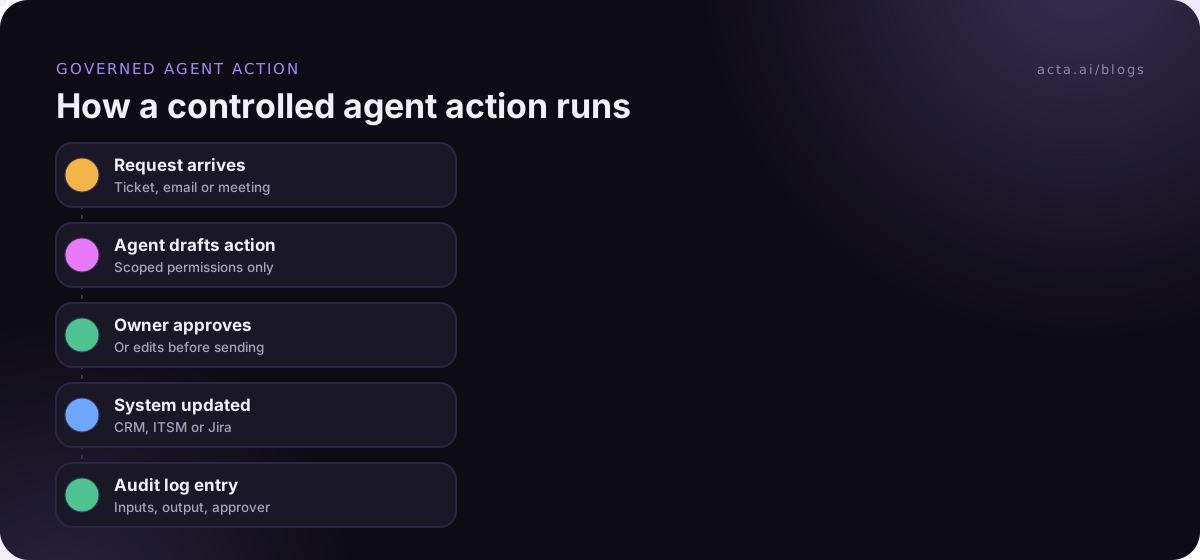
In my experience, agent pilots rarely stall because the model was weak. They stall at the security review, or because nobody can explain what the agent did last Tuesday. AI agent governance comes down to a handful of controls, and you should ask every vendor how they handle each one.
- Identity: does the agent act as itself, as the user, or as a shared service account? Shared accounts make audits nearly impossible.
- Scoped permissions: can you limit the agent to specific objects, fields and actions, not the whole system?
- Human approval: can you require sign-off before emails go out, records change or money moves? Our post on human approval in automation covers where to put those gates.
- Audit log: is every tool call recorded with inputs, outputs and who approved it?
- Spending caps: can you cap usage per project or agent so a loop doesn't run up a bill?
Prompt injection belongs on that list too. An agent that reads emails, documents or meeting transcripts can be fed instructions hidden in that content. The risks of AI agents at work post goes through the main failure modes and what to do about each.
Run a two-week pilot before you sign
A pilot tells you more than any demo. Keep it narrow and measurable.
- Pick one workflow with a clear before-and-after. "Draft follow-up emails after customer calls" or "triage password-reset tickets" works. "Improve productivity" doesn't.
- Measure the baseline. Time per task, error rate, or how many items wait more than a day. Write it down before the agent touches anything.
- Turn on approval for every action in week one, then relax it only for actions that were approved unchanged most of the time.
- Read the audit log weekly with someone from security in the room.
- Track usage cost daily. Consumption pricing surprises people most in the first month.
- Decide with the numbers. Keep, change scope, or stop. Stopping a pilot is a good outcome if it saves a bad contract.
Frequently asked questions
What are enterprise AI agents?
Enterprise AI agents are AI systems that complete multi-step tasks inside business software, such as updating CRM records, resolving tickets or drafting documents, while respecting company identity, permissions and audit rules. They differ from chatbots because they take actions, and from traditional automation because they handle steps that need judgement rather than fixed rules.
Agentforce vs Copilot Studio: which should I choose?
Choose based on where your data lives. Agentforce is the stronger fit when sales and service processes run in Salesforce, because agents act directly on CRM records. Copilot Studio fits organisations standardised on Microsoft 365 and Teams. Many large companies end up using both, each within its own system, under one governance policy.
How is AI agent pricing usually structured?
Most platforms now charge by consumption: credits per action, per conversation or per compute unit, sometimes on top of a per-user or edition fee. Model usage is often billed separately. Ask each vendor for a worked cost example based on your expected volume, and set spending caps before any agent goes live.
Do enterprise AI agents need human approval?
For anything that leaves the building or changes money, records or access, yes, at least at first. Start with approval on every action, review what the agent proposed and what people changed, then remove approval only for low-risk actions that are consistently accepted unchanged. Keep approval permanently for external emails and financial actions.
Is agentic AI ready for production in large companies?
For narrow, well-defined workflows with human checkpoints, yes. Broad "do anything" agents are still risky because of errors, prompt injection and unclear accountability. The companies getting value start with one measurable process, keep a person in the loop, and expand only once audit logs show the agent behaving predictably.
Pick an enterprise agent platform with this checklist
Narrow the field before you book demos. These five checks remove most of the wrong options.
- Start from the data: list the system where the workflow's records live, and shortlist that vendor's agent first.
- Name the builder: decide whether business users or developers will build the agents; that splits suites from build platforms.
- Test the controls: confirm identity, scoped permissions, approvals and audit logs in a sandbox, not on a slide.
- Model the cost: get a written estimate for your expected volume and a way to cap spend.
- Plan the exit: check how you'd export agent definitions and logs if you switch platforms.
If your first agent is going to run off meetings, you can test the Acta desktop app and Agent Builder free for 15 days; plans are on the pricing page.