The best AI agents for business are usually the ones built into software you already pay for: Copilot Studio if you run on Microsoft 365, Agentforce if Salesforce is your system of record, Gemini Enterprise on Google Workspace, ServiceNow for IT and HR service desks. Point agents like Intercom Fin handle one job very well, and Zapier Agents or n8n fit when the work crosses many apps. Pick by where your data lives, then by pricing model.
This guide compares nine options a small or mid-sized business can actually buy in November 2026, with the pricing model for each and the jobs they suit. It's for operations leads, founders and IT managers choosing a first platform. If you want a plain definition first, read what an AI agent is; if you're comparing model benchmarks, the Arena leaderboard post covers that instead.
Key takeaways
- Start with the platform that already holds your data: Microsoft 365, Salesforce, Google Workspace or ServiceNow each sell agents that can read it with less setup.
- Agent pricing comes in three shapes: per seat (Gemini Enterprise, ChatGPT Business), per credit or action (Copilot Studio, Agentforce, Zapier Agents) and per outcome (Intercom Fin at $0.99).
- Estimate monthly volume before you buy. 2,000 Fin resolutions a month is about $1,980 before seat fees.
- Give your first agent one narrow job, read-only access where possible and a human approval step before anything is sent or changed.
- Check the audit log and permissions on day one; most agent incidents are access problems, not model problems.
Table of contents
- An AI agent for business takes actions in your systems
- Where your data lives decides most of the shortlist
- AI agents for business: nine platforms reviewed
- Agent pricing models punish the wrong guess
- Start with one narrow job and an approval step
- Permissions and logs matter more than the model
- Where Acta fits
- Frequently asked questions
- Choose your first AI agent platform
An AI agent for business takes actions in your systems
A chatbot answers a question. An agent takes a goal, decides on steps, uses tools such as your CRM, inbox or ticketing system, and does something: updates a record, drafts a reply, routes a ticket. That's the difference worth paying for, and also the part that needs guardrails.
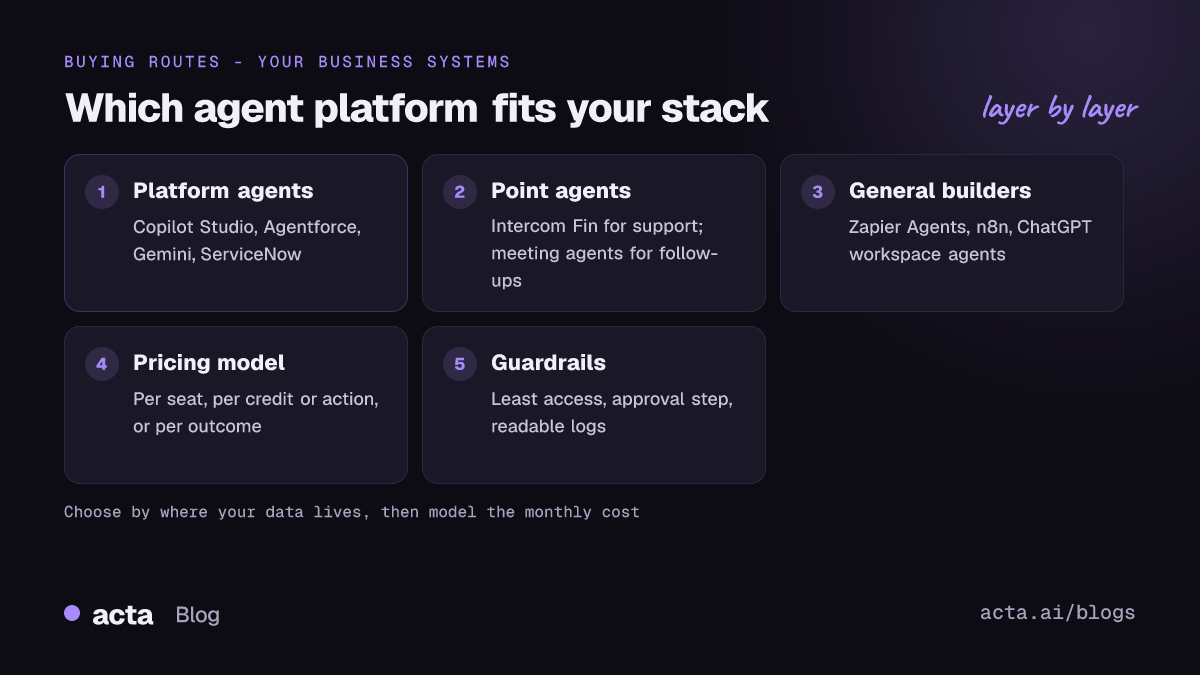
When people search for AI agents for business, they're usually choosing between three routes:
- Agents inside a platform you already run. Copilot Studio, Agentforce, Gemini Enterprise, ServiceNow. Less plumbing, more lock-in.
- Point agents for one job. Intercom Fin for support, a meeting agent for follow-ups. Narrow, quick to prove value.
- General builders. Zapier Agents, n8n, ChatGPT workspace agents. Flexible across apps, but you design the job yourself.
Most companies I've seen end up with one of each over time. The mistake is starting with a general builder and trying to automate everything at once.
Where your data lives decides most of the shortlist
Here's the summary. "Pricing model" matters more than the headline number, because it decides what a busy month costs.
| Platform | Best for | Pricing model | Published starting point |
|---|---|---|---|
| Microsoft Copilot Studio | Microsoft 365 companies | Credits | $200 per 25,000-credit pack/month |
| Salesforce Agentforce | Salesforce CRM users | Flex Credits per action | $500 per 100,000 credits |
| Gemini Enterprise | Google Workspace teams | Per seat | From $21/seat/month (Business) |
| ChatGPT Business | General knowledge work | Per seat plus usage pool | $20/user/month annual |
| ServiceNow AI Agents | IT and HR service desks | Assists, via sales | Not published |
| Intercom Fin | Customer support | Per outcome | $0.99 per outcome |
| Zapier Agents | Small teams, many apps | Activities | Free, 400 activities/month |
| n8n | Technical teams, self-hosting | Free self-hosted or paid cloud | Community edition free |
| Acta Agent Builder | Meeting follow-up work | Per seat | $6/seat/month annual |
Checked on 12 November 2026; confirm on each vendor's pricing page.
AI agents for business: nine platforms reviewed
These AI agent platforms are not ranked. Read the "Best for" line and skip the ones that don't match your stack. If you're buying for a large company, our enterprise AI agent platforms comparison goes deeper on governance and pricing models.
1. Microsoft Copilot Studio
Best for: companies on Microsoft 365 and Teams. Pros: low-code builder, connects to Microsoft data and Power Platform connectors. Cons: credit-based billing is hard to forecast, unused pack credits don't roll over, and Microsoft notes an Azure subscription is needed for agents. Price: Microsoft lists a pack of 25,000 Copilot Credits at $200 a month, or pay-as-you-go at $0.01 per credit (as of November 2026).
2. Salesforce Agentforce
Best for: sales and service teams whose customer data is in Salesforce. Pros: works on CRM records directly; you're charged when an agent takes an action, not for chat alone. Cons: pricing assumes you're already a Salesforce customer, and setup usually needs an admin. Price: Salesforce's help center says one action uses 20 Flex Credits ($0.10), and the Agentforce pricing page sells credits in packs of 100,000 for $500 (as of November 2026).
3. Google Gemini Enterprise
Best for: Google Workspace teams who want no-code agents and research agents. Pros: the Business edition includes prebuilt agents such as Deep Research and a no-code Workflow Builder. Cons: Google's comparison table shows Business can't bring full-code agents or use the Agent Marketplace; quotas are pooled per seat. Price: Business edition starts at $21 per seat per month with a 30-day trial (as of November 2026).
4. ChatGPT Business (workspace agents)
Best for: teams already living in ChatGPT who want shared agents for research and drafting. Pros: familiar interface; OpenAI says it doesn't train on business data by default. Cons: agent runs now use token-based credits from a shared pool, so heavy use can surprise you. Price: Standard seats are $20 per user per month billed annually or $25 monthly, with a two-seat minimum (as of November 2026).
5. ServiceNow AI Agents
Best for: larger IT, HR and customer service operations already on ServiceNow. Pros: agents work inside existing service workflows and records. Cons: ServiceNow doesn't publish prices; usage is counted in "assists", and community guides describe 2026 changes to the package tiers. Price: through your ServiceNow account team (as of November 2026).
6. Intercom Fin
Best for: support teams answering repetitive customer questions. Pros: outcome pricing means you pay when Fin resolves or completes something, and it works with other helpdesks too. Cons: costs scale with success, so a busy month is an expensive month; minimum commitments apply outside Intercom. Price: $0.99 per outcome, charged at most once per conversation, plus seats if you use Intercom's helpdesk (as of November 2026).
7. Zapier Agents
Best for: small teams that already use Zapier and want agents across many SaaS apps. Pros: thousands of app connections, and agent activities don't eat your Zap tasks. Cons: on the free plan tests count against your quota and each run is capped at 10 activities. Price: free with 400 activities a month; Pro is listed at $33.33 a month billed annually for 1,500 (as of November 2026).
8. n8n
Best for: technical teams that want control and self-hosting. Pros: the AI Agent node takes a chat model, tools and memory as sub-nodes, and the Community edition is free to self-host for internal use. Cons: you own hosting, upgrades and security; simple memory isn't kept across sessions. Price: Community edition free; cloud plans are paid (as of November 2026).
9. Acta Agent Builder
Best for: teams whose follow-up work starts in meetings: recap emails, CRM notes, Jira tickets. Pros: agents trigger when a meeting ends and work from the transcript, decisions and action items, with approval steps before anything is sent. Cons: it's an AI meeting assistant, not a general agent platform; it won't run your support inbox or service desk. Price: Pro is $8 per seat per month, or $72 a year billed annually, after a 15-day free trial (as of November 2026).
Agent pricing models punish the wrong guess
AI agent pricing looks cheap per unit and gets expensive at volume. Do the arithmetic with your own numbers before you sign anything. Three quick examples using the published rates above:
- Per outcome. A support team with 2,000 Fin resolutions a month pays about $1,980 for Fin, before helpdesk seats.
- Per action. An Agentforce agent that takes 3 actions on each of 10,000 cases uses 600,000 Flex Credits, which is six packs, or about $3,000.
- Per seat. Twenty people on Gemini Enterprise Business at $21 is $420 a month, whatever they run, within the pooled quotas.
Seat pricing is easiest to budget but you pay for people who never touch the agent. Credit and outcome pricing tracks usage but needs a monthly cap or alert. Ask every vendor two questions: what counts as one unit, and what happens when we hit the limit.
Start with one narrow job and an approval step
The teams that get value from AI agents for business pick one boring, frequent job first. Here's the order I'd follow:
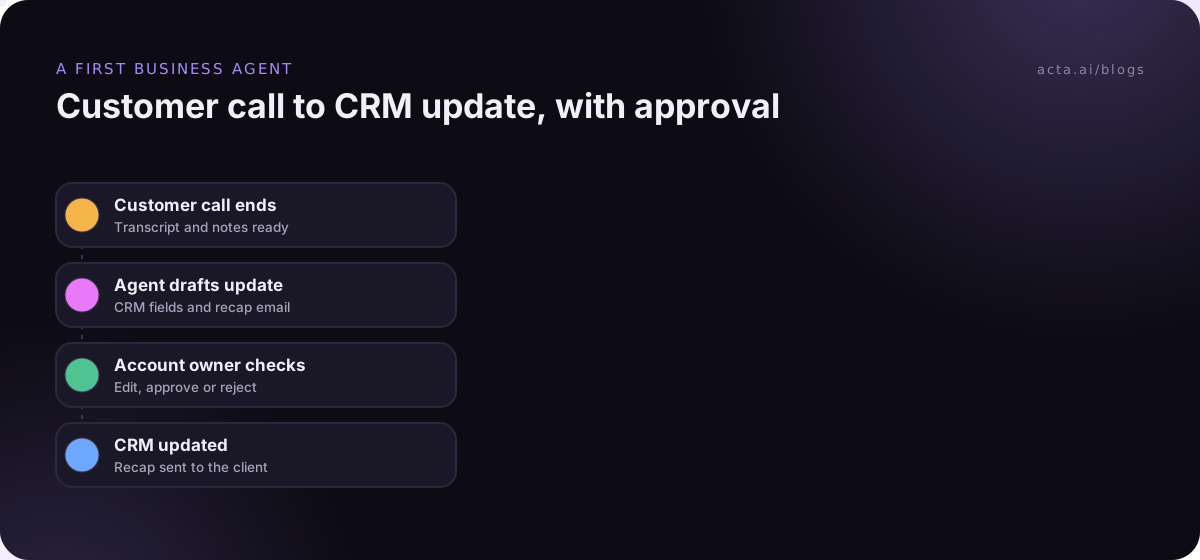
- List five repetitive tasks and pick the one with the clearest input and output, such as "after every customer call, update the CRM and draft the recap".
- Write down what the agent may read, what it may change and what it must never touch.
- Build it in the platform that already holds that data.
- Keep a human approval step on every outgoing email or record change for the first month.
- Review 20 runs by hand, then decide whether to loosen approvals or widen scope.
If you're stuck at step one, our guide on how to pick your first AI agent use case walks through scoring candidates, and the no-code AI agents builder guide covers building one without developers.
Permissions and logs matter more than the model
An agent with access to your inbox, CRM and file storage is effectively a new employee with admin rights who works very fast. Treat it that way. Give it its own service account, the smallest permissions that work, and a log you can actually read.
Watch for three specific problems. Prompt injection, where text in an email or web page tells the agent to do something you didn't ask for. Over-broad connectors, where "read Drive" quietly means every shared folder in the company. And silent failures, where a step fails and nobody notices for a week. Our post on the risks of AI agents at work covers the controls in more detail, and human approval in automation explains where to put the checkpoints.
Where Acta fits
Acta is an AI meeting assistant, so it only belongs on this list for work that starts in a meeting. Its Agent Builder runs automations after a call, such as drafting a follow-up email or updating Salesforce or HubSpot, and asks for approval before sending. Meetings can be captured by a bot, or without one using the desktop app or Chrome extension; either way, tell participants you're recording, as covered in our guide to recording consent.
Frequently asked questions
What are AI agents for business?
They're AI systems that take a goal, plan steps and use business tools to complete work, such as updating a CRM record, resolving a support ticket or drafting a follow-up email. Unlike a chatbot, an agent takes actions. Most businesses buy them inside platforms they already use, or build them with no-code tools like Zapier Agents or n8n.
How much do AI agents for business cost?
It depends on the pricing model. Published examples include $0.99 per resolved conversation for Intercom Fin, $0.10 per Agentforce action, $200 for 25,000 Copilot Studio credits and $21 per seat for Gemini Enterprise Business, as of November 2026. Estimate your monthly volume first, because usage-based pricing grows with every run.
Which AI agent platform is best for a small business?
For most small businesses, start with whatever matches your existing tools: Gemini Enterprise on Google Workspace, Copilot Studio on Microsoft 365, or Zapier Agents if your work spreads across many SaaS apps. Zapier Agents has a free plan, and n8n's Community edition is free if someone can self-host it.
Are no-code AI agents good enough for real work?
Yes, for narrow, well-defined jobs like routing requests, drafting replies or updating records from a known source. No-code AI agents struggle with vague goals and many steps. Keep the job small, give the agent limited permissions and review its runs before you let it act without approval.
Do AI agents replace employees?
In practice they take over repetitive steps inside a job, such as first replies, data entry or follow-up drafts, rather than whole roles. Someone still sets the rules, handles exceptions and checks the output. Plan for people to supervise agents, especially in the first months.
Choose your first AI agent platform
Use this short checklist before booking demos.
- Locate your data: note which system holds the records the agent needs to read and change.
- Pick one job: choose a frequent task with a clear input and a clear output.
- Model the cost: multiply your monthly volume by the vendor's unit price and add seats.
- Limit access: create a service account with the smallest permissions that work.
- Keep approvals: require a person to approve outgoing messages and record changes for the first month.
If your first agent should handle meeting follow-ups, record your next call with the Acta desktop app and build the automation during the 15-day free trial on the pricing page.