The best low code workflow automation tools for most teams are a general-purpose connector platform (Zapier or Make), the automation that ships with your office suite (Power Automate or Google Workspace Studio), or an open-source builder (n8n or Activepieces) if data has to stay on your own servers. Pick the family first, then the product. The resources below cover all three, plus where to learn and how to keep things tidy.
This is a curated list, not a price shoot-out. If you want a side-by-side of plans and starting prices, see the cloud-based workflow automation comparison. And if your problem is a single data sync that IT already owns, a low-code tool may be the wrong answer: ask for the integration instead of building a shadow one.
Key takeaways
- Choose by where your data lives: Microsoft 365 shops start with Power Automate, Google shops with Workspace Studio, mixed stacks with Zapier or Make.
- Check the billing unit before you build: Zapier counts tasks, Make counts credits, n8n counts whole workflow runs.
- Self-host only when you have a real reason (data rules, volume, cost) and someone who will patch the server.
- Put a human approval step in front of anything that emails a customer or edits a record.
- Write down who owns each flow on day one; orphaned flows are the most common mess.
Table of contents
- Low code workflow automation tools come in three families
- General-purpose platforms cover most cross-app work
- Suite-native tools win when you live in one ecosystem
- Open-source builders suit teams that must self-host
- Approval steps belong in anything customer-facing
- Free courses and templates shorten the learning curve
- Governance resources stop flow sprawl
- Meeting-driven workflows need a different trigger
- Frequently asked questions
- Pick your first tool with this checklist
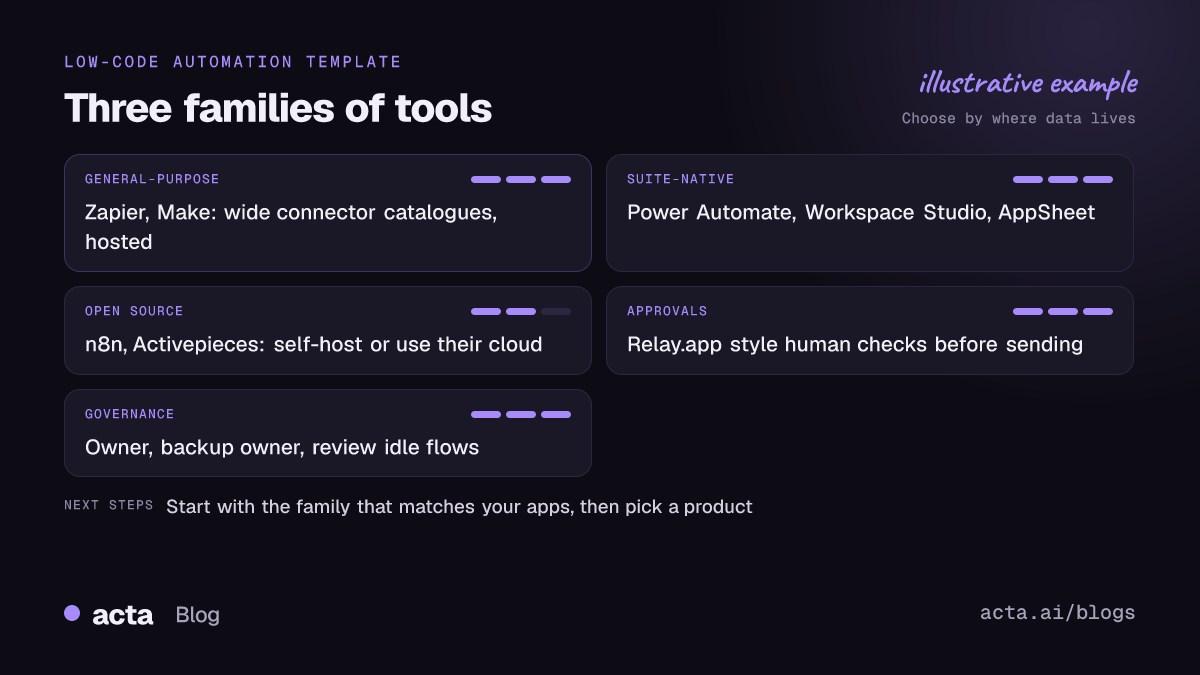
Low code workflow automation tools come in three families
Almost every product in this space works the same way: a trigger (a new form entry, a new email, a schedule) starts a run, and a chain of steps moves data between apps. What differs is who hosts it, which apps it reaches out of the box, and how you pay.
I sort them into three families, because the family decides most of your trade-offs:
- General-purpose cloud platforms (Zapier, Make): thousands of app connectors, hosted for you, billed per step or credit.
- Suite-native automation (Power Automate, Google Workspace Studio, AppSheet): built into the office suite you already pay for, strongest inside that suite.
- Open-source builders (n8n, Activepieces): you can run them on your own server, or pay for their cloud.
A quick test: list the five apps your first workflow touches. If four of them are Outlook, Teams, SharePoint and Excel, you already know where to start. If they are HubSpot, Slack, Typeform and Notion, a general-purpose platform will save you a lot of custom work.
General-purpose platforms cover most cross-app work
These are the tools most people mean when they say low-code automation. They're the right default for a mixed stack and a team without a developer on call.
1. Zapier
Useful because it has the widest catalogue of connectors and the gentlest learning curve. The thing to understand early is the task: every action step that runs counts against your monthly allowance, and Zapier's own blog post explaining what counts as a task is worth ten minutes before you design anything with loops. As of November 2026 the free plan is limited to two-step Zaps, so plan on a paid tier for anything with a filter or a branch.
2. Make
Useful when your flow branches, loops over lists or reshapes data, because the visual canvas shows the whole scenario at once. Make bills in credits, with most actions using one; its pricing page lists a free plan with 1,000 credits a month as of November 2026. It takes longer to learn than Zapier, and the free Make Academy (below) is the fastest way in. For a detailed head-to-head, read Zapier vs Make vs n8n.
Suite-native tools win when you live in one ecosystem
If your company already pays for Microsoft 365 or Google Workspace, check what's included before buying anything else. The connectors to your own suite are usually deeper than any third-party tool can offer.
3. Microsoft Power Automate
Useful for approvals, SharePoint lists, Outlook and Teams flows. Microsoft 365 subscriptions include cloud flows that use standard connectors; flows that touch premium connectors such as Salesforce need a paid plan. The Power Automate pricing page listed Premium at $15 per user per month as of November 2026. Check which connectors are premium before you promise a workflow to anyone.
4. Google Workspace Studio
Useful for Gmail, Drive, Sheets and Chat automations that a non-technical person can describe in plain English. Google's Workspace Studio help explains how Gemini builds a flow from a description, which you then review before turning on. Flows can include AI steps such as Summarize and Extract. A typical first flow: every morning, summarise unread email from three clients and post it to you in Chat.
5. AppSheet Automation
Useful when the workflow needs a small app around it, such as a travel request form that emails the approver. AppSheet bots pair an event with a process. One gotcha from Google's docs: edits typed straight into the underlying spreadsheet don't go through AppSheet, so they don't fire your bots.
Open-source builders suit teams that must self-host
Self-hosting makes sense when data rules say it can't leave your infrastructure, or when volume makes per-step pricing painful. It doesn't make sense when nobody owns updates. A forgotten automation server with API keys to your CRM is a liability.
6. n8n
Useful for technical teams who want code steps when they need them and a visual editor the rest of the time. On n8n's cloud plans, one execution is one complete workflow run however many steps it has, which changes the maths for long flows. Its template library docs show how to start from a working example instead of a blank canvas.
7. Activepieces
Useful as a simpler open-source option: the Community Edition is MIT-licensed and free to run on your own server, and there's a hosted cloud with a free tier. It's a good fit for a small team that likes the n8n idea but wants a gentler editor.
Approval steps belong in anything customer-facing
The most expensive automation mistake I see is a flow that sends something to a customer with no human glance first. A wrong merge field in a renewal email is embarrassing; a wrong discount is worse.
8. Relay.app
Useful because human-in-the-loop steps are a core feature rather than a workaround. Relay offers approvals, steps that ask a person for missing data, real-world tasks and manual path choices, and its site says these are included on every plan. Even if you build elsewhere, its approach is a good model to copy.
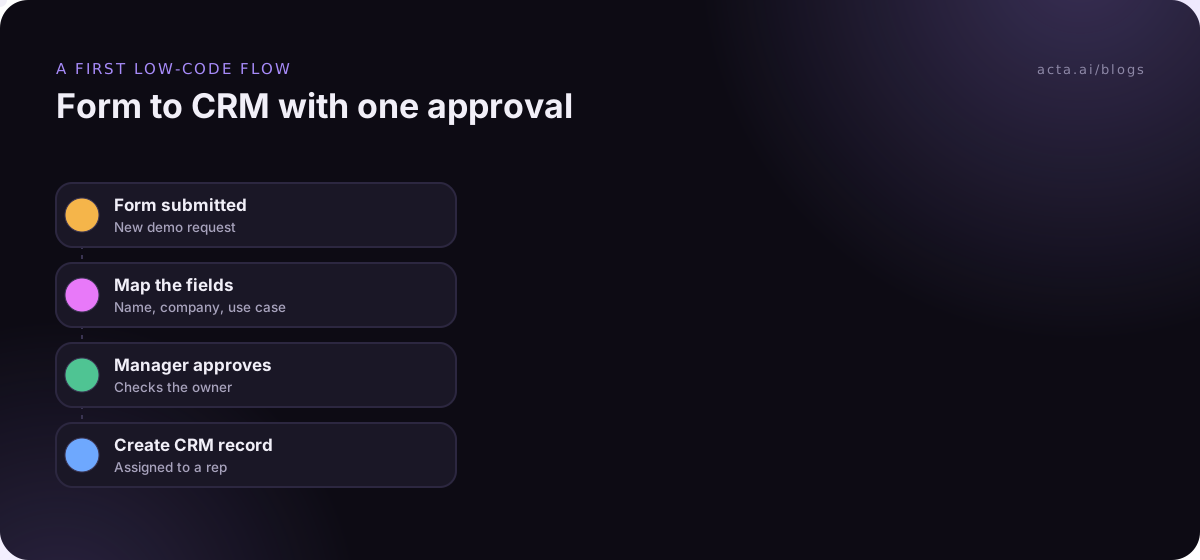
Whatever tool you use, build and test with the send step switched off. The guide to human approval in automation covers where to put the checkpoint, and testing automation without sending covers dry runs.
Free courses and templates shorten the learning curve
You don't need a paid course to get competent. Two afternoons with the right material beats a month of trial and error.
9. Make Academy
Make Academy is free and self-paced. The beginner course on setting up your first scenario takes roughly an hour or two, and later courses cover routers, filters, arrays and AI steps. Even if you end up on another tool, the routing and aggregation lessons teach concepts that transfer.
10. Template galleries
Every platform above has one. Use templates to see how someone else structured a flow, then rebuild it yourself. Copying a template blind means you inherit choices you don't understand, like a polling interval that eats your allowance.
Governance resources stop flow sprawl
Low-code means more people build. That's the point, and it's also how you end up with 300 flows, half owned by people who left.
11. Microsoft's Center of Excellence guidance
Microsoft's CoE Starter Kit included processes to find flows owned by former employees and to ask owners to justify keeping them. Microsoft Learn now marks the kit as no longer actively maintained and points admins to the Power Platform admin center and managed environments. The CoE overview is still a useful checklist of what to track, even if you never install it.
The same habits apply on any platform: name flows by team and purpose, record an owner and a backup owner, and review anything that hasn't run in 90 days. When flows fail, the causes are usually boring (expired tokens, renamed fields), and why automations break walks through them.
Meeting-driven workflows need a different trigger
A lot of real work starts in a call, and general-purpose tools only see what someone typed afterwards. Acta takes the meeting itself as the trigger: it produces a transcript, summary, decisions and action items with owners, and its Agent Builder can draft the follow-up or update HubSpot or Jira from there, with an approval step if you want one. If bots aren't welcome in your calls, the desktop app captures the meeting audio from your own computer; check the rules on recording consent and tell people first.
Frequently asked questions
What is the difference between low-code and no-code automation?
No-code tools let you build entirely with clicks and forms. Low-code tools add an escape hatch: a code step, a formula language or custom API calls for the 10% of cases the visual editor can't handle. In practice the line is blurry, and most products in this list sit somewhere in between. Pick based on your apps, not the label.
Which low code workflow automation tools are free?
Most have a free tier as of November 2026. Zapier's free plan is limited to two-step Zaps, Make lists 1,000 free credits a month, and n8n and Activepieces can be self-hosted at no licence cost. Power Automate cloud flows with standard connectors come with many Microsoft 365 plans. Free tiers are for learning, not production volume.
Is Power Automate better than Zapier?
For Microsoft-heavy work, usually yes, because the Outlook, Teams and SharePoint connectors go deeper and the licence may already be paid. For a mixed stack of SaaS apps, Zapier's catalogue and simpler editor tend to win. Many companies run both: Power Automate for internal approvals and Zapier for marketing and sales tools.
How do I avoid automation sprawl?
Require an owner and a backup owner for every flow, use a naming convention that includes the team, keep production connections on shared service accounts rather than personal logins, and review idle flows quarterly. Microsoft's CoE guidance lists the signals worth tracking, and they apply to any platform.
Do I need a developer to use these tools?
Not for straightforward flows like form-to-spreadsheet or new-deal-to-Slack. You'll want someone technical for webhooks, API calls, error handling across many steps or self-hosting. A good pattern is a business user who builds and a technical reviewer who checks anything that writes to a system of record.
Pick your first tool with this checklist
Run through these before you sign up for anything. They take an hour and save weeks.
- Map the apps: list every app your first workflow reads from or writes to, and check each has a ready-made connector.
- Find the billing unit: estimate monthly runs times steps, then compare that with tasks, credits or executions on each plan.
- Decide on hosting: use the vendor's cloud unless a written data rule or real volume says otherwise.
- Add a checkpoint: put a human approval before any step that contacts a customer or changes a record.
- Name an owner: record who maintains the flow and who covers when they're away.
If your first workflow starts in a meeting, try capturing calls with the Acta desktop app and see what you can automate from the notes.