A 3PL's decisions live in five different meetings
Walk through a week at a mid-size warehouse in Bhiwandi and you will count at least five meetings where decisions get made. The dispatch planning meeting, often Monday morning, sets the week's routes, vehicle mix and loading sequence by client. The daily dispatch huddle at the dock, ten minutes before the first loading wave, deals with what broke overnight. Then the transporter review with fleet vendors, the weekly client ops review (OTIF, fill rate, damages, the MIS the client wants), and the inventory reconciliation meeting after cycle counts.
The people overlap but are never the same: the ops head, the warehouse manager, shift in-charges, the transport supervisor, the key account manager, sometimes the client's supply chain lead on a video call. A decision made in one room has to survive into the others. Usually it does not, because nobody writes it down in a form the next room can see. Good 3PL operations depend less on clever routing than on everyone running the same plan.
Most companies have a spreadsheet called "route master" and a WhatsApp group for drivers. Neither records why the route is what it is, or who agreed it. When a transporter offers a cheaper rate on Thursday, the person on duty has no way to know the Monday route was chosen to hit a client's receiving slot, not to save money.
A route agreed on Monday was undone by Thursday
An illustrative example, with invented names and numbers. Konkan Freight & Warehousing runs three warehouses in Bhiwandi with 180 people, serving a home-care brand and two e-commerce sellers. The home-care brand's dark stores in Vashi and Kharghar accept deliveries only between 7 and 9 am.
Monday, dispatch planning meeting. Rohit, the ops head, decides that Navi Mumbai drops (Vashi, Kharghar, Panvel, 11 stops) will move from two vehicles on the Thane route to one 14-ft vehicle via Taloja, leaving at 5:30 am, starting Tuesday. Asha, the key account manager, says she has promised the client "no more missed slots this month". Faisal, the transport supervisor, is on leave.
Tuesday and Wednesday. It works. Both dark stores receive on time.
Thursday, daily dispatch huddle. Faisal is back. A transporter has offered two smaller vehicles at a lower combined rate. Nobody in the huddle was at Monday's meeting except a shift in-charge who remembers "something about Taloja". Faisal splits the load across two vehicles on the old route. The Vashi vehicle reaches at 9:40 am, misses the slot, and the client raises a chargeback on Friday. Asha hears about it from the client.
On Friday afternoon three people argue about what was decided on Monday. Rohit is sure. Faisal is sure nobody told him. They are both right, and a decision log would have settled it in thirty seconds.
A good dispatch meeting decision log has six fields
If you keep a log by hand, use this decision log template. Six fields are enough for dispatch work:
| Field | Example from Konkan Freight |
|---|
| Decision (one sentence) | Navi Mumbai drops go on one 14-ft vehicle via Taloja, leaving 5:30 am |
| Decided by | Rohit (ops head), dispatch planning meeting, Mon 10 Nov |
| Owner | Faisal (transport supervisor) |
| Why | Client receiving slot 7 to 9 am at Vashi and Kharghar |
| Status | Active, Changed, Reversed or Done |
| History | Every later meeting where it was confirmed or changed, with the line said |
The "why" field is the one most logs skip, and it is the one that would have stopped Thursday's change. Faisal was not careless. He saw a cheaper option and had no reason to think the route was tied to a slot.
The hard part is not the template. It is filling it after every meeting, including the ten-minute huddle where the exception was made. That is where recording helps. For a broader view of how to keep decisions findable, see how to track decisions made in meetings.
Acta's Decision log shows the reversal with both quotes
At Konkan Freight with Acta, Rohit records the Monday dispatch planning meeting on his phone in the dock office, and Asha records client ops reviews on Google Meet with the Chrome extension, which captures the call without a bot joining. The shift in-charge records the daily huddle on the Acta mobile app. Each meeting is shared with the workspace.
Two built-in report templates suit a 3PL: Decisions & RACI for the planning meeting, and Vendor review for transporter reviews. A custom template (paid plans) tailors the planning meeting:
Template name: Dispatch planning meeting
What should this report do? For the weekly dispatch planning meeting at a 3PL warehouse: routes, vehicles, cut-offs and client slot commitments decided for the week, with reasons.
Sections: 1. Volume plan (Table: Client, Orders, Vehicles, Cut-off). 2. Route decisions (Table: Route, Decision, Decided by, Reason, Starts). 3. Transporter changes (Bullets). 4. Promises made to clients (Bullets). 5. Tasks (Checklist: task, owner, due date). 6. Open questions (Bullets).
When should Acta use it? Only matching meetings.
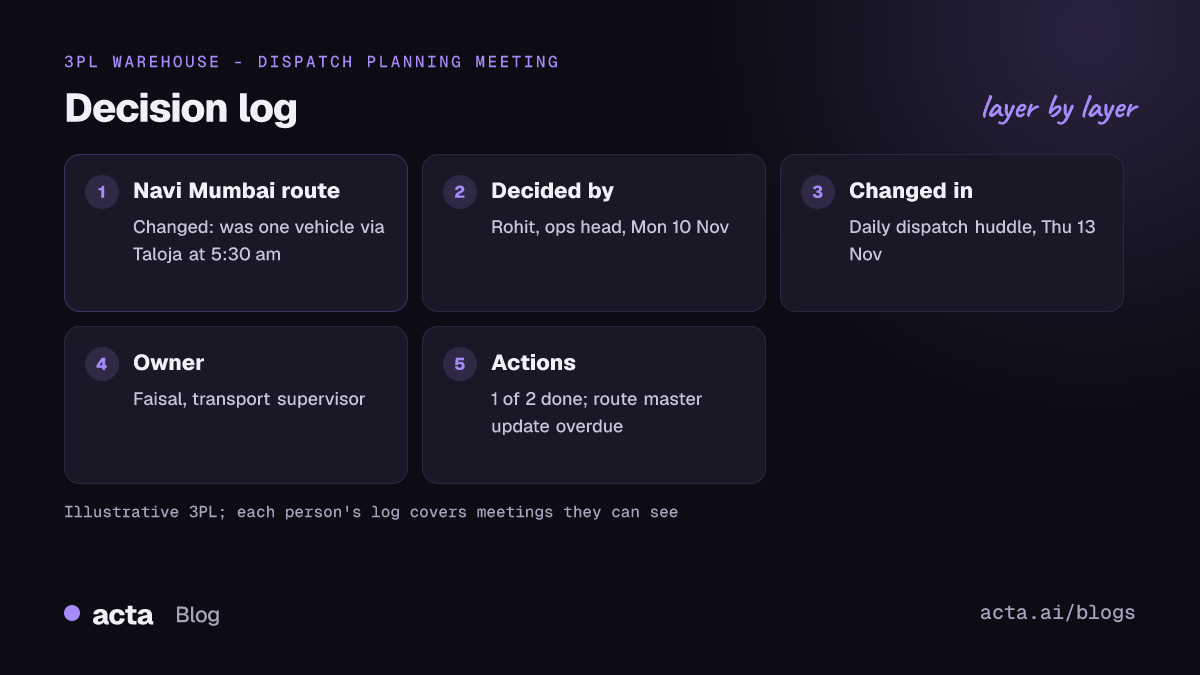
The view that would have saved Friday is My meetings > Outcomes > Decision log. Acta reads each meeting for decisions, merges repeats into one card, and keeps a history. Rohit's log, built from the meetings he recorded and the ones shared with him, shows this card after Thursday:
- Decision: Navi Mumbai drops on two vehicles via the Thane route. Status Changed. "Was: one 14-ft vehicle via Taloja, leaving 5:30 am · changed 13 Nov".
- Decided by: Rohit. Owner: Faisal. Discussed in 2 meetings.
- History: Mon 10 Nov, dispatch planning meeting, first raised: "From tomorrow Navi Mumbai goes on one vehicle via Taloja, 5:30 sharp, because of the Vashi slot." Thu 13 Nov, daily dispatch huddle, updated: "Let's split it, the two small ones are cheaper." Each line has a play button for the moment.
- Actions: 1 of 2 done (the 5:30 am gate pass done; "update route master" overdue).
The Changed or reversed tile at the top would have read 1 on Thursday afternoon. If Rohit had checked it before leaving, the Vashi vehicle would have been re-planned that night. If the change was a mistake, re-confirm Monday's plan at the next huddle so the history records it; if Acta merged two different decisions, "Not the same decision?" splits them. Export CSV gives you the whole log for the client review, with columns for decision, status, decided by, owner and dates. The decision log and RACI guide goes further into ownership.
Tasks, risks and questions sit next to the decisions
Decisions create work. The same meetings feed Outcomes > Action items, where Rohit would have seen:
| Action item | Owner | Due | Status |
|---|
| Update route master in WMS for Navi Mumbai | Sneha (MIS) | Tue 11 Nov | Overdue 3 days |
| Issue 5:30 am gate pass for Taloja vehicle | Prakash (security) | Mon 10 Nov | Done |
| Confirm slot plan with client by email | Asha | Wed 12 Nov | Due today |
The overdue route-master update is the quiet cause: the system still showed two vehicles, so Thursday's split looked normal.
The Risk Registry tab catches what someone worried about out loud. On Monday a shift in-charge said one vehicle with 11 drops would struggle if loading started late. Acta logged it: Risk "One vehicle for 11 Navi Mumbai drops misses the 9 am slot if loading starts after 5 am", Impact Medium, Mitigation "Load Navi Mumbai first on the 4 am wave" tagged Suggested (Acta's idea, not yet agreed), Owner "No owner", Status Open. Assigning it to the warehouse manager takes one click.
On Friday Asha opened OneChat and asked: "What did we decide about the Navi Mumbai route this week, and did anyone change it?" The answer gave both decisions in order, noted that Thursday's huddle changed Monday's plan, and listed under Found in the dispatch planning meeting and the daily dispatch huddle, each opening at the quoted moment. She sent the client a straight explanation the same afternoon. The OneChat guide shows how to limit a question to some meetings.
A route-change notice agent keeps the floor in step
The log tells managers. Drivers and loaders need to hear it too, the same day. Agent Builder (beta) can prepare that notice every time a dispatch decision is made or changed, with a person approving first. Setup, step by step:
- In Agent Builder, click New agent and describe it in words, or start from blank.
- Trigger: Event in a connected app > Acta > decision made or changed. Use the "Only when" condition so it fires only for meetings whose title contains "dispatch" (see the triggers guide).
- Acta data step: get the decision, who decided it and its owner.
- If / else: if the decision was changed or reversed, take the "change" path, which also names the older decision; otherwise the "new" path.
- AI step: write a two-sentence floor notice in plain words: what changes, from which wave, and why.
- Human approval: the ops head approves or rejects in the Approvals tab or by email. Nothing goes out if no one answers within 24 hours.
- Action: Slack, message to the #dispatch-floor channel. Add Drafts to copy to prepare the same text for the drivers' WhatsApp group; agents never post drafts, a person pastes it.
- Action: Google Sheets, add a row to a "Route changes" sheet with date, route, old and new decision.
- Test, Run test, then Turn on.
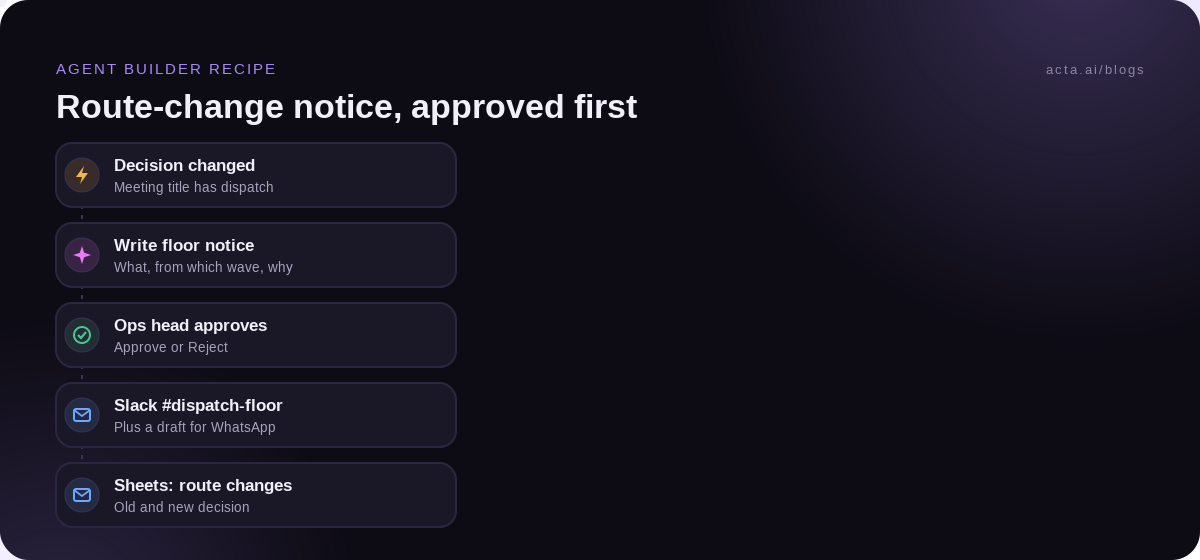
With this running, Thursday's split would have produced a notice for Rohit to approve, and he would have seen the conflict before the vehicles left.
Introduce it across the warehouse in two weeks
A 3PL with 50 to 200 staff usually adds five to eight people to the workspace: ops head, warehouse managers, the transport supervisor, key account managers and one shift in-charge per warehouse. Each of them uses a seat, recorder or not, while shift staff named on a task can get it in the daily follow-up email without joining. Set up the workspace in Settings > Workspace using the team setup guide; members' meetings are private until they share them with Everyone in the workspace.
Remember that each person's Decision log is their own. Rohit sees the Thursday huddle only because the shift in-charge shared it. If huddles stay private, the reversal never reaches his log. Make sharing the default for dispatch and client meetings, and leave HR conversations private.
Days 1 to 3: invite the recorders, explain at the morning huddle what is recorded and why, and record only the dispatch planning meeting. Days 4 to 7: add the daily huddle at each warehouse; at the end of each one, the in-charge says the decisions out loud in one sentence each. Days 8 to 10: add the client ops review and transporter review; build the custom template. Days 11 to 14: review the Decision log together on Friday, mark wrong entries "Not a decision", and test the route-change agent before turning it on.
Mistakes we see: recording only the planning meeting (the reversals happen at the huddle); letting the log fill with non-decisions and never cleaning it; and turning the Slack notice on without approval. Recording drivers or client staff needs their knowledge; read what to tell participants before recording, which is general information, not legal advice.
The wider push is real: the government's National Logistics Policy, launched in September 2022, set out to bring logistics costs closer to global benchmarks (PIB release, PM India). For a single warehouse the lever is smaller and closer: fewer missed slots because everyone runs Monday's plan. Our logistics and 3PL page has more examples.
Acta records meetings, writes notes, decisions and action items, and keeps the Decision log, Risk Registry and OneChat in the 15-day trial and Pro. It will not decide your routes; it remembers who did.
Frequently asked questions
What is the difference between dispatch meeting minutes and a decision log?
Minutes describe one meeting. A decision log follows each decision across meetings: when it was first made, who confirmed it, who changed it and what it said before. For warehouse meeting notes, minutes help the people who missed the meeting; the log helps the person who has to know what is true today.
Does Acta update the decision log when a huddle changes a plan?
Yes, if the huddle is recorded and the person reading the log can see that meeting. Acta marks the decision Changed, shows the previous wording, and adds the huddle to its history with the quote. If the huddle was recorded by someone else and kept private, it will not appear in your log.
Can we use a free decision log template instead?
You can, and the six-field table above works in Excel or Google Sheets. The weak point is that someone must update it after every huddle, which rarely happens on a busy dock. Some teams keep the sheet for clients and fill it from Acta's CSV export once a week.
Can drivers get the route change notice on WhatsApp?
Acta does not post to WhatsApp. An agent can prepare the notice as a draft to copy, and a supervisor pastes it into the drivers' group. Slack and Gmail messages can be sent by the agent after approval. Many 3PLs use the Slack post for supervisors and the copied draft for drivers.
How many people need Acta seats in a 3PL?
Everyone you add to the workspace, since each member uses a seat whether they record or not. In a 150-person warehouse that is often six to eight people: managers, supervisors and account managers. Pro is $8 per seat a month, or $72 per seat a year, after a 15-day free trial. During the trial, invites are free for up to 10 people.
Choose where your decision log starts
Start where your plans get overridden most often, which in most warehouses is the gap between the planning meeting and the dock huddle.
- Record both ends: the dispatch planning meeting and the daily huddle that changes it.
- State the why: say the reason with each route decision so the log carries it.
- Check one tile: look at "Changed or reversed" every afternoon before the next day's plan.
- Share by default: dispatch and client meetings go to Everyone in the workspace.
- Approve every notice: keep a human approval step before anything reaches the floor.
Record your next client review with the Acta Chrome extension and try the Decision log free for 15 days on Acta pricing.