Five school meetings decide whether a pilot converts
Selling to schools runs through a predictable chain of conversations. The first meeting with the principal is about fit: which grade, which problem, which budget line. Then comes a demo to the grade-level team or the instructional coach. If that goes well, a pilot kickoff sets success criteria, dates, who trains the teachers and when students get rostered. Pilot check-ins every two weeks track usage and teacher feedback. The end-of-pilot review decides whether the principal recommends a purchase to the district.
Different people from your side attend each one. The partnership manager runs the first two, an implementation specialist takes over at kickoff, and a district sales lead appears for the end-of-pilot review. Every handoff is a chance for a promise to fall between two people, which is why most edtech sales follow-up breaks at kickoff rather than at the demo. Principals notice: they are juggling testing windows, staffing and parents, and a vendor that forgets a Friday report becomes a vendor they stop answering.
Schools also have their own process for approving online tools. The U.S. Department of Education's student privacy office recommends that schools have policies to evaluate and approve online educational services and use written agreements where possible. That paperwork is often a pilot's first deadline, and it shows up in your meeting notes long before it shows up in a contract.
The Brookside pilot nearly stalled on three small promises
An illustrative example. Lumen Reading (a made-up company) has 70 staff and sells a reading-fluency app for grades two to five. Partnership manager Dana Whitfield has spent two months on Brookside Elementary, one of eight schools in a district that could buy for all of them.
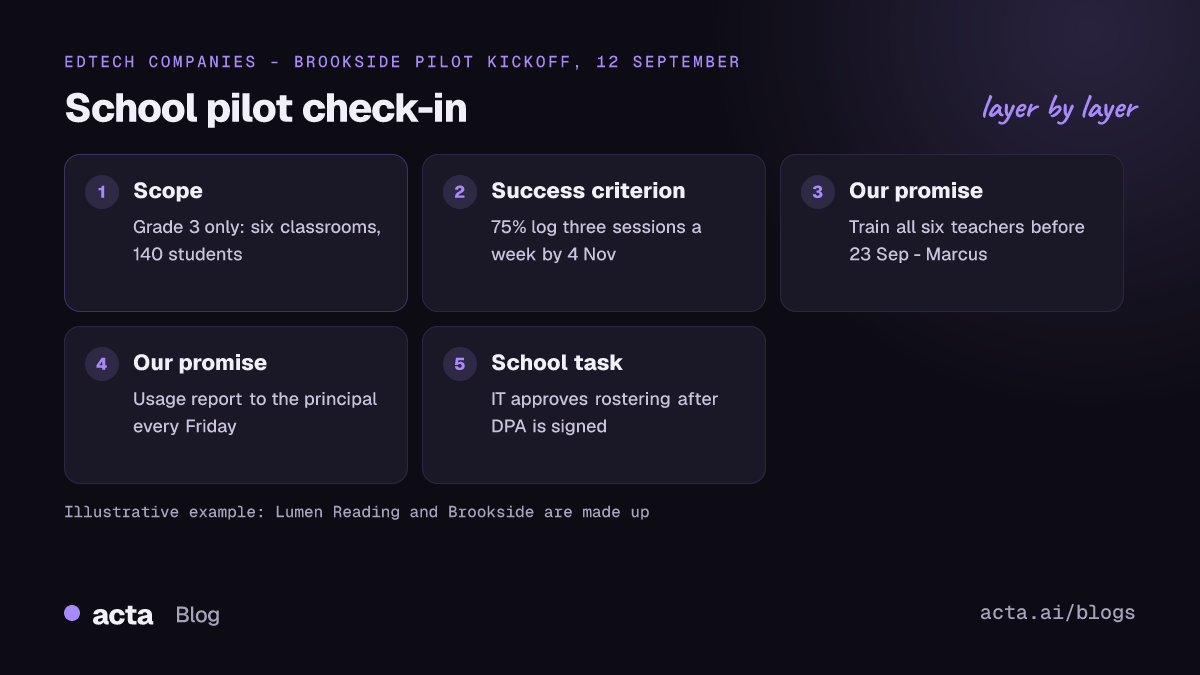
12 September, pilot kickoff. Principal Dr. Elena Alvarez, instructional coach Sam Tran and district IT director Karen Lowe join. They agree: the pilot covers third grade only, six classrooms and 140 students. Success means 75% of students logging three sessions a week by 4 November. Lumen promises three things: a 45-minute training session for all six teachers before 23 September, a usage report to Dr. Alvarez every Friday, and Lumen's signed exhibit for the district's data privacy agreement by 15 September, so Karen can approve rostering.
Weeks 2 and 3. Dana flies to a conference. Implementation specialist Marcus Bell runs the training, but two teachers are covering a field trip and miss it. Marcus assumes Dana is sending the Friday reports; Dana assumes Marcus is. The signed exhibit sits in Lumen's legal inbox. Rostering slips a week.
10 October, check-in. Dr. Alvarez opens with, "I haven't had a single Friday report." Usage is at 48%, partly because two classrooms never had training. The district's purchase decision for eight schools, worth $54,000 a year, now depends on a recovery plan. Nothing here was hard. It was three promises with no single owner and no reminder.
Edtech school partnership meeting notes must survive the handoff to implementation
The fix starts with notes built for the handoff. Acta's built-in Product demo review template suits the demo to the grade-level team, and Customer QBR works for the end-of-pilot review. For kickoff and check-ins, write a custom template (paid plans; up to 12 sections; share it with the team so every implementation specialist uses the same one):
Template: School pilot check-in (runs on "Only matching meetings": pilot kickoffs and check-ins with schools)
Success criteria status (Table: Criterion | Target | Current | Said by)
Our promises to the school (Checklist: promise, owner, due date)
What the school agreed to do (Checklist: task, school contact, due date)
Teacher feedback (Bullets, in teachers' words)
Blockers (Bullets: rostering, devices, schedule, paperwork)
Next check-in (Paragraph: date and agenda)
Extra instruction: "Never include student names. Use class or grade totals."
The two checklists do the work. "Our promises" becomes action items with owners at Lumen; "What the school agreed" keeps the school's side visible without nagging anyone. The custom templates guide covers building one from "Describe it".
Three Agent Builder recipes keep pilot promises on time
Notes tell you what was promised. Agent Builder (beta) makes sure the promises move without someone remembering on a Friday afternoon. Each recipe below uses only triggers, steps and apps the builder offers, and each takes under an hour to set up once Gmail, Slack, Google Sheets and Google Calendar are connected under Connectors (see how to connect apps). Agents act as you, so connect your own work accounts.
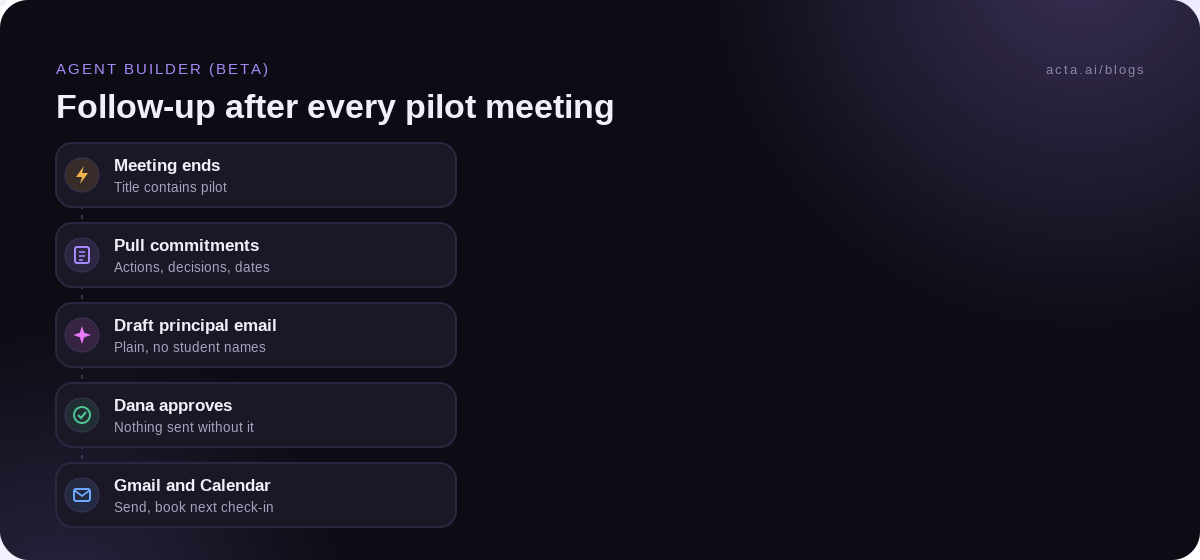
Recipe 1: a follow-up email after every pilot meeting
- Click New agent and describe it: "After each pilot meeting, email the principal what we agreed and set the next check-in."
- Trigger: When a meeting ends, filtered to titles that contain "pilot".
- Acta data: this meeting's action items, decisions and attendees.
- AI: "Write a short, plain email to the principal. List what we will do with dates, what the school agreed, the success criteria status and the next check-in date. No jargon. No student names."
- Human approval: Dana approves or rejects, in the Approvals tab or by email. If nobody answers in 24 hours, nothing is sent.
- Gmail: send the approved email. Google Calendar: create the next check-in with a Meet link. Google Sheets: update the school's row in the pilot tracker.
Recipe 2: the Friday report check
- Trigger: On a schedule, Fridays at 10:00.
- Acta data: open action items whose text contains "usage report".
- If / else: if any are still open, continue; otherwise stop.
- Slack: message Marcus with the list of schools still waiting.
A Slack message to a colleague is low risk, so many teams skip approval here. Your call.
Recipe 3: an overdue alert for school promises
- Trigger: Event in a connected app, app Acta, event "action item overdue". Under "Only when", the meeting title contains "pilot" or the school's name.
- AI: summarise what is overdue, for which school, how many days late, and the quote from the meeting where it was promised.
- Slack: message the partnership manager and the head of partnerships.
Test before you trust it
Click Test, then Run test on a past check-in. In a test nothing is sent: emails and messages are only shown, and approvals pass by themselves. Read the draft email as if you were Dr. Alvarez. When it is right, Turn on the agent; later edits go live only when you click Update the live version. For a failing Gmail step, set the failure behaviour to "Try again" rather than "Carry on". The test and turn-on guide walks through each screen, and building your first AI agent shows a similar follow-up agent from scratch.
The Outcomes views show what is slipping across schools
Agents act on single events. To see the whole pilot portfolio, use the views in My meetings. Each is per person, built from the meetings that person recorded or that teammates shared with them in the workspace, so Dana's views cover Marcus's check-ins only if he shares them.
Action items (Outcomes > Action items), grouped by Meeting: "Send Friday usage report to Dr. Alvarez (third-grade pilot)", owner Marcus Bell, status "Overdue 12 days", from Brookside pilot kickoff, 12 Sep. The Overdue tile counts every late school promise in one place.
Decision log: "Brookside pilot covers grade 3 only: six classrooms, 140 students", decided by Dr. Alvarez, owner Dana Whitfield, status Active, linked actions 2 of 5 done, so the banner reads "3 overdue action items".
Risk Registry: "Students cannot log in until the data privacy agreement is countersigned", Impact High, owner Dana, Mitigation Agreed ("Lumen sends signed exhibit by 15 Sep"), card "Fix is overdue". Group by Project / customer to see each school's risks together.
OneChat, asked before the 10 October check-in:
Question: What have we promised Brookside Elementary since the first demo, and what is still open?
Answer: Three promises from the 12 September kickoff: training for all six third-grade teachers before 23 September (done for four), a usage report every Friday (none sent), and the signed privacy exhibit by 15 September (sent 22 September). Found in: Brookside pilot kickoff, 12 Sep; Brookside check-in, 26 Sep.
Dana walks into the check-in with an honest recovery plan instead of an apology. Teams that send a recap after every call may also like automating meeting follow-up emails.
Student privacy shapes what you record and share
This is general information, not legal advice. Partnership meetings are about adoption and logistics; they rarely need student-level detail. Keep it that way. Agree with the school that pilot meetings discuss class and grade totals, and that individual student records stay in the school's own systems.
Ask before you record. Tell the principal at the start, explain where the recording goes, and offer to stop. The guide on recording consent and what to tell participants covers the wording. Districts often use Zoom or Teams desktop apps; the Acta desktop app records those from your laptop with no bot joining, and its "Copy notice" button pastes a recording notice into the meeting chat.
When the school's privacy review comes up, the Department of Education's model terms of service guidance shows what many schools check vendor terms against. Read it before kickoff so the paperwork promise in your notes has a realistic date.
A two-week rollout for partnership and implementation teams
Who records which meetings
- Partnership managers: first principal meetings, demos and end-of-pilot reviews.
- Implementation specialists: pilot kickoffs, check-ins and teacher training sessions.
- Head of partnerships: the weekly pipeline review where pilots are prioritised.
Two weeks, step by step
- Days 1-2: Create the workspace and invite the partnership and implementation team from Settings > Workspace (free for up to 10 people during the trial). The team setup guide covers roles.
- Days 3-5: Record every school meeting and share it with Everyone in the workspace. Meetings stay private until shared.
- Week 2, Monday: Turn on the School pilot check-in template and Auto follow-up for meetings you own, so owners get a daily email of their open items.
- Week 2, Wednesday: Build Recipe 1, test it on last week's check-ins, and turn it on with approval.
- Day 14: Review the Overdue tile together and add Recipes 2 and 3.
Common mistakes
- Sending agent emails to principals without approval. One wrong date in a principal's inbox costs more than the time saved.
- Letting implementation specialists keep meetings private. The partnership manager's views then miss half the pilot.
- Recording teacher training sessions where students are present. Keep those off the record.
The Acta page for edtech companies covers other meetings in the sales cycle. The Outcomes views, the Risk Registry and OneChat are included in the 15-day trial and in Pro; Agent Builder is locked after the trial without Pro.
Frequently asked questions
What should edtech school partnership meeting notes include?
Include the pilot's scope (grades, classrooms, student count), success criteria as numbers with a date, every promise your team made with an owner and due date, what the school agreed to do, teacher feedback, blockers such as rostering or devices, and the next check-in. Leave out student names; discuss totals.
How do I automate meeting follow-up for school pilots safely?
Use an agent that drafts the follow-up when a pilot meeting ends, then stops at a human approval step before anything is sent. In Acta's Agent Builder, the approval goes to the agent's owner, can be answered by email, and nothing is sent if nobody approves within 24 hours by default.
Can a principal see our internal notes?
Only if you send them. Each person's meetings in Acta are private by default and can be shared with your own workspace. What the principal receives is the follow-up email you approve, which should cover commitments and dates rather than your internal discussion of the account.
What is a good success criterion for a school pilot program?
One the principal can check without your help, tied to a date: for example, "75% of third graders complete three sessions a week by 4 November" or "all six teachers trained before week two". Avoid criteria based on outcomes that need a full year to measure, such as end-of-year test scores.
Do teachers need Acta accounts?
No. Seats are only for people in your company's Acta workspace, and each member uses one whether they record or not; teachers and principals are outside it. Teachers and principals join calls as usual. If your team uses the desktop app or Chrome extension, no bot joins the school's call at all; with the notetaker bot, an Acta participant appears in the meeting.
Set up the follow-through before your next pilot kickoff
The best time to set this up is the week before a kickoff, while the pilot is still a plan. Checklist:
- Write numeric success criteria: agree them on the kickoff call and let the template capture them.
- Name one owner per promise: training, weekly report, paperwork, rostering.
- Share every school meeting: partnership and implementation see the same record.
- Turn on the follow-up agent: with Human approval, tested on a past meeting.
- Check Overdue every Monday: before the principal has to ask.
Install the desktop app before your next principal call and test the agents on a 15-day free trial.