Credit committee meeting minutes must carry the conditions, not only the verdict
Credit committee minutes are the written record of how a lending proposal was decided: who was present, what was proposed, what the committee sanctioned, on what terms, and why. A one-line verdict ("Approved, 2.4 crore, LAP") tells credit operations almost nothing. They need the terms that gate the money.
For a secured MSME loan, sanction conditions usually fall into three groups. Conditions precedent must be met before a disbursal: mortgage creation, guarantees, insurance with the lender's interest noted, a legal and technical report. Conditions subsequent must be met after: updated financials, stock statements, end-use confirmation. Deviations record where the proposal sits outside policy (an LTV or FOIR above the normal limit) and the reasoning for accepting it. Dissent records who disagreed and why. A good minute captures all four.
The RBI's NBFC FAQ page describes how NBFCs are classified, including layers under scale-based regulation. What it means for your committee's paperwork is a question for your compliance team. The practical point here is narrower: whatever your policy requires, the record has to stay accurate after the meeting ends.
Lending decisions move through more rooms than the committee
At a mid-size lender, a single proposal touches several conversations:
- The credit committee: weekly or twice a week, chaired by the chief credit officer, with the risk head, business head, legal and sometimes the CEO. Sanctions, declines, deviations.
- Pre-committee discussions: credit managers walking the business team through the appraisal note, often by phone.
- Exception calls: a relationship manager asking for a condition to be relaxed because the customer is under pressure. These sometimes happen inside the next committee meeting, sometimes in a corridor.
- Credit operations huddles: the disbursement team checking which files are cleared.
- Portfolio and early warning reviews: monthly, on overdue accounts and covenant breaches.
Loan approval minutes are usually written by a committee secretary from notes, circulated a day or two later and signed. That works for the original sanction. It breaks when a condition is changed two meetings later under "any other business" and the secretary records it in a different set of minutes that nobody cross-references to the original file.
Two relaxations in four weeks released a tranche without a guarantee
An illustrative case. Vardhan Finance is a 210-person NBFC in Pune lending secured business loans and loans against property to MSMEs. Sunil Kulkarni chairs the credit committee as chief credit officer. Aparna Joshi heads risk, Rohit Mehta heads SME lending, Neha Deshpande is legal counsel, and Imran Shaikh runs credit operations and disbursement.
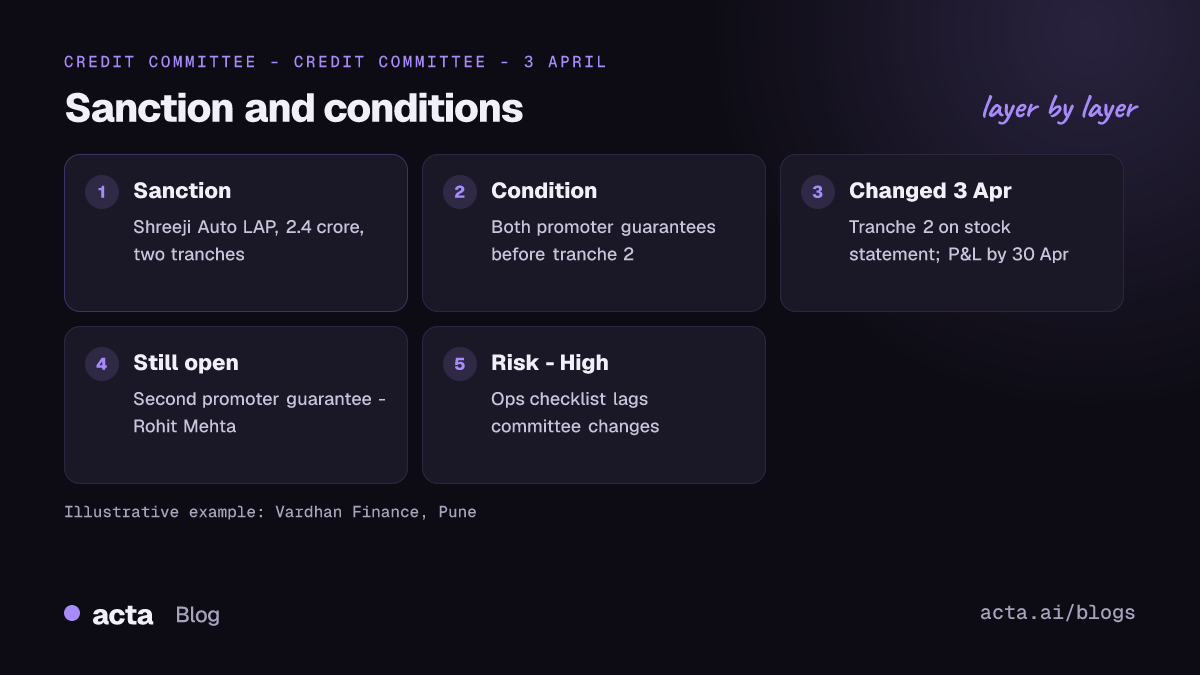
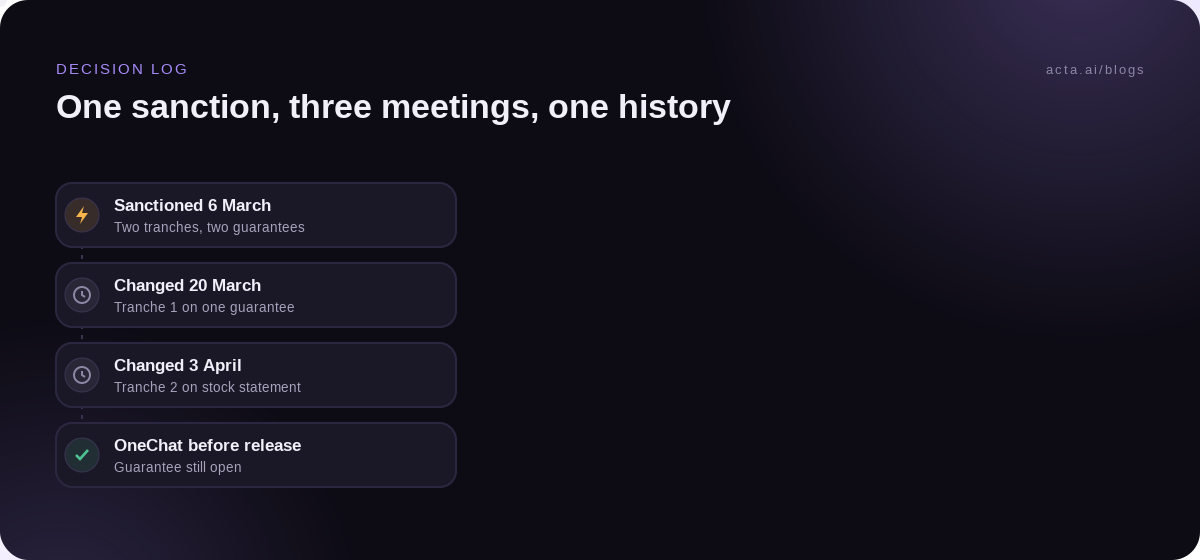
6 March. The committee sanctions a 2.4 crore loan against property to Shreeji Auto Components, secured on its factory premises. Conditions: personal guarantees from both promoters; insurance with Vardhan's interest noted; disbursal in two tranches, 1.6 crore on mortgage creation and 0.8 crore after a current stock statement and CA-certified March provisional financials. A FOIR deviation of four points is approved on the strength of a confirmed export order. Aparna records a concern about customer concentration.
20 March. Rohit reports that the second promoter, Mahesh, is abroad until May. The committee agrees: release tranche 1 on one guarantee; the second guarantee must be in place before tranche 2.
3 April. Rohit says the customer needs tranche 2 for the export order. Sunil agrees to release it on the stock statement, with the March financials allowed until 30 April. Imran is at a branch audit and misses the meeting. The second guarantee is not mentioned.
10 April. Imran's team reads the two sets of minutes, concludes the guarantee relaxation applies to the whole loan, and releases 0.8 crore. In June, internal audit flags the file: tranche 2 went out without the second promoter's guarantee. Nobody acted in bad faith. The sanction was changed twice, in two meetings, and the second change was silent on one condition.
The Decision log follows each sanction through every revision
Acta's Decision log sits under My meetings, then the Outcomes view, then the Decision log tab. It reads the meetings you record, finds decisions, and merges the same decision across meetings into one card with a running history. For a lender, that is the credit committee decision log you have always tried to keep in a spreadsheet: one sanction, every revision, in order.
What the Shreeji card looks like
By 3 April, Sunil's log would hold:
Shreeji Auto Components LAP 2.4 crore: tranche 2 released on stock statement; March financials by 30 April. Status: Changed. Was: tranche 2 after stock statement and CA-certified March financials. Decided by: Sunil Kulkarni. Owner: Imran Shaikh. Discussed in 3 meetings. Actions: 1 of 3 done.
History: 6 Mar, first raised: "Two tranches, second after stock statement and March provisionals." 20 Mar, updated: "Release tranche 1 on one guarantee; second guarantee before tranche 2." 3 Apr, updated: "Release tranche 2 on the stock statement; financials by 30 April."
Each history line plays the moment it was said. Laid out like this, the gap is visible: nothing on 3 April lifted the guarantee condition from 20 March. The status labels are exactly four: Active, Changed, Reversed and Done. There is no "proposed" or "approved" state, which suits a committee: a sanction is a decision, and later meetings either change it or reverse it.
Tiles for the risk head
Across the top: Decisions, Need follow-through, Changed or reversed and Done. "Changed or reversed" is the list of sanctions whose terms moved after the original meeting, the ones internal audit will ask about. "Need follow-through" shows decisions whose linked actions are not done. An attention line on a card reads "No owner yet", "No action items yet" or "N overdue action items", with an "Assign owner" button.
Whose log is it?
Every person has their own Decision log, built from meetings they recorded and meetings colleagues shared with them in the workspace. There is no single company log. If the committee secretary records the meeting and shares it with "Everyone in" the workspace, the chair, the risk head and credit operations each see the same sanctions in their own logs. Keep committee recordings private and only the secretary sees them; decide that deliberately.
Search, grouping and export
Search "Shreeji" or "guarantee" to find cards; group by Topic or by Person to see what Imran owns. "Not a decision" hides chatter the log picked up. Export CSV produces acta-decision-log.csv with Decision, Status, Topic, Decided by, Owner, First discussed, Last discussed, Meetings, Actions done, Actions and Previously: a usable attachment for an internal audit query. Our earlier post on credit committee minutes and decision records covers the minute itself; this one is about keeping it true afterwards.
A conditions-first template sits beside the built-in Credit committee report
Acta's Finance templates include Credit committee, KYC onboarding, Compliance check and Client review. The built-in Credit committee template is a good default during the 15-day trial. On a paid plan, add a custom template that puts conditions first; the custom templates guide covers the builder.
Template name: Sanction and conditions
What should this report do? For credit committee meetings: for each proposal, record the decision, amount and structure, every condition with the tranche it gates, deviations from policy with the reason, dissent, and any change to conditions from earlier sanctions.
- Decision and structure (Paragraph): amount, tenor, security.
- Conditions precedent (Table: Condition | Gates which tranche | Owner | Status).
- Conditions subsequent (Checklist: task, owner, due date).
- Deviations approved (Table: Deviation | Policy norm | Approved by | Reason).
- Changes to earlier sanctions (Table: Case | Condition before | Condition now).
- Dissent and concerns (Bullets).
Add one instruction: "Never infer a condition was removed; if a later meeting is silent on it, write: unchanged, not discussed." That single line would have caught the Shreeji gap.
Action items, the Risk Registry and OneChat follow conditions to disbursement
Action items
Under Outcomes, the Action items tab lists every follow-up with owner and status. Group by Person and Rohit's open item shows plainly:
Obtain personal guarantee from Mahesh (second promoter), Shreeji Auto, before tranche 2. Owner: Rohit Mehta. Overdue 4 days. From: credit committee, 20 March.
Filter by Overdue each morning and credit operations can check every open condition before releasing anything.
Risk Registry
The Risk Registry tab turns concerns raised in committee into rows:
Risk: Condition changes in committee not reflected in the disbursement checklist. Mitigation (Agreed): credit operations updates the conditions checklist within 24 hours of each meeting and the chair signs off. Owner: Aparna Joshi. Impact: High. Status: Mitigating.
Aparna's concentration concern from 6 March would sit there too, with impact Medium and "No owner" until someone takes it.
OneChat
Before releasing any tranche, Imran can ask:
Imran: What conditions are still open on Shreeji Auto Components before tranche 2?
OneChat: Two. The second promoter's personal guarantee, required before tranche 2 since 20 March and not lifted later. The CA-certified March financials, now due by 30 April. The stock statement was received. Found in: credit committee, 20 March, at 18:40; credit committee, 3 April, at 09:15.
Asked on 10 April, that answer keeps 0.8 crore in the bank until the guarantee is signed. If your team uses Claude or ChatGPT, the MCP connector can answer the same decision-history questions there.
An Agent Builder recipe hands approved changes to credit operations
The Vardhan gap came from a handoff: the committee changed conditions and credit operations learned late. Agent Builder (beta) can close it, with the chair approving every change before it reaches operations. The test and turn-on guide explains safe testing.
- In Agent Builder, click "New agent" and name it "Committee conditions handoff".
- Trigger: "When a meeting ends", filter "title contains credit committee".
- Acta data step: the meeting's notes, decisions and action items.
- AI step: "For each case discussed, list conditions added, changed or removed versus earlier meetings. If a condition was not mentioned, write: unchanged. Flag any tranche whose release conditions changed."
- Human approval step: the chief credit officer approves or rejects, in the Approvals tab or by email. No decision in 24 hours means nothing is sent.
- Gmail step: send the approved list to the credit operations mailbox.
- Google Sheets step: update the matching rows in the conditions tracker.
- Test, then Run test on a past committee meeting; nothing is sent. Then Turn on.
A two-week rollout starts with the committee secretary
At a 100 to 500 person lender, the workspace stays small: the committee secretary, the chief credit officer, the risk head, and credit managers who run pre-committee calls, one seat each. Branch staff named on a condition can get it in the daily follow-up email without joining. See the workspace setup guide for roles.
- Days 1-3: The owner invites the committee members and the head of credit operations from Settings, Workspace. Agree titles: "Credit committee - date".
- Days 4-7: The secretary records each committee meeting; online meetings on Zoom or Teams run through the desktop app, in-room meetings through the mobile app. Share each with "Everyone in" the workspace, or a narrower decision if your policy requires it.
- Week 2: Turn on the template, run the handoff agent with approval, and hold the first monthly review of "Changed or reversed" sanctions.
Avoid three mistakes: recording without telling members and invitees (read what to tell participants about recording), letting the Acta record replace your signed minutes, and assuming silence in a later meeting removes a condition. More on audit-ready records in who decided what: building a meeting audit trail, and on Acta's page for NBFCs and lenders.
Frequently asked questions
Can a recording replace signed credit committee minutes?
Treat it as support, not a replacement. Your credit policy defines the formal minutes and who signs them. A recording, transcript and Decision log help the secretary write accurate minutes faster and give you the exact words when a condition is questioned later. Ask your compliance team how recordings fit your record-keeping policy.
How should a changed sanction condition be recorded?
As a change to the original sanction, not a new decision. Name the case, the condition before, the condition now, who approved the change and the reason. Say explicitly which other conditions remain unchanged. In Acta's Decision log the card moves to Changed and keeps the old wording under "Was:".
Can dissent in the committee be captured?
Yes, if it is said aloud. The transcript keeps who said what, and a template section for dissent and concerns pulls it into the report. Concerns about risk also appear in the Risk Registry, where they can be given an owner and a status rather than disappearing after the meeting.
Does Acta use our borrowers' information to train its AI?
No. Acta does not use customer data to train AI models. Meetings are private by default and shared only when the person who recorded them chooses to share them with the workspace. Check Acta's security page and your own data policies before recording committee meetings.
What does it cost for a credit team of eight?
Each person in your Acta workspace uses one seat, whether they record or only read the minutes. At 8 dollars per seat a month, eight seats are 64 dollars a month, or 576 dollars a year at 72 dollars per seat. The Decision log and OneChat are included in the 15-day trial and Pro.
Decide what your committee record must prove
Before you change tools or templates, agree internally what the committee record has to prove six months from now, then build the habit around that.
- Structure the sanction: amount, security, conditions by tranche, deviations, dissent.
- Record every change: relaxations go against the original sanction, with old wording kept.
- Hand off within a day: credit operations works from an approved, current conditions list.
- Own every condition: a named person and date for each open item.
- Review monthly: every sanction marked Changed or reversed, with the risk head.
Record your next committee meeting with the Acta desktop app and try the Decision log with a 15-day trial.