Enterprise requests get lost between the account review and the centre
A coworking operator with enterprise clients runs on a handful of recurring meetings. The monthly account review with each enterprise client's workplace or admin lead, usually on Teams or Meet. The weekly centre ops meeting, where centre managers, facilities and finance go through occupancy, maintenance tickets and billing queries. The renewal pipeline review between the founder and the sales head. And the daily community huddle at each centre, which is mostly about events, visitors and the coffee machine.
The account review is where things go wrong. The client's workplace lead brings a list: two more phone booths, weekend air conditioning for a project team, ten extra parking slots, a meeting room held every Tuesday. Your account manager says yes to some, "let me check" to others, and promises a quote on the rest. Then the call ends. The centre manager wasn't on it. Facilities hears about it a week later in a corridor. Finance learns about the weekend AC when the meter readings arrive.
Enterprise members are a different kind of member. People who use coworking spaces value the community and the autonomy, as HBR's research on why people thrive in coworking spaces found, and later work on coworking and employee well-being looked at what makes these spaces work for staff who are sent there by an employer. The employee enjoys the café. The workplace lead, though, judges you on whether what was agreed last month actually happened. Your coworking member meeting notes for that relationship need to work as a client request tracker, not a chat summary.
A month of small yeses nearly cost a 120-seat renewal
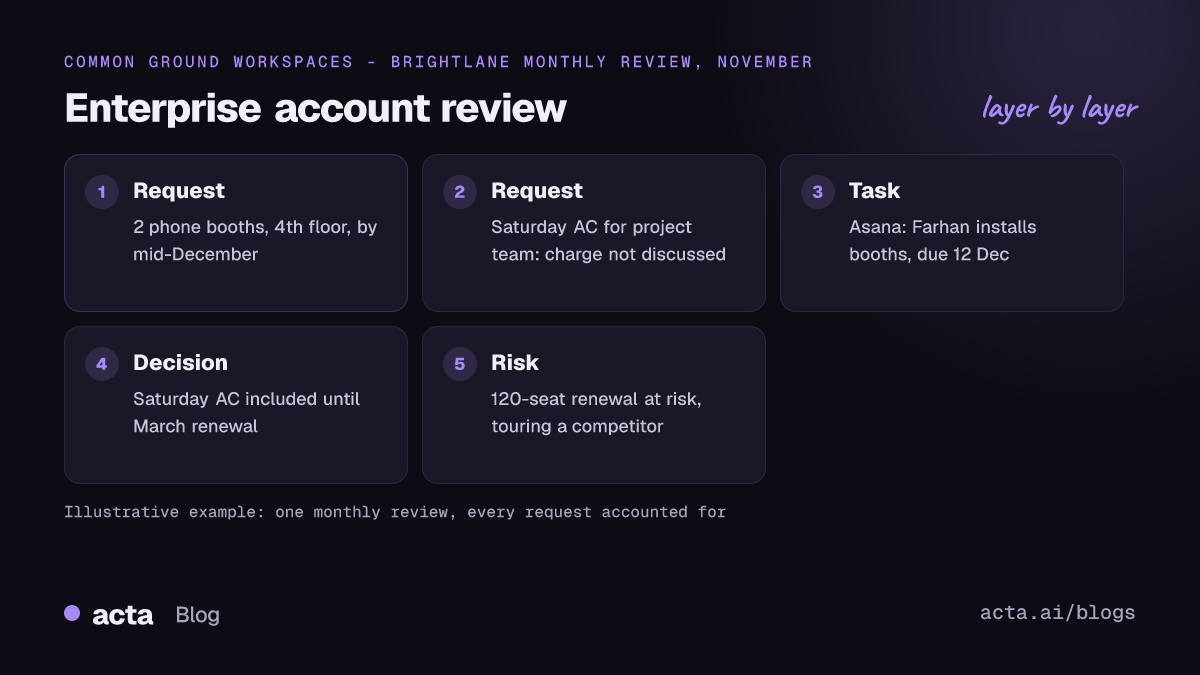
An illustrative case. Common Ground Workspaces runs three centres in Hyderabad (HITEC City, Madhapur and Gachibowli), about 1,400 seats and 48 staff. Its largest client, Brightlane Analytics, has a 120-seat managed floor at Gachibowli, with its lock-in ending in March. The people: Kavya (co-founder, operations), Arjun (enterprise account manager), Meera (Gachibowli centre manager), Farhan (facilities head) and Lakshmi (finance).
Week 1. In November's account review, Brightlane's workplace lead asks for four things. Arjun agrees to two phone booths by mid-December and says Saturday AC for a 15-person project team is "fine, we'll sort it". He'll check on parking and come back on the Tuesday room hold.
Week 2. Arjun mentions the booths at the centre ops meeting. He forgets the AC. Meera only learns about it when Brightlane's team turns up on Saturday to a warm floor and calls her personal number.
Week 3. Farhan switches the AC on for Saturdays. Lakshmi sees the meter jump and, following the standard rate card, adds after-hours AC charges to Brightlane's December invoice.
Week 4. Brightlane's finance team disputes the invoice: "We were told this was included." Their workplace lead mentions, politely, that they have booked a tour of a competitor's building for January. Nobody at Common Ground can say exactly what Arjun promised, because nobody has the words.
Each person acted sensibly with what they knew. What was missing was a written answer to one question: what did we say yes to, and on what terms?
An account review template captures coworking member meeting notes properly
Acta's standard notes already pull out decisions and action items with owners. For enterprise clients, two built-in report templates fit: Customer QBR for the quarterly review and Contract negotiation for the renewal call itself. For the monthly review, a custom template works better because it can force the "on what terms" column. Custom templates are a Pro feature; in Templates, click "Create template", pick "Built-in" to start from Customer QBR, and change the sections:
Template name: Enterprise account review
What should this report do? For monthly reviews with an enterprise coworking client: every request raised, our answer and the commercial terms, service issues, seat changes and renewal signals.
1. Requests raised (Table: Request, Raised by, Our answer, Charged or included, Owner)
2. Service issues (Bullets: issue, centre, since when)
3. Seat and space changes (Table: Centre, Current seats, Change asked, From date)
4. Renewal signals (Paragraph: anything said about budget, headcount, other buildings or the lock-in)
5. Our next steps (Checklist: task, owner, due date)
Extra instructions: Use the client's own words for requests. If the charge was not discussed, write "Not discussed".
That last instruction would have saved Common Ground. In November's report, the Saturday AC row would read: Saturday AC for project team, raised by workplace lead, our answer "fine, we'll sort it", Charged or included: Not discussed, Owner: Arjun. A "Not discussed" in the money column is a flag you can act on the same day. Set the template to "Only matching meetings" so it runs on account reviews, and use "Share with my team" so every account manager reviews clients in the same format. The custom templates guide walks through the builder.
The Agent Builder recipe does the follow-up for you
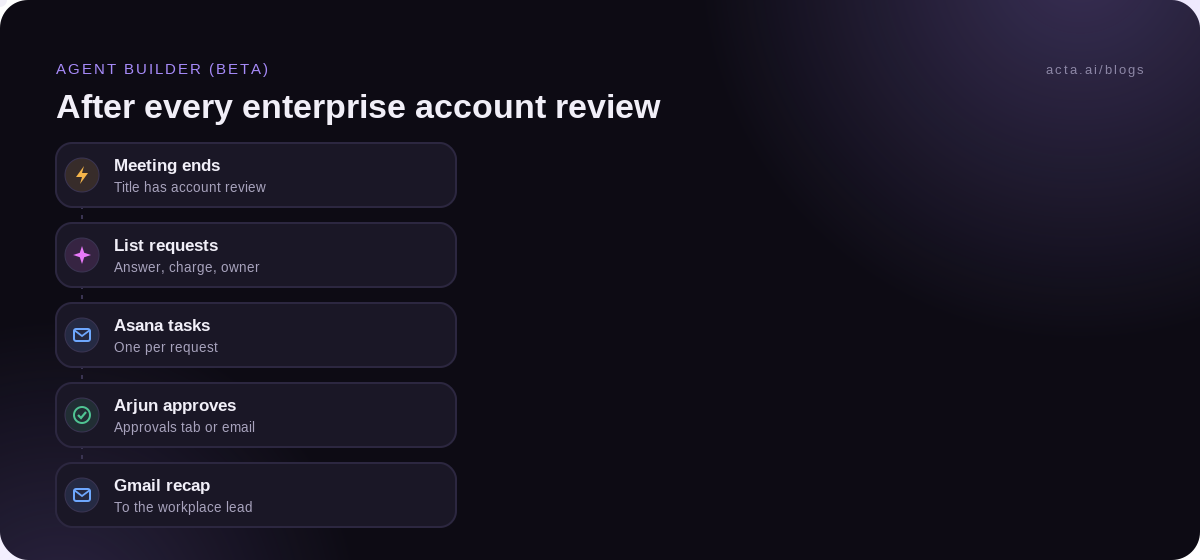
This is where an operator of this size gets the most back from meeting follow-up automation. The template tells you what was said. An agent built in Agent Builder (beta) makes sure each request reaches the person who has to act on it, and sends the client a written recap, with you approving before anything leaves. Here is the recipe, step by step:
- Open Agent Builder from the sidebar and click "New agent". Describe it in a sentence ("After each enterprise account review, create a task per request and draft a recap for the client") and let Acta draft it, or choose "Start from blank instead".
- Trigger: "When a meeting ends", with the filter title contains "account review".
- Acta data: read this meeting's action items, decisions and the Enterprise account review report.
- AI: "For each client request, return: request, our answer (yes, no, checking), whether a charge was agreed, owner, and the centre it affects."
- For each request: an Action step in Asana, "create task" in the centre's project, assigned to the owner, with the request wording in the description.
- If / else: if any request says "Not discussed" for the charge, send a Slack message to Lakshmi in finance so the invoice isn't guessed.
- AI: write a short recap email to the client: what we agreed, what we're checking and by when, and what is chargeable.
- Human approval: the account manager sees the draft and the task list in the Approvals tab, or by email if "Also email me Approve and Reject buttons" is ticked.
- Action: Gmail, "send" to the client's workplace lead once approved. If you'd rather paste it yourself, use Gmail "draft" instead.
- Click Test and Run test on last month's review: emails are only shown, never sent. Then Turn on.
Approvals go to the agent's owner, and if nobody approves within 24 hours, nothing is sent. For a client-facing email that's the behaviour you want. The triggers guide lists the other ways an agent can start.
A second, smaller agent is worth adding a week later. Use the trigger Event in a connected app with the Acta event "action item overdue", and a Slack step that messages the owner directly: "Brightlane phone booths were due Friday, still open." No AI step needed, and it takes ten minutes to set up.
Action items, decisions, risks and OneChat back up the agent
The agent pushes work out. The Outcomes views are where you check it landed.
Action items
My meetings > Outcomes > Action items, grouped by Person, shows Arjun's list across every client meeting he recorded. A typical row: "Install two phone booths on Gachibowli 4th floor for Brightlane", owner Farhan, "Due in 6 days", 1 comment ("vendor confirmed delivery 12 Dec"). The Overdue tile is the one Kavya opens every Monday.
Decision log
Kavya's Decision log (Outcomes > Decision log) would show the AC resolution after the dispute: "Saturday AC for Brightlane's project team included until March renewal; charged at rate card after that." Status: Changed, with "Was: Saturday AC charged at standard after-hours rate". Decided by Kavya, owner Lakshmi. The history keeps the quote from the call where it changed. That's the line you read out at renewal.
Risk Registry
In the Risk Registry tab: Risk "Brightlane may not renew 120 seats at Gachibowli; touring a competitor in January", Impact High, Owner Arjun, Date 15 Dec, Mitigation Agreed "Kavya and Arjun to meet workplace lead with a renewal proposal", Status Mitigating. Group by Project / customer and every enterprise client gets its own block.
OneChat
Before the renewal call, Arjun asks OneChat: "What has Brightlane asked for since August, and what did we deliver?" The answer lists each request with status, and Found in points to the August, September, October and November reviews, each opening at the exact moment. You can also add an answer straight into the Decision log from OneChat.
One rule to keep in mind: these views are per person. Arjun's Decision log and Risk Registry are built from the meetings he recorded plus the ones shared with him. If Kavya wants the same picture, Arjun shares the account reviews with "Everyone in" the workspace.
Renewal prep starts from the request history
Most operators prepare a renewal from the occupancy report and the rate card. The client prepares from its own memory of how you treated it. Bring the request history instead: twelve months of asks, what you said, what you delivered and how long it took. If it's good, it is your best sales document. If it isn't, better to find out 90 days before the lock-in ends than in the meeting.
Ask OneChat for that history, download the answer as a Word report, and check it against the Decision log CSV export (Export CSV on the Decision log). Then record the renewal call with the Contract negotiation template switched on. For more on keeping track of what you owe clients, our post on tracking customer promises and catching overdue ones goes deeper, and how to run a QBR customers value covers the agenda side.
Roll it out across centres in two weeks
For a 48-person operator, five or six people need to record: the founder, enterprise account managers, centre managers and the facilities head. Each of them takes one workspace seat; front desk and housekeeping teams can stay outside the workspace and get their jobs through Asana or Slack. Account reviews happen on video calls, so the desktop app records Teams or Zoom from your own computer with no bot joining, and its "Copy notice" button pastes a short recording notice into the chat. Tell clients at the start of every call; our guide to recording consent and what to tell participants has wording. Centre ops meetings in person can be recorded on the mobile app.
Days 1 to 3: Kavya and Arjun record every enterprise account review and the weekly ops meeting. They check whether owner names come out right.
Days 4 and 5: build the Enterprise account review template, test it on two past reviews, share it with the team.
Days 6 to 8: invite the centre managers and Farhan from Settings > Workspace. Agree a rule: every account review and ops meeting is shared with the workspace; one-to-ones stay private, which is the default.
Days 9 and 10: build the account review agent, run it in Test on last month's meeting, then turn it on with approval going to Arjun.
Days 11 to 14: add the overdue-item agent and review the Risk Registry together once.
The common mistakes: letting the agent send without the approval step "because it's only a recap"; sharing nothing, so every manager's view stays empty; and recording member events, which adds noise and makes members uneasy. Acta's role here is modest: it records, writes the request table and runs the agent you designed. Your account managers still own the relationship. The Acta for coworking operators page has a short overview.
Frequently asked questions
What should coworking operators write down after an enterprise client meeting?
Every request the client raised, your exact answer, whether it is charged or included, the owner and the due date. Add service issues, seat changes and anything said about budget or other buildings. Those last notes are your early renewal signals, and they're the first thing people forget once the call ends and the next one starts.
Can an AI agent email clients without my approval?
Not if you build it with a Human approval step, which this recipe does. The agent's owner approves or rejects each email in the Approvals tab or by email. If nobody answers within 24 hours, nothing is sent. During testing, emails and messages are only shown, never delivered, so you can check the wording on old meetings first.
Which apps can the agent create tasks in?
Agent Builder actions include Asana tasks, Jira issues, Google Sheets rows, Slack messages, Gmail emails and drafts, Zendesk or Freshdesk tickets, and notes on HubSpot, Salesforce or Zoho contacts. Most coworking teams use Asana or a Google Sheet for facilities requests and Slack for internal alerts.
Do community managers need their own seat?
Only if you add them to the workspace, which they need to open shared reviews or ask OneChat. Every workspace member uses one seat, recorder or not, at $8 per month billed monthly or $72 per year on Pro. Many operators give seats to account managers and centre managers, and let front desk staff receive task assignments through Asana or Slack instead.
How far ahead should we prepare an enterprise renewal?
Start around 90 days before the lock-in ends. Pull a year of requests and outcomes from your meeting history, note anything you didn't deliver, and fix what you can before the proposal goes out. Clients notice when the renewal meeting opens with their own list of past asks, answered honestly.
Run your next account review this way
Pick one enterprise client and run their next monthly review through the whole loop before you touch the others.
- Record the review: with the client told at the start, using the desktop app on the call.
- Force the money column: every request gets "charged" or "included" before the call ends.
- Let the agent draft: tasks per request and a recap email, approved by the account manager.
- Share the meeting: with everyone in the workspace, so centre managers see the same list.
- Check Monday: the Overdue tile and the Risk Registry, ten minutes, founder and sales head together.
Try it during a 15-day trial, recording account reviews in the browser with the Chrome extension or on the desktop app.