Customer technical meeting notes record what the customer's lab decided
A technical call with a customer is not a sales call. The people on it are chemists, application engineers and plant managers, and they talk in test methods: Brookfield viscosity at 25°C, grind gauge readings, gloss at 60 degrees, pot life, colour difference against standard. The notes have to keep those numbers exactly as said, with units and methods, or they are useless to the lab back home.
Good notes from a trial review hold five things. The trial conditions (which grade, which lot, dosage, customer's base formulation). The results against the customer's target. Any requested change to your specification, with old and new values. The samples, data and documents each side owes. And the customer's exact words on anything they might later dispute, such as "we can live with 350 to 450 for now."
Spec changes also have regulatory knock-ons. If a grade's composition changes, your regulatory person needs to know, because the safety data sheet may need revisiting. In the US, OSHA's Hazard Communication Standard sets a 16-section format for safety data sheets, and its quick card explains that manufacturers, distributors and importers must provide one for each hazardous chemical. That is general information, not regulatory advice; the point for your notes is simply that a spec decision should reach the person who owns the SDS.
Chemical makers run four meetings that touch one spec
In a mid-sized specialty chemicals company, one customer grade passes through several conversations a month:
- Customer technical meeting or trial review call (Teams or Zoom): your technical service manager and sales manager with the customer's R&D chemist and sometimes their plant manager.
- Application lab review: your lab team going through the trial data before and after the call.
- Weekly production planning meeting: planning, production, QC and stores agree what gets made and packed next week, using the batch sheet as it stands.
- Monthly sales and technical review: the owner or business head checks key accounts, trial pipeline and complaints.
The spec decision is made in the first meeting and executed in the third. In most plants, the only bridge between them is an email from technical service to planning, written from memory, sometimes days later. When the customer changes their mind on a later call, the bridge has to be crossed again, and that second email is the one that gets forgotten.
A viscosity change was reversed on a call production never heard
An illustrative example. Vapi Additives (invented) is a 160-person maker of wetting and dispersing additives in Gujarat. One of its larger export customers is a coatings formulator in Ohio. The grade in question, DA-240, ships at a viscosity window of 400 to 600 cP.
Week 1. Trial review call. Anjali, the technical service head, and Kiran from export sales meet Dana, the customer's R&D chemist. Dana's lab trial in a new low-VOC base shows good gloss but slow flow. She asks for a lower window, 350 to 450 cP. Anjali agrees for the next order of 12 drums. Anjali emails Hemant, the planning head, who updates the batch sheet.
Week 3. Second call. Dana's plant manager joins. Their plant trial at 350 to 450 cP showed settling in storage. Dana says, "Let's go back to the standard window and fix flow on our side." Kiran is on the call; Anjali is at a conference. Kiran makes a note in his phone to "tell Hemant," and the order confirmation goes out unchanged.
Week 5. The 12 drums ship at 360 to 440 cP, the lower window. The customer's incoming QC rejects them against the original spec. Freight back, re-blending, a credit note and a strained relationship with a buyer the business head had spent two years winning. Everyone did their job. The reversal simply never became a decision anyone owned.
The Decision log keeps every spec change with its history
With both calls recorded in Acta and shared with the workspace, the reversal looks very different. Acta reads each meeting for decisions and puts them in the Decision log, which lives under My meetings then Outcomes then the Decision log tab. Duplicate mentions of the same decision are merged into one card, with a history of every meeting where it came up.
Here is how Hemant's Decision log card would read after the week 3 call (Hemant didn't attend, but the call was shared with everyone in the workspace, so it feeds his log too):
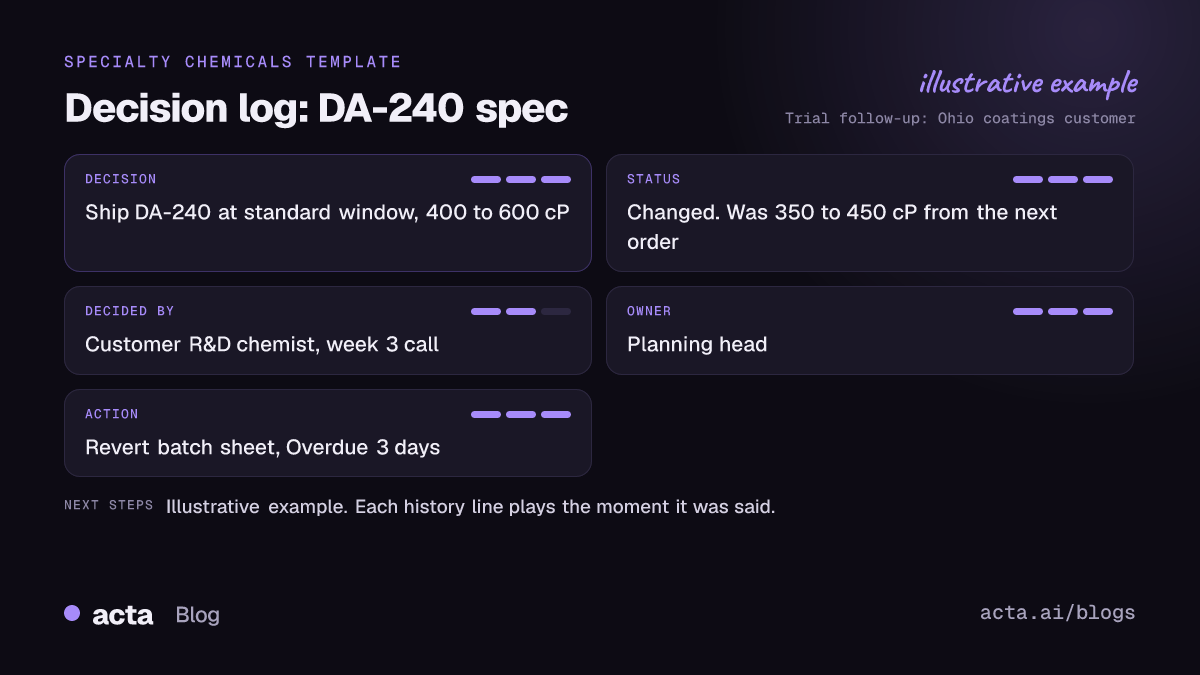
DA-240 for Ohio coatings customer: ship at standard viscosity window, 400 to 600 cP
Status: Changed · Was: "Ship DA-240 at 350 to 450 cP from the next order" · changed in week 3
Decided by: Dana (customer R&D) · Owner: Hemant · Discussed in 2 meetings
Actions: 0 of 1 done · "Revert batch sheet for DA-240 Ohio grade to 400 to 600 cP" (owner Kiran, Overdue 3 days)
History: first raised week 1, trial review: "Can you bring it down to 350 to 450 for the next lot?" · updated week 3, plant trial follow-up: "Let's go back to the standard window and fix flow on our side."
Each history line has a play button that opens the call at that moment. That is the difference between "Kiran thinks Dana said" and hearing Dana say it.
The screen around the card is built for exactly this kind of review. The tiles across the top are Decisions, Need follow-through, Changed or reversed and Done. In the weekly production planning meeting, Hemant clicks Changed or reversed and reads every card before the plan is frozen. Group by Topic and you see all decisions about DA-240 together; group by Person and you see what Anjali, Kiran or a customer decided.
A card with no linked actions shows the banner "No action items yet", and one with no owner shows "No owner yet" with an Assign owner button. Those two banners are your early warning. A decision about a spec with no action item behind it is a decision that will not reach the batch sheet. The card menu also lets you Mark as reversed or Mark as done yourself, mark something as "Not a decision", or split two decisions Acta merged by mistake with "Not the same decision?".
Statuses are deliberately simple: Active, Changed, Reversed and Done. There is no "proposed" or "approved" stage, so if your company has a formal internal approval for spec changes, keep running it; the log shows what was decided in meetings, not what your quality system has signed off. Export CSV downloads the log with columns for Decision, Status, Topic, Decided by, Owner, First discussed, Last discussed and the previous value, which QC can file against each grade.
One honest limit: the Decision log is personal. It is built from the meetings that person recorded and the ones shared with them. If Kiran keeps his customer calls private, Hemant's log never sees the reversal. The fix is a team habit, not a setting: every customer technical call is shared with the workspace. Our earlier post on a decision log and RACI built from meetings covers the general pattern.
Action items, the Risk Registry and OneChat cover the rest
The Decision log tells you what changed. The other three screens tell you who has to act, what could go wrong and why.
| Screen | Filled example | What to watch |
|---|
| Action items (Outcomes) | "Send Dana 1 kg retained sample of lot 2409 and CoA" · owner Anjali · Due tomorrow | Overdue tile; group by Person before planning |
| Risk Registry | "Lower viscosity grade may settle in the customer's storage tanks" · Impact High · owner Anjali · mitigation Suggested: run a 4-week storage test before shipping · Open | "High · no owner" and "Getting worse" cards |
| OneChat | "Why did we go back to 400 to 600 cP for the Ohio customer?" | Answer cites the week 3 call at the exact minute |
In Action items, the filter tiles are Open, Overdue, Due this week and Done. Turn on Auto follow-up with "Each owner, their own items" and Kiran would have had an email every weekday about the batch sheet until he ticked it. Read why small teams miss these in why action items don't get done.
The Risk Registry is a tab of its own under My meetings. Its table has Risk, Mitigation, Owner, Date, Impact and Status columns, and a mitigation is tagged Agreed (decided in a call) or Suggested (Acta's idea, not agreed yet). Settling in storage was raised once, by the customer's plant manager; in the registry it stays one row and updates if it is raised again.
OneChat answers across every meeting you can see, with sources. Ask "Why did we go back to the standard window?" and the answer quotes Dana from week 3. Ask a follow-through question such as "Which spec changes agreed with customers this quarter have open action items?" and OneChat checks the Decision log for you; there is no separate promises screen. You can even ask "Why did we change DA-240 for Ohio? Then add it to the Decision log." For one call on its own, Ask Acta on the meeting page is quicker.
Two built-in templates and one custom one
Turn on Decisions & RACI (Operations) for customer technical calls and Incident post-mortem for the internal review after a rejection. Then build one custom template (paid plans; see custom report templates):
- Name: Customer trial review. Use on: Only matching meetings ("technical calls with customers about trials, test results, samples or specification changes").
- Trial set-up (Paragraph: grade, lot, dosage, customer base)
- Results against target (Table: Test | Method | Result | Customer target)
- Spec changes requested (Table: Property | Old value | New value | Requested by | From which order)
- Samples and documents owed (Checklist: task, owner, due date)
- Customer's exact words (Bullets)
Add the instruction "Keep units and test methods exactly as said." Use "Test on a past meeting" to check it against a call you remember well before turning it on.
Agent Builder (beta) can post each spec change to production
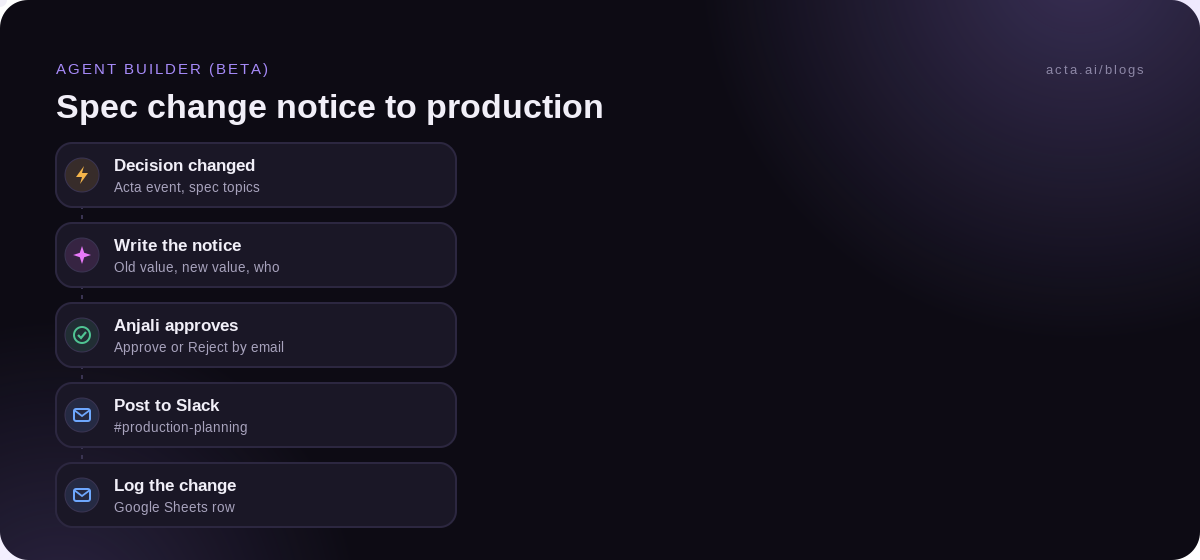
The week 3 failure was a missing message. Agent Builder (beta) can send it every time, after a person checks it. Set it up in an afternoon:
- In Agent Builder, click New agent and describe it: "When a customer spec decision changes, tell production planning."
- Trigger: Event in a connected app, choose Acta, event "decision made or changed". Add an "Only when" condition: the decision mentions viscosity, solids, pH, spec or window.
- AI step: "Write a spec change notice: grade, customer, old value, new value, who decided, from which order, and the meeting link. Flag anything unclear."
- Human approval step, owned by the technical service head, with email Approve and Reject buttons. No answer in 24 hours means nothing is posted.
- Slack action: message to the #production-planning channel.
- Google Sheets action: add a row to your spec change register.
- Test, Run test on the week 3 call (nothing is sent in a test), then Turn on.
The guide to triggers lists the Acta events you can start from.
Technical service goes first, production follows in week two
For a company of 50 to 200 people, the workspace usually starts with technical service, export sales and the business head, and each member uses a seat whether or not they record: Pro is USD 8 per seat a month, or USD 72 per seat a year. The Outcomes views, Risk Registry and OneChat are included in the 15-day trial and Pro.
Week 1: create the workspace and invite technical service, export sales and the business head. They record every customer technical call. Customer calls on Teams or Meet in the browser can be captured with the Acta Chrome extension, so no bot joins a call with a customer's R&D team. Agree a naming rule: "Customer – grade – topic". Tell customers you record and why; see what to tell participants.
Week 2: invite planning, QC and the regulatory person as Members. Share every customer technical call with "Everyone in" the workspace so it reaches their logs. Hemant opens the Changed or reversed tile in the planning meeting. Turn on Auto follow-up and the spec change agent.
Mistakes to avoid: recording only the first trial call and not the follow-ups (the reversal lives in the follow-up), letting a Suggested mitigation pass as agreed, and treating the log as a substitute for your formal change control.
Frequently asked questions
Will the notes keep units and test methods correctly?
The transcript keeps what was said, and the notes and templates write from it. Numbers spoken clearly ("three fifty to four fifty centipoise, Brookfield, spindle three") come through well. Add a template instruction to keep units and methods exactly as said, and spot-check the first few reports against the recording before relying on them.
Can production see a customer call they were not on?
Yes, if the person who recorded it shares it with everyone in the workspace. Shared calls appear under Shared with me, teammates can ask OneChat about them, and the decisions and action items flow into their own Decision log and Action items views. Unshared calls stay private to the recorder.
Is a decision log the same as a spec change control record?
No. The Decision log captures what was decided in meetings, with quotes and status. A formal change control record is part of your quality system, with its own approvals and sign-offs. Use the log to make sure nothing decided on a call is missed, then run your normal change process.
What if the customer meeting is in Hindi or mixed Hindi and English?
Hindi, including Hindi-English mixing, is detected automatically, along with English, French, Spanish and German. Ten more languages, including Japanese and Arabic, are in beta and chosen in Settings. Notes can be written in English while quotes stay as spoken.
Does Acta use our formulation discussions to train AI models?
No. Acta does not use customer data to train AI models. Meetings are private by default and shared only when you choose to share them.
Choose which customer meetings to capture first
Start with the accounts where a spec is still moving.
- List live trials: every customer currently testing a new or modified grade.
- Record the follow-ups: second and third technical calls matter more than the first.
- Share with production: every customer technical call goes to the workspace.
- Review reversals weekly: Changed or reversed tile before the plan is frozen.
- Approve before posting: keep a person between Acta and the shop floor.
Acta will not run your lab or your quality system; it makes sure that what a customer decided on a call is written down, owned and visible to the people who make the batch. More examples sit on our page for specialty chemical manufacturers. Add the Chrome extension before your next trial review, and see the pricing page to start the 15-day trial.