Weekly status calls are where escalations start
An IT services firm runs on a rhythm of client meetings: the weekly service review or status call, the monthly SLA report walk-through, the quarterly business review, change advisory meetings, and the bridge call when something breaks badly. The delivery manager or service delivery lead runs most of them. The client side is usually their IT manager plus whoever is annoyed that week. The account manager, the person who owns the renewal, attends the quarterly review and very little else.
That split is where things leak. Delivery people hear problems as tickets. Account managers hear problems as commercial risk. The same sentence, "if this isn't fixed before close, our finance director will want a word", is a P3 to one and a red flag to the other. Client status call notes written by the delivery side tend to record the ticket and drop the threat.
Atlassian's guide to escalation policies describes three ways work moves up: hierarchical (to someone more senior), functional (to someone with the right skills) and automatic (after a time limit or when impact grows). Most IT service escalation process documents cover the first two inside the support team. Few say how a commercial escalation reaches the account manager. That gap is what the rest of this post is about.
A month-end close turned a P3 ticket into a renewal risk
An illustrative account. Northgate Systems is an 80-person firm that supports ERP and integration platforms for mid-sized companies. One client, a 450-person freight company, pays about £210,000 a year under a contract that renews in four months. Ines Carvalho is the delivery manager, Marek Nowak leads the support engineers, and Rohan Bhatt is the account manager. On the client side: Gareth Pole, IT manager, and Sandra Kemp, finance director.
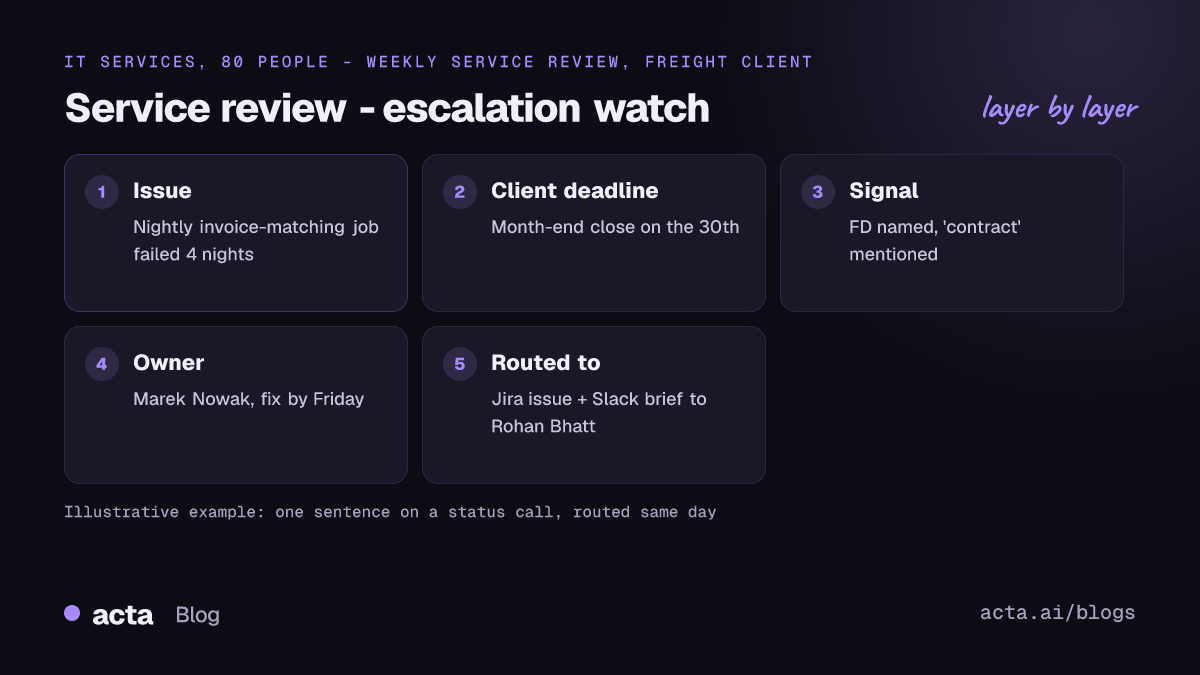
Tuesday, week 1. On the weekly service review, Gareth says the nightly invoice-matching job has failed on four nights since the ERP upgrade. Then: "If it isn't stable before month-end close on the 30th, Sandra will want a meeting about the contract." Ines logs a P3 in Jira. Rohan isn't on the call and nobody tells him.
Tuesday, week 2. The job has failed twice more. The call spends 20 minutes on a reporting request. Marek says a fix will deploy Friday. Gareth says "fine", sounding anything but.
Friday, week 2. The client's own change freeze for month-end blocks the deploy. The fix waits until Monday.
Month-end. The job fails on the 30th. Sandra's team matches about 1,900 invoices by hand over a weekend. On Monday she emails Rohan asking for an escalation meeting and "a conversation about service credits". Rohan opens the account folder and finds a ticket marked P3.
Nobody was careless. Ines did log it, Marek did write a fix. What failed was the route: a date, a named executive and the word "contract" were said on a recorded call and stayed there.
Client escalation meeting notes need five parts
When the escalation meeting does happen, the notes are a working document for both sides, and the client will hold you to them. Keep them to five parts:
- The issue, plainly. "Nightly invoice-matching job failed on 7 of 22 nights since the ERP upgrade on the 3rd."
- Impact in the client's words. Quote it: "My team lost a weekend matching invoices." This shows you heard it, and it stops the notes sounding defensive.
- Commitments, each one specific: root-cause report by Thursday, fix deployed in the agreed window, daily check-in until stable.
- Owners and dates. One name per commitment, on both sides. Client-side actions (approve the change window) count too.
- Who talks next, and when. If Sandra expects to hear from Rohan on Friday, write that.
Escalation meeting minutes should go out the same day. If they take three days, the client writes their own version first. Our IT meeting minutes examples include formats for incident and change meetings, and if your weekly calls also feed a status report, the post on status reports built from status meetings shows the format.
Atlassian's incident handbook on responding to an incident separates severity 1 and 2, which page people at once, from severity 3, handled in business hours. That is sensible for engineering. Add one commercial rule on top: any ticket the client links to a business deadline or a senior person gets an account manager alert, whatever its severity.
Acta keeps the account's issues, owners and risks in one place
Ines records the weekly service review with Acta. If the client's IT policy blocks notetaker bots, the Acta Chrome extension records Google Meet, Microsoft Teams in the browser and the Zoom web client from her own browser. Either way, tell the client the call is recorded; see our guide on recording consent and what to say.
Templates for the service review
Two built-in templates do most of the work. Ticket suggestions proposes Jira tickets from the conversation; Ines ticks the right ones and clicks Create in JIRA, and nothing is created without her click (details in the Jira integration guide). Incident post-mortem runs on the escalation meeting itself. On top, a custom template (a Pro feature) set to "Only matching meetings":
Service review - escalation watch
1. Issues raised (Table: Issue | Raised by | Impact in their words | Ticket)
2. Escalation signals (Bullets: business deadlines, contract, credits or penalties, senior names, "again" or "still")
3. What we promised (Checklist: task, owner, due date)
4. Client-side dates (Table: Date | What happens on their side)
5. Note for the account manager (Paragraph, three sentences)
Run against Tuesday of week 1, section 2 would have read: "Month-end close on the 30th; Sandra Kemp (FD) named; 'contract' mentioned."
Action items, Decision log, Risk Registry, OneChat
Under My meetings > Outcomes > Action items, grouped by Person, Ines's view after week 2:
| Action item | Owner | Status |
|---|
| Deploy invoice-matching fix to production | Marek Nowak | Overdue 2 days |
| Confirm month-end change freeze dates with Gareth | Ines Carvalho | Overdue 4 days |
| Send reporting request estimate | Ines Carvalho | Due in 3 days |
The second row is the one that would have saved the month. Turning on Auto follow-up, with "Due or overdue" items going to "Each owner, their own items" on weekdays, would have put it in Ines's inbox every morning.
Her Decision log (Outcomes > Decision log) would show "Fix deploys Friday outside the client's change window" as Reversed once Gareth's freeze blocked it, with both meetings in its history. The Risk Registry tab would hold: Risk "Invoice-matching failures block client's month-end close" · Mitigation "Hotfix by Friday" (Agreed, with the moment linked) · Owner Marek Nowak · Impact High · Status Mitigating · Date overdue, which puts it in the "Fix is overdue" card.
These views are per person, built from the meetings each person recorded or that were shared with them. So Rohan only sees any of this if Ines shares the service reviews with the workspace. Once she does, he can ask OneChat: "Has the freight client mentioned the contract, credits or their finance director on any call this quarter?" The answer would cite week 1: Gareth Pole said "Sandra will want a meeting about the contract" if the job wasn't stable by month-end close. Found in: Weekly service review, 9 Sep.
An escalation radar agent routes signals to Jira and the account manager
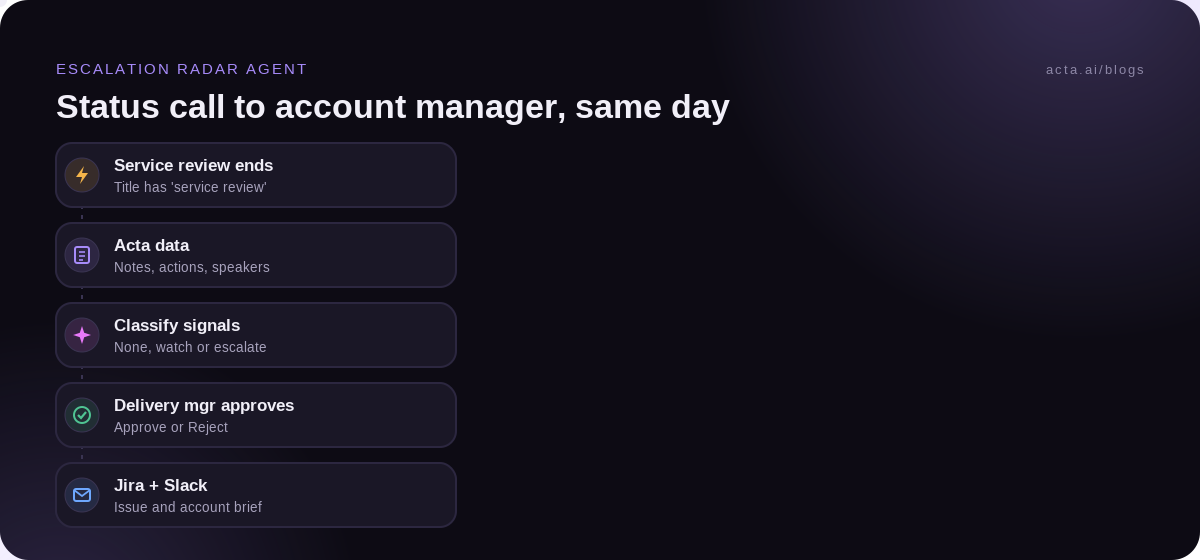
Recording and reading still depends on someone looking. The fix for Northgate's problem is an agent that reads every service review the moment it ends. Acta's Agent Builder (beta) sits in the sidebar; click "New agent", describe it in a sentence, and edit the draft it builds, or start from blank. Here is the escalation radar, step by step.
- Start: "When a meeting ends", with the filter title contains "service review". The triggers guide lists the other starts.
- Acta data: pull the meeting's notes, action items and the speakers.
- AI: "Read these notes from a weekly IT service review. List any escalation signals: a client business deadline, the words contract, credit, penalty or renewal, a named senior person, or an issue described as happening again. Classify the call as none, watch or escalate. Write a five-line brief for the account manager with quotes."
- Switch on the classification. None: stop. Watch: Slack message to the account manager only, no approval needed because it stays inside the firm. Escalate: go on.
- Human approval: the delivery manager owns the agent, so the request goes to her, in the Approvals tab and by email with Approve and Reject buttons. If nobody answers within 24 hours, nothing is sent.
- Action, Jira: create an issue with the brief as its description. Set its failure option to "Try again".
- Action, Slack: message the account manager the brief. Set failure to "Carry on", so a Slack hiccup doesn't block the rest.
- Action, Gmail: draft a reply to the client's IT manager listing what was promised and by when. A draft, not a send: the delivery manager reads it before it goes.
Click Test, then Run test on the four most recent service reviews, including one you know went badly. In a test run emails and messages are only shown, never sent, and approvals pass by themselves. Tune the AI instruction until "watch" and "escalate" match your instincts, then Check and Turn on. Later edits go live with "Update the live version", and History shows every run. The test and turn-on guide walks through it.
A second, smaller agent is worth adding in week two: start on the Acta event "action item overdue", filter to service review meetings, and send a Slack message to the owner. It takes ten minutes and catches the "confirm the change freeze" kind of miss. Both agents act as the person who built them, so build them under the delivery manager's account, not a shared login. Our post on human approval in automation covers where approval steps earn their keep.
Roll it out to delivery and account teams in two weeks
Who records which meetings
- Delivery managers: every weekly service review and SLA walk-through, shared with Everyone in the workspace.
- Account managers: QBRs and renewal conversations, shared when the delivery team needs context.
- Support leads: major incident bridge calls, so the post-mortem template has something to work from.
- Not recorded: internal salary or HR conversations. Keep those out of the workspace entirely.
Two weeks, one account first
- Day 1: owner creates the workspace and invites the delivery manager, two support leads and the account manager from Settings > Workspace.
- Days 2-4: record one large account's calls. Turn on Ticket suggestions and the escalation watch template.
- Day 5: review the week's Action items by Person with the support leads; fix owner names Acta couldn't match.
- Week 2, days 1-2: build the escalation radar, test it on past calls, turn it on.
- Week 2, days 3-5: add the overdue-action agent; extend recording to two more accounts; agree in the delivery meeting that every escalate brief gets a reply from the account manager within one working day.
Mistakes that undo it
- Keeping service reviews private. The account manager's OneChat can only answer from meetings shared with the workspace.
- Making every call "watch". If the account manager gets a Slack ping after each call, they'll mute it. Tighten the AI instruction.
- Skipping the approval on client-facing email. Keep it, at least for the first quarter.
Frequently asked questions
What should client escalation meeting notes include?
Five things: the issue stated plainly, the business impact in the client's own words, each commitment you made, one named owner and date per commitment on both sides, and who speaks to whom next. Send them the same day. Leave out internal blame and speculation about root cause until it is confirmed.
How is an escalation meeting different from a weekly status call?
A status call reviews open tickets and planned work with the client's IT contact. An escalation meeting is called because the client believes the normal route has failed, and it usually brings in someone senior on their side and an account manager on yours. The notes carry more weight, so quote the client and keep commitments specific.
Can an Acta agent create Jira tickets without anyone checking?
It can if you build it that way, but put a Human approval step before the Jira action at first. Separately, the Ticket suggestions template never creates anything by itself: you tick the suggestions you want and click Create in JIRA. Many teams use the template for routine tickets and the agent for escalations.
Does the account manager need their own Acta seat?
Yes, if they are in the workspace at all: every workspace member uses a seat, recording or not, and the workspace owner pays for them. Pro is $8 per seat per month or $72 per seat per year. During the 15-day trial, workspace invites are free for up to 10 people, which is enough to pilot one account with delivery and account staff.
What happens if nobody approves the agent's message?
Nothing goes out. Approval requests wait in the Approvals tab and, if you switch it on, arrive by email with Approve and Reject buttons. By default, a request with no answer within 24 hours expires and the email, Slack message or Jira issue after it is not sent.
Decide what your service reviews should trigger
The question isn't whether to take notes on status calls; you already do. It's what a worrying sentence should set off, and how fast. Before next Tuesday's calls:
- Write your escalation signals: the dates, words and names that should reach the account manager on the same day.
- Share service reviews: with Everyone in the workspace, so account managers can ask about them.
- Turn on Ticket suggestions: keep routine tickets flowing to Jira with a click.
- Build the radar agent: test it on four past calls, keep the approval step, then turn it on.
- Review overdue items weekly: by person, with the support leads, until the Overdue tile stays small.
Start the 15-day free trial on one account and run the radar for a fortnight. More on how IT services firms use Acta is on the IT services page.