Instructions arrive on calls, and calls leave no file note
A litigation or transactional boutique has a predictable meeting pattern. There are client strategy calls, where the client decides what to pursue and at what cost. There is the weekly case team meeting, where the partner, associates and paralegal go through each matter's deadlines, discovery and next steps. Before a mediation or closing there is a prep session, and after it a debrief with the client. New matters start with an intake meeting.
The instructions that matter most are given on the client calls. Under the ABA's Model Rule 1.2, a lawyer must abide by the client's decision whether to settle a matter, and consult on the means. Rule 1.4, in state versions such as New Hampshire's client communications rule, requires a lawyer to promptly inform the client of decisions needing their informed consent and to explain matters enough for the client to make informed decisions. Your own state's version governs; the point for practice management is that the client's call is often where the decision is made.
Yet that call usually produces, at best, a short file note by whoever was on it, written after two more calls. If a different lawyer takes the next call, the two notes may sit in different places. Our page for law firms covers the other meetings where this shows up.
A Denver boutique went to mediation on superseded instructions
The firm, client and figures below are invented for illustration. Calloway Reyes is a 32-person commercial litigation boutique in Denver. Dana Calloway is the partner on a breach-of-contract claim brought by a former distributor against Summit Air Services, a regional HVAC company. Elena Ruiz is the senior associate, Tom the paralegal. On the client side, Greg is Summit's CEO and Ana its CFO.
4 March, client strategy call (Dana and Elena). After Dana walks through the risks, Greg says: "You can settle up to $180,000. But I want mutual non-disparagement in there, that's not negotiable." Dana's file note says the same.
12 March, follow-up call (Elena only). Summit's board met. Greg and Ana tell Elena the authority is now $150,000, and "if dropping non-disparagement gets it under 150, drop it." Elena types the change into her own notes document and means to tell Dana at the Monday team meeting. Monday's meeting is spent on a different client's summary judgment motion.
18 March, mediation. Dana works from the 4 March note. She signals flexibility up to the $160,000s while insisting on non-disparagement. The other side moves to $165,000 in principle. When Dana calls Greg for sign-off, he says: "I told your office $150,000 last week, and I told you to drop the clause." The deal has to be walked back, the mediator is unimpressed, and the client relationship takes a hit that has nothing to do with legal skill.
Elena did her job; she recorded the instruction. It never reached the person acting on it, and the old instruction was never marked as replaced.
A client instruction log for law firms records the change, not just the latest view
Think of it as a decision log template built for instructions. A useful entry has six parts: the matter, the instruction in the client's own words, who gave it and on which call, its limits or conditions, what it replaces, and whether it has been confirmed to the client in writing. The "replaces" field is the one most firms skip, and it is the one that would have saved the Summit mediation.
Acta's built-in templates include Contract negotiation, which suits negotiation calls, and Decisions & RACI, which works for the weekly case team meeting. For client strategy calls, write a custom template (paid plans; up to 10 per person; the custom templates guide explains the builder):
Template name: Client instructions call
What should this report do? For calls where a client gives or changes instructions on a matter: record each instruction in the client's words, who gave it, its limits, and any earlier instruction it changes.
Instructions given (Table: Instruction | Given by | Limits or conditions | Changes an earlier instruction?)
Authority and ranges (Bullets: settlement, budget, deadlines the client set)
Client questions and our explanation (Bullets)
To confirm in writing (Checklist: task, owner, due date)
Extra instructions: Quote the client exactly on any authority or limit. Do not summarise numbers.
When should Acta use it? Only matching meetings
Check it with "Test on a past meeting" before turning it on. Reports use only what was said: an empty section reads "Not discussed", an item without an owner reads "Unassigned", and each report carries key quotes you can play back.
The Decision log keeps every version of an instruction
The feature that maps most closely to an instruction log is Acta's Decision log, under My meetings, then Outcomes, then the Decision log tab. It reads your meetings for decisions, merges repeats of the same decision into one card, and keeps a history of every meeting where it came up. Each card shows who decided it and who owns carrying it out.
Statuses are deliberately few: Active, Changed, Reversed and Done. When a later meeting updates a decision, the card moves to Changed and shows the old wording under "Was:" with the date it changed. The History timeline marks each meeting as "first raised", "confirmed", "updated" or "reversed", with the quote and a play button for the exact moment.
Here is how the Summit card would have looked after 12 March, in the log of anyone who had the call:
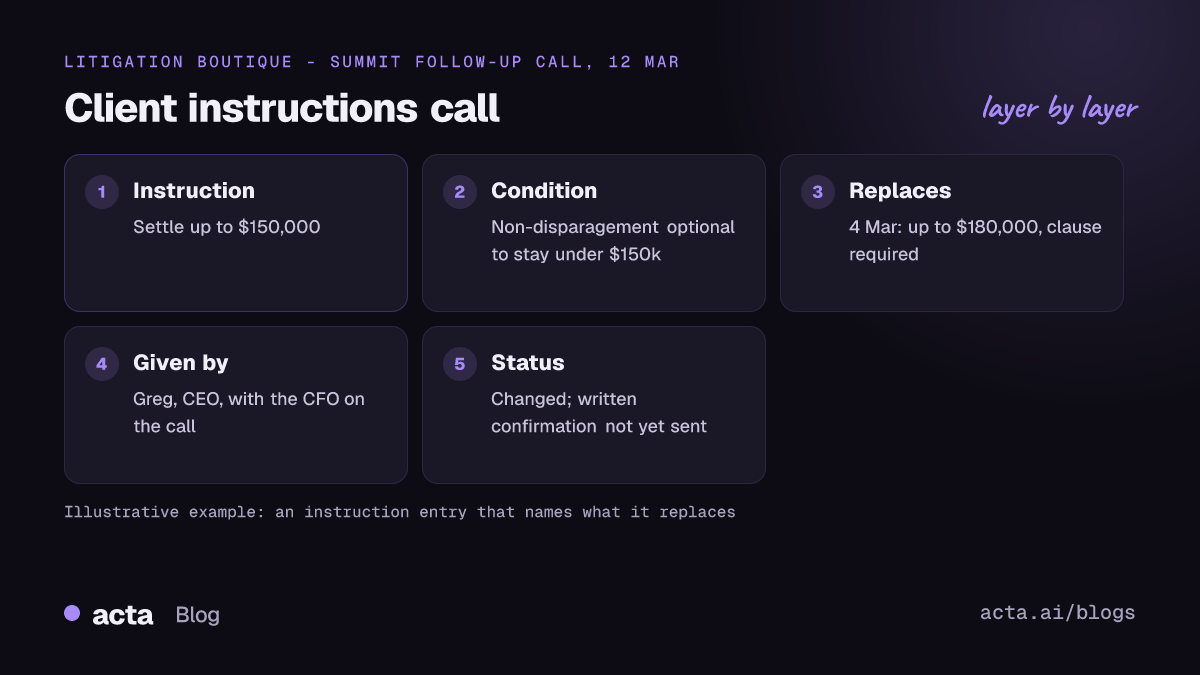
Decision: Settlement authority, Summit Air Services distributor claim: up to $150,000; mutual non-disparagement optional if needed to stay under $150,000.
Status: Changed. Was: up to $180,000 with mutual non-disparagement required, changed 12 Mar.
Decided by: Greg (Summit). Owner: Dana Calloway. Discussed in 2 meetings.
History: 4 Mar, first raised: "You can settle up to $180,000... non-disparagement, that's not negotiable." 12 Mar, updated: "The board says 150. If dropping non-disparagement gets it under 150, drop it."
Actions: 0 of 1 done (Send written confirmation of revised authority, Elena).
The tiles at the top, Decisions, Need follow-through, Changed or reversed, and Done, give a partner a quick read before any hearing or mediation: open Changed or reversed and look at every matter where the client moved. Group by Topic to see one matter's decisions together, or by Person to see what a given lawyer owns. The menu lets you correct the record: "Mark as reversed", "Mark as active", "Not a decision" for something Acta misread, or "Not the same decision?" to split two cards it merged. Export CSV writes the log to a file with columns for status, decided by, owner, first and last discussed, and the previous wording, which you can save to the matter file.
Now the part that would have mattered at Calloway Reyes. The Decision log is per person. Dana's log is built from the meetings she recorded and those shared with her in the workspace. Elena's 12 March call would appear in Dana's log only if Elena recorded it and shared it with the workspace. So the rule for matter teams is plain: share every client call with the team the same day. For more on tracking decisions generally, see how to track decisions made in meetings.
Action items, the Risk Registry and OneChat catch the gaps around it
Action items. Under Outcomes, the Action items tab would list "Send written confirmation of revised settlement authority to Greg", owner Elena, status "Overdue 4 days" by 16 March. Group by Person in the Monday case team meeting and the overdue confirmation is the first thing on screen.
Risk Registry. The Risk Registry tab lists risks heard in meetings, with Risk, Mitigation, Owner, Date, Impact and Status. A row like "Mediation 18 Mar: team may rely on 4 Mar authority", Impact High, Mitigation "Partner to confirm current authority with client before mediation" tagged Suggested, would sit on the "High · no owner" card until someone took it.
OneChat. The night before mediation, Dana could ask: "What is Summit's current settlement authority, and has it changed since we started?" The answer would give the $150,000 figure and the dropped condition, quote Greg, and list Found in: "Summit, client follow-up call, 12 Mar" and "Summit, strategy call, 4 Mar". OneChat answers only from meetings you can see and files you add.
Like the Decision log, the Action items view and the Risk Registry are personal to each user. OneChat, the Outcomes views and the Risk Registry are included in the 15-day trial and in Pro.
An agent drafts the confirmation letter when an instruction changes
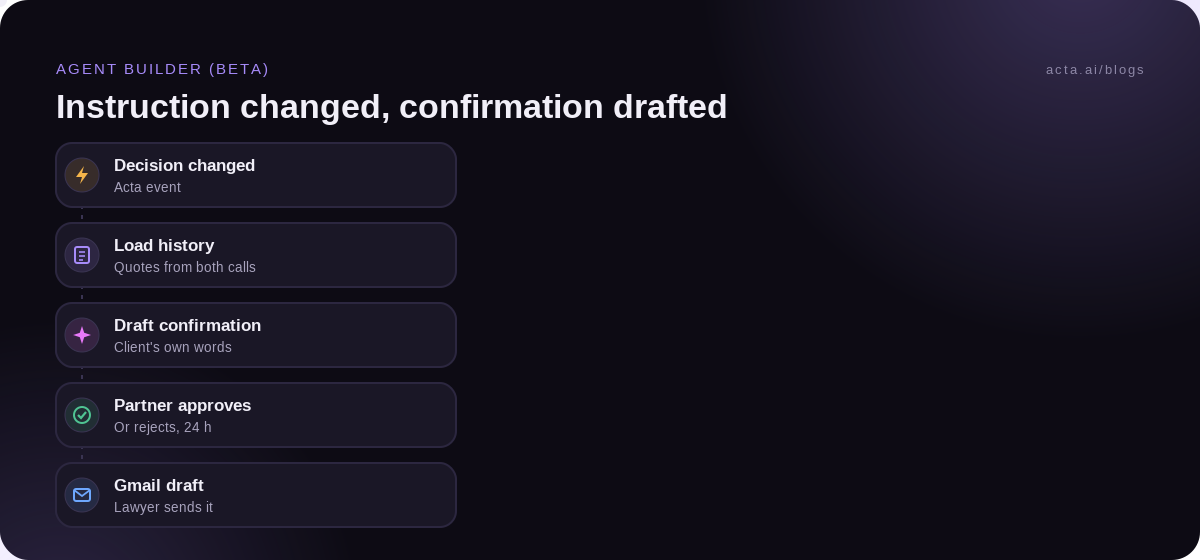
Agent Builder (beta) can react to the Decision log itself. When a decision on a matter changes, it drafts a confirmation of instructions and puts it in front of the responsible partner. It never sends anything to a client by itself in this recipe. Read the Agent Builder overview first.
- Click "New agent" and pick the trigger Event in a connected app, app Acta, event "decision made or changed".
- Add an "Only when" condition so it runs only for decisions whose text mentions settlement, authority or instructions.
- Add an Acta data step that loads the decision with its history and quotes.
- Add an AI step: "Draft a short letter to the client confirming the instruction as changed, quoting their words, stating the earlier instruction it replaces and the date of the call. Plain English, no legal conclusions."
- Add a Human approval step assigned to you as the responsible partner, with email Approve and Reject buttons.
- After approval, a Gmail action creates a draft (not a send) to the client, so the lawyer reads it once more and sends it from their own mailbox.
- Add a Gmail send to the matter team with the new instruction, so the associate and paralegal see it the same day.
- Run Test on the 12 March call; tests only show what would be sent. Then Turn on.
Unapproved runs lapse after 24 hours with nothing sent. Agents act as the person who owns them, so build it from the partner's account.
Introduce it to matter teams over two weeks
Confidentiality comes first. Decide which matters and which calls you will record, tell clients and get their agreement, and check your bar's guidance on cloud tools. Our posts on an AI notetaker for lawyers and confidentiality and on recording meetings with AI and consent cover the questions to settle. Acta does not use customer data to train AI models, each person's meetings are private until shared, and Enterprise plans add options such as SSO and custom data retention.
Who records: the lawyer who takes each client call, usually partners and senior associates. Every person added to the workspace takes a seat, so add paralegals only if they need to open matter calls themselves; one named on a task can get it by the daily follow-up email. Each seat is $8 per month billed monthly, or $72 per year, paid by the workspace owner. Calls on Zoom or Teams can be captured on the lawyer's own computer with the desktop app, with no bot in the participant list, and it has a Copy notice button to tell everyone the call is recorded.
Set up the workspace in Settings, then Workspace, invite the matter team, and make the managing partner an Admin. Use the share icon and choose "Everyone in" the workspace for client calls on shared matters. Sharing is either everyone in the workspace or Private, with no per-matter setting, so firms that wall off matters should decide up front which calls stay Private.
- Week 1: one partner, one associate, two active matters. Record client calls and case team meetings. Turn on the Client instructions call template; check every Decision log card against the file notes.
- Week 2: add two more matter teams. Start each case team meeting with the Changed or reversed tile. Test the confirmation agent on three past calls, then turn it on for one partner.
Mistakes to avoid: treating the Decision log as the formal file instead of a working aid; leaving calls private on a shared matter; and letting an agent send anything to a client without a lawyer's review.
Frequently asked questions
What is a client instruction log for law firms?
It is a dated record of each instruction a client gives on a matter: the instruction in their words, who gave it, any limits, and which earlier instruction it replaces. It helps every lawyer on the matter act on the current instruction and shows the history if questions arise later. This is general information, not legal advice.
Can Acta's Decision log serve as our instruction log?
It can serve as a working aid. It captures decisions from recorded calls, shows statuses Active, Changed, Reversed and Done, keeps the old wording and a quoted history, and exports to CSV. It is per person and built from meetings, so your formal file and written confirmations to the client should remain the authoritative record.
How does a partner see instructions an associate took?
The associate records the call and shares it with "Everyone in" the workspace. It then appears under Shared with me and feeds the partner's own Decision log, Action items and OneChat answers. Without sharing, the partner's views do not include it, because each person's Acta views are built from their own and shared meetings.
Is it appropriate to record client calls?
Many firms do, with the client's agreement and attention to privilege and confidentiality. Consent rules vary by state and country, and bars have issued guidance on cloud and AI tools, so check what applies to you. Tell the client at the start, explain why, and stop if they object. This is general information, not legal advice.
Can the agent send confirmation letters to clients automatically?
It can be built to send, but for client communications it should not. Use a Human approval step and have the Gmail action create a draft, so a lawyer reviews and sends it. If nobody approves within 24 hours, the run ends and nothing is sent. Testing shows the output without sending anything.
Choose your firm's standard for recording instructions
Firms rarely lose instructions through carelessness. They lose them between people. A shared standard closes that gap.
- Define an instruction entry: matter, client's words, who gave it, limits, what it replaces, confirmed or not.
- Agree on consent: which calls you record and how you tell clients.
- Share client calls the same day: with the matter team, through the workspace.
- Check before every hearing or mediation: the Changed or reversed tile and one OneChat question.
- Keep humans on client letters: approval and a draft, never an automatic send.
Start the 15-day trial from the pricing page on one matter team, or record browser-based calls with the Chrome extension.