Buyer calls carry approvals that never reach the tech pack
An export house runs on a few recurring meetings. The weekly call with each buyer or buying office goes style by style through lab dips, strike-offs, fit samples and test reports. There is the PP (pre-production meeting) before bulk cutting, where merchandising, production, the dyeing in-charge, quality and stores agree what the buyer approved and what still hangs. There is the daily production review on the floor, and a TNA (time and action) review once a week where somebody admits which dates are slipping.
The buyer call is the one that decides money. A technologist in Leicester or Manchester will say "lab dip B is fine for dusty rose, but I want it checked under TL84 before bulk, our stores are lit with it" and move straight on to the next style. That sentence is an approval with a condition. If it reaches the dye house as "dusty rose approved, lab dip B", the condition is gone, and nobody notices until the shipment sample fails at the buyer's QC.
Without a record, conditions drop off approvals, two merchandisers remember the same call differently, and a style that changes hands during Diwali leave arrives with emails but none of the spoken comments. The buyer, meanwhile, has notes, and quotes the date of the call when a dispute comes. Our page for textile and apparel exporters covers the other meetings in an export house.
A Tiruppur exporter lost a shade condition spoken three calls ago
Here is an illustrative case; the company and people are invented, the pattern is common. Kavin Knits is a 140-person knitwear exporter in Tiruppur making jersey tees and polos for a UK high-street buyer. Style KK-2241 is an 18,000-piece order in two colours, navy and dusty rose, with an ex-factory date of 24 October.
9 September, buyer call. Hannah, the buyer's technologist, approves lab dip B for dusty rose "provided it passes under TL84 as well as D65; half a shade lighter is fine, redder is not." Divya, the senior merchandiser, says "noted" and types "LD B approved" in her diary.
16 and 23 September, buyer calls. Fit and trims dominate. Dusty rose is not discussed again. At the PP meeting on 25 September, Kathir, the dyeing in-charge, asks if there were any comments on the shade. Divya checks her diary: "approved, B." Bulk is dyed and checked in the light box under D65 only.
6 October. The shipment sample goes to the UK. On 13 October the buyer's QC writes back: the dusty rose shows a clear red cast under TL84, "as raised on our call of 9 September". Senthil, the MD, is left with two options: a re-dye of 9,000 pieces, which wipes out the ex-factory date, or a discount the buyer names. Nobody at Kavin can find the condition in writing, because it was never written.
Multiply that by a season. A Ministry of Textiles release on PIB puts India's readymade garment exports at Rs 139,350 crore for 2025-26 (provisional), but for a mid-sized house the arithmetic is closer to home: one re-dye can erase a style's margin (the IBEF apparel overview has more background).
What the team lacked was a way to ask, in front of the dye house, "was there a condition on that lab dip approval?" and get the buyer's own words back with the date.
Buyer call notes for garment exporters need one row per style
Use a structure that mirrors how the technologist talks: style by style, stage by stage.
In Acta, start with the built-in templates that fit export work. Vendor review (in the Operations group) suits the monthly review where the buyer scores you on delivery and quality, and Contract negotiation fits price and payment-term calls with a new buyer. For the weekly style call, write your own. Custom templates are on paid plans and you can make up to 10 per person; the custom templates guide covers the builder. Here is the one Kavin's merchandising head would set up:
Template name: Buyer style call
What should this report do? For weekly calls with a garment buyer or buying office: list every style discussed with its stage, the buyer's verdict, any condition attached, and what our side must do next.
Section 1, Style comments (Table: Style no. | Stage | Buyer verdict | Condition or tolerance | Our owner | Due)
Section 2, Conditional approvals (Bullets: every approval that came with a "provided", "as long as" or "but", in the buyer's own words)
Section 3, Rejections and resubmits (Checklist: task, owner, due date)
Section 4, Dates the buyer mentioned (Bullets: ex-factory, sample deadlines, inspection dates)
Section 5, Open questions for the buyer (Bullets)
Extra instructions: Use the buyer's exact words for shade and fit comments. Keep style numbers as said.
When should Acta use it? Only matching meetings
In the builder each section is its own row with a title, an instruction and a format. Test it with "Test on a past meeting" on last week's call before you switch it on. Each report adds an "In short" summary and key quotes, and writes "Not discussed" rather than guessing when a style never came up.
The 9 September row for KK-2241 would have read:
| Style no. | Stage | Buyer verdict | Condition | Our owner | Due |
|---|
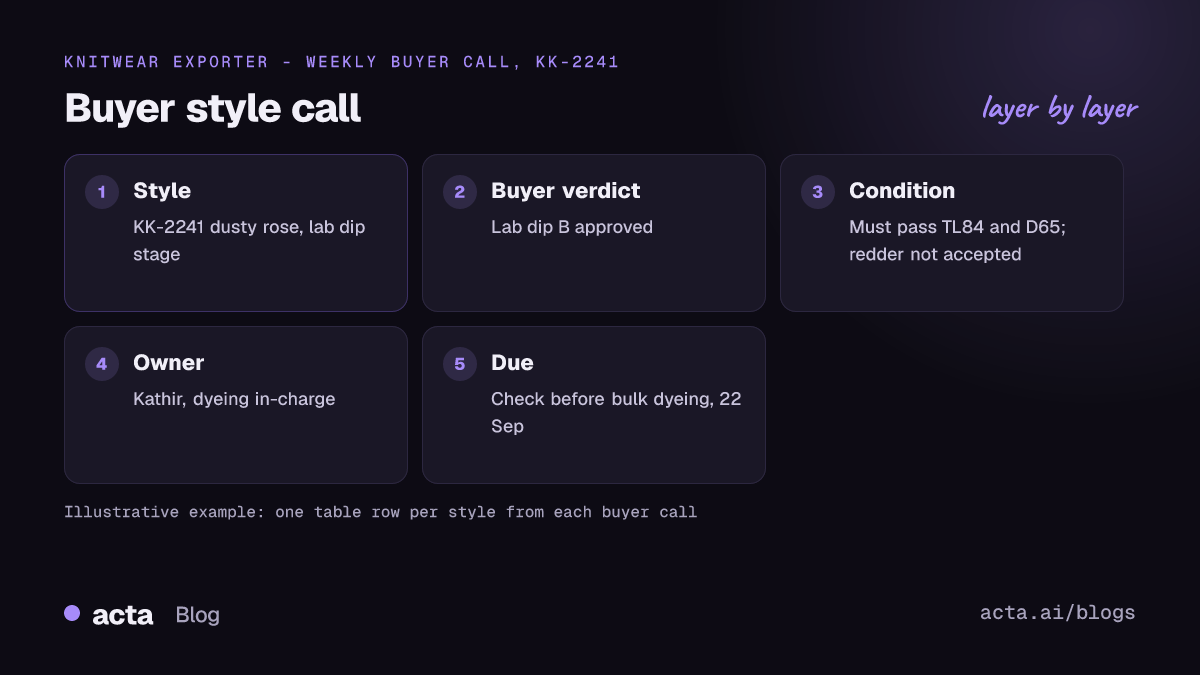
| KK-2241 dusty rose | Lab dip | B approved | Must pass TL84 and D65; lighter by half a shade OK, redder not | Kathir (dyeing) | Before bulk, 22 Sep |
| KK-2241 navy | Lab dip | A approved | None | Kathir | 22 Sep |
| KK-2238 polo | Fit sample | Rejected | Body length +1.5 cm at size L | Mohan (sampling) | Resubmit 19 Sep |
OneChat answers the "what did the buyer say" question across calls
The Kavin problem was a question across calls, asked weeks later by someone who was not on the original call. That is what OneChat is for. It sits first in the Acta sidebar and answers from all the meetings you recorded or that were shared with you, plus any files and links you add, and every answer lists where it was found. Click a source and the recording opens at that moment. (Ask Acta, on a single meeting's page, is the tool for questions about that one call.)
Had Kathir asked before the PP meeting, the exchange would look like this:
Question: What did the buyer say about the dusty rose shade on KK-2241 since August? Any conditions?
Answer: On 9 September Hannah approved lab dip B for dusty rose with a condition: "provided it passes under TL84 as well as D65; half a shade lighter is fine, redder is not." It was not raised again on 16 or 23 September, so the condition still stands.
Found in: Buyer call, KK-2241 fits and shades, 9 Sep (at 14:32)
Two habits help. Use the scope button under the box to limit a question to one buyer's calls. And drop the tech pack and test report into the chat as files (up to 10 at a time), so OneChat can compare the written tolerance with what Hannah said. Then ask what your team actually argues about:
- "Which styles were approved with a condition this month, and has anyone confirmed the condition was met?"
- "Did we promise the buyer a revised ex-factory date for KK-2238, and who said it?"
Floor meetings in Tamil work too: Tamil is a beta language you pick in Settings, and OneChat replies in the language you ask in. For more on asking across many meetings, see our piece on asking questions across every meeting you've had, and the OneChat help guide.
Action items, the Decision log and the Risk Registry close the loop
OneChat finds the words. Three other views in Acta keep the follow-up honest. All of them live under My meetings, and all of them are personal: each one is built from the meetings that person recorded or that were shared with them in the workspace. Divya's views show what Divya can see; there is no single company register.
Action items
Under My meetings, open Outcomes, then Action items. The filter tiles read Open, Overdue, Due this week and Done, and you can group by Meeting or by Person. A typical row from the 9 September call: "Check KK-2241 dusty rose bulk under TL84 and D65 before cutting", owner Kathir, status "Due in 3 days". If Divya switches on Auto follow-up, Acta emails each owner their own open items every weekday morning until they are done.
Decision log
Outcomes also has a Decision log tab. The decision "Dusty rose for KK-2241 runs on lab dip B, subject to TL84 check" would show as Active, decided by Hannah, owned by Kathir, with a History entry marked "first raised" and the quote. A later change would show as Changed, with the old wording under "Was:". The "Need follow-through" tile flags decisions whose action items are not done.
Risk Registry
The Risk Registry tab lists risks raised in meetings with Risk, Mitigation, Owner, Date, Impact and Status. Kavin's row: "Dusty rose may show red cast under store lighting (TL84)", Impact High, mitigation "Light-box check under TL84 before bulk" marked Agreed, owner Kathir, status Open. If nobody owned it, it would surface on a "High · no owner" card at the top.
The Outcomes views, the Risk Registry and OneChat are included in the 15-day trial and in Pro.
An agent can post every buyer comment to your style sheet
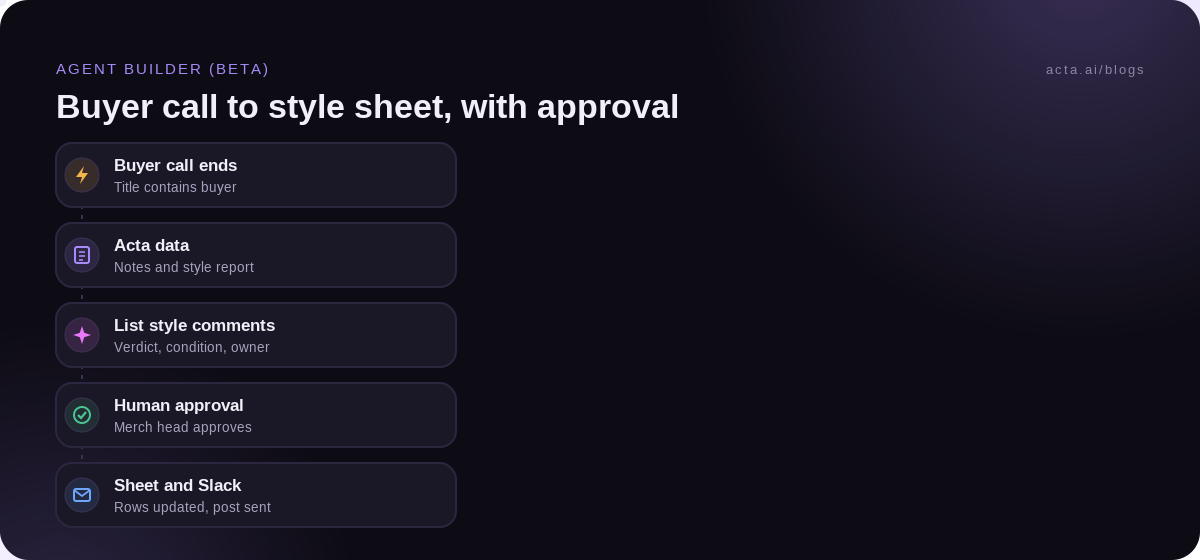
Most exporters already keep a style status sheet, effectively a buyer comments tracker, in Google Sheets. Agent Builder (beta) can fill it from each buyer call, with a person approving before anything goes to the team channel. A merchandising head can set this up in an afternoon; the Agent Builder page explains the building blocks.
- Click "New agent" and choose the trigger When a meeting ends, with the filter that the title contains "buyer".
- Add an Acta data step to pull that meeting's notes and the Buyer style call report.
- Add an AI step: "For each style, return style number, stage, verdict, condition in the buyer's words, owner and due date. Mark any approval with a condition."
- Add a For each step over the styles, with a Google Sheets action that finds the row by style number and updates the "Last buyer comment" and "Condition" columns.
- Add a Human approval step addressed to you, with "Also email me Approve and Reject buttons" ticked.
- After approval, a Slack action posts the conditional approvals to your #merchandising channel.
- Click Test, then Run test on last week's call. Nothing is sent during a test. Then Turn on.
If nobody approves within 24 hours, nothing is posted. Agents act as you, using your own connected accounts.
Roll it out to merchandising in two weeks
In a 60 to 250 person export house, only the merchandisers, the merchandising head and whoever chairs the PP meeting need to record. Every workspace member holds a seat; supervisors can get tasks by follow-up email instead.
Sharing is per meeting. Each person's meetings are private by default; on a buyer call, click the share icon and choose "Everyone in" your workspace so teammates can open it and ask OneChat about it. They will find it under the Shared with me tab. Invite people from Settings, then Workspace, and give the MD or merchandising head the Admin role. The team setup guide has the steps.
Before the first call, tell the buyer. Our guide on recording meetings with AI and what to tell participants covers consent; this is general information, so check the rules where you and your buyer operate. For Teams or Zoom calls from the office PC, the Acta desktop app records without a bot joining, which buyers tend to prefer.
- Days 1 to 3: one merchandiser and one buyer. Record every call for that buyer, switch on the Buyer style call template, and compare its table with the merchandiser's own notes.
- Days 4 to 7: add the PP meeting. Share both with the dyeing in-charge, quality head and production manager, so every lab dip approval reaches the floor with its condition.
- Week 2: all merchandisers, all buyers. Each one asks OneChat two real questions a day and the merchandising head checks the Risk Registry before each PP meeting.
- End of week 2: turn on the Google Sheets agent and Auto follow-up for buyer calls.
Mistakes to avoid: recording calls but never sharing them, so the dye house still asks Divya, and treating the AI table as the approval record before a merchandiser has checked it. Related reading: how to search meeting transcripts for what was said.
Frequently asked questions
What should buyer call notes for garment exporters include?
Each style discussed, its stage (lab dip, strike-off, fit, PP, TOP), the buyer's verdict, any condition or tolerance in the buyer's words, the owner on your side and the due date. Add dates the buyer mentioned and open questions. Conditions matter most, because an approval without its condition is how shade and fit claims start.
Can a merchandiser find what a buyer said several calls ago?
Yes, if the calls were recorded or shared with them. In Acta, OneChat answers questions across all those meetings and shows the source meeting and moment for each answer, so the merchandiser can play the buyer's exact words. Narrow the scope to one buyer's calls when several buyers have similar styles or colour names.
Do production and dyeing staff need their own Acta seats?
Only if they join the workspace; every member holds a seat, recorder or not. Named owners can get their items by the Auto follow-up email. Most exporters give seats to merchandisers and the merchandising head first, then add the production manager if they chair the PP meeting.
Is there a shared decision log for the whole export house?
No. The Decision log, Action items view and Risk Registry in Acta are per person, built from the meetings each person recorded or that were shared with them. To give the merchandising head a complete picture, share every buyer call and PP meeting with the workspace.
Will the buyer see a bot in the call?
Only if you send the Acta Notetaker. The desktop app on Windows or Mac and the Chrome extension record from your own computer with no bot in the participant list. Either way, tell the buyer at the start that you are recording and why; most buying teams accept it when they understand it protects both sides.
Decide what your merchandisers will capture from Monday
You do not need a new system to stop losing buyer comments. You need one agreed table, recorded calls, and a habit of asking before acting.
- Pick one buyer: the one with the most conditional approvals, and record every call for two weeks.
- Agree the columns: style, stage, verdict, condition in the buyer's words, owner, due.
- Share by default: every buyer call and PP meeting goes to the workspace, so the dye house can ask its own questions.
- Ask before the PP meeting: "which approvals this month came with a condition?" in OneChat.
- Check the flags: look at the Risk Registry cards and the Overdue tile before each TNA review.
The 15-day trial includes OneChat, the Outcomes views and the Risk Registry; start it on the pricing page and record your next buyer call with the Chrome extension or desktop app.