A voice AI agent is a phone line that listens, reasons and acts
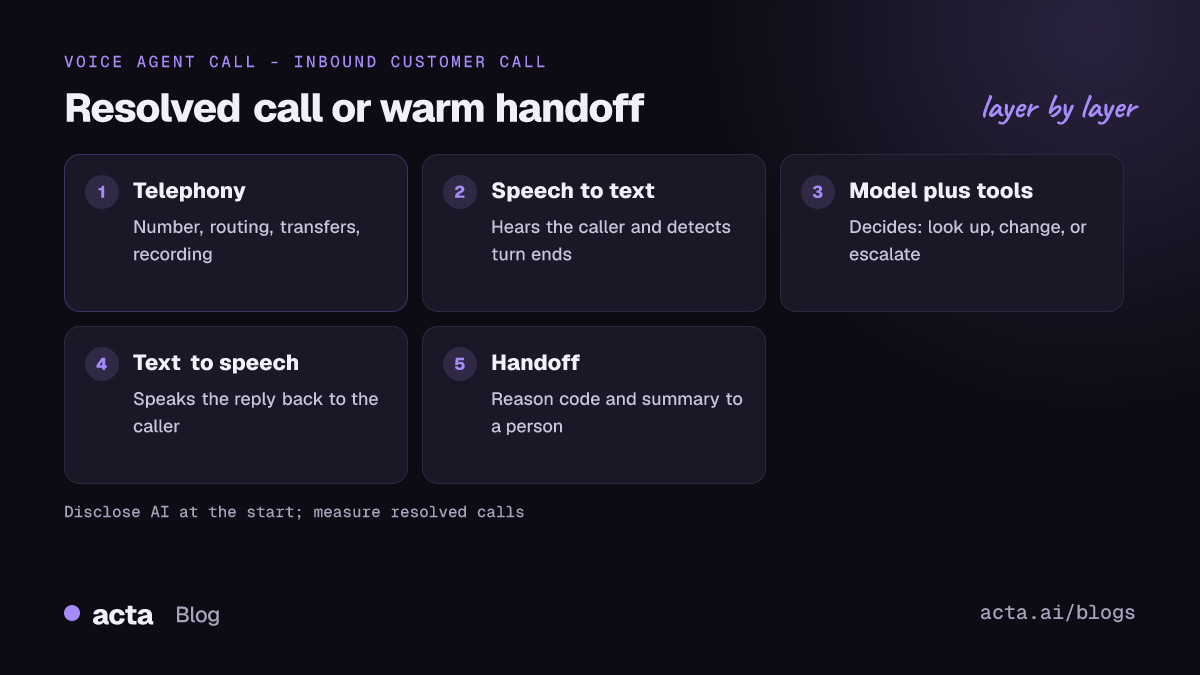
A voice AI agent is software that holds a spoken conversation on a phone call and can take actions in your systems during it. Under the hood, most have the same parts, whatever the vendor calls them:
- Telephony: the phone number, call routing, transfers and call recording, usually your existing contact centre or a carrier platform.
- Speech recognition: turns the caller's words into text as they speak, and detects when they've stopped.
- The reasoning layer: a language model with instructions and a set of tools, such as "look up order", "change delivery date", "escalate".
- Speech output: turns the reply back into voice. Some newer models go speech to speech without a text step in between.
- Handoff: moves the call to a person, ideally with a summary.
The difference from an old IVR is the middle layer. An IVR follows a menu tree you drew; a voice agent decides what to do from what the caller says. That's why it can handle "I moved house and the parcel's going to the old address" without a menu option for it, and also why it can confidently do the wrong thing if its tools and instructions are loose.
The cloud contact centre platforms now package this. Amazon's documentation for agentic self-service in Amazon Connect describes creating an orchestrator AI agent in an AI agent designer, setting it as the default self-service agent, and giving it tools, including an escalation tool. If you want a plain explanation of what makes something an agent rather than a chatbot, see AI agent vs chatbot vs Zapier automation.
AI voice agents for customer service handle narrow calls well
The calls that work share three traits: the caller's goal is clear, the answer lives in one system, and a mistake is cheap to reverse. The calls that fail have the opposite traits.
Good first calls
- Status lookups: where's my order, has my claim been received, when is my appointment.
- Simple changes: reschedule a booking, update a delivery slot, confirm an address.
- Account housekeeping: password reset flows, sending a document again, opening hours and policies.
- Triage and routing: find out what the call is about, collect the account number and the problem, then pass a ready-made summary to the right queue.
Calls to keep with people
- Complaints and anything where the caller is angry or upset.
- Bereavement, financial hardship, health or other vulnerability.
- Legal threats, regulatory complaints and anything a regulator might later review.
- Multi-system problems ("the invoice is wrong because the contract changed and the portal shows something else").
- Sales negotiations and retention offers, unless you've tightly scripted the offer.
Triage is underrated. Even when the agent can't resolve the call, collecting the details and writing a clean summary for the human shortens the call and makes the handoff better. It's also the lowest-risk way to learn how your callers actually talk. The same summary discipline matters for human calls; see support case summaries from customer calls.
Build vs buy is a question of which layer you own
"Build or buy" sounds binary. In practice there are three models, and the question is which layers of the call you want your engineers to own for the next few years.
| Model | What you own | Pick it if | Watch out for |
|---|
| AI agents inside your contact centre platform | Instructions, tools, flows | You already run that platform and want agents in the same queues and reports | Tied to the platform's models and features |
| Specialist voice-agent vendor | Prompts, integrations, testing | You want speed and don't have a voice engineering team | Per-minute pricing, data terms, how handoff reaches your queues |
| Build on open-source frameworks and APIs | The whole pipeline | Voice is core to your product and you can staff it long term | Ongoing work as speech, model and carrier providers change |
My verdicts. Buy inside your platform if you run a cloud contact centre already: agents share the queues, recordings and reporting your supervisors use, and escalation is a transfer within one system. Buy a specialist if you're a mid-size support team on an older phone system and need something live in weeks; check how their handoff lands in your queue before you sign. Build only if voice is a product feature, not a support cost, and you can give it engineers permanently. Open-source frameworks such as Pipecat and LiveKit Agents lower the starting cost, but you still pay for every speech, model and telephony service they call, and someone has to keep the pipeline working as those services change.
Whichever model you choose, insist on three things in the contract or design: you can export call transcripts and outcomes, you control the instructions and tool list, and you can switch the agent off for a call type instantly.
Escalation design decides whether callers trust the agent
Most bad voice-agent experiences are escalation failures: the caller asks for a person and gets another question. Design escalation before you design the happy path.
When to escalate
- The caller asks for a person, in any wording. Don't argue and don't offer one more try.
- The agent fails to understand or fails a tool call twice in a row.
- The topic matches the red list above (complaint, vulnerability, legal).
- The caller's identity can't be verified for an action that needs it.
- The call runs past a time limit you set for that call type.
How to escalate
Transfer with context. Amazon Connect's documentation shows replacing the default escalate tool with a custom one whose input captures the escalation reason, a summary, the customer's intent and sentiment, so the human sees why the call arrived. Twilio's AI-to-human handoff blueprint works the same way: the agent's model calls a handoff tool that packages the conversation context and routes it to a human agent, and the docs suggest adding escalation triggers, such as the customer asking for a human, to the system prompt.
Copy this handoff payload as a starting point:
Reason: caller asked for a person / not understood twice / red-list topic / identity not verified / time limit. Summary (two sentences): what the caller wants and what the agent already did. Verified: yes or no, and how. Account or order number. Caller's mood: calm, frustrated, upset. Next step the agent promised, if any.
Then tell the caller what happens: "I'm passing you to a colleague now and I've sent them a summary, so you won't need to repeat yourself." And make it true, because the first time a human says "can you start from the beginning?" the caller stops trusting the agent.
Disclosure and consent rules apply from the first second
Two rules shape how voice agents open a call, and recording rules sit on top of both. This is general information; check with counsel for your markets.
EU: tell people they're talking to AI. Article 50(1) of the EU AI Act requires providers to design AI systems that interact directly with people so those people are informed they're interacting with an AI system, unless that's obvious to a reasonably well-informed person. The Commission's AI Act Service Desk sets out the article; these transparency obligations apply from 2 August 2026, and the Commission published guidelines on Article 50 in July 2026. On a phone call, "obvious" is a weak bet. Say it.
US: AI voices are "artificial" voices. In February 2024 the FCC ruled that the TCPA's restrictions on "artificial or prerecorded voice" calls cover AI technologies that generate human voices, including voice cloning. The FCC's announcement matters most for outbound calls: calls using AI voices generally need the same prior express consent as other artificial-voice calls. Inbound support lines raise fewer TCPA issues, but outbound reminders and callbacks need care.
Recording and transcription. A voice agent transcribes everything, and most deployments keep recordings. Consent rules for recording differ by country and US state. Our guide on whether it's legal to record conversations with AI covers the common patterns, and is it illegal to record a conversation goes through one-party and all-party consent.
A disclosure line that covers all three: "Hi, you're speaking with [Company]'s automated assistant. This call is recorded and transcribed. You can ask for a person at any time."
Measure resolved calls, not contained calls
"Containment rate" (the share of calls the agent finished without a human) is the number vendors lead with, and it's the easiest one to game. An agent that refuses to transfer has perfect containment and furious customers. Track these instead, per call type:
- Resolution rate: calls the agent finished where the caller's problem was actually solved, checked by a sample review or by the absence of a repeat contact.
- Repeat contact within 7 days: the same caller about the same issue. This catches false containment.
- Escalation rate and reasons: split by reason code. A rise in "not understood twice" points at speech or prompt problems; a rise in "asked for a person" may point at the opening.
- Handoff quality: did the human have to re-ask for information? Ask agents to tick a box after each transferred call.
- Customer satisfaction for AI-handled and human-handled calls of the same type, side by side.
- Cost per resolved call: total per-minute and platform costs divided by resolved calls, not by all calls.
Review a sample of calls every week during the pilot: some resolved, some escalated, and every call that ended in a complaint. Listen, don't just read transcripts; tone problems don't show up in text. If you are still choosing where an agent should start, how to pick your first AI agent use case helps narrow it down.
Run a six-week pilot on one call type
A pilot that tries to cover every call teaches you nothing. Pick one call type and run it properly.

- Weeks 1 to 2, scope and script. Choose the call type, write the disclosure line, list the tools (read-only first), the red-list topics and the escalation triggers. Write ten test calls, including three where the right answer is "transfer".
- Week 3, internal testing. Staff call in with accents, background noise, interruptions and wrong account numbers. Fix the prompts and tools; don't widen scope yet.
- Weeks 4 to 5, limited live traffic. Route a small share of that call type to the agent during staffed hours, so every escalation has a human ready. Review calls daily.
- Week 6, decide. Compare resolution, repeat contacts and satisfaction with the human baseline for the same call type. Expand, fix and rerun, or stop.
The calls that escalate are your best training material, and they're handled by people on whatever phone or meeting app your team uses. If you want those human conversations written up too, Acta's desktop app records any calling app on Windows or Mac and writes the transcript, summary and action items, which makes the weekly review faster. That's a supporting tool for the human side, not a voice agent.
Frequently asked questions
What can AI voice agents handle in customer service?
They handle narrow, repeatable calls well: order and appointment status, rescheduling, address updates, resending documents, and triage that collects details before a transfer. They struggle with complaints, vulnerable callers, legal issues and problems spanning several systems. Start with one high-volume, low-risk call type the agent can resolve by reading or changing a single record.
Should we build or buy a voice AI agent?
Buy if you already run a cloud contact centre whose platform offers AI agents, or if you need something live in weeks without a voice engineering team. Build on open-source frameworks only if voice is a product feature and you can staff the pipeline long term, because speech, model and telephony providers keep changing underneath it.
Do you have to tell callers they're talking to AI?
In the EU, Article 50(1) of the AI Act requires people to be informed they're interacting with an AI system unless it's obvious, from 2 August 2026. In the US, the FCC treats AI-generated voices as artificial voices under the TCPA, which mainly affects outbound calls. Disclosing at the start of every call is the simplest safe practice.
How do you measure an AI voice agent?
Measure resolution rate, repeat contacts within seven days, escalation rate by reason, handoff quality and satisfaction against human-handled calls of the same type. Treat containment rate with care: an agent that never transfers looks perfect on containment and still fails customers. Review a sample of recorded calls every week during the pilot.
When should a voice agent hand off to a human?
Hand off when the caller asks for a person in any wording, when the agent fails to understand twice, when the topic is a complaint or involves vulnerability or legal issues, when identity can't be verified, or when the call runs too long. Pass a reason and a short summary so the caller doesn't repeat themselves.
Decide whether a voice agent fits your phone line
A voice agent earns its place when it takes predictable calls off your team and hands the hard ones over cleanly. Use this list before you sign anything.
- Pick the call type: one high-volume, low-risk call that a single system lookup or change can resolve.
- Write the red list: topics that always go to a person, agreed with your support and compliance leads.
- Design the handoff: reason code, two-sentence summary and verification status, tested end to end.
- Fix the opening line: AI disclosure, recording notice and "ask for a person any time".
- Set the scorecard: resolution, repeat contacts, escalation reasons and satisfaction against the human baseline.
For the calls your team still takes by hand, the Acta Chrome extension writes up browser meetings and calls without a bot, so the human side of support keeps good notes too.