RPA, workflow automation and AI agents do three different jobs
Robotic process automation (RPA) is software that operates other software through its user interface: it clicks buttons, types into fields, copies values from one screen and pastes them into another. UiPath's own documentation (as of November 2026) describes its robots as deterministic and rule-based, suited to repetitive, structured workflows, and running on schedules, triggers or attended execution. Same input, same clicks, every time.
Workflow automation (Zapier, Make, n8n, Power Automate cloud flows) connects apps through their APIs. A trigger fires ("new row in a sheet", "form submitted"), and a chain of fixed steps runs: look up a contact, create a ticket, post to Slack. There's no screen involved, which is why these flows survive a redesign of the app's interface. Our Zapier vs Make vs n8n comparison covers how those three differ on pricing and hosting.
AI agents use a language model to read the situation and choose what to do next, often by calling tools. The same UiPath documentation describes agents as probabilistic and adaptive, aimed at unstructured tasks, ambiguous environments and exception-heavy processes. That flexibility is the point, and it's also the risk: an agent can pick a different path on Tuesday than it did on Monday for an input that looks almost the same. If you want the basics first, what an AI agent is covers the definition without the hype.
So the useful question isn't "which is better?" It's "which part of this process is fixed, and which part needs reading and judgment?" Almost every real process has both.
Pick by input shape, interface and error cost
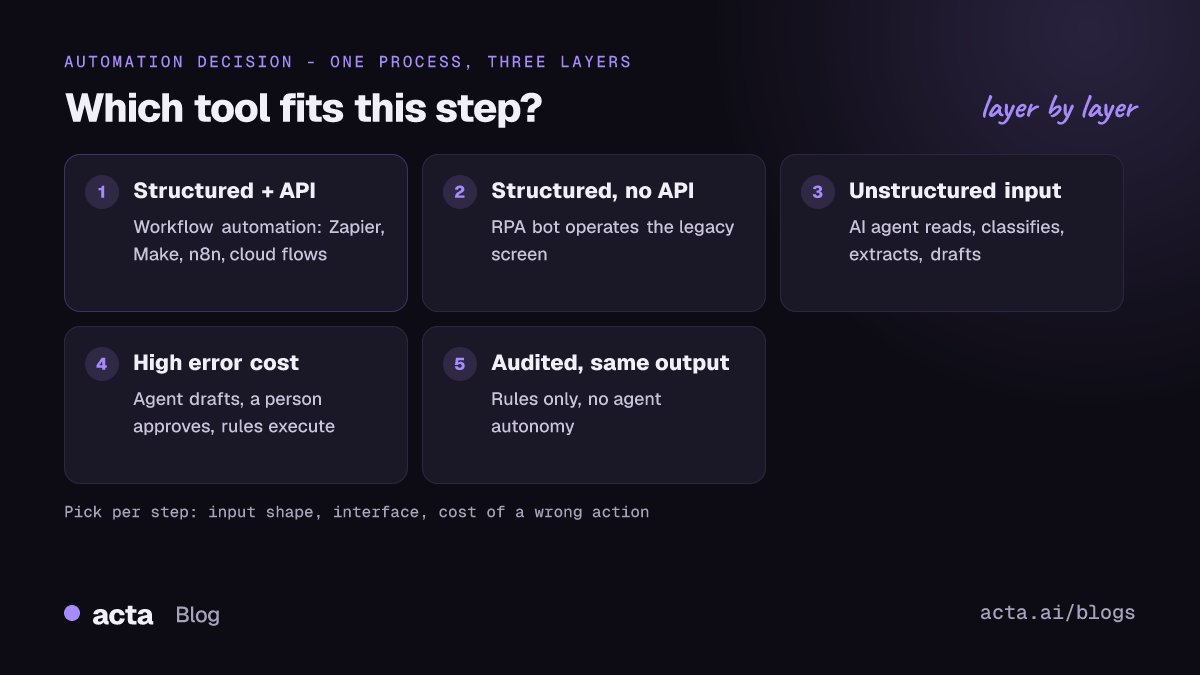
Run each step of a process through three questions before you pick a tool. Is the input structured (fields, IDs, fixed formats) or unstructured (free text, scans, voice)? Does the target system expose an API, or only a screen? And what happens if the step does the wrong thing once?
| Step looks like this | Best fit | Why |
|---|
| Structured data, app has an API | Workflow automation | Cheapest to build, testable, survives UI changes |
| Structured data, legacy screen only | RPA | Only option that can operate the interface |
| Free text or documents, low-risk output | AI agent | Needs reading and judgment; mistakes are cheap |
| Free text, high-risk action | Agent drafts, human approves, rules act | Keeps judgment and accountability apart |
| Same decision every time, regulated | Rules (RPA or workflow) | Auditors want the same output for the same input |
Two rules of thumb fall out of the table. First, an API beats a screen every time it exists; RPA is the adapter for systems that never got one. Second, an agent should almost never be the last step before something irreversible. Let it classify, extract or draft, and let a deterministic step or a person do the final write.
RPA still wins where there is no API
Plenty of business-critical software still has no usable API: old ERP clients, insurance and banking back-office screens, government portals, desktop accounting packages. For those, RPA is often the only automation that works without a costly integration project. Microsoft's Power Automate for desktop (desktop flows) exists for exactly this gap, and Microsoft's guidance on attended and unattended scenarios separates two ways of running a bot.
- Attended RPA runs on demand on a signed-in user's machine. A person starts it and can step in when a decision is needed. Good for "fill these twelve fields while I check the claim."
- Unattended RPA runs high-volume work with no one watching, typically started from a cloud flow. Microsoft's guidance notes that Windows 10 and 11 machines can't run unattended desktop flows while any user session is active, even a locked one, and that it creates a fresh session for each run.
The weakness is well known: a bot that finds fields by position or label breaks when the screen changes. Microsoft's own troubleshooting guidance for unattended runs lists differences between the attended and unattended environment, screen resolution among them, as a common cause of failure. Budget for maintenance every time the target app ships an update, and keep a list of every screen each bot touches so you know what to retest.
Will AI agents replace RPA? For screens with no API, not soon. Agents that operate a browser or desktop exist, but they choose clicks probabilistically, which is the opposite of what you want for posting 4,000 invoices into an ERP the same way every night. The more realistic change is that agents call existing RPA bots as tools, a pattern UiPath's own documentation describes as combining agents with robots.
Workflow automation is the default for app-to-app work
If both apps have APIs, start with a workflow tool. RPA vs workflow automation isn't a close call in that case: an API call doesn't care about button positions, it returns structured errors you can branch on, and many tools let you replay a failed run with the same data. Building the same flow with screen automation means paying the maintenance cost described above for no benefit.
Workflow automation still breaks, just for different reasons: expired OAuth tokens, renamed fields, rate limits, and silent changes in the upstream data. Our guide to why automations break lists the usual causes and the monitoring that catches them. The main habit worth copying: every flow gets an owner and an alert that goes to a person, not to a shared inbox nobody reads.
Where workflow tools struggle is the step in the middle that needs reading. "If the email is a complaint, open a ticket" is one rule in a flow builder, but deciding whether it is a complaint is a judgment call. That single step is where an AI model belongs, and many workflow tools now let you drop an AI step into an otherwise fixed flow. That is often all the "agent" a process needs.
AI agents earn their place on messy inputs and exceptions
Agents are worth the extra uncertainty when the input is unstructured or the path varies case by case. Typical good fits:
- Reading inbound emails and routing them by intent, urgency and account.
- Extracting fields from supplier PDFs whose layouts change every month.
- Handling the exceptions an RPA bot or a workflow rule kicks out, such as an invoice whose PO number doesn't match.
- Turning call notes into follow-up drafts, CRM notes and tickets.
- Research steps: "find the contract clause that covers early termination and summarise it."
And typical poor fits: anything with a fixed formula (tax calculations, payroll rules), anything where the same input must always produce the same output for audit, and high-volume steps where a rule would be right every time. An agent costs model calls on every run and can be wrong in ways that look plausible, so using one where a rule would do adds cost and risk for nothing.
When people say "agentic AI vs RPA", they're usually comparing an agent that improvises with a bot that never does. Neither is better in general. The agent is better on the email that doesn't match any template; the bot is better on the 300 that do.
The cost of a wrong action sets the level of autonomy
Before you automate a step, write down what a single wrong action costs and whether it can be undone. That one sentence decides how much freedom the step gets. A practical scale:
- Reversible and internal (tagging a ticket, drafting a note nobody sees yet): let the agent act and review samples weekly.
- Reversible but visible (updating a CRM field, posting to an internal channel): let it act, log every change, and make undo easy.
- Hard to reverse or external (emailing a customer, changing an order, granting access): the agent drafts, a person approves, a rule executes.
- Irreversible or regulated (payments, deletions, filings): no agent autonomy; rules only, with a human sign-off where policy requires one.
OWASP's Top 10 for LLM applications names this risk "Excessive Agency" (LLM06:2025): damaging actions taken because a model's output was unexpected, ambiguous or manipulated. It traces the cause to three things you control: too much functionality, too many permissions and too much autonomy. The mitigation list reads like the scale above: fewer tools, narrow permissions, and human approval for high-impact actions. Our post on human approval in automation covers where to put that checkpoint so it doesn't become a rubber stamp.
RPA has a different failure profile. A bot rarely makes a creative mistake, but when it's wrong, it's wrong at scale: the same bad paste into every entry until someone notices. So RPA needs input validation and volume alarms, while agents need permission limits and approvals.
Most teams combine them: the agent decides, rules act
The pattern that holds up in practice splits each process into a judgment layer and an execution layer. The agent reads, classifies, extracts and drafts. A workflow or RPA step performs the write, with fixed inputs it can validate. A person sits between them wherever the error cost says so. UiPath calls the combination agentic automation; you don't need their platform to use the pattern.

Here's a worked example from accounts payable. Supplier invoices arrive as PDFs in a shared inbox. A workflow tool picks up each new email and saves the attachment. An agent extracts supplier, amount and PO number and compares them with the PO data from the API. Clean matches go straight to an RPA bot that keys them into the old ERP screen. Mismatches go to an approver with the agent's reasoning ("amount is 3% above the PO; the PDF mentions a freight surcharge"). The approver clicks approve or reject, and only then does the bot post it.
Notice what each layer is trusted with. The agent never touches the ERP. The bot never decides whether a mismatch is acceptable. The workflow tool just moves files and calls. If the agent is wrong, the worst case is a bad suggestion in front of a person. Test the whole chain with dry runs before it goes live; testing automation without sending shows how to do that with sample data.
Governance for AI agents vs RPA bots is not the same job
RPA governance is mostly change control: which bot runs which process, on which machine, under which service account, and who retests it when the target screen changes. AI agents vs RPA governance differs because agent behaviour can change without anyone editing it, when the model, the prompt or the input data shifts.
The NIST AI Risk Management Framework core organises the work into four functions: Govern, Map, Measure and Manage, with Govern cutting across the other three. Translated into an agent checklist:
- Govern: every agent has a named owner, a written scope ("drafts replies to billing questions; never issues refunds"), and a review date.
- Map: list the tools, data and accounts the agent can reach, and the worst thing each could do in the wrong hands.
- Measure: sample outputs on a schedule and keep a log of overrides, so you know how often people correct it.
- Manage: have a kill switch, a rollback plan, and an incident path when the agent does something odd.
Two controls apply to both kinds of automation. Give each bot or agent its own credentials, never a person's login, so logs show who acted. And keep secrets out of prompts and flow descriptions. Our post on the risks of AI agents at work goes deeper on prompt injection and data exposure. If your agents remember context between runs, read how AI agent memory works before you decide what they may keep.
Where Acta fits
A lot of agent input starts as a conversation: a sales call, a project review, a customer escalation. Acta turns meetings into notes, decisions and action items with owners, and its Agent Builder (in beta) can start an automation when a meeting ends and pause at a human approval step before anything is sent. If bots aren't welcome on your calls, the desktop app captures them from your own computer instead.
Frequently asked questions
Will AI agents replace RPA?
Not for screens without APIs, as of November 2026. RPA bots repeat the exact same clicks every run, which is what high-volume, audited back-office work needs. AI agents choose steps probabilistically, so they suit reading and exceptions rather than bulk data entry. The likely direction is agents calling RPA bots as tools, with each doing the part it's reliable at.
What is the difference between agentic AI vs RPA?
RPA follows fixed rules and repeats scripted steps in a user interface, so the same input gives the same output. Agentic AI uses a language model to interpret input and decide the next action, so it handles unstructured text and exceptions but can vary between runs. Use RPA for stable, structured tasks and agents where judgment is the work.
Is RPA vs workflow automation the same comparison?
No. Both follow fixed rules, but RPA works through the user interface while workflow automation connects apps through their APIs. If the target app has an API, workflow automation is usually cheaper to build and much less fragile, because a redesigned screen doesn't break it. Keep RPA for legacy desktop or web systems with no API.
What is intelligent automation?
Intelligent automation is the common label for combining rule-based automation (RPA and API workflows) with AI steps that read documents, classify requests or draft text. In practice it means the agent-decides, rules-act pattern: AI handles the unstructured part of a process, and deterministic steps perform the actions, with human approval where a wrong action would be costly.
Do AI agents need human approval?
Agents need human approval for any action that is external, hard to reverse or regulated, such as customer emails, payments, access changes and deletions. OWASP lists excessive autonomy as a root cause of LLM incidents. Low-risk internal actions, like tagging a ticket or drafting a private note, can run without approval if you sample outputs regularly.
Choose the right automation for each step
Don't pick one tool for the whole process. Break it into steps and give each step the cheapest tool that is reliable enough for its error cost.
- Map the steps: write the process as a numbered list and mark each step as structured or unstructured input.
- Check for APIs: any step whose target system has an API goes to workflow automation, not RPA.
- Isolate the judgment: give agents only the reading, classifying and drafting steps.
- Price a mistake: add human approval wherever a wrong action is external or hard to undo.
- Assign an owner: every bot and agent gets a named person, its own credentials and a review date.
When meetings are where the work starts, try the Acta Chrome extension for Meet, Teams and Zoom in the browser, and see what an agent can do with clean notes.