AI agent memory has four layers
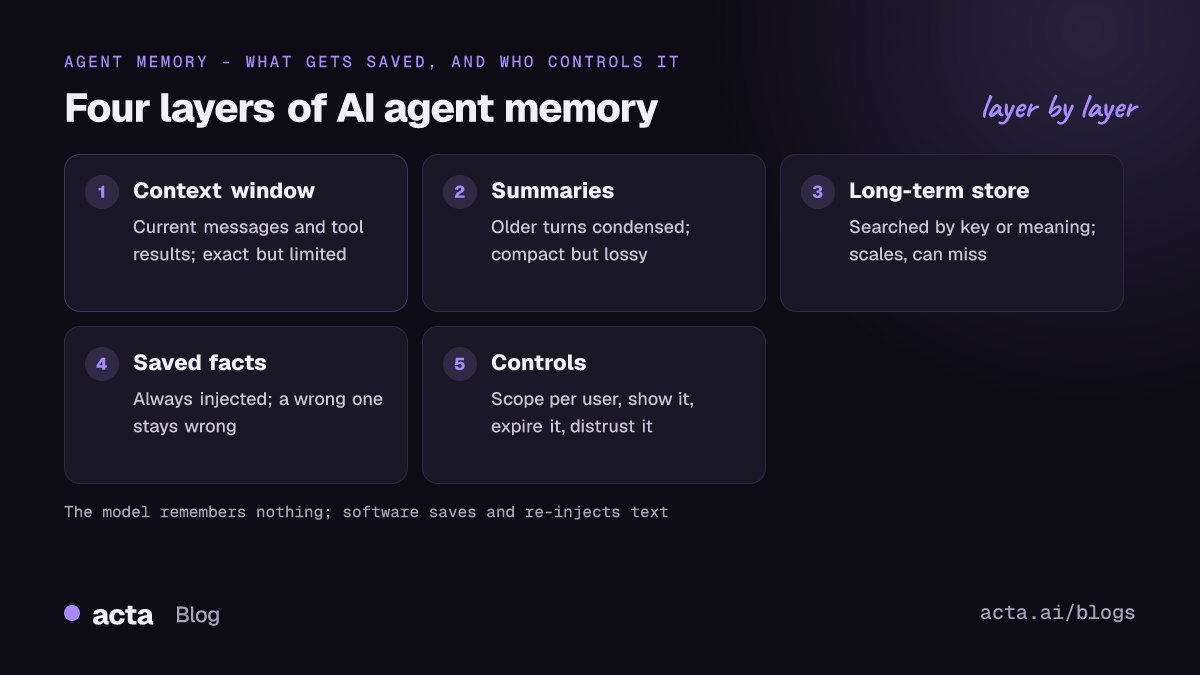
A language model takes text in and returns text. It has no hidden notebook between calls. So how do AI agents remember? Software around the model decides what to save after each turn and what to put back in front of the model on the next one. Everything people call agent memory is a version of that loop.
- Context window (working memory). The messages, tool results and instructions in the current request. The model sees all of it, and only it.
- Summaries. When a session gets long, older turns are condensed into a shorter note that replaces them, so the conversation can continue.
- Long-term store. Past conversations, documents or extracted facts saved in a database. The agent searches it, by key or by meaning (vector memory), and pulls relevant pieces into the context.
- Saved facts or profile. A short list of durable statements ("prefers metric units", "works in the Berlin office") injected into every conversation.
The layers differ in what they cost and what goes wrong. The context window is exact but limited. Summaries are compact but lossy. A store scales but depends on retrieval finding the right piece. Saved facts are always present, which makes a wrong one persistently wrong.
Short-term memory is the context window, and it runs out
Within one conversation, "memory" usually just means sending the earlier messages along with the new one. Agent frameworks wrap that up as a session. The OpenAI Agents SDK sessions documentation describes built-in session memory that keeps conversation history across agent runs, so you don't pass it by hand. Its SQLite session uses an in-memory database by default, which is lost when the process ends; to keep history across restarts, you give it a file. The docs' own pattern looks like this:
from agents import Agent, Runner, SQLiteSession
agent = Agent(name="Assistant", instructions="Reply very concisely.")
session = SQLiteSession("user_123", "conversations.db")
result = await Runner.run(agent, "What city is the Golden Gate Bridge in?", session=session)
That one line choice, in-memory or on disk, is the difference between an agent that forgets on every deploy and one that remembers a user for months. Make it deliberately. A file on disk is now user data, with the retention and deletion obligations that come with it.
The other limit is size. Context windows are large now, but every turn and tool result still takes space, and long contexts cost more per call. The SDK lets you cap how many recent items load per run. Most frameworks offer something similar; use it, and decide what happens to the older turns rather than letting them silently fall off.
Summaries keep long sessions going, at the cost of detail
When history outgrows the budget, the usual answer is compaction: summarise the oldest part, keep the summary, drop the original turns. Anthropic's API adds a related tool called context editing, which clears stale tool calls and results from the context as it approaches its limit, leaving the conversation itself in place.
Summaries are lossy by design. A one-paragraph summary of a two-hour working session keeps the decisions and drops the numbers, the caveats and who objected. That's fine for continuity and bad for anything you'll later need to verify. Two habits help:
- Keep the full transcript or log somewhere outside the context, and let the summary point back to it.
- Tell the summariser what must survive: open questions, commitments with owners, exact figures, and identifiers such as ticket or order numbers.
If your agent works over meetings or documents, retrieval over the originals is usually better than ever-longer summaries; our comparison of long context vs RAG explains when each holds up. Our guide to building RAG over meeting transcripts and documents shows that architecture end to end.
Long-term memory for AI agents lives in a store you query
Long-term memory survives across sessions because it lives in a database the agent reads from. The LangGraph memory docs draw the line clearly: short-term memory is thread-scoped and kept in checkpoints of the agent's state, while long-term memory sits in a store that spans threads and is organised into namespaces you define, such as one per user. The store supports semantic search, and the docs recommend a database-backed store (Postgres, MongoDB or Redis) for production rather than the in-memory one used in examples.
Vector memory is the common form of semantic search here. Each saved item is turned into an embedding, and at question time the agent fetches the items closest in meaning to the current request. It scales well and fails quietly: if retrieval picks the wrong past note, the agent answers confidently from it.

Anthropic takes a file-based approach with its memory tool. Claude reads and writes files in a memory directory and checks that directory before starting a task. The tool runs on the client side, which means your application implements the file operations and decides where they are stored. The docs tell you to restrict every operation to the /memories directory. That's a good example of a general rule: whoever stores the memory owns its security.
Whatever the mechanism, design the namespace first. Memory keyed only by "agent" rather than by user, team or tenant is how one customer's details end up in another customer's answer. Our post on permission-aware RAG covers the same problem for document retrieval.
ChatGPT memory and Claude memory work differently
Both assistants combine saved facts with the ability to draw on past conversations, but the controls differ. As of November 2026, from each vendor's help pages (features vary by plan and change often, so check the current page):
| Question | ChatGPT | Claude |
|---|
| What it keeps | Saved memories plus context from past chats | Memory plus search across past chats |
| Private mode | Temporary Chat: no memories used or created | Incognito chat: not saved to memory or history |
| Deleting a chat | Saved memories from it remain until deleted | Chat search can be switched off in settings |
| Org control | Check your workspace admin settings | Team and Enterprise owners control memory |
ChatGPT memory. OpenAI's Memory FAQ explains that saved memories are stored separately from chat history, so deleting a conversation doesn't remove a memory saved from it. To erase something fully, you delete it from every place it appears, including past and archived chats and the memory itself. You can turn memory off under Settings, Memory. OpenAI also says a log of deleted saved memories may be kept for up to 30 days for safety and debugging.
Claude memory. Anthropic's help article on chat search and memory says paid plans can let Claude search past chats, limited to chats outside projects or within the same project, and that this can be switched off in settings. Memory can be paused or reset. Incognito chats aren't saved to chat history or memory. On Team and Enterprise plans, owners control whether memory is available, and incognito chats still follow the organisation's data retention and export settings.
The practical difference for a user: in ChatGPT, check the memory list itself, not just your chat list; in Claude, check whether you are inside a project, because that scopes what past chats it can see.
Persistent memory brings four specific risks
Memory turns a one-off mistake into a standing one. The risks worth planning for:
- Stale or wrong facts. "Works at Northwind" stays true in memory long after the person moves. Saved facts need an owner who can see and fix them.
- Cross-context leakage. A detail from a personal chat surfaces in a work answer, or one client's data appears in another client's session. Scoping by project, user and tenant prevents most of this.
- Memory poisoning. An attacker plants instructions in a document, email or web page; the agent saves them; later sessions act on them. OWASP's agentic security work lists memory poisoning as its own risk, and in 2026 it published Agent Memory Guard, an open-source layer that screens reads and writes to an agent's memory store. Our post on prompt injection explains why instructions in data are so hard to block.
- Retention you didn't plan. Memories are personal data. If they are kept longer than the chats they came from, your retention policy has a gap. Our guide to AI data leakage covers secrets and personal information in context.
Users, admins and builders each own different controls
Memory is only safe if someone can see it. Split the checks by role.
Users: open your memory list once a month and delete what's wrong or private. Use Temporary Chat or incognito for anything sensitive, such as health, HR matters or a colleague's details. Don't paste secrets into a chat with memory on.
Admins: decide whether memory is on for the workspace and write the reason down. Align memory retention with your chat retention, check what exports include, and tell staff where the controls are.
Builders: namespace memory per user and tenant, store provenance (which conversation or document each memory came from), give memories an expiry, show users what's stored with a delete button, and treat anything read back from memory as untrusted input. If your agent acts on memory, put an approval step before high-impact actions; our comparison of AI agents vs RPA vs workflow automation covers where that checkpoint belongs.
Where Acta fits
For work, the most useful long-term memory is often what was said in meetings, kept with its source. Acta's OneChat answers questions across your meetings and shows where each answer was found, and meetings are private by default until you share them. If bots aren't welcome on a call, the desktop app captures it from your own computer.
Frequently asked questions
Do AI agents remember previous conversations?
Only if they are built to. The language model itself is stateless; an agent remembers earlier conversations because its software saves history, summaries or facts to a store and adds them back into later prompts. Frameworks such as the OpenAI Agents SDK and LangGraph provide sessions and stores for this, and ChatGPT and Claude offer memory features users can switch off.
How does ChatGPT memory work?
ChatGPT memory combines saved memories, which are facts you or ChatGPT chose to keep, with context drawn from past chats. Saved memories are stored separately from chat history, so deleting a chat doesn't delete them. Temporary Chats don't use or create memories. You can review, delete or turn off memory under Settings, Memory, as of November 2026.
Does Claude remember past chats?
On paid plans, Claude can search past chats and use memory to build on earlier context, as of November 2026. Search is limited to chats outside projects or within the same project, and it can be switched off in settings. Incognito chats are not saved to memory or chat history. On Team and Enterprise plans, owners decide whether memory is available.
What is memory poisoning in AI agents?
Memory poisoning is when false information or hidden instructions get saved into an agent's long-term memory, often from a document, email or web page the agent read, and then influence its later sessions. Defences include scoping memory per user, keeping provenance for each entry, expiring entries, and screening what the agent writes to and reads from memory.
Is long-term memory for AI agents the same as RAG?
They overlap. RAG retrieves passages from documents you supply; long-term agent memory retrieves what the agent itself saved from past interactions, such as preferences, decisions or summaries. Both often use vector search. The difference is who writes the content: with memory, the agent writes it, so you need review, expiry and deletion controls.
Set up agent memory you can trust
Good memory is visible, scoped and easy to delete. Use this checklist before you turn it on for a team or ship it in a product.
- Choose the layer: decide whether the task needs session history, summaries, a long-term store or saved facts, and use the smallest one that works.
- Scope it: separate memory by user, project and tenant from day one.
- Show it: give people a list of what's stored and a delete button.
- Expire it: set retention for memories that matches your chat retention.
- Distrust it: treat memory read-backs as untrusted input and gate risky actions behind approval.
To give your team's assistants a memory of meetings with sources attached, start with the Acta Chrome extension for Meet, Teams and Zoom in the browser.