Guarding companies review sites in three kinds of meeting
The first is the weekly incident review meeting. The operations head, the area or field officers, the control room supervisor and someone from HR go site by site: incidents logged in the occurrence book, absentees and reliefs, equipment faults, patrol checks missed. It is usually in the office on Monday morning, with a couple of officers dialling in from the road.
The second is the monthly client site review, held at the client's premises with their facility head, warehouse manager or housing society committee. This is where the client raises complaints ("guards on their phones at the main gate"), and where your officer says things like "the rear lights need repair, that's on your side". Then there is the client escalation: a call the morning after something went wrong, often heated, often with the client's own security manager taking notes.
All three generate risks, and almost none are written down as risks. They appear as a sentence in a WhatsApp group, a line in a field officer's diary, or nowhere. The occurrence book records what happened. Nothing records what was likely to happen. The risk register example further down shows what fills that gap.
A word on the rules around your business. In India, private security agencies are licensed under the Private Security Agencies (Regulation) Act, 2005; the Act's text is on India Code, and the Ministry of Home Affairs' PSARA portal carries the Act and the model rules. As of November 2026, licences are issued and supervised by each state's Controlling Authority. This is general information, not legal advice; check the portal and your state authority for what applies to you.
A rear-dock camera was mentioned twice before the theft
An illustrative example. Watchpoint Guarding Services (invented) has about 340 guards on 46 sites around Pune: housing societies, two hospitals, an IT office and eight warehouses in the Chakan belt. Its largest warehouse client stores auto components and pays for 14 guards across three shifts.
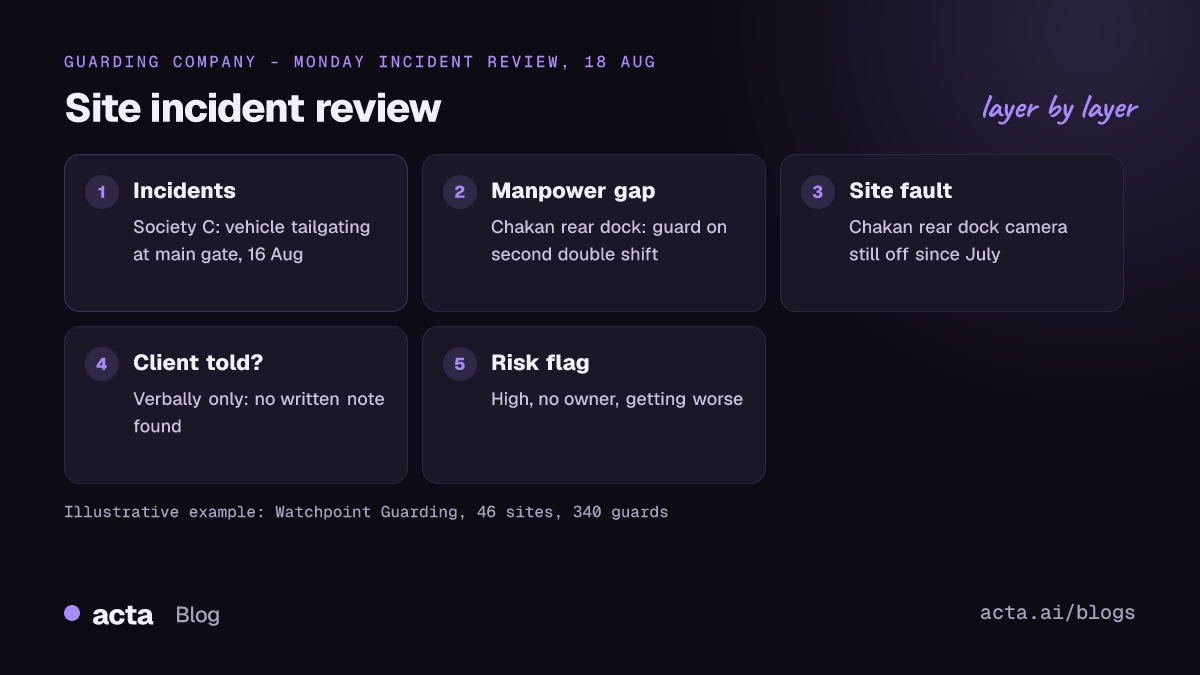
4 August, weekly incident review. Area officer Sameer runs through Chakan. Near the end he adds: "Rear dock camera is off since the rains, I told their IT person." The operations head, Vikram, nods and moves to the next site. No owner, no date, no note to the client in writing.
18 August, weekly review. Sameer mentions Chakan again, this time about manpower. Two night guards are on leave, so Dattatray at the rear dock is doing a double shift, his second that week. Sameer adds that the camera is "still the same". Again, the meeting moves on. Nobody connects the two remarks: an unwatched dock, guarded by a man on hour twenty.
22 August, 3:40 am. Two cartons of brake parts, worth about 1.8 lakh rupees, leave through the rear dock. The client's security manager calls at 8 am. "Your guard was asleep and the camera was off. Did anyone tell us?" Sameer had told their IT person. Verbally. Once. Watchpoint can't prove it, the client deducts the loss from the invoice and asks for the contract to be reviewed at the next quarter.
What hurts most is that the risk was known twice, by the right people, in the right meeting. It just never became a row anyone owned.
The Risk Registry turns remarks into owned risks
Acta's Risk Registry is a tab under My meetings. It reads your recorded meetings for risks and updates after each new one, keeping a risk raised again later as one row with the newest details. The table has six columns: Risk, Mitigation, Owner, Date, Impact (High, Medium or Low) and Status (Open, Mitigating or Closed). Mitigations are tagged Agreed when the fix was decided in a meeting, or Suggested when it is Acta's idea and nobody has agreed it yet.
Like the other Outcomes views, it is per person: Vikram's Risk Registry is built from the meetings Vikram recorded plus those his area officers shared with him in the workspace. There is no single company register that everyone edits. In practice that is fine, because the operations head is the one who needs the full picture, and sharing gives it to him.
Here is how Vikram's register would have looked after the 18 August review:
| Risk | Mitigation | Owner | Impact | Status |
|---|
| Chakan warehouse: rear dock camera off since July rains | Hourly patrol to rear dock, written note to client IT (Suggested) | No owner | High | Open, Getting worse |
| Chakan: rear dock night guard on second double shift this week | Relief from Bhosari pool from 19 Aug (Agreed) | Pooja, HR | High | Mitigating |
| Hospital B: visitor pass register not kept after 9 pm | Night supervisor checks register at 10 pm (Agreed) | Sameer | Medium | Open |
| Society C: boundary light on east wall broken | Raise with committee in monthly review (Suggested) | Suggested: Ritu | Low | Open |
Above the table, up to three attention cards show what needs you first. On 18 August two would have fired: "High · no owner" for the camera, and "Getting worse" because the same risk came back with more detail. One click on "Assign owner" puts Sameer's name and a date on it; "See history" shows both meetings with the exact quotes, which is the evidence Watchpoint didn't have on 22 August.
Use the chips to filter "N high" or "N no owner", and group by Project / customer so each client site is its own block. Before a client site review, group by that customer and you have the agenda. When a risk is fixed, close it, or let Acta mark it "suggested" closed when someone says in a meeting that it's solved, and confirm.
A note on guards working alone. Night posts at docks, basements and back gates are often single-person. The UK HSE's page on managing the risks of working alone asks employers to assess those risks and involve the workers in it; whatever your jurisdiction, a lone night post with no check-in call belongs in the register as its own row.
Security agency site review meeting notes need a fixed shape
Acta writes standard notes for every meeting: summary, decisions, action items with owners. For the special cases, use built-in templates from the templates by role list: Incident post-mortem after a serious incident, and Customer QBR for the monthly client site review. For the weekly review, a custom template (paid plan; up to 12 sections) keeps every officer's report in the same order:
Template name: Site incident review
What should this report do? For weekly incident reviews at a guarding company: incidents by site, manpower gaps, equipment faults, client complaints and anything that could lead to a loss or an escalation.
1. Incidents this week (Table: Date | Site | What happened | Reported by)
2. Manpower gaps (Table: Site | Post | Gap | Cover arranged)
3. Equipment and site faults (Table: Site | Fault | Whose fix | Client told in writing?)
4. Client complaints and escalations (Bullets, in the client's words)
5. Actions (Checklist: task, owner, due date)
When should Acta use it? Only matching meetings.
The column "Client told in writing?" is the one that would have saved Watchpoint. If the fault is the client's to fix, the report shows whether you have proof you told them. Run "Test on a past meeting" on an old review before you switch it on, and see the custom templates guide for the builder.
A good security incident report still belongs in your occurrence book and your client's format. The meeting notes are different: they capture the discussion around incidents, the "we should" and "it's still off" remarks that never reach an incident form.
Actions, decisions and OneChat close the gaps around each risk
Action items
Under Outcomes > Action items, the items from all those meetings sit in one list with Open, Overdue, Due this week and Done tiles, grouped by Meeting or Person. A filled row from Vikram's list: "Email Chakan client IT: rear dock camera off, request repair date" · owner Sameer · Overdue 3 days · comment "Called twice, no email yet". Turn on Auto follow-up so each officer gets a daily email of their own open items on weekdays.
Decision log
After the theft, Vikram decides that no guard works more than one double shift a week, with reliefs from a standby pool. In his Decision log that appears as: Decision: max one double shift per guard per week. Status: Active. Decided by: Vikram. Owner: Pooja (HR). Actions: 1 of 3 done. If, in a busy October week, someone says "let's allow two for Diwali", the card shows Changed with "Was: max one double shift", and it lands in the "Changed or reversed" tile so nobody can claim they didn't know.
OneChat
OneChat answers across all your meetings and cites them. Before the quarterly review with the Chakan client, Vikram asks: "Which sites had a camera or lighting fault raised in the last 60 days, and did we tell the client in writing?" The answer lists four sites, marks two as "no written note found", and links each to the meeting and moment it was said. The OneChat help page shows other questions to try.
A control-room alert agent takes an afternoon to build
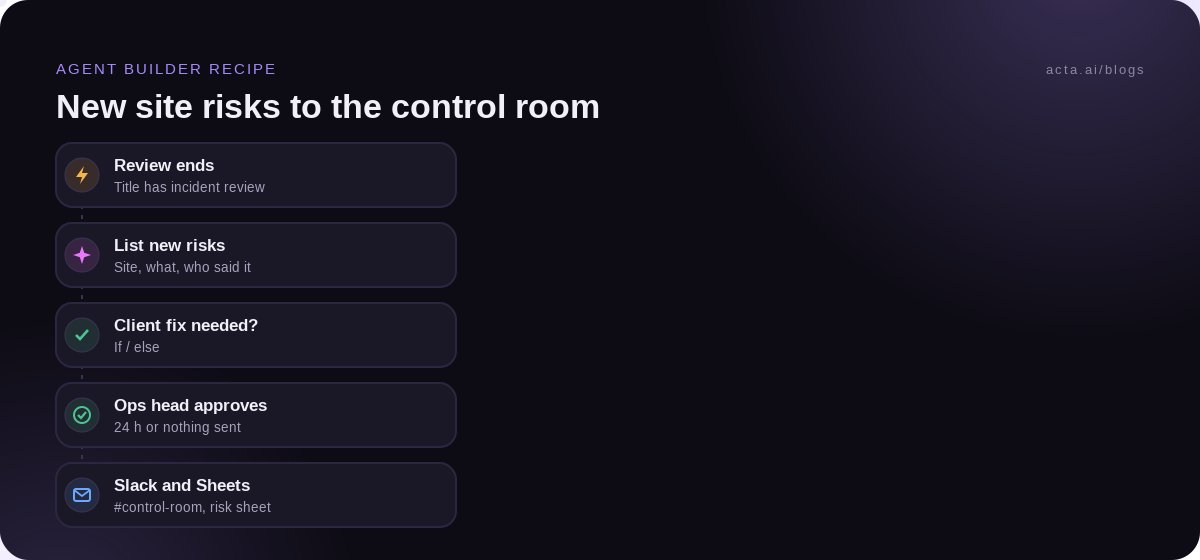
Agent Builder (beta) lets you chain a trigger, AI steps and app actions, with a human approval before anything goes out. This recipe posts new site risks to your control room's Slack channel and keeps a sheet of them:
- Click "New agent" and choose the trigger When a meeting ends, filtered to titles containing "incident review" or "site review".
- Add an Acta data step that reads the meeting's notes.
- Add an AI step: "List every new risk mentioned: site, what could go wrong, who said it, and whether the client needs to fix something. Skip anything already fixed."
- Add an If / else step: continue only if at least one risk names a client-side fix or a lone night post.
- Add Human approval so the operations head checks the wording; approvals go to the agent's owner, and nothing is sent if nobody answers within 24 hours.
- Add a Slack action that messages the #control-room channel, and a Google Sheets action that adds one row per risk to the site risk sheet.
- Run Test on the 18 August review, read the output, then Turn on.
The step list in the Agent Builder steps guide shows what else you can add, such as a Gmail draft to the client's facility head.
Two weeks gets every area officer on board
Only people added to the workspace use a seat. In a 340-guard agency that is the operations head, the area officers and perhaps the control room supervisor: six to ten seats, not 340. Pro is $8 per seat a month or $72 a year, and the Risk Registry, Outcomes and OneChat are included in the 15-day trial and in Pro.
Who records what. The operations head records the weekly incident review; if it is in the office, the mobile app on the table works. Area officers record client site reviews, also with the phone, and escalation calls. Those calls often happen on WhatsApp or a phone bridge; the desktop app records any call on a laptop when you press Record. Tell clients you record reviews and why; the guide to recording consent has wording.
Sharing. Meetings are private by default. Area officers share each client review with "Everyone in" the workspace so it feeds Vikram's register. The workspace setup guide covers invites and roles.
- Week 1, days 1-2: Set up the workspace, invite the operations head and two area officers, record the Monday review.
- Week 1, days 3-5: Open the Risk Registry daily. Assign an owner to every High risk; close anything stale.
- Week 2, days 6-8: Write the Site incident review template; test it on the first review. Turn on Auto follow-up.
- Week 2, days 9-10: Add the remaining officers, build the control-room agent, and bring the register to one client review.
Mistakes we'd avoid: leaving Suggested mitigations unagreed for weeks, letting "No owner" become normal, recording guard briefings nobody will read, and treating the register as paperwork rather than the agenda for client reviews. For the bigger habit, read 7 risks hiding in everyday conversations.
Frequently asked questions
What should go into a risk register for a security agency?
One row per risk, with the site, what could go wrong, the agreed fix, an owner, a date, impact and status. Include equipment faults, manpower gaps such as repeated double shifts, access-control lapses, lone night posts and client-side repairs you're waiting on. Note whether the client was told in writing, because that decides who carries the loss.
Can our client see the Risk Registry?
No. The Risk Registry is per person inside your Acta workspace, built from meetings you recorded or that teammates shared with you. To show a client, filter by their site and share the relevant rows in your monthly review deck or report. In our experience a client trusts a visible list of owned risks more than another apology.
How is meeting notes software different from an incident report?
An incident report records one event after it happens, in a fixed format for the client or police. Meeting notes capture the discussion around many sites, including warnings, half-promises and repairs nobody owns yet. You need both: the report for the record, the notes to catch what comes next.
Do field officers need laptops?
No. Officers can record client site reviews on the Acta mobile app for iPhone or Android, and the notes, action items and risks appear in their account after processing. The desktop app helps for calls taken at a desk, and the Chrome extension for Google Meet or Teams in a browser.
How long until the Risk Registry is useful?
The first time you open it, Acta reads your existing meetings for risks, which happens once. After two or three weekly reviews you will see repeats and "Getting worse" flags. Expect the first week to surface a backlog of unowned site faults; that backlog is the point.
Choose the risks you will own this month
You won't fix every site this month. You can make sure no known weak point stays ownerless. Start here:
- Record the Monday review: every site, every remark, every week.
- Clear "no owner": no High risk without a name and a date by Wednesday.
- Put it in writing: any client-side fix gets an email the same day.
- Cap double shifts: log the rule as a decision so changes are visible.
- Bring the register to clients: group by customer before every site review.
Install the desktop app for escalation calls and try the Risk Registry free during the 15-day trial.