STP and ETP contractors make promises in four kinds of meetings
A treatment plant contractor lives two lives. On the project side, a new STP for a gated community or an ETP for a pharma or textile unit runs through project progress meetings with the client and their PMC: civil works, tank construction, equipment delivery, electrical, commissioning dates. On the service side, every plant you handed over sits under an AMC (annual maintenance contract), with a monthly AMC review in the client's conference room, regular site visits by a service engineer, and a weekly internal O&M review where operators' problems, chemical stock and spares get discussed.
The project meetings tend to be documented, because the PMC insists. The service meetings mostly aren't. The client's EHS or facility manager asks for the flow meter calibration certificate, three months of lab reports and copies of the sludge dispatch log. Your service manager says "by next Friday". The operator mentions the MBBR blower has started vibrating. Then everyone drives back to the office.
Good plant operation has always been a record-keeping discipline. The US EPA's resources for wastewater operators include training modules on topics like lift stations and asset management, and the Texas regulator's note on EPA's process-control assistance for small mechanical plants is a reminder that small plants struggle with the same basics everywhere. The meeting side of it is simpler: write down what you promised and check it happened.
Three missing documents put a ₹14 lakh AMC renewal at risk
An illustrative example. BlueMarq Water Systems is a 95-person contractor in Hyderabad that builds STPs and ETPs and runs about 60 of them under AMC. One client is a mid-sized pharma unit whose ETP BlueMarq built in 2023; the AMC is worth ₹14.4 lakh a year and renews in October.
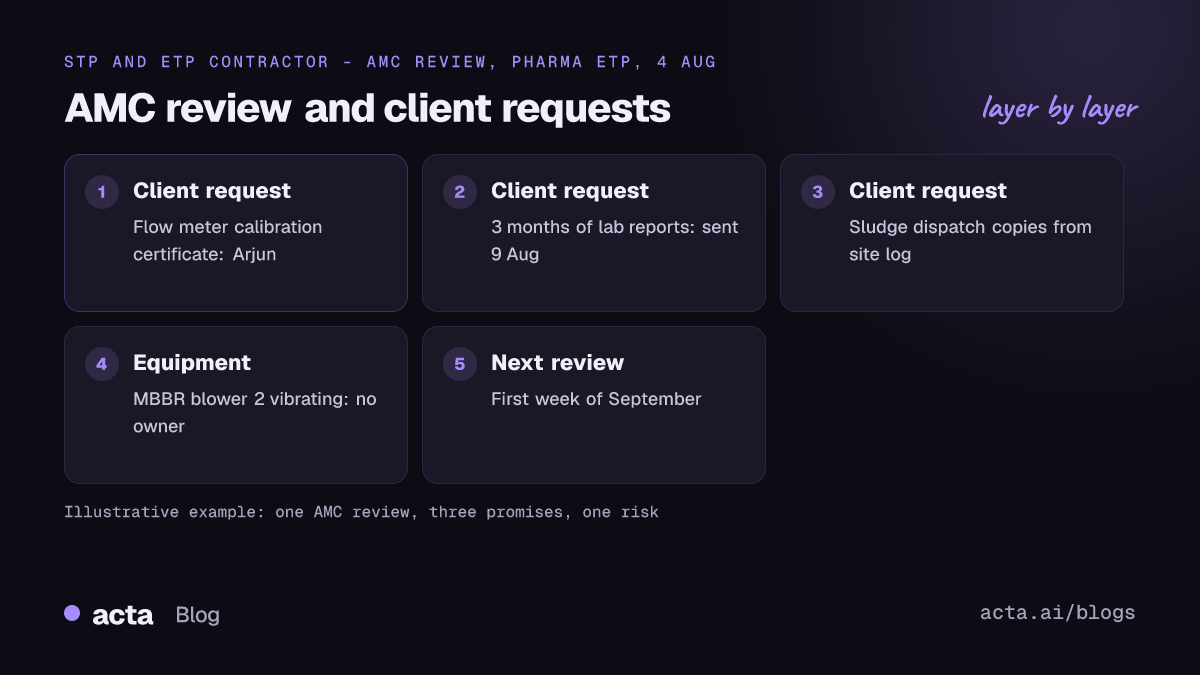
At the AMC review on 4 August, the client's EHS manager, Kavitha Rao, asked for three things ahead of an inspection she was expecting: the flow meter calibration certificate, the last three months of third-party lab reports on treated water, and copies of the sludge dispatch records. BlueMarq's service manager, Arjun Reddy, said all three would come by 11 August. The site operator, Mahesh, added that one of the two MBBR blowers had been vibrating for a week.
The lab reports went on 9 August. The calibration certificate didn't, because nobody had booked the calibration vendor's visit; Arjun thought the service engineer had, and the engineer thought the request was Arjun's. The sludge records were in a paper logbook at site, and nobody asked Mahesh to scan them. The blower got a note in the O&M review and nothing else.
On 25 August, Kavitha emailed BlueMarq's managing director, copying her purchase head, saying she would put the AMC out to tender in October. On 2 September the vibrating blower tripped, aeration ran on one blower for two days, and BlueMarq paid to rent a replacement. Not one of these failures was technical. Each was a promise made in a meeting that nobody chased.
Water treatment project meeting notes start with an AMC template
Acta records each meeting and writes a transcript with speaker names, notes, decisions and action items with owners and due dates. Its built-in templates already cover some of a contractor's meetings: Project status for installation progress meetings, Customer QBR for quarterly reviews with large clients, and Vendor review for calls with your calibration lab or chemical supplier. For the monthly AMC review, write your own in Templates using "+ Create template". Custom templates are on paid plans, and the custom templates guide shows each field.
Name: AMC review and client requests · When: Only matching meetings
What should this report do? For AMC reviews and site visits at sewage and effluent treatment plants: record plant performance as discussed, equipment problems, every document or report the client asked for, chemicals and spares, operator issues, and the next visit.
Sections: 1. Client requests (Checklist: task, owner, due date). 2. Plant performance as discussed (Table: Parameter | What was said | Concern raised). 3. Equipment issues (Table: Equipment | Problem | Action agreed). 4. Chemicals and spares (Bullets). 5. Operator and staffing issues (Bullets). 6. Next visit and next review (Paragraph).
Extra instructions: Put client requests first. Name the document exactly as the client said it. Never state whether a reading meets a limit unless someone in the meeting said so.
That last instruction matters for a contractor. The report should record what was said, not offer a view on compliance. Where something wasn't discussed, Acta writes "Not discussed" rather than guessing. Test it on a past AMC review with "Test on a past meeting" before saving.
An overdue-item agent chases the team and drafts the client update
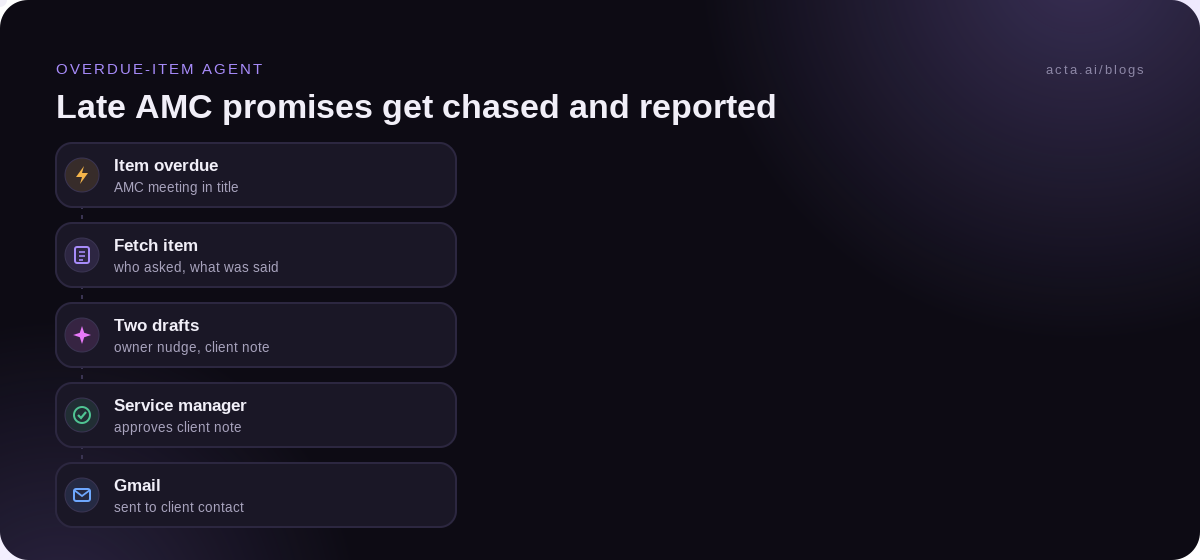
This is the piece that would have saved the pharma AMC. Acta's Agent Builder lets you build automations from triggers, steps and connected apps. Agent Builder (beta) is in the 15-day trial and Pro. Agents act as you, so anything addressed to a client goes through an approval step. Set it up like this:
The recipe
- In Agent Builder, open Connectors and connect Gmail with "Connect here". Acta itself needs no sign-in.
- Click "New agent" and describe it: "When an action item from an AMC meeting becomes overdue, remind the owner, and draft a short status update for the client for my approval." Review the draft steps it produces.
- Trigger: Event in a connected app, Acta, "action item overdue". Add an "Only when" condition: the meeting title contains "AMC". Events are checked every few minutes.
- Acta data: fetch the overdue item and its meeting, so the AI sees who asked and what was said.
- Memory: check whether this item has already produced a client update. If yes, stop; one update per item is enough.
- AI: "Write two things. First, a two-line reminder to the owner naming the item, the client, the date promised and how late it is. Second, a three-line note to the client contact giving the honest status and a new date only if the owner has commented one; otherwise say we will confirm a date tomorrow."
- Action: Gmail sends the reminder to the owner straight away. Internal nudges don't need approval.
- Human approval: the client note waits in Approvals. Tick "Also email me Approve and Reject buttons" so Arjun can approve from site. No answer in 24 hours means nothing goes to the client.
- Action: Gmail sends the approved note to the client contact. Memory records that this item has been reported.
- Set the failure behaviour on the Gmail steps to "Try again" and on the AI step to "Stop the run".
Test it before it touches a client
Click Test, then Run test. During a test nothing is sent: emails are shown on screen and approvals pass by themselves. Run it against the 4 August meeting and read both drafts. When they're right, click Check, then Turn on; the agent shows "On · version 1". Later changes go live with Update the live version, and History shows each run. AI steps use AI credits. The guide to testing and turning on agents covers each button.
Had this run in August, Arjun would have had a reminder on 12 August that the certificate was a day late, and Kavitha would have received an approved note that day saying the calibration visit was being booked. An honest update on day one costs nothing. A silent fortnight cost an escalation to the MD.
A second agent briefs the service manager before each AMC review
The first agent reacts. This one prepares. Use the trigger Event in a connected app, Calendar, "meeting about to start", limited to events with "AMC" in the title. Add an Acta data step for the last AMC review with that client, an AI step that lists last month's requests and their status, open equipment issues and anything the client complained about, then a Gmail draft to yourself. No approval is needed because it only goes to you.
Arjun walks into the September review knowing the certificate is still open before Kavitha says it. For more patterns like this, see meeting prep brief automation and the three agents you can copy in the help center.
Action items, decisions, risks and OneChat show what the agents act on
The agents work on the same data you see under My meetings. Those views are per person: Arjun's are built from the meetings he recorded plus those his engineers shared with the workspace. If a site debrief stays private on an engineer's phone, Arjun's lists and his agents never see it.
Action items (Outcomes > Action items, grouped by Meeting) on 13 August:
Send flow meter calibration certificate to Kavitha Rao · Owner: Arjun Reddy · Due 11 Aug · Overdue 2 days · from "AMC review, ETP, 4 Aug"
Decision log (Outcomes > Decision log):
Calibrate flow meters on all pharma ETP sites before each client inspection season · Status: Active · Decided by: BlueMarq MD · Owner: Arjun Reddy · Discussed in 2 meetings · Actions 0 of 4 done
Risk Registry tab:
Risk: MBBR blower 2 vibrating at pharma ETP, one blower left as standby · Mitigation: Suggested, bearing check and standby rental quote this week · Owner: No owner · Impact: High · Status: Open
That row sits in the "High · no owner" card until someone takes it. OneChat answers the MD's question across every meeting:
Q: What did we promise the pharma ETP client in August, and what's still open?
A: Three documents were promised by 11 August. Lab reports were sent on 9 August. The calibration certificate and sludge dispatch copies are still open, owner Arjun Reddy. A blower vibration was raised by the operator on 4 August with no owner. Found in: AMC review, ETP, 4 Aug · O&M review, 11 Aug.
The OneChat help page explains scope and sources.
A two-week rollout for project, service and operator teams
Who records what
- AMC reviews at the client's office: the service manager, on the Acta mobile app.
- Project progress meetings on Teams or Zoom: the project manager, with the notetaker bot.
- Operator calls on WhatsApp: the service engineer, on the desktop app, which records any call when you press Record.
- Weekly O&M review: the head of service.
Tell clients at the start of an AMC review that you record it to keep track of their requests; most welcome it. The recording consent guide covers how to say it.
The fortnight
- Days 1-2: Owner creates the workspace and invites the service manager, two service engineers and the project lead from Settings > Workspace. Members see their own meetings and those shared with the workspace.
- Days 3-6: Record every AMC review and debrief for three clients. Title them "AMC review - client - plant". Share each with everyone.
- Days 7-8: Build the AMC template; test on two past reviews.
- Days 9-11: Build the overdue-item agent. Run tests until the client note reads like Arjun wrote it.
- Days 12-14: Turn it on for the three clients. Add the prep agent. Review History daily.
What to avoid
Letting the agent send client notes without approval. Titling meetings inconsistently, which breaks the "Only when" filter. And asking the AI to judge plant performance against limits: keep reports to what was said. For more on why automations fail, why automations break is a useful read before you turn anything on.
Frequently asked questions
What should AMC review minutes for an STP or ETP include?
Every request from the client with an owner and due date, plant performance as discussed, equipment problems and agreed actions, chemicals and spares, operator or staffing issues, and the next visit. Put client requests at the top. Record what was said about readings without adding your own judgement on whether they meet any limit.
Can an Acta agent email our clients automatically?
It can send through Gmail when you build it to, and it acts as you. For client messages, add a Human approval step: the draft waits in Approvals or arrives by email with Approve and Reject buttons, and if no one answers within 24 hours nothing is sent. Internal reminders to your own staff can go without approval.
Does Acta check whether our plant meets discharge standards?
No. Acta records and summarises what was said in meetings and tracks the actions. It doesn't assess compliance, and your templates should tell it not to. Whether a reading meets a standard is for the plant owner and their advisers, using their own lab results and regulatory guidance.
How do service engineers record site visits?
With the Acta mobile app on iPhone or Android, which records in person, or by recording the debrief call afterwards with the desktop app. Either way the engineer shares the meeting with the workspace so the service manager's action items, risks and agents include it.
What does it cost for a service team of six?
Acta Pro is $8 per seat a month billed monthly, or $72 per seat a year. Each engineer or manager in the workspace uses a seat, whether they record or only read. Agent Builder, the Outcomes views, the Risk Registry and OneChat are included in the 15-day trial and Pro. Custom templates need a paid plan.
Pick one AMC client and start the agent there
Start with the client whose renewal worries you most. Then:
- Record the review: the next AMC meeting, on the mobile app, shared with the workspace.
- Run the template: client requests first, checklist with owners and dates.
- Build the overdue agent: owner reminder at once, client note after approval.
- Add the prep brief: a draft to yourself before each AMC review.
- Own every High risk: clear the "High · no owner" card weekly.
Get the desktop app for operator calls and try it with one client on the 15-day free trial. More for the sector is on Acta for water treatment companies.