A rooftop solar EPC runs on a weekly project review meeting
Most rooftop solar EPC firms run the same small set of meetings. The weekly project review meeting, usually Monday, goes through every live project with the founder or project head, project managers, the liaison executive who visits DISCOM offices, installation supervisors, procurement and someone from sales. Then come site survey debriefs, vendor calls with panel and inverter distributors, the cash-flow review (which projects can be billed this month), and calls with housing society committees or factory owners.
The review meeting is where money is won or lost, because an EPC's last payment milestone is often tied to commissioning, and commissioning waits on the DISCOM. Under the government's rooftop programme the sequence is broadly the same: the DISCOM gives technical feasibility, the system is installed, a net-meter application follows, the DISCOM inspects and fits or reconfigures the meter, and commissioning is recorded. The details vary by state and DISCOM; the MNRE rooftop programme page lists the operational guidelines, and Delhi's government site describes a feasibility approval sent by email. Check your own DISCOM's current procedure.
Each step has a waiting period and a document someone has to chase. What goes wrong without notes is not dramatic. Files simply sit, because "follow up" sounds like progress in a meeting.
Fourteen net-metering files went stale for a month
An illustrative EPC, with invented names and numbers. Suryodaya Rooftops in Indore has 45 people and installs residential society and small commercial systems from 10 to 150 kWp. In October it has 14 installed projects waiting at some stage of net metering approval. Final payments on those 14 projects add up to a large share of the month's expected collections.
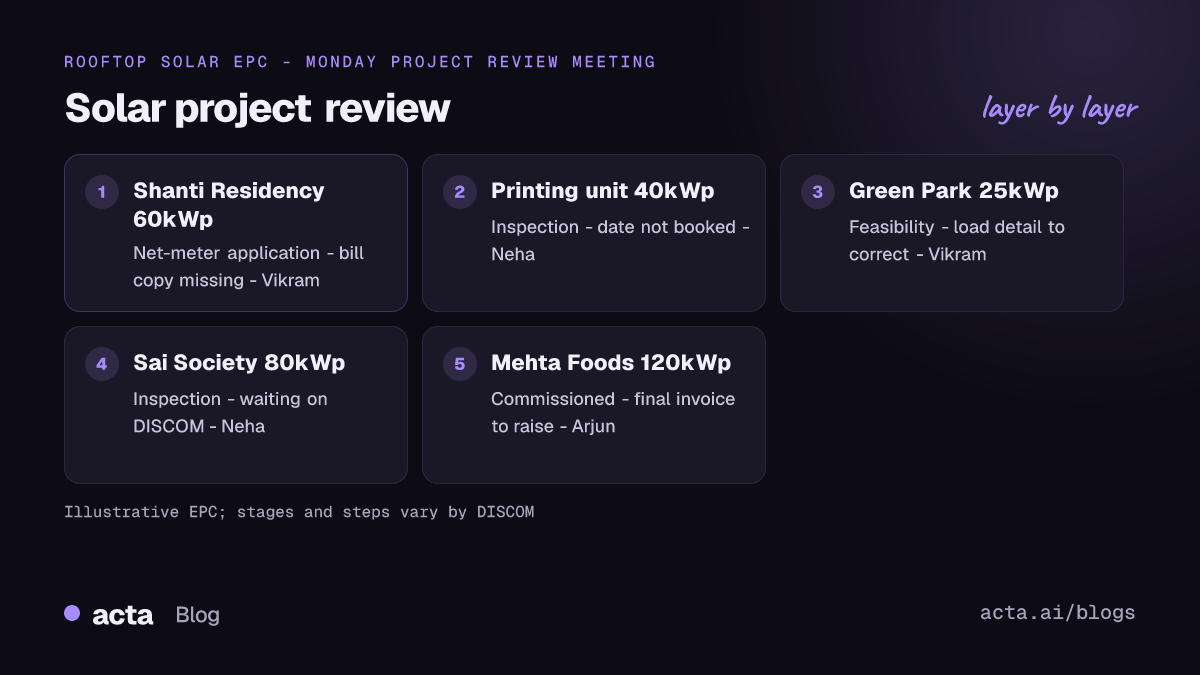
Week 1. At the Monday review, Neha, the liaison executive, says six files are "with the sub-division office" and she will follow up. Vikram, a project manager, mentions that two societies still have not sent their updated electricity bill copies. Arjun, the founder, asks sales to call those customers.
Weeks 2 and 3. The same six files are "being followed up". Nobody mentions the two missing bills. Sales assumed project management would call. One commercial customer, a printing unit, phones Arjun to ask why the meter is not installed when the panels have been on the roof for five weeks.
Week 4. Neha finally explains that three of her six files are stuck not at the DISCOM but on missing customer documents, which she had mentioned once in week 1 in the middle of another topic. Two other files needed a corrected load sanction detail. Only one was really waiting on the DISCOM.
Fourteen files, four meetings, one month of collections delayed, and every individual did their job. What failed was the review: it produced talk, not a list of who had to do what by when.
Solar project review meeting notes should capture stage, blocker and owner
Good solar project review meeting notes answer three questions per project: which stage, what is blocking it, who moves it next. With Acta, Arjun records the Monday review in the office meeting room using Record audio in the browser, or the mobile app when the meeting happens at a site. Vendor calls on Google Meet go through the Chrome extension without a bot joining. The built-in Project status template covers the basics, and Vendor review suits panel and inverter supplier calls. On a paid plan, a custom template makes the review match your solar project tracker:
Template name: Solar project review
What should this report do? For weekly reviews of rooftop solar projects: each project's net-metering stage, blocker, next step and owner, plus billing and material issues.
Sections: 1. Projects by stage (Table: Project, kWp, Stage, Blocker, Next step, Owner). 2. Waiting on customers (Checklist: task, owner, due date). 3. Waiting on DISCOM (Bullets). 4. Material and vendor issues (Bullets). 5. Billing this month (Table: Project, Milestone, Amount status). 6. Decisions made (Bullets).
When should Acta use it? Only matching meetings.
From the same meetings, the Outcomes views give you the rest. In Outcomes > Action items, grouped by Person, Neha's week-1 remark becomes a row: "Collect updated electricity bill copy from Shanti Residency", owner Vikram, due 10 Oct, then "Overdue 9 days". The Decision log holds Arjun's week-4 call, "No installation starts before the feasibility letter is received", status Active, owner Vikram. The Risk Registry picks up "Inspection backlog at the sub-division office before Diwali", Impact Medium, Mitigation "Book inspection dates for four sites together" tagged Agreed, owner Neha, Status Mitigating. All three views are Arjun's, built from meetings he recorded or that the team shared with him in the workspace.
In OneChat, Arjun asks: "Which net-metering files were marked follow-up in more than one review, and what is actually blocking each?" The answer lists the six files with their blockers and points under Found in to the four Monday reviews, opening at the moment each was discussed. That question alone would have saved two weeks.
Agent one: a Monday chase list with approval
Notes show the problem. An agent makes the chase happen without someone remembering. Agent Builder (beta) sits in the Acta sidebar; agents act as you, using the apps you connect. Before you start, connect Gmail and Google Sheets with "Connect here" on the Connectors tab (the connect apps guide shows how). Your tracker sheet needs columns for Project, Customer email, Stage, Blocker, Days in stage and Last chased.
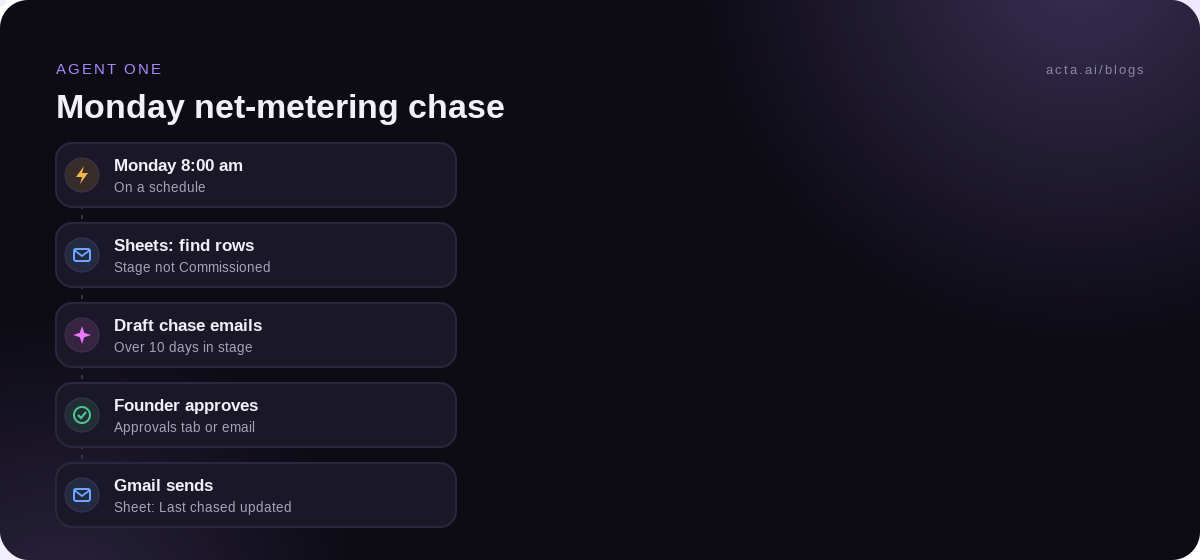
- Click New agent. Describe it: "Every Monday at 8 am, find solar projects stuck in a net-metering stage for more than 10 days, draft a chase email for each, and ask me to approve." Review the AI draft, or choose Start from blank instead.
- Trigger: On a schedule, Mondays at 8:00 am, an hour before the review.
- Action: Google Sheets, find rows where Stage is not "Commissioned".
- For each row, then If / else: Days in stage over 10 continues; otherwise skip.
- Switch on Blocker: "Customer document" goes to a customer email path; "DISCOM" goes to an internal path for Neha; anything else goes to the project manager.
- AI step on each path: write a short, polite email naming the project, the missing item and the date it was first requested.
- Human approval: Arjun reviews the batch in the Approvals tab, or by email with "Also email me Approve and Reject buttons" ticked. Rejected drafts are not sent; with no answer in 24 hours, nothing goes.
- Action: Gmail, send the approved customer emails; for the internal path, Gmail draft to Neha instead.
- Action: Google Sheets, update the row's Last chased date.
- Optional Memory step: remember which projects were chased this week, so a re-run does not email a customer twice.
Set what happens on failure for each app step: Try again for Gmail, Carry on for the Memory step, and Stop the run if the sheet cannot be read. Then click Test and Run test. In a test nothing is sent; emails are only shown and approvals pass by themselves, so you can read every draft safely. Use Check, then Turn on; the agent shows "On · version 1". When you change it later, Update the live version, and use History to see each run. AI steps use AI credits, so a 14-row sheet is a sensible first size.
Why approval and not full automation? A wrong email to a housing society committee secretary undoes months of goodwill. Our piece on human approval in automation makes the wider case.
Agent two: the review meeting updates your tracker
The first agent reads the sheet. The second keeps the sheet true, using the review itself, which is the step teams skip when they are busy.
- New agent, trigger When a meeting ends, filter: title contains "project review".
- Acta data: get the meeting's notes and action items.
- AI: for each project discussed, extract stage, blocker, next step and owner, in the sheet's column names.
- Human approval: Neha or Arjun checks the proposed updates.
- Action: Google Sheets, update the matching rows; add a row for any new project.
- Action: Slack message to the project managers' channel listing what changed, if you use Slack.
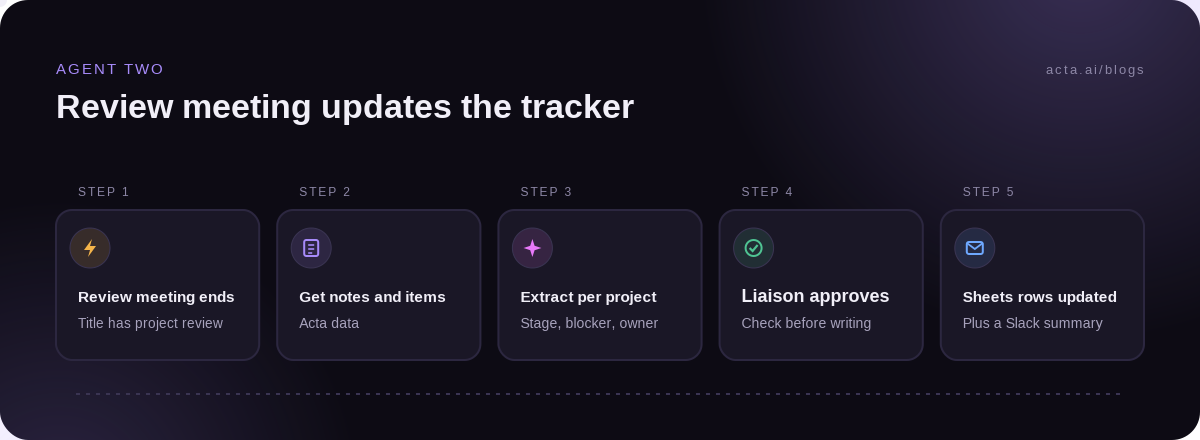
Together the two agents form a loop: Monday's meeting updates the sheet, the next Monday's agent chases from it. The steps guide explains For each, Switch and Memory in more detail, and testing an automation without sending anything covers the habit of running tests on past meetings first.
Roll it out to project and liaison teams in two weeks
For an EPC of 20 to 150 people, the workspace usually holds the people who run the reviews, one seat each: founder or project head, project managers, the liaison executive, the procurement lead and a sales lead. Installers and site technicians stay outside it and get their own action items by the daily follow-up email. Create the workspace in Settings > Workspace, invite the team (during the trial, invites are free for up to 10 people), and share the Monday review and vendor calls with Everyone in the workspace. Customer pricing calls can stay private.
Days 1 to 4: record the Monday review with the custom template; at the end, go through every project once and say its blocker and owner aloud. Days 5 to 7: clean the tracker sheet so its columns match the template. Days 8 to 10: build agent one, run tests on the real sheet, read every draft. Days 11 to 14: turn agent one on for the second Monday; build agent two in test mode and decide after one more review whether to switch it on.
Mistakes to avoid: letting "follow up" stand as a blocker; building both agents on day one; giving the agent customer email addresses that sales has not checked; and recording society committee meetings without asking. Tell people what is recorded and why; see recording consent basics, which is general information, not legal advice. More EPC examples are on our solar EPC page.
Acta records your reviews and calls, writes notes, decisions and action items, and runs agents you build, with approval steps you control. Outcomes, Risk Registry and OneChat are included in the 15-day trial and on Pro at $8 per seat a month.
Frequently asked questions
Can an AI agent for follow-ups email our customers automatically?
It can send through your connected Gmail, but we recommend a Human approval step before any customer email. The agent's owner approves or rejects each batch in the Approvals tab or by email, and nothing is sent if no one answers within 24 hours. In test runs, nothing is sent at all.
Does Acta connect to the PM Surya Ghar portal or DISCOM systems?
No. Acta works from your meetings and the apps you connect, such as Gmail, Google Sheets, Slack and Google Calendar. Your liaison team still files applications on the portal. Acta keeps track of what was promised in reviews and helps chase the people involved.
Do I need a developer to build these agents?
No. You describe the agent in words and Acta drafts the steps, or you add steps yourself: trigger, Google Sheets, AI, Human approval, Gmail. A project head comfortable with spreadsheets can build the Monday chase agent in an afternoon. Agent Builder is in beta, so expect changes.
What should our solar project tracker sheet contain?
One row per project with Project, Customer, Customer email, kWp, Stage, Blocker, Owner, Days in stage and Last chased. Keep Stage to a fixed list (feasibility, installation, net-meter application, inspection, commissioned) so agents can filter on it reliably. Free-text stages break automations.
Can I ask questions across all project reviews?
Yes, with OneChat. Ask, for example, "Which projects were waiting on customer documents last month?" It answers from your meetings and any files you add, and shows the meetings where it found each fact. Ask Acta on a single meeting answers questions about that meeting only.
Pick the first agent to switch on
If your files go stale between reviews, start with the Monday chase. If your tracker is always out of date, start with the review-to-sheet agent.
- Fix the stages: five fixed stages in the sheet before any automation.
- Name the blocker: no project leaves the review with "follow up" as its blocker.
- Approve customer emails: Human approval on every path that writes outside the company.
- Test on real data: Run test against this week's sheet and read every draft.
- Share the review: so the liaison executive and project managers work from the same notes.
Record next Monday's review and vendor calls with the Acta Chrome extension, then build your first agent during the 15-day trial on Acta pricing.