Supplier negotiation call notes capture terms, not conversation
A supplier call wanders: last season's breakage, carton print, freight rates. Somewhere in the middle the supplier says, "For forty thousand sets I can do one thirty-six, but I need thirty percent upfront." That sentence is worth more than the other 40 minutes, and it is the one most likely to be misquoted a week later.
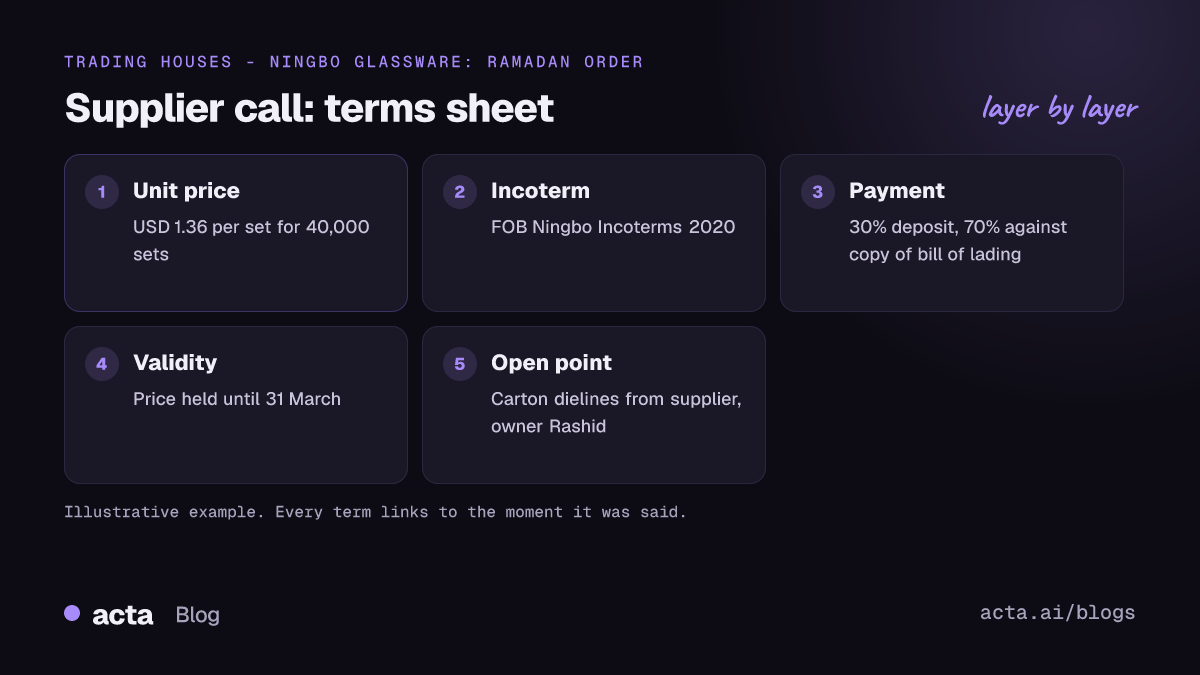
So good notes are a terms sheet with evidence attached. For each item, write the unit price and currency, the quantity or minimum order quantity, the Incoterm with its named place, the payment split and trigger (deposit, balance against copy of bill of lading, LC at sight), lead time from deposit, and how long the offer holds. Add the supplier's exact words for anything you might have to quote back to them.
The Incoterm deserves special care. The International Chamber of Commerce publishes the Incoterms 2020 rules, and its guidance is to name the rule, the place and the version in the contract, because the rules only bind when the parties write them in. "FOB" with no port, or "CIF" without saying which port, is how a trading house ends up paying freight it thought the supplier was paying. DHL's freight help pages give a readable summary of the eleven Incoterms 2020 rules if your junior buyers need a refresher.
For longer legal back-and-forth, see contract negotiation notes, clause by clause. Supplier calls are shorter and messier, so they need a stricter format.
Trading houses lose money in the gap between calls
A typical general trading company in Deira or Jebel Ali runs on a handful of recurring conversations. There is the supplier call (Zoom, Teams, WeChat voice or WhatsApp) where price and terms move. There is the Sunday or Monday purchase meeting where the buyers walk through open indents, pending proformas and which supplier gets the next order. There is the shipment status meeting with the logistics coordinator and the clearing agent. And there are customer calls with supermarket chains and distributors where the sales team commits to delivery windows that depend on the supplier keeping their word.
The owner joins the big negotiations, a purchase manager owns the supplier, a buyer handles daily calls and accounts releases deposits. Nobody writes minutes, and the WhatsApp group fills with voice notes no one can search.
What goes wrong is rarely dramatic. A supplier quotes FOB on one call and CFR on the next. The buyer who heard the discount is on leave when the proforma arrives. Each slip costs a few cents a unit, and on a container of housewares that is the margin.
A glassware order shows how agreed terms drift
Here is an illustrative example. Saffar & Co. Trading (invented) is a 38-person housewares importer in Dubai that sells glass food containers and ceramic tableware to Gulf supermarket chains. Rashid, the purchase manager, has been working on a 40,000-set order of glass storage containers from a factory in Ningbo for a Ramadan promotion.
Call 1, 4 March. The supplier's export manager, Vivian, quotes USD 1.42 per set FOB Ningbo, MOQ 8,000 sets, 50% deposit. Rashid pushes on quantity.
Call 2, 11 March. Rashid is travelling, so Meera, a purchase executive, takes the call with Faisal, the owner. Vivian agrees USD 1.36 per set for 40,000 sets, 30% deposit and 70% against a copy of the bill of lading, price held until 31 March. Faisal says, "Good, send the PI." Meera types three lines in a notebook.
Call 3, 18 March. Rashid is back and calls about carton artwork. Vivian mentions shipment "early April, CFR Jebel Ali is also possible." Nobody responds to that.
20 March. The proforma invoice arrives: USD 1.39 per set, CFR Jebel Ali, 50% deposit. Rashid thinks the price is close enough. Meera thinks it should be 1.36 but is not sure about the freight. Faisal remembers agreeing "something with thirty percent." Accounts wants to release the deposit before the bank cut-off.
Without a record, the easy path is to pay. On 40,000 sets, three cents a set is USD 1,200, and the extra 20% deposit ties up about USD 11,000 for six weeks in peak buying season. Worse, CFR hands the freight booking to the supplier.
OneChat settles the argument with the call itself
Now run the same three weeks with every supplier call recorded in Acta. Each call gets its notes, decisions and action items automatically. The useful part comes on 20 March, when Rashid opens OneChat, the first item in the Acta sidebar, and asks across all his meetings plus the ones Meera shared with the workspace.
Question: What price, Incoterm and payment terms did Ningbo Glassware agree for the 40,000-set order, and has anything changed since?
Answer (summarised): On 11 March Vivian agreed USD 1.36 per set FOB Ningbo for 40,000 sets, 30% deposit and 70% against copy of the bill of lading, price valid to 31 March. Faisal accepted and asked for the PI. On 18 March Vivian mentioned CFR Jebel Ali as an option; nobody agreed to it. No later call changes the price.
Found in: "Ningbo Glassware: price for Ramadan order" (11 Mar, at 23:14), "Ningbo Glassware: carton artwork" (18 Mar, at 31:40).
Clicking a source opens the call at that moment, so Rashid can play Vivian saying "one thirty-six" and quote the supplier to the supplier.
OneChat also reads files and links you add, up to 10 at a time. Drop the proforma PDF into the chat and ask, "Does this PI match what was agreed on the calls? List every difference." You get a short list with the call moments next to each line. Other questions trading teams ask in OneChat every week:
- "Which suppliers quoted for 1-litre glass containers this quarter, and at what FOB price?"
- "What did we promise the supermarket chain about the April delivery window, and which supplier date does it depend on?" (promises and follow-through are answered here; there is no separate promises screen)
For questions about a single call, use Ask Acta on that meeting's page instead; it answers from that one conversation and lets you save the answer to the meeting's Overview. The help guide on asking OneChat about your meetings shows the scope button that switches between all meetings, some meetings, or only your files and links.
Action items, the Decision log and the Risk Registry hold the order steady
OneChat answers the argument. The Outcomes screens stop the next one. In Acta they sit under My meetings: the Outcomes tab holds Action items and the Decision log, and the Risk Registry has its own tab. Each of these is built per person, from the meetings that person recorded and the meetings colleagues shared with them in the workspace. Rashid's Decision log is his; Meera's is hers. That is why sharing supplier calls with the workspace matters so much in a small trade desk.
Here is what Rashid's screens looked like after the 11 March call, once Meera shared it.
| Screen | Example entry | Status shown |
|---|
| Action items | "Send revised PO: 40,000 sets at USD 1.36 FOB Ningbo, 30/70" · owner Meera | Due in 2 days |
| Action items | "Ask Vivian for carton dielines before deposit" · owner Rashid | Overdue 1 day |
| Decision log | "Buy 40,000 sets from Ningbo Glassware at USD 1.36 FOB Ningbo Incoterms 2020, 30% deposit" · decided by Faisal · owner Rashid | Active |
| Risk Registry | "Shipment after 10 April misses the Ramadan promo" · Impact High · owner Rashid · mitigation Agreed: book space with forwarder by 25 March | Mitigating |
In the Action items tab, the filter tiles (Open, Overdue, Due this week, Done) double as counts, and you can group by Meeting or by Person. Group by Person before the Sunday purchase meeting and you see what each buyer still owes each supplier. Turn on Auto follow-up and Acta emails each owner their own open items every weekday until they are done.
The Decision log merges duplicate mentions into one decision with a history. When Vivian's CFR remark came up on 18 March, it would show in the decision's history only if someone agreed to it; since nobody did, the decision stays Active at FOB. Had Faisal said "fine, CFR," the card would read Changed, with "Was: USD 1.36 FOB Ningbo" and the date. Scan the "Changed or reversed" tile weekly, and use Export CSV to give accounts the agreed terms.
The Risk Registry lists risks raised in meetings with Risk, Mitigation, Owner, Date, Impact and Status columns. A mitigation tagged Agreed was decided in a call; one tagged Suggested is Acta's idea, not yet agreed. The attention cards "High · no owner" and "Fix is overdue" are the ones a purchase head should clear before Monday.
A terms-sheet template for supplier calls
Two built-in report templates fit trading work: Contract negotiation (General) and Vendor review (Operations). Most trade desks also build one custom template, a paid-plan feature found under Templates with "+ Create template" (see building your own report templates). Here is one you can copy:
- Template name: Supplier call: terms sheet. When to use: Only matching meetings ("calls with overseas suppliers about price, quantity, shipment or payment").
- Agreed prices (Table: Item | Unit price | Currency | Quantity/MOQ | Valid until)
- Incoterm and named place (Paragraph: rule, place, version, as said)
- Payment terms (Bullets: deposit, balance trigger, LC or TT)
- Lead time and shipment window (Bullets)
- What each side still owes (Checklist: task, owner, due date)
- Supplier's exact words (Bullets: quotes on price, terms and dates)
Use the extra instruction "If a term was not discussed, write Not discussed. Never assume FOB." The report writes "Not discussed" rather than guessing, which is exactly what you want from a terms sheet.
An Agent Builder (beta) recipe confirms terms in writing
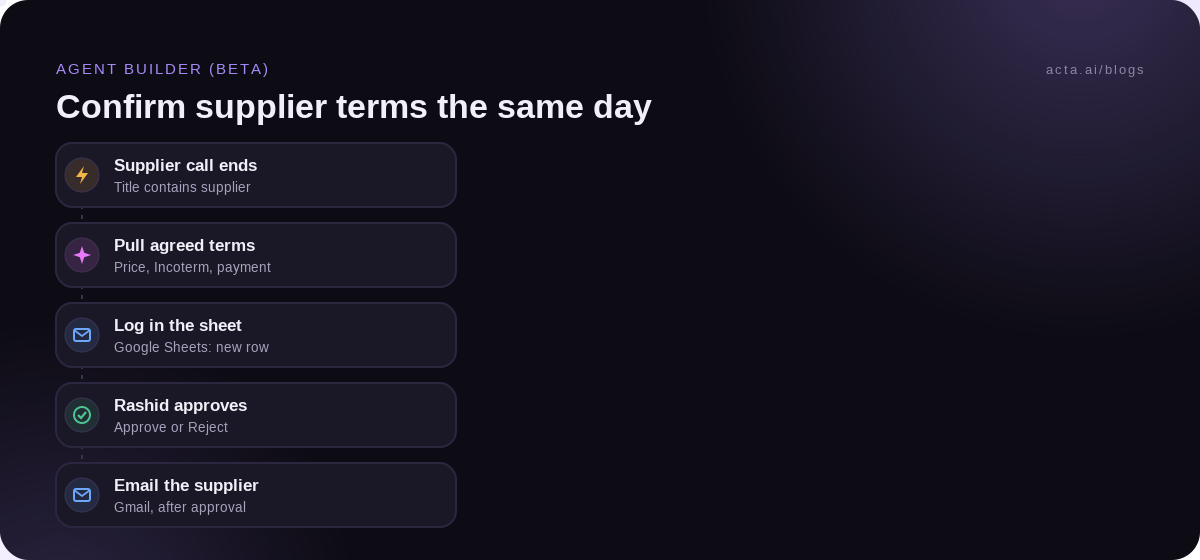
The best protection against a drifting proforma is a short confirmation email the same day. Agent Builder (beta) can draft it after every supplier call and wait for your approval before anything goes out. A purchase manager can set this up in an afternoon:
- Open Agent Builder in the sidebar and click New agent. Describe it in words ("after each supplier call, write a terms confirmation and log it") or choose "Start from blank instead".
- Set the trigger to When a meeting ends, with the filter title contains "supplier" (name your calendar invites "Supplier: Ningbo Glassware" and so on).
- Add an AI step: "From the meeting notes, list agreed unit price, currency, quantity, Incoterm with named place and version, payment terms, lead time and validity. If anything is unclear, say so."
- Add a Google Sheets action: add a row to your "Supplier terms" sheet with supplier, date and each term.
- Add a Human approval step and tick "Also email me Approve and Reject buttons". If nobody answers within 24 hours, nothing is sent.
- Add a Gmail action that sends the confirmation to the supplier contact, ending with "Please issue the PI on these terms."
- Click Test, then Run test on a past call. Nothing is sent during a test. When it looks right, Turn on.
The approvals guide explains where Approve and Reject show up. Keep the approval step even after the agent has behaved for a month; one wrong price in writing to a supplier is hard to walk back.
A purchase team can be running in two weeks
Seats are per person in the workspace, whether they record or not. For a team of six buyers, Pro is USD 8 per seat a month billed monthly, or USD 72 per seat a year. Outcomes, the Risk Registry and OneChat are included in the 15-day trial and in Pro, so you can test the whole loop before paying.
Week 1. The owner creates a workspace and invites the purchase manager and two buyers who handle your top ten suppliers. Each records their supplier calls: the Acta desktop app handles Zoom and Teams desktop calls and anything else (WeChat or WhatsApp on the laptop) at the press of Record, with no bot in the call. Every supplier call is shared with "Everyone in" the workspace. Tell suppliers you record; our post on consent and what to tell participants has wording, and the desktop app's "Copy notice" button pastes a notice into the chat.
Week 2. Add the logistics coordinator (shipment status meeting) and accounts. Turn on Auto follow-up with "Each owner, their own items" on weekdays. Run the Sunday purchase meeting from the Action items tab grouped by Person. Build the terms-sheet template and the confirmation agent. At the end, check one recent proforma in OneChat against its calls.
Mistakes to avoid: keeping supplier calls private (no one else's Decision log sees them), vague meeting names like "Call with Vivian", and the owner skipping the calls where the biggest concessions happen. Internal meetings in Arabic can be transcribed by choosing Arabic (beta) in Settings; Hindi is detected automatically, which helps with Indian suppliers.
Frequently asked questions
Can I record supplier calls that happen on WhatsApp or WeChat?
Yes, if the call runs on your laptop. The Acta desktop app for Windows and Mac records any calling app when you press Record, capturing the call's sound and your microphone, never the screen. For calls on your phone held away from a computer, the Acta mobile apps can record in person, or you can upload an MP3 or M4A afterwards.
Do I have to tell the supplier the call is recorded?
You should, and in many places you must. Rules differ by country and by who is on the call, so treat this as general information rather than legal advice. A short line at the start ("we record supplier calls so our terms sheet is accurate") is normal in trading, and most suppliers prefer it to disputes about what was agreed.
Can OneChat compare quotes from different suppliers?
Yes. Ask something like "Compare FOB prices for 1-litre glass containers quoted this quarter" and OneChat answers across every call you recorded or that was shared with you, listing each supplier, price and date with links to the exact moments. Add the suppliers' price lists as files and it reads those too.
Who in my company can see a supplier call?
Each person's meetings are private by default. When the recorder shares a call with everyone in the workspace, teammates can open it and ask OneChat about it; only the owner can rename or delete it. Members see shared calls under the Shared with me tab of My meetings.
Decide what your trade desk records first
You do not need to record every call on day one. Start where a few cents a unit add up fastest.
- Pick the suppliers: the ten that make up most of your purchase value.
- Fix the Incoterm habit: rule, named place and version, said out loud and written down on every call.
- Share by default: every supplier call goes to the workspace so the whole desk can ask about it.
- Check before paying: no deposit leaves until the proforma matches the call in OneChat.
- Confirm the same day: an approved email to the supplier after every negotiation.
Acta records the call, writes the notes and keeps the terms searchable; it will not negotiate for you, and it is only as good as the calls you actually capture. You can find more sector examples on our page for import-export trading companies. Install the desktop app before your next supplier call, and start the 15-day trial from the pricing page.