Guides & How-tos 9 min read
How to Fine-Tune an LLM on One GPU With PEFT and bitsandbytes
A practical QLoRA guide: load an open LLM in 4-bit with bitsandbytes, train LoRA adapters with PEFT and TRL on one GPU, then merge or serve the adapter.
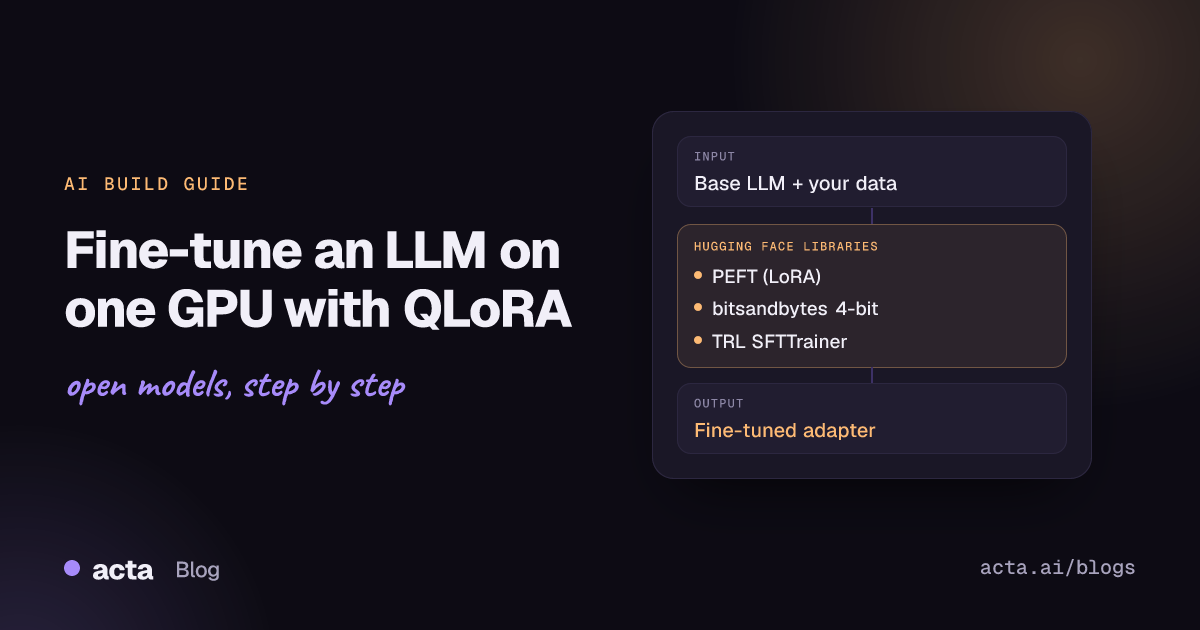
Quick answer: To fine-tune an open LLM on one GPU, load the base model in 4-bit with bitsandbytes (NF4 via BitsAndBytesConfig), freeze it, and train small LoRA adapters with Hugging Face PEFT. This is the QLoRA recipe. You train well under 1% of the parameters, save an adapter of a few megabytes, and later load it on a 4-bit base or merge it into a 16-bit copy.
Full fine-tuning a 7B model needs memory for the weights, the gradients and the optimizer states, which is more than one GPU usually holds. Parameter-efficient fine-tuning (PEFT) and k-bit quantization change those numbers. Together they let a single workstation or cloud GPU adapt an open model to your domain, your output format or your tone.
This guide is the first in our Training & Optimization series. It covers the two libraries that make single-GPU fine-tuning practical: PEFT and bitsandbytes, with TRL as the training loop.
What problem do PEFT and bitsandbytes solve?
The PEFT docs break training memory into three parts. First, the base model weights: a 1B-parameter model in float16 takes about 1.86 GiB (2 bytes per parameter). Second, for every trainable parameter, gradients (1x) plus Adam optimizer states (2x), which is why full fine-tuning of that 1B model adds about 5.59 GB on top. Third, activations, which grow with batch size and sequence length.
The two libraries attack different parts of that bill:
- PEFT freezes the base model and trains a small number of extra parameters (for example LoRA matrices). Gradients and optimizer states then exist only for those extra parameters. The PEFT GitHub README shows its Qwen2.5-3B example training 3,686,400 of 3,089,625,088 parameters, or 0.1193%.
- bitsandbytes shrinks the frozen weights themselves by storing them in 8-bit or 4-bit precision. Its README lists three main features: 8-bit optimizers, LLM.int8() inference and 4-bit QLoRA-style quantization.
The PEFT docs make one point clearly: PEFT makes fine-tuning parameter efficient, but not automatically memory efficient. Quantizing the base model is what takes the largest remaining block of memory out of the picture.
How do LoRA and 4-bit quantization work?
LoRA
LoRA (Hu et al., 2021) freezes the pretrained weight matrix W and learns the update as the product of two small matrices, B and A, of rank r. Only A and B are trained. The paper reports, for GPT-3 175B compared with Adam fine-tuning, about 10,000 times fewer trainable parameters and about 3 times lower GPU memory, with no added inference latency once the update is merged into W. In PEFT, r sets the rank, lora_alpha scales the update, and target_modules chooses which layers get adapters. By default PEFT adapts the query and value projections. Setting target_modules="all-linear" applies LoRA to every linear layer, as QLoRA does.
4-bit quantization and QLoRA
QLoRA (Dettmers et al., 2023) backpropagates through a frozen 4-bit base model into LoRA adapters. It added three ideas, all available through bitsandbytes and Transformers:
- NF4 (4-bit NormalFloat), a data type designed for normally distributed weights (
bnb_4bit_quant_type="nf4"). - Double quantization, which quantizes the quantization constants too. The Transformers bitsandbytes guide puts the saving at about 0.4 bits per parameter (
bnb_4bit_use_double_quant=True). - Paged optimizers, which handle memory spikes during training.
The weights are stored in 4-bit, but matrix multiplications run in a higher-precision compute dtype, usually bfloat16 (bnb_4bit_compute_dtype). The adapters stay in higher precision and are the only part that receives gradients. The Transformers docs state that 8-bit and 4-bit training is only supported for training extra parameters, which is exactly what LoRA provides.
When should you use them (and when not)?
Use PEFT plus 4-bit bitsandbytes when:
- You have one GPU and the model does not fit for full fine-tuning in 16-bit.
- You want many task- or customer-specific variants of one base model. Each is a small adapter, not a full checkpoint.
- You are teaching format, style, domain vocabulary or a narrow task, where a low-rank update is usually enough.
Consider something else when:
- You have enough GPUs for full fine-tuning and need maximum quality on a large, very different dataset. See our guide on scaling training with Accelerate, Optimum, TPUs and Trainium.
- Your goal is preference alignment or reasoning with rewards. PEFT still applies, but the training loop is DPO or GRPO in TRL, covered in training LLMs with reinforcement learning, TRL and OpenEnv.
- Prompting or retrieval already solves the problem. Fine-tuning does not add fresh facts reliably; if you only need an app on top of an existing model, start with building a text generation app with open LLMs.
How do you fine-tune an LLM on one GPU, step by step?
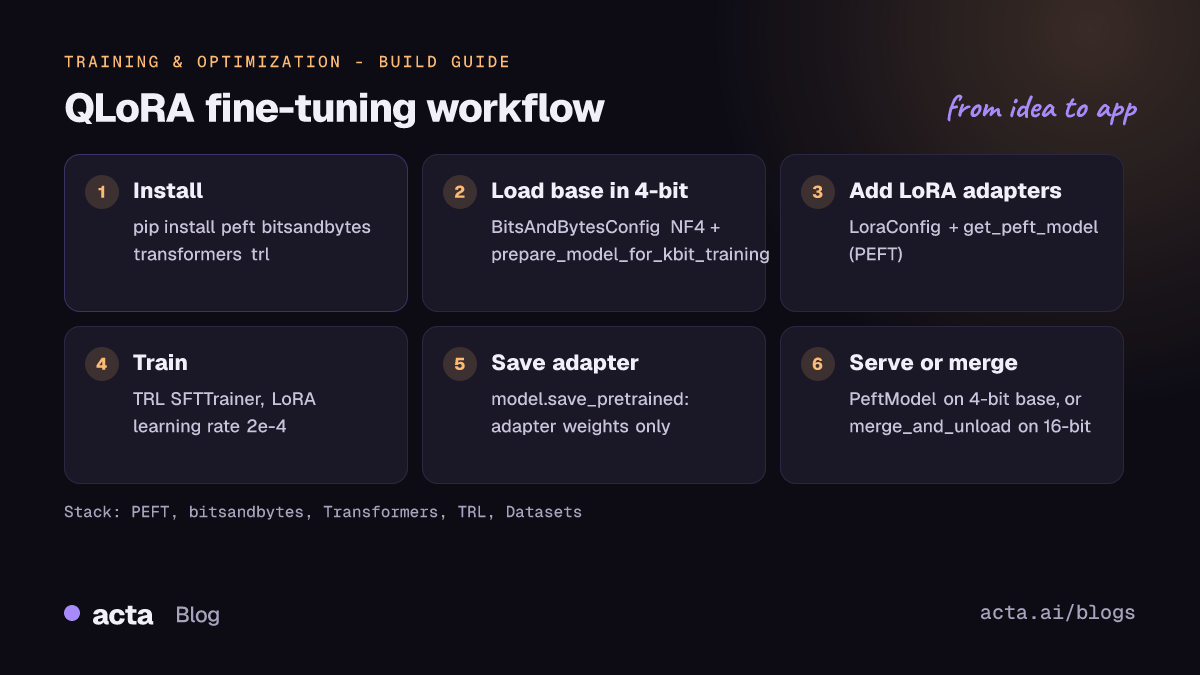
- Install the stack.
pip install peft bitsandbytes, plustransformers,accelerate,datasetsandtrl. Pin the versions you test with. - Pick a base model and check its licence. The examples use Qwen/Qwen2.5-3B-Instruct, the model in the PEFT README quickstart. Its Hub page lists the
qwen-researchlicence, so read the terms before commercial use. - Prepare data. TRL's
SFTTraineraccepts language-modeling and prompt-completion datasets, in plain text or conversational (messages) form, and applies the chat template for conversational data. - Load the base model in 4-bit with a
BitsAndBytesConfig, then callprepare_model_for_kbit_training. - Attach LoRA adapters with
LoraConfigandget_peft_model, and check the trainable parameter count. - Train with
SFTTrainer, save the adapter, then run inference on a 4-bit base or merge it into a 16-bit copy for serving.
The first snippet follows the PEFT quantization guide, with the model ID swapped for the one in the PEFT README:
import torch
from transformers import AutoModelForCausalLM, BitsAndBytesConfig
from peft import LoraConfig, get_peft_model, prepare_model_for_kbit_training

bnb_config = BitsAndBytesConfig(
    load_in_4bit=True,
    bnb_4bit_quant_type="nf4",
    bnb_4bit_use_double_quant=True,
    bnb_4bit_compute_dtype=torch.bfloat16,
)
model = AutoModelForCausalLM.from_pretrained(
    "Qwen/Qwen2.5-3B-Instruct", quantization_config=bnb_config
)
model = prepare_model_for_kbit_training(model)

lora_config = LoraConfig(
    r=16,
    lora_alpha=8,
    target_modules=["q_proj", "k_proj", "v_proj", "o_proj"],
    lora_dropout=0.05,
    bias="none",
    task_type="CAUSAL_LM",
)
model = get_peft_model(model, lora_config)
model.print_trainable_parameters()
The second snippet trains it with TRL. It follows the TRL PEFT integration guide ("applying PEFT to the model directly", so no peft_config is passed) and the dataset from the SFTTrainer docs. The learning rate is the 10x LoRA rate TRL recommends for SFT; batch size and accumulation come from TRL's QLoRA command-line example.
from datasets import load_dataset
from trl import SFTConfig, SFTTrainer

dataset = load_dataset("trl-lib/Capybara", split="train")

training_args = SFTConfig(
    output_dir="qwen2.5-3b-qlora",
    learning_rate=2.0e-4,
    per_device_train_batch_size=1,
    gradient_accumulation_steps=16,
)
trainer = SFTTrainer(
    model=model,  # the 4-bit PEFT model from the previous snippet
    args=training_args,
    train_dataset=dataset,
)
trainer.train()
model.save_pretrained("qwen2.5-3b-qlora")
The third snippet loads the adapter for inference. Option A keeps the base in 4-bit; option B merges into a 16-bit base, following the PEFT README and the LoRA merge example (merge_and_unload returns a new model and is not in place):
import torch
from transformers import AutoModelForCausalLM, AutoTokenizer, BitsAndBytesConfig
from peft import PeftModel

model_id = "Qwen/Qwen2.5-3B-Instruct"
tokenizer = AutoTokenizer.from_pretrained(model_id)

# Option A: quantized inference, 4-bit base + adapter
bnb_config = BitsAndBytesConfig(
    load_in_4bit=True,
    bnb_4bit_quant_type="nf4",
    bnb_4bit_compute_dtype=torch.bfloat16,
)
base = AutoModelForCausalLM.from_pretrained(model_id, quantization_config=bnb_config)
model = PeftModel.from_pretrained(base, "qwen2.5-3b-qlora")
inputs = tokenizer("Summarize the meeting notes:", return_tensors="pt").to(model.device)
outputs = model.generate(**inputs, max_new_tokens=50)
print(tokenizer.decode(outputs[0], skip_special_tokens=True))

# Option B: merge into a 16-bit base for a standalone checkpoint
base = AutoModelForCausalLM.from_pretrained(model_id)
merged = PeftModel.from_pretrained(base, "qwen2.5-3b-qlora").merge_and_unload()
merged.save_pretrained("qwen2.5-3b-merged")
Merge into an unquantized base when you can. The current PEFT quantization guide explains that merging into quantized weights dequantizes the base weight, adds the adapter and re-quantizes, so repeated merge and unmerge cycles accumulate rounding error.
Hardware and cost considerations
Only a few numbers here are verified, and they come from the library authors:
- Base weights: 16-bit weights take 2 bytes per parameter. 4-bit storage is a quarter of that in raw bits, plus a small overhead for quantization constants, which double quantization trims by about 0.4 bits per parameter.
- QLoRA headline: the QLoRA paper and the PEFT docs state that the method can fine-tune a 65B-parameter model on a single 48GB GPU.
- LoRA without quantization: the PEFT README measured, on an A100 80GB, 47.14GB of GPU memory for full fine-tuning of bigscience/T0_3B against 14.4GB with LoRA. For bigscience/bloomz-7b1, full fine-tuning ran out of memory while LoRA used 32GB.
- Storage: the same README reports a 19MB LoRA checkpoint for T0_3B compared with 11GB for the full model, and the PEFT quicktour shows an opt-350m adapter file of 6.3MB.
On hardware support, the bitsandbytes README lists NVIDIA and AMD GPUs, Intel XPU and Gaudi, CPU, and Apple Metal (mps, with QLoRA support) on macOS, with some backends marked as not yet performance-optimized. Activations are not covered by any of these numbers. If you run out of memory, reduce sequence length and batch size first, then turn on gradient checkpointing, as the PEFT memory guide suggests. model.get_memory_footprint() reports only the parameters, not the activations or KV cache.
How do you evaluate the fine-tuned adapter?
- Held-out loss. Split off an evaluation set and pass it to the trainer. A training loss that falls while evaluation loss rises means overfitting.
- Base vs adapter on the same prompts. Compare outputs from the base model and the adapter on a fixed set of real prompts from your use case. Score them with task metrics (exact match, F1, ROUGE) or a rubric.
- Forgetting. Check that general skills did not regress. The PEFT method comparison Space tracks a forgetting score alongside task accuracy, which is a useful model for your own checks.
- Standard benchmarks. Run the merged model through Lighteval. Our guide to evaluating and shipping LLMs with Lighteval and Safetensors covers that step and publishing to the Hub.
Pitfalls and tips
- Use bfloat16 compute. The original QLoRA repository notes that an fp16 compute dtype can cause instabilities. NF4 is the recommended 4-bit type for training.
- Raise the learning rate. TRL recommends roughly 10x the full fine-tuning rate for LoRA: 2.0e-4 instead of 2.0e-5 for SFT.
- Check target modules. Layer names differ by architecture. PEFT raises an error only when none of the
target_modulesmatch; entries that do not match are skipped silently, so check the trainable parameter count afterget_peft_model.target_modules="all-linear"avoids naming layers. - Keep base and adapter paired. An adapter only works with the base model it was trained on. Record the base repo ID and revision with every adapter.
- Assign the merge result.
merge_and_unload()is not in-place; use the returned model. - Run a healthcheck. Recent PEFT docs add
print_healthcheck(), which reports trainable parameters, adapter state and library versions; it is useful in bug reports. - Check the licence of base and data. The adapter inherits the base model's licence terms and your dataset's terms.
Where do you get help?
- The PEFT troubleshooting guide covers dtype errors, models that do not improve and loading problems.
- Bugs and feature requests: PEFT GitHub issues and bitsandbytes GitHub issues.
- Questions and worked answers on the Hugging Face forum, for example this thread on merging LoRA weights back into the base model.
- Background reading: the Hugging Face blog post Making LLMs even more accessible with bitsandbytes, 4-bit quantization and QLoRA.
Frequently asked questions
What is the difference between LoRA and QLoRA?
LoRA trains low-rank adapters on top of a frozen base model stored in 16-bit or 32-bit. QLoRA does the same with the frozen base stored in 4-bit NF4 through bitsandbytes, which cuts the memory used by the base weights.
Does 4-bit quantization hurt the quality of the fine-tuned model?
The QLoRA paper reports matching 16-bit fine-tuning performance in its experiments. Results depend on the model and task, so compare the adapter against the base model and, if you can, a 16-bit LoRA run on your own evaluation set.
Should I merge the adapter or keep it separate?
Keep it separate when you serve several adapters on one base or want the smallest download. Merge into a 16-bit base when you want a standalone checkpoint with no adapter overhead at inference.
Can I use bitsandbytes without an NVIDIA GPU?
Yes. The bitsandbytes README lists AMD and Intel GPUs, Intel Gaudi, CPU and Apple Metal backends, but feature coverage and performance differ by platform, so check the support table for your hardware.
Adapters are a practical way to specialize a model for one job, such as the meeting summaries Acta produces; see building a summarization app with open models for that use case.
Found this useful? Share it with your team.