Guides & How-tos 11 min read
Train LLMs With Reinforcement Learning: TRL and OpenEnv
A practical guide to TRL and OpenEnv: when to use SFT, DPO or GRPO, how to write reward functions, and how to train an agent in an OpenEnv environment.
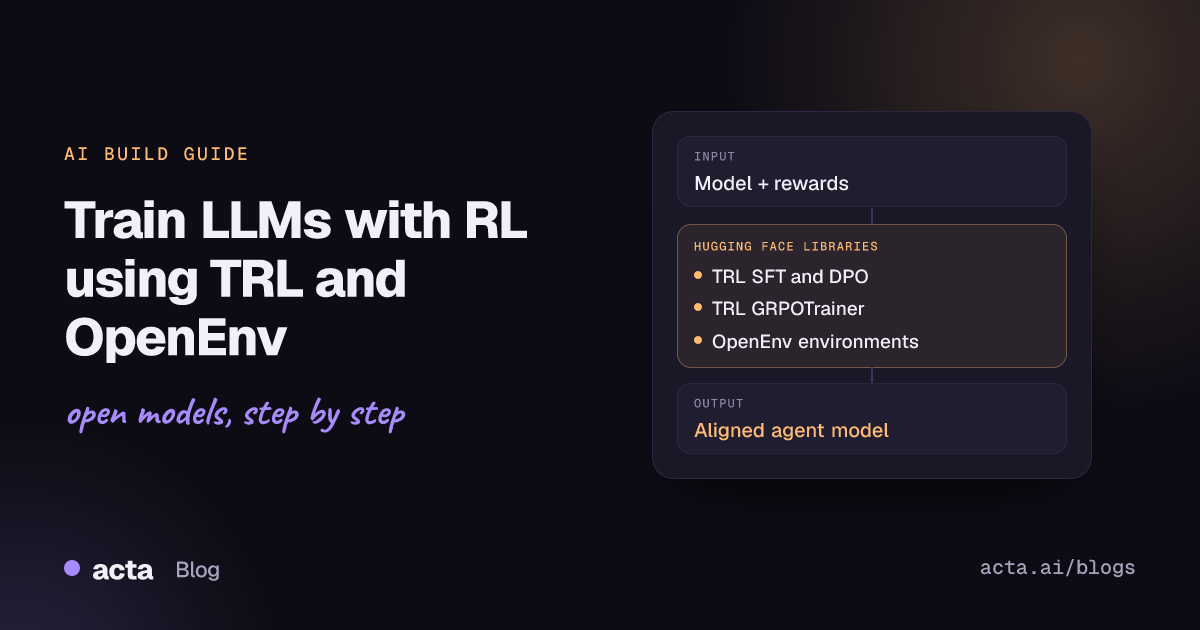
Quick answer: Use TRL to post-train an open model in stages: SFTTrainer to teach the format, DPOTrainer to learn from preference pairs, and GRPOTrainer to optimize against reward functions. When the task needs multi-turn interaction (games, code execution, browsing), wrap an OpenEnv environment as a class and pass it to GRPOTrainer through environment_factory.
Pretrained and instruction-tuned models are a starting point. Teams that want a model to follow a house style, prefer safer answers, solve verifiable problems more often or act as an agent inside a tool loop need post-training. This guide covers the two Hugging Face libraries built for that job: TRL for the training algorithms and OpenEnv for the environments an agent learns in.
What problem do TRL and OpenEnv solve?
TRL (Transformers Reinforcement Learning) is the Hugging Face library for post-training foundation models. It packages methods such as Supervised Fine-Tuning (SFT), Direct Preference Optimization (DPO), Group Relative Policy Optimization (GRPO), KTO and reward modeling as trainer classes. Each trainer is a light wrapper around the Transformers trainer, so you get the usual logging, checkpointing and distributed training (DDP, DeepSpeed ZeRO, FSDP) without writing your own training loop. The code lives in the huggingface/trl GitHub repository.
OpenEnv solves a different problem: where does an agent get experience? It is a framework for creating, deploying and using isolated execution environments for agentic reinforcement learning, with a Gymnasium-style API. Every environment exposes the same reset(), step() and state() calls, runs as a Docker image locally, on a cloud sandbox or as a Hugging Face Space, and can be shared on the Hub. The OpenEnv GitHub repository (BSD-3-Clause) lists more than 40 ready-to-use environments, from games and coding sandboxes to browsers and simulators, and the OpenEnv organization on the Hub hosts them as Spaces.
Together they cover the full loop: TRL generates completions, scores them and updates the weights; OpenEnv supplies the stateful world the model acts in and the reward it earns.
How do SFT, DPO and GRPO work?
The three methods differ mainly in what kind of signal they learn from.
- SFT (supervised fine-tuning): the model imitates example outputs. You provide text or prompt-completion pairs (often multi-turn chats), and the SFT Trainer minimizes next-token loss. By default the loss is computed on completion tokens only. SFT teaches format, tone and task behaviour.
- DPO (Direct Preference Optimization): the model learns from pairs of a chosen and a rejected answer to the same prompt. The DPO paper shows that the standard RLHF objective can be solved with a simple classification-style loss, without training a separate reward model or sampling during training. The DPO Trainer docs explain the dataset format and metrics.
- GRPO (Group Relative Policy Optimization): an online RL method introduced in the DeepSeekMath paper. For each prompt the model samples a group of completions, a reward function scores each one, and the advantage of a completion is measured relative to the group average, so no separate value model is needed. The GRPO Trainer docs break it into four steps: generating completions, computing the advantage, estimating the KL divergence to the reference model, and computing the loss.
Reward functions are plain Python callables in TRL. They receive keyword arguments such as prompts, completions, completion_ids and any extra dataset columns (for example ground_truth), and return one float per completion. TRL also ships ready-made rewards such as accuracy_reward in trl.rewards.
Environments add state. The TRL OpenEnv integration guide distinguishes tools, where each call is stateless, from environments, which keep state across turns so that what the agent sees next depends on what it did before. In TRL you write a small class with a reset() method and one public method per tool; GRPOTrainer creates one instance per generation, exposes the methods as function-calling tools, runs the multi-turn loop and then calls your reward function with the list of environment instances. The OpenEnv concepts page describes the client-server design behind this: a client sends structured actions over WebSocket to an isolated server.
When should you use SFT, DPO or GRPO (and when not)?
- Use SFT when you have good example outputs and need the model to adopt a format or domain. It is the cheapest step and usually comes first. It cannot teach the model to beat its examples.
- Use DPO when you can say which of two answers is better but cannot write a scoring rule: tone, helpfulness, safety preferences. It is offline, so it is stable and cheap compared with online RL. It is a poor fit when you have no paired preference data.
- Use GRPO when correctness can be checked by code: math answers, unit tests, JSON validity, game outcomes. Because it learns from the model's own samples, it can improve beyond the training examples, but it costs more compute because every step generates several completions per prompt.
- Use GRPO with an OpenEnv environment when the task is multi-turn and stateful: playing Wordle, running code and reading the error, navigating a web page. If each tool call is independent, plain tools without an environment are simpler.
- Skip RL entirely if prompt changes or retrieval solve the problem, or if you cannot define a reward you trust. A reward that can be gamed will be gamed.
If memory is the constraint, combine any of these trainers with LoRA adapters through PEFT; the companion guide on fine-tuning an LLM on one GPU with PEFT and bitsandbytes covers that side.
How do you post-train a model with TRL and OpenEnv, step by step?
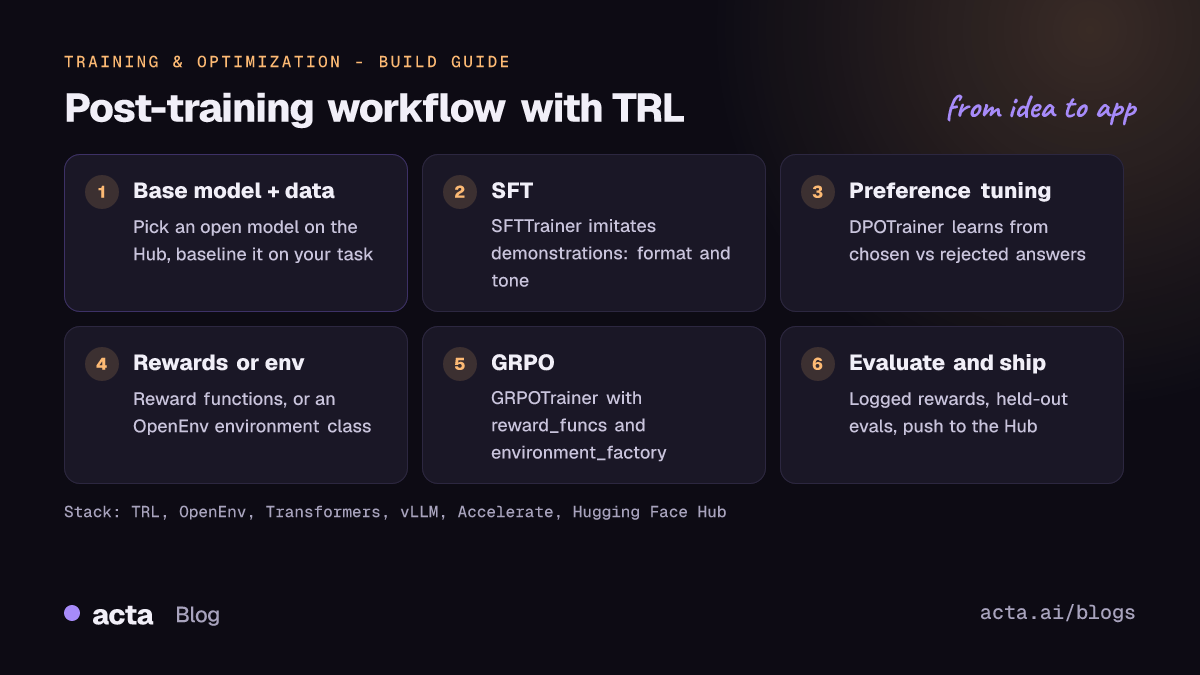
- Pick a base model and baseline it. Start small. The TRL examples use Qwen/Qwen3-0.6B (Apache 2.0, with switchable thinking and non-thinking modes) and Qwen/Qwen2.5-0.5B-Instruct. Measure the base model on your task before training.
- Install TRL.
pip install trl, or install from GitHub for features not yet released. Addtrl[vllm]if you want fast generation for GRPO. - Run SFT on demonstration data in a format TRL accepts (text, prompt-completion or conversational messages).
- Run DPO if you have preference pairs, starting from the SFT checkpoint.
- Write and test reward functions for GRPO. Call them by hand on a few completions before training.
- Connect an environment for multi-turn tasks: install an OpenEnv environment client from its Space, wrap it in a class, and pass the class as
environment_factory. - Train, watch the logged rewards, evaluate on held-out data, then push the model or adapter to the Hub.
The first example shows the two offline trainers. Both snippets follow the Quick Start in the TRL README on GitHub (main branch, October 2026); they are independent examples, each with the model and dataset the README uses.
from datasets import load_dataset
from trl import SFTTrainer, DPOTrainer

# SFT: imitate multi-turn chat demonstrations
dataset = load_dataset("trl-lib/Capybara", split="train")
trainer = SFTTrainer(
    model="Qwen/Qwen2.5-0.5B",
    train_dataset=dataset,
)
trainer.train()

# DPO: learn from chosen vs rejected answers
dataset = load_dataset("trl-lib/ultrafeedback_binarized", split="train")
trainer = DPOTrainer(
    model="Qwen/Qwen3-0.6B",
    train_dataset=dataset,
)
trainer.train()
The second example is GRPO with a verifiable reward, exactly as in the README and the GRPO Trainer quick start. accuracy_reward compares the model's final answer with the dataset's solution; for reasoning models the README recommends reasoning_accuracy_reward() instead.
from datasets import load_dataset
from trl import GRPOTrainer
from trl.rewards import accuracy_reward

dataset = load_dataset("trl-lib/DeepMath-103K", split="train")

trainer = GRPOTrainer(
    model="Qwen/Qwen2.5-0.5B-Instruct",
    reward_funcs=accuracy_reward,
    train_dataset=dataset,
)
trainer.train()
The third example trains an agent against the OpenEnv Echo environment hosted as a Space. It follows the quick start of the TRL OpenEnv integration guide (the grpo_echo example), with the docstring shortened and one variable renamed for length. Install the client first with pip install "openenv-echo-env @ git+https://huggingface.co/spaces/openenv/echo_env".
from datasets import Dataset
from echo_env import EchoEnv
from echo_env.models import EchoAction
from trl import GRPOConfig, GRPOTrainer
ENV_URL = "https://openenv-echo-env.hf.space"

class EchoToolEnv:
    def __init__(self):
        self.env = EchoEnv(base_url=ENV_URL)
        self.reward = 0.0
    def reset(self, **kwargs) -> str | None:
        self.reward = 0.0
        return None
    def echo(self, message: str) -> str:
        """Echo the message back from the environment.
        Args:
            message: The message to echo
        """
        obs = self.env.step(EchoAction(message=message))
        self.reward = obs.observation.reward
        return obs.observation.echoed_message

def reward_func(environments, **kwargs):
    return [env.reward for env in environments]
dataset = Dataset.from_dict({"prompt": [[{"role": "user", "content": "Try to echo 'Hello World!' in the environment."}]] * 64})
trainer = GRPOTrainer(model="Qwen/Qwen3-0.6B", train_dataset=dataset, reward_funcs=reward_func,
    args=GRPOConfig(chat_template_kwargs={"enable_thinking": False}, log_completions=True),
    environment_factory=EchoToolEnv)
trainer.train()
Note the rules from the guide: pass the class, not an instance; __init__ takes no arguments; every public method except reset becomes a tool, and each needs a docstring with an Args: section so TRL can build the tool schema. To build your own environment, the OpenEnv packaging and deploying guide walks through openenv init, openenv validate and openenv push, and the OpenEnv getting started page shows how to run an environment from a Docker image or a local server.
What hardware and cost should you plan for?
SFT and DPO cost roughly what any fine-tune of the same model costs, because they train on a fixed dataset. GRPO is more expensive: every training step first generates several completions per prompt before it can compute a single update. For scale, the GRPO Trainer docs note that their quick-start run of Qwen2.5-0.5B-Instruct on DeepMath-103K, distributed across 8 GPUs, takes approximately one day.
- Use vLLM for generation. GRPOConfig supports
use_vllm=True. Colocate mode (the default) runs vLLM inside the trainer process and shares GPU memory; server mode runs vLLM on separate GPUs and talks to the trainer over HTTP. The vLLM docs on TRL cover the same setup from the vLLM side. - Cut memory. The TRL guide to reducing memory usage covers truncation, gradient checkpointing, activation offloading, mixed precision, Liger kernels and PEFT adapters.
- Scale out with Accelerate. Launch scripts with
accelerate launchto use DDP, DeepSpeed or FSDP; see the series guide on scaling training with Accelerate, Optimum, TPUs and Trainium. TRL's README also notes that its trainers now run on AWS Trainium. - Budget for environments. OpenEnv environments are containers. A public Space is fine for experiments; for long runs, run the Docker image yourself so throughput and uptime are under your control.
How do you evaluate the result?
- Training metrics. GRPOTrainer logs
reward, per-functionrewards/{name}/mean,reward_std,frac_reward_zero_std(prompts where every completion scored the same, so there is nothing to learn from) andcompletions/clipped_ratio(completions cut off at the length limit). For DPO, the docs say to watch the reward margin, which should increase as the model improves. - Read samples. Set
log_completions=Trueand read what the model actually writes. Rising reward with strange text usually means reward hacking. - Held-out evaluation. Score the trained model on prompts it never saw, and on general benchmarks, to check it did not lose skills it had before. The companion guide on evaluating and shipping LLMs with Lighteval and Safetensors covers this step.
- Environment success rate. For agents, the honest metric is task success in the environment (games won, tests passed). The OpenEnv README notes that rewards can be composed with rubrics and that environments can be evaluated with Inspect AI.
Pitfalls and tips
- Keep rewards simple. The TRL OpenEnv guide reports that in their Wordle and Sudoku experiments, binary rewards (1.0 for success, 0.0 otherwise) gave cleaner signals than shaped rewards with partial credit, because GRPO cares about relative ranking within a group.
- Check the final state, not the path. Let the environment judge the outcome rather than rewarding a fixed sequence of actions.
- Test rewards before training. Run a few episodes by hand. If a capable model cannot score above a random baseline, fix the reward first.
- Raise
max_completion_lengthfor long episodes. In multi-turn training it limits the total tokens of the whole conversation, model turns and tool results combined. Episodes that stop mid-game usually hit this limit. - Name tools clearly. Use specific methods with typed arguments such as
guess(word: str), not a genericstep(action); the model learns from the names and docstrings. - Raise errors to end episodes. If a tool method raises an exception, TRL feeds the message back to the model as the tool response, which is the recommended way to signal an invalid move or game over.
- Pin versions. OpenEnv is in early development and its README warns that APIs may change. TRL docs exist per version, so check the version selector before copying code.
- Respect licences. The fine-tuned model inherits the base model's licence; check it on the model card before you ship.
Where can you get help?
- TRL GitHub Discussions for questions such as choosing between SFT and GRPO, with Q&A, Ideas and Show and tell categories.
- TRL GitHub issues for bugs; search for your error message before opening a new one.
- The OpenEnv repository's issue tracker and RFCs, linked from the OpenEnv README; the project asks contributors to open or claim an issue before larger changes.
- For background on serving the trained model, see the earlier guide on building a text generation app with open LLMs.
Frequently asked questions
Do I need a reward model to use GRPO?
No. GRPOTrainer accepts plain Python reward functions that return one float per completion, such as an exact-match check against a ground_truth column or a format check. You can still pass a trained reward model if your signal cannot be written as code.
Should I run SFT before DPO or GRPO?
Usually yes. SFT teaches the format and gives later stages a model that already produces sensible answers. With GRPO this matters more: if no completion in a group earns a reward, there is no signal to learn from.
What is the difference between tools and environments in TRL?
Tools are stateless functions the model can call. Environments, passed through environment_factory, keep state across turns, so each action changes what the model sees next. Use environments for games, code execution or browsing.
Can I use OpenEnv with frameworks other than TRL?
Yes. The OpenEnv README lists integrations with Unsloth, SkyRL, ART, Oumi, torchforge and others. Any framework that can call reset() and step() on an environment can train on it.
Can I train on a single GPU?
Start with a small model such as Qwen3-0.6B, which is what the TRL examples use, and add LoRA adapters, gradient checkpointing and vLLM colocate mode if memory is tight. Measure on your own data; GRPO needs more time per step than SFT or DPO because it generates samples during training.
Found this useful? Share it with your team.