Use Cases 6 min read
SPICED Deal Reports Written From Every Sales Call, Automatically
How Acta turns a recorded sales call into a SPICED deal report, with objections, procurement, upsell signals and next steps sorted for you.

Quick answer: A SPICED deal report organises a sales conversation into Situation, Pain, Impact, Critical Event and Decision, then adds objections, procurement details, upsell signals and next steps. Acta writes it from the recording of your call: it reads what the buyer actually said, files each point under the right SPICED element and flags what is still missing before the next call.
Most reps know SPICED from training, but very few fill it in properly after a call. The CRM fields get a line each, the critical event is left blank, and the pain is written in the rep's words rather than the customer's.
That gap matters most when a manager reviews the pipeline. A deal that looks qualified in the forecast can turn out to have no date driving it and no clear picture of who signs. A report built from the conversation itself closes that gap without adding admin to the rep's day.
What is the SPICED framework?
SPICED is a customer-centric sales methodology developed by Winning by Design, who describe the SPICED framework as a way to diagnose a buyer's problem before prescribing a solution. It is popular with SaaS and recurring-revenue teams because it focuses on the outcome the customer needs, not only on whether they can buy.
- Situation: the facts about the customer today: team size, current tools, processes and context.
- Pain: the problem they want to solve, ideally in their own words.
- Impact: what solving it is worth, rational (hours, cost, revenue) and emotional (stress, reputation).
- Critical Event: the date or deadline that forces a decision, and what happens if it is missed.
- Decision: how the buying decision gets made: the people involved, the criteria and the process.
The elements rarely come up in order. An informed buyer may name the critical event in the first five minutes, while the decision process only surfaces on the third call. That is why a report that sorts the conversation after the fact is more useful than a script the rep tries to follow live.
What does Acta's SPICED deal report include?
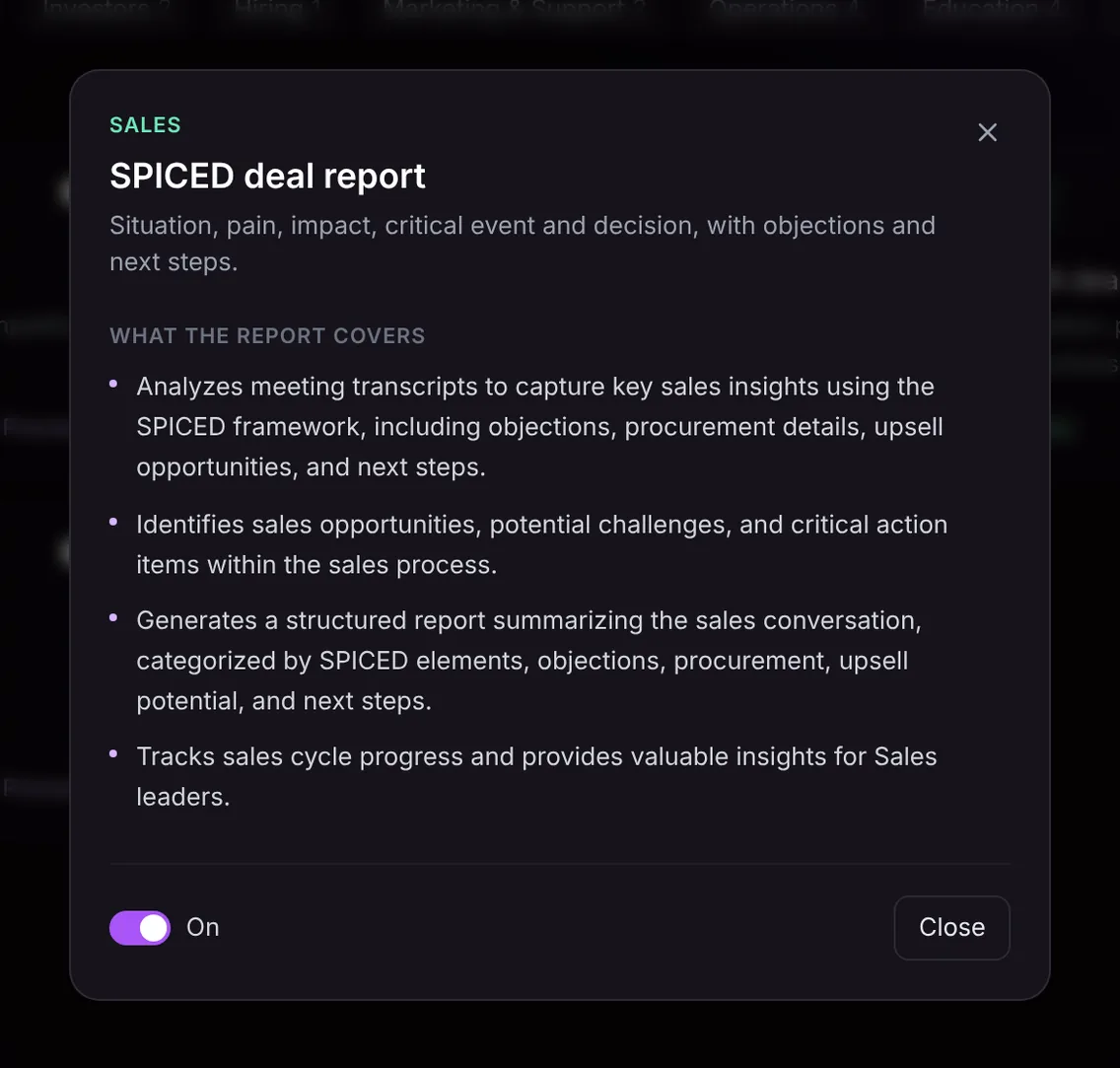
The SPICED deal report reads the whole transcript and organises it around the framework plus the commercial details a sales leader needs to judge the deal:
- SPICED elements: situation, pain, impact, critical event and decision, each summarised from what the buyer said.
- Objections: concerns raised on the call, such as price, timing, security reviews or an incumbent tool.
- Procurement details: legal review, security questionnaires, vendor onboarding and anyone in purchasing who was mentioned.
- Upsell potential: other teams, use cases or seats that came up and could expand the deal later.
- Next steps: what was agreed, who owns it and when, so the follow-up is clear.
- Opportunities and risks: the strengths that help the deal and the challenges that could stall it, so a sales leader can track the cycle across calls.
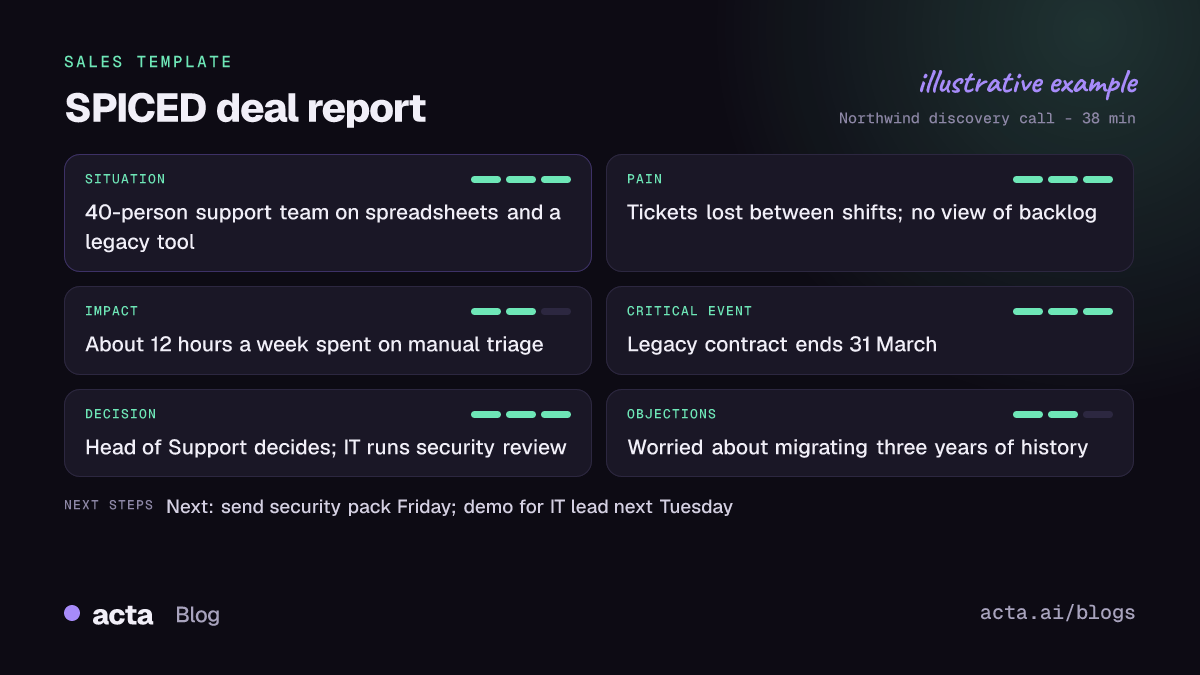
Like the other sales reports, it can open with an "In short" summary, a confidence level that says what was missing, the qualification status, coverage of each SPICED element on a three-point scale, "Ask on the next call" questions for the gaps, and key quotes with the speaker.
Here is the template in Acta's Templates page, with the preview of what the report covers:
And an illustrative example of a finished report:
Why is a SPICED report useful, and who is it for?
It is built for account executives, SDRs who run discovery, and the sales managers and RevOps people who coach them. The value is that every deal is described the same way, in the customer's language, without anyone retyping notes.
- Pipeline reviews: a manager can open the report and see at once whether a deal has a real critical event or just a hopeful close date.
- Coaching: the coverage scale shows which elements a rep tends to skip. If impact is weak on every call, that is the next coaching session.
- Handoffs: when a deal moves from an SDR to an AE, or from an AE to customer success, the pain and impact travel with it, so nobody asks the customer the same questions twice.
- Multi-call deals: because each call produces its own report, you can see the decision process fill in over time and spot when a new stakeholder appears.
Teams that also qualify with other frameworks can compare approaches. The MEDDPICC deal report suits complex enterprise deals with many stakeholders, and the BANT qualification report is a lighter fit for early discovery.
How does Acta pick the SPICED template automatically?
You do not have to remember to switch the template on before a call. Acta reads the conversation and, when it fits, picks the SPICED template for you. The report is labelled "Auto", and Acta explains why it chose it, for example that the buyer described their current setup, a business problem, what it costs them and a renewal date that forces a decision.
Signals that point to SPICED include questions about how the customer works today, talk of what the problem costs in time or money, a named deadline such as a contract renewal, board meeting or launch, and discussion of who else needs to approve the purchase. If you like the result, one click on "Turn on for future meetings" keeps it on.
The relevance check works in the other direction. If you have the SPICED template on and the meeting turns out to be an internal forecast review or a team standup, Acta does not force a deal report out of it. The template is listed under "Not relevant" with the reason, so you are not left with an empty report full of guesses.

How do you use the SPICED deal report in Acta?
- Record the call. Acta can join Zoom, Google Meet or Microsoft Teams through its meeting bot, or record without a bot using the bot-free desktop app, the Chrome extension or the mobile apps. You can also upload a recording.
- Turn on the template. Open Templates in Acta, find SPICED deal report in the Sales group, preview what it covers and switch it on. Or leave it off and let Acta pick it when a call fits.
- Open the meeting's Templates tab. After the call, the report sits next to the summary and transcript.
- Share it. Copy it into Slack or an email, download it as PDF, Word or Markdown, or use Push to CRM to add it as a note on the contact in Salesforce, HubSpot or Zoho (paid plan, with that CRM connected).

Tips for a more complete SPICED report
The report only contains what was said, so the best way to improve it is to ask the questions that fill each element. A few that work well:
- For impact, ask the buyer to put a number on it: "What does this cost you each month today?"
- For the critical event, ask what happens if the date passes, not just what the date is.
- For the decision, ask who else will weigh in and what they will care about most.
- Summarise the next step out loud at the end, with a name and a date, so it lands in the report clearly.
Use the "Ask on the next call" list as your prep for the follow-up. For more on how Acta supports reps, see Acta for sales teams or the SPIN selling deal report if your team runs discovery with SPIN questions.
Frequently asked questions
What does SPICED stand for in sales?
SPICED stands for Situation, Pain, Impact, Critical Event and Decision. It is a qualification and discovery framework created by Winning by Design and widely used by SaaS sales teams.
What is the difference between SPICED and MEDDPICC?
SPICED centres on the customer's problem, its impact and the event that sets the timeline. MEDDPICC adds more structure around metrics, the economic buyer, paper process and competition, which suits large enterprise deals.
Does Acta guess missing SPICED elements?
No. The report only contains what was said in the meeting. When an element did not come up, the coverage and confidence notes say so, and Acta suggests questions to ask on the next call.
Can I send the SPICED report to my CRM?
Yes. On a paid plan with Salesforce, HubSpot or Zoho connected, Push to CRM adds the report as a note on the customer's contact. You can also copy it or download it as PDF, Word or Markdown.
Want SPICED notes after every discovery call without writing them? Start a free 15-day trial of Acta.