The stock review is where expiry and cold-chain risks surface
In most distributors the rhythm is similar. A short dispatch huddle each morning sorts routes and urgent hospital orders. Once a week, or twice a month, the owner chairs the stock review: the inventory manager brings the expiry report, purchase brings slow movers and pending orders, accounts brings outstanding expiry and breakage claims with each principal, and the cold-chain in-charge reports on the cold rooms, data loggers and any excursion. Every month or quarter there is also a review with each principal's area manager, often on a video call, about secondary sales, returns and schemes.
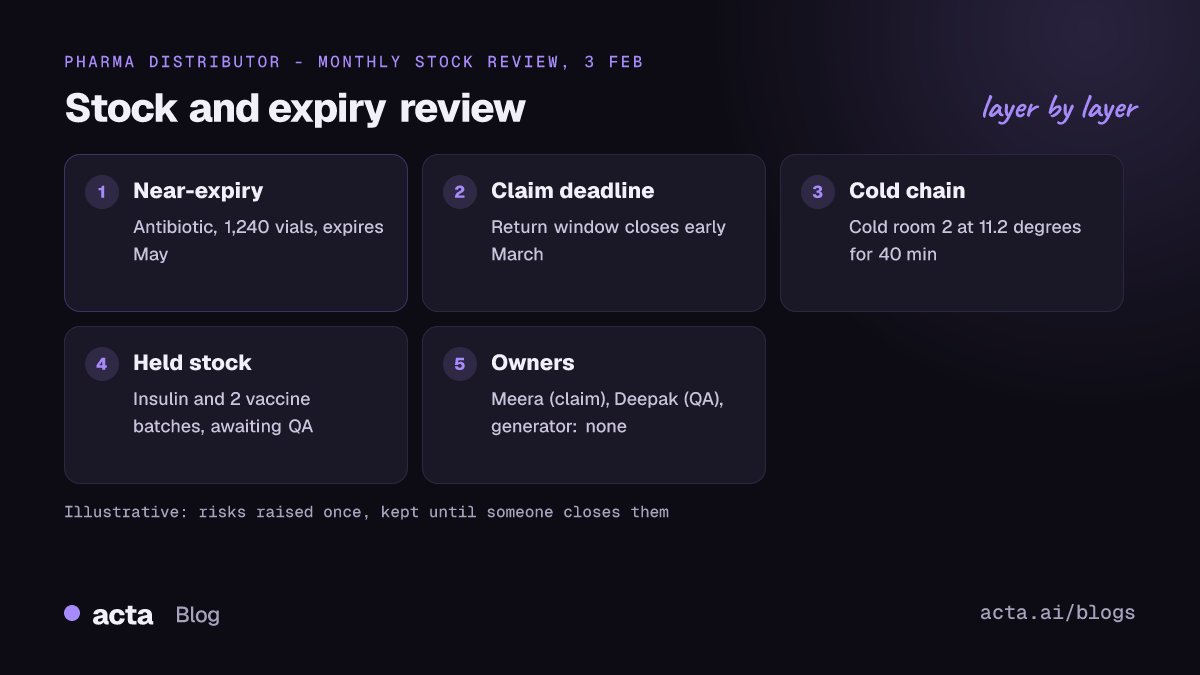
That stock review is where the expensive problems are said out loud. "We have 1,200 units of that antibiotic expiring in May." "The logger in cold room 2 showed 11 degrees for 40 minutes during Wednesday's power cut." Everyone hears it. The trouble is that a stock review covers 40 things in an hour, and the minutes, if anyone writes them, say "expiry stock discussed".
The WHO guidance on good storage and distribution practices for medical products treats each stage of the chain, from storage to transport and distribution, as a point where products can be put at risk. Its model guidance for time- and temperature-sensitive products deals specifically with the cold chain excursion and how to reduce it. Your SOPs will say what to do. The meeting is where you decide who does it and by when, and that is the part a note-taker can help keep. Our page for pharma distributors covers the other meetings where this applies.
A month at an Indore distributor: two risks raised and dropped
An illustration, with invented names and numbers. Narmada Medico Distributors in Indore has 70 staff, carries stock for 12 principal companies and supplies about 1,800 chemists and 40 hospitals. Rakesh owns it. Farah runs the warehouse and inventory, Sunil handles purchase, Meera handles claims in accounts, and Deepak is the cold-chain in-charge.
3 February, stock review. Farah flags a batch of an injectable antibiotic: 1,240 vials expiring in May, worth about Rs 3.8 lakh. In this illustration the principal accepts short-expiry returns only up to 60 days before expiry, so the claim must go in before early March. Rakesh says, "Meera, raise it this week, and Sunil, try pushing some to the hospital accounts first." Later in the same meeting Deepak mentions that cold room 2 hit 11.2 degrees for about 40 minutes on 29 January when the generator changeover failed. Insulin pens and two vaccine batches were inside. Rakesh says, "Hold those batches and check with the principal's QA." The meeting moves on to a new principal.
17 February, stock review. The new principal takes the whole hour. Neither item comes up. Meera assumed Sunil's hospital push came first. Sunil sold 200 vials and stopped. Deepak put the insulin on hold but never wrote to QA, because nobody asked him for an update.
4 March. Another power cut; the generator changeover fails again, the same cold room warms up, and this time the hospital pharmacist asks for the logger printout before accepting a delivery. That afternoon Meera opens the claim portal: the return window for the antibiotic closed on 2 March. Rs 3.2 lakh of stock is now a likely write-off, and the January insulin batches are still on hold with no QA answer, a month later.
Nobody hid anything. Both risks were said clearly in a meeting with the owner present. They just had nowhere to live between meetings.
Notes for a pharma distributor stock review meeting need batch-level detail
"Expiry discussed" is useless. Good stock review minutes name the product, batch, expiry date, quantity, value and the action, and they record each cold-chain event with the unit, the reading, the duration and what was held. Treat them as a near-expiry stock report written by the meeting itself.
In Acta, two built-in templates help here. Vendor review suits the call with each principal's area manager, and Incident post-mortem works for the meeting held after an excursion. For the stock review itself, write a custom template (paid plans; up to 10 per person; see how custom templates work):
Template name: Stock and expiry review
What should this report do? For a pharma distributor's internal stock review: list near-expiry batches, cold-chain events, slow movers, pending claims and every risk raised, with owners and dates.
Near-expiry batches (Table: Product | Batch | Expiry | Qty | Value | Action)
Cold-chain events (Table: Date | Unit | Reading and duration | Products held | Next step)
Claims and credit notes (Checklist: task, owner, due date)
Slow movers and liquidation ideas (Bullets)
Risks raised (Bullets, in the speaker's words)
Extra instructions: Keep batch numbers, temperatures and amounts exactly as said.
When should Acta use it? Only matching meetings
Run it on last month's recording with "Test on a past meeting" before switching it on. Where a section was not covered, the report says "Not discussed", which is useful in itself: a stock review with no cold-chain section is a question for the chair.
The Risk Registry keeps each risk alive until someone closes it
Under My meetings, the Risk Registry tab collects risks raised in your meetings and updates them after each new one. The first time you open it, Acta reads your past meetings for risks; after that a badge shows "Updated after every meeting" and the last meeting it read.
The table has six columns: Risk, Mitigation, Owner, Date, Impact and Status. Impact is High, Medium or Low, with a line saying what is at stake. Mitigation carries a tag: Agreed means it was decided in a meeting, and the play button opens that moment; Suggested means it is Acta's idea and nobody has agreed it yet. Status is Open, Mitigating or Closed. A risk raised again later stays one row, with the newest details, and its History shows how it changed.
Here is a risk register example from the 3 February review, as Rakesh's Risk Registry would have shown it:
| Risk | Mitigation | Owner | Date | Impact | Status |
|---|
| Antibiotic batch, 1,240 vials, expires May; return window closes early March | Raise short-expiry claim this week (Agreed) | Meera | 7 Feb | High: about Rs 3.8 lakh write-off | Open |
| Cold room 2 reached 11.2 degrees for 40 min on 29 Jan; insulin and vaccines inside | Hold batches; ask principal QA for disposition (Agreed) | Deepak | No date | High: product quality and patient safety | Mitigating |
| Generator changeover failed during power cut | Service the changeover switch and test weekly (Suggested) | No owner | None yet | High | Open |
Three cards sit above the table and would have caught this month early. "High · no owner" would have flagged the generator row on day one, with an "Assign owner" button. "Fix is overdue" would have shown the antibiotic claim on 8 February. And after the 4 March power cut, the generator row would carry the "Getting worse" tag. Filter chips ("3 high", "1 no owner") and grouping by Project / customer let Rakesh see risks per principal, or by Impact or Owner before the review.
Be clear with your team about one thing: the Risk Registry is per person. Rakesh's version is built from the meetings he recorded plus those others shared with him. If Farah records the principal reviews and never shares them, those risks are not in Rakesh's view. For more on risks that hide in ordinary talk, see project risks hiding in everyday conversations.
Action items, the Decision log and OneChat back up the risk list
The risk list says what could go wrong. Three other views say who is doing what.
Action items. In Outcomes, on the Action items tab, "Raise short-expiry claim for antibiotic batch with principal" would sit under Meera with status "Overdue 3 days" by 10 February. Group by Person before each review; set Auto follow-up so each owner gets a daily email of their own due or overdue items.
Decision log. "Hold cold room 2 insulin and vaccine batches until principal QA clears them" becomes a decision, status Active, decided by Rakesh, owner Deepak. With no linked action items done, it shows on the "Need follow-through" tile. Use Export CSV if your quality file needs a copy.
OneChat. Before the March review, Rakesh could ask: "Which cold-chain incidents have we discussed since January, and what was agreed for each?" The answer would list the 29 January excursion and the hold, quote Deepak, and note there was no later update, with Found in pointing to "Stock review, 3 Feb" at the minute it was raised. OneChat reads only your meetings and any files you add, such as the logger export or the principal's return policy.
All of these, including the Risk Registry, are in the 15-day trial and in Pro.
An agent can log every expiry and excursion after the meeting
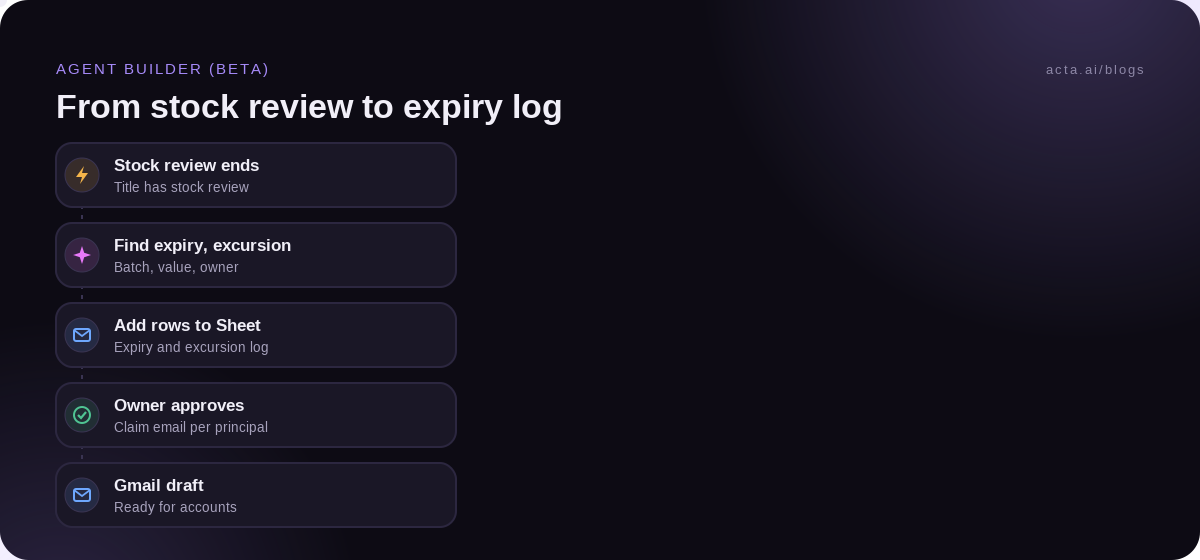
With Agent Builder (beta), the review can feed your existing expiry log in Google Sheets and prepare the claim email for approval. The Agent Builder page shows the pieces; the triggers guide explains the meeting-end filter.
- Create a new agent with the trigger When a meeting ends, filtered to titles containing "stock review".
- Add an Acta data step that brings in the meeting's notes and the Stock and expiry review report.
- Add an AI step: "List every batch with expiry within 90 days and every temperature excursion mentioned. For each, give product, batch, value, owner and the agreed action."
- Add an If / else step: continue only if the list is not empty.
- Add a Google Sheets action that adds one row per item to your "Expiry and excursion log".
- Add a second AI step that drafts a short-expiry claim email per principal, then a Human approval step for the owner.
- After approval, a Gmail action creates the draft in your outbox for Meera to check and send.
- Click Test and Run test on the 3 February recording; nothing is sent in a test. Then Turn on.
Unanswered approvals expire after 24 hours and nothing goes out. Because the agent acts as you, connect the Gmail and Sheets accounts the claims team already uses.
Bring the warehouse and accounts teams in over two weeks
Recording is simple to assign. The owner or operations head records the stock review, usually in a meeting room, with the Acta mobile app or browser recording. Whoever runs the principal reviews records those calls; on Teams or Zoom from the office PC, the desktop app records without adding a bot. Every member of the workspace uses a seat, recorder or not.
Create the workspace in Settings, then Workspace, and invite Farah, Sunil, Meera and Deepak as Members. After each review, share the meeting with "Everyone in" the workspace so each of them can open it and ask OneChat their own questions; their Shared with me tab collects these. The workspace guide has the details. Tell people the review is recorded and why; the post on recording consent with AI notetakers is a good primer (general information, not legal advice), and ask each principal's manager before recording their call.
- Days 1 to 4: record the next stock review and the dispatch huddle. Read the Risk Registry together and assign an owner to every High row.
- Days 5 to 7: switch on the Stock and expiry review template; correct anything it got wrong on batch numbers by checking the transcript.
- Week 2: add principal reviews, share every meeting with the workspace, and start each stock review with the three attention cards.
- End of week 2: test the expiry-log agent on two past reviews, then turn it on.
Common mistakes: letting the Risk Registry substitute for your temperature records (it lists what people said, not what the logger measured); leaving Suggested mitigations unconfirmed; and closing a risk because it went quiet rather than because someone fixed it.
Frequently asked questions
What should a pharma distributor stock review meeting cover?
Near-expiry batches with quantities, values and return deadlines; slow movers; pending expiry and breakage claims; cold-chain events with readings and the batches held; supplier and principal issues; and every risk raised, each with an owner and a date. Start with last meeting's open risks before new business, so nothing raised quietly drops away.
Does Acta monitor cold room temperatures?
No. Acta records and summarises meetings; it does not connect to data loggers or sensors. It captures what people say about an excursion, who owns the follow-up and what was agreed, and keeps that visible until it is closed. Your temperature monitoring system and SOPs remain the record of what actually happened.
Can the whole team see one risk register?
Not as a single company-wide register. The Risk Registry in Acta is built per person from the meetings they recorded or that were shared with them. If every stock review and principal call is shared with the workspace, the owner's Risk Registry covers all of them, and each colleague can open those meetings and ask OneChat about them.
How is the Risk Registry different from an expiry report?
An expiry report comes from your inventory software and lists every batch by date. The Risk Registry lists only the risks people raised in meetings, with the agreed fix, owner and status, and it flags rows with no owner or an overdue fix. Use the report to find problems and the Registry to make sure each one gets handled.
What happens to the Risk Registry after the trial ends?
The Risk Registry, Outcomes views and OneChat are included in the 15-day trial and in Pro. If the trial ends without Pro, you can still see the register, but changing it needs Pro. Pro is $8 per seat per month billed monthly, or $72 per seat per year.
Close the gap between raising a risk and fixing it
The meeting already finds the problems. What it needs is a place where each one stays visible, with a name and a date, until it is fixed.
- Record the review: every stock review and every principal call, starting this week.
- Use batch-level notes: product, batch, expiry, quantity, value, action.
- Own every High row: no High-impact risk leaves the meeting without a person and a date.
- Open with the cards: "High · no owner", "Fix is overdue" and "Getting worse" before any new topic.
- Share by default: so the owner's view covers warehouse, purchase and accounts.
Start with your next review on the 15-day trial from the pricing page, and use the Chrome extension for principal calls in Meet or Teams in the browser.