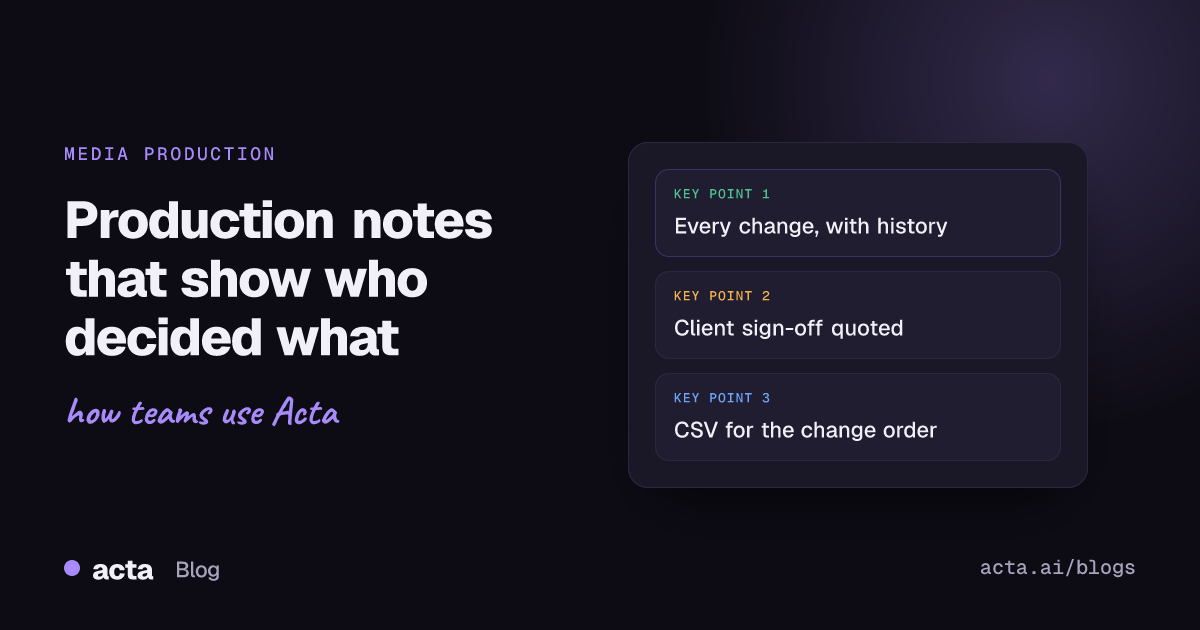
MEP consultancies run on three kinds of review meeting
Most building services practices hold three recurring meetings per project. The internal design review is where the HVAC, electrical and public health leads walk through drawings before an issue. The MEP coordination meeting, usually fortnightly, brings in the architect, the structural engineer and sometimes the client's project manager to agree routes, levels and shaft sizes. And the clash detection meeting, run by the BIM coordinator, goes through the federated model's clash list. Once construction starts, site coordination meetings and RFI reviews are added on top.
In UK practice much of this work peaks during Spatial Coordination (RIBA Stage 3), where the architectural and engineering information is tested and coordinated before detailed design. That is exactly when engineers say things like "we can drop the sprinkler main below the tray once structure freezes the downstand". It is a sensible plan. It is also a risk with a dependency, and the minutes usually record it as "sprinkler/tray clash L4: noted".
What goes wrong without a record is predictable. The dependency gets resolved in an email thread that only one engineer reads. The clash list marks the item reviewed. The drawings go out. Weeks later, a contractor sends an RFI, and the team spends a day finding who said what in which meeting.
A clash mentioned once came back as a site RFI
An illustrative example. Vectra Building Services is a 60-person MEP consultancy in Chennai. On Tower B, a nine-storey office block, the project team is Karthik Raman (director), Leena D'Souza (HVAC lead), Sameer Qureshi (electrical lead), Vivek Nair (public health and fire) and Priyanka Iyer (BIM coordinator). The client has been promised a 2,700 mm clear ceiling in the level 4 corridors.
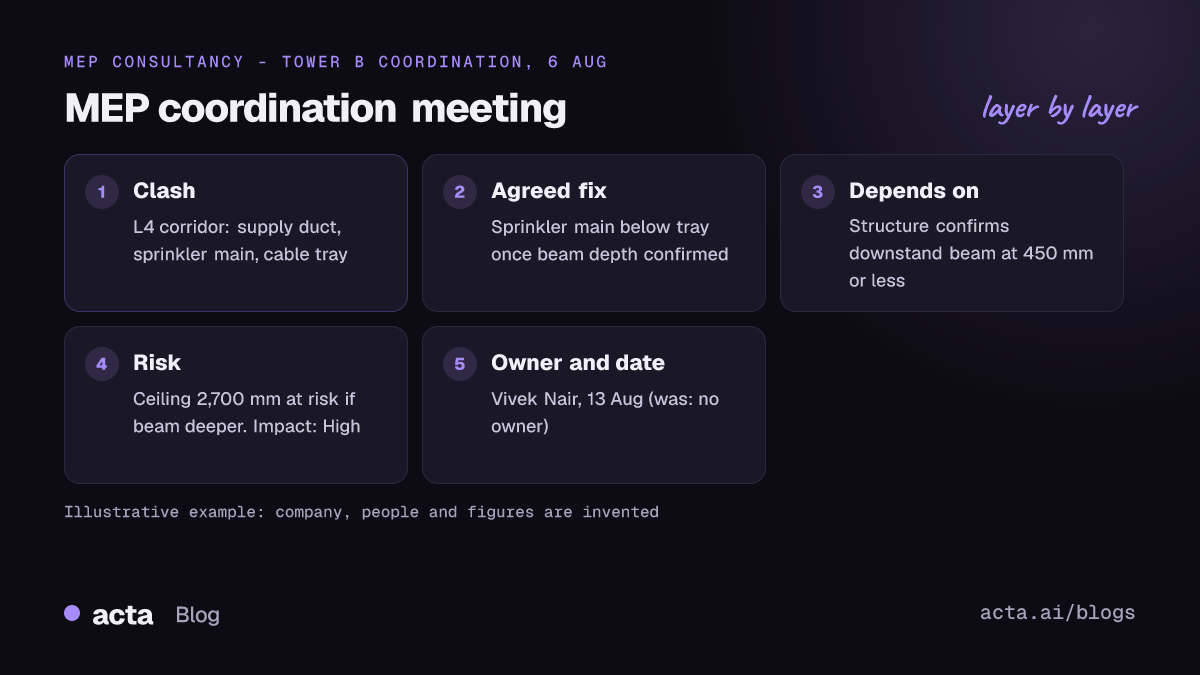
At the coordination meeting on 6 August, Priyanka showed a clash on the level 4 corridor: the 600 mm supply duct, the sprinkler main and Sameer's cable tray all competed for the zone under a new downstand beam. Vivek said, "We'll take the sprinkler main under the tray once structure confirms the beam is 450 deep. If it goes deeper we lose the ceiling height." Everyone nodded and moved to the risers. Nobody owned the follow-up.
On 20 August, the structural engineer confirmed by email that the beam would be 525 mm, not 450. At that day's coordination meeting the structural engineer mentioned "a couple of beams went deeper on four"; nobody connected it to the 6 August clash. The drawings were issued for construction on 3 September. On 30 September the contractor raised an RFI: the services would not fit under the beam at 2,700 mm. The fix took about 40 engineering hours, the corridor ceiling dropped to 2,550 mm in two bays, and Karthik had an awkward call with the client.
The clash itself was found early. The risk was the sentence after it.
A design review meeting risk log is different from a clash report
Clash tools are good at geometry. Autodesk's Navisworks Clash Detective searches the federated model for cross-discipline interferences, and its Results tab tracks each clash with statuses such as New, Active and Reviewed. What a clash tool cannot hold is the conversation: the condition under which the fix works, who promised to check it, and by when. That is what a design risk register from meetings adds.
| Question | Clash report | Design review meeting risk log |
|---|
| Where do items come from? | Model geometry | What people said in reviews |
| Typical entry | Duct vs beam, grid C/4, level 4 | Ceiling height at risk if beam deeper than 450 mm |
| Holds a dependency? | Rarely | Yes, in the mitigation and date |
| Owner | Assigned discipline | A named person |
| Closes when | Geometry no longer clashes | The fix is agreed and done, or the risk is gone |
A useful risk register example row for Tower B, written the way a lead engineer would want it, reads: "L4 corridor: ceiling at 2,700 mm depends on beam depth of 450 mm or less; if deeper, sprinkler main and tray cannot both pass. Mitigation: confirm beam depth with structure, then rerun the L4 clash test. Owner: Vivek. Date: 13 Aug. Impact: High." Seven lines of the 6 August minutes could have carried that. None did.
Acta can write the meeting side for you. For internal reviews, the built-in Project status template gives a RAG-style status, and Decisions & RACI lists who decided what. After an RFI like Tower B's, Incident post-mortem turns the lessons meeting into a timeline. For the coordination meeting itself, a custom template works better. Custom templates are on paid plans (up to 10 per person, 12 sections each), and you can share one with your team so every lead runs the same format:
Template name: MEP coordination meeting
What should this report do? For building services coordination and design review meetings: record each clash or spatial conflict discussed, the agreed fix, what it depends on, and the design risks raised.
1. Clashes discussed (Table: Level and location | Services involved | Agreed fix | Depends on)
2. Design risks (Table: Risk | Discipline | Impact | Owner)
3. Information needed from other consultants (Checklist: task, owner, due date)
4. Decisions (Bullets)
5. Issue readiness (Paragraph: what must close before the next drawing issue)
Extra instructions: Keep dimensions and levels exactly as spoken. Write "Unassigned" when no owner was named.
The Risk Registry keeps clash risks owned and dated
The Risk Registry tab in My meetings collects risks raised in your meetings and updates them after each new one. Its table, "Risks · all meetings", has the columns Risk, Mitigation, Owner, Date, Impact (High, Medium or Low) and Status (Open, Mitigating or Closed). A mitigation is tagged Agreed when it was decided in a meeting, with a link that plays the moment, or Suggested when it is Acta's idea and not yet agreed.
The registry is per person. Leena's registry is built from the meetings Leena recorded or that were shared with her in the workspace; Karthik's is built from his. So the director sees every project's risks only if the leads share their coordination meetings with the workspace. On Tower B, after the 6 August meeting, Karthik's registry would have shown:
Risk: L4 corridor ceiling height (2,700 mm) at risk if downstand beam is deeper than 450 mm · Mitigation: Agreed, reroute sprinkler main under the tray once beam depth is confirmed · Owner: No owner · Date: None yet · Impact: High · Status: Open · Tag: New
That row would also have raised the High · no owner attention card at the top of the screen, with an Assign owner button. After 20 August, when the deeper beams came up again, the same row would have updated rather than duplicated (a risk raised again later stays one row with the newest details) and could carry the Getting worse tag. Once Vivek owns it with a date of 13 August, a missed date raises Fix is overdue. Three cards, each pointing at the same corridor, before any drawing went out.
A few habits make the registry earn its place in a consultancy:
- Group by Project / customer in the Monday review, then filter with the "N high" and "N no owner" chips.
- Open History on any risk before you close it; it shows how the risk changed and where it was said to be solved.
- Close risks in the meeting where the fix is confirmed, so the registry shows them under "solved in a meeting".
Action items, decisions and OneChat on the same project
The other Outcomes views carry the rest. Under Outcomes > Action items, an action item tracker for teams grouped by Person, Vivek's row from 6 August would read: "Confirm L4 downstand beam depth with structure and rerun clash test · Owner: Vivek Nair · Due 13 Aug · Overdue 7 days". The Decision log would hold "L4 corridor: sprinkler main runs below cable tray" with status Active, Decided by Vivek, and a history showing it first raised on 6 August. If the team later moved the main into the ceiling void, the card would show Changed, with the old statement under "Was".
And OneChat answers the question Karthik actually asks on a Monday:
Question: On Tower B, which clashes are waiting on information from structure, and who owns each one?
Answer: One open item. On 6 August Vivek said the sprinkler main would go under the tray "once structure confirms the beam is 450 deep". On 20 August structure mentioned that beams on level 4 went deeper. No one has confirmed the new depth against the corridor ceiling.
Found in: Tower B coordination, 6 Aug (00:37:15); Tower B coordination, 20 Aug (00:12:48)
OneChat only reads meetings you can see, and it shows where each answer came from, so Karthik can play the 20 August moment and hear the structural engineer say it.
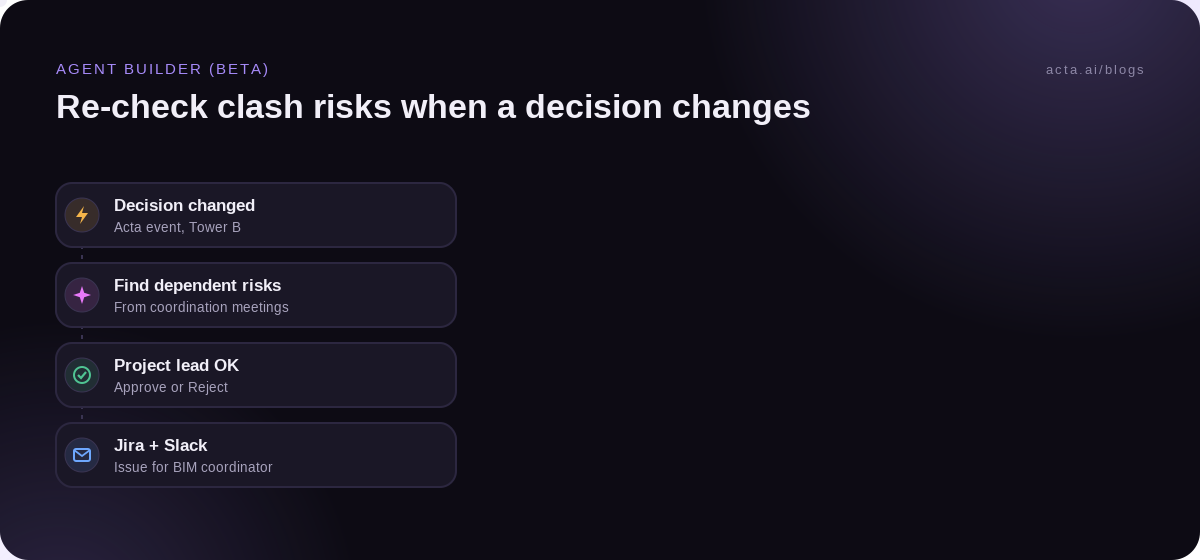
An agent re-checks risks when structure changes a decision
The Tower B failure was a change in one discipline that never reached another. Agent Builder (beta) can watch for exactly that. Here is a recipe a project lead could build in an afternoon:
- Start: "Event in a connected app", Acta, "decision made or changed". Add an "Only when" condition so it runs only for meetings whose title contains "Tower B".
- Acta data step: pull the project's recent coordination meetings and their notes.
- AI step: "Here is a decision that changed. List any open clash or coordination risk from these meetings that depends on it, with level, services and the person who raised it. If none, say none."
- If / else: if the AI step found nothing, stop. Otherwise continue.
- Human approval: the agent's owner gets Approve and Reject in the Approvals tab (and by email if switched on). No answer in 24 hours means nothing is created or sent.
- Jira: create an issue, "Rerun L4 clash test after beam depth change", for the BIM coordinator.
- Slack: post a short note to the project channel naming the affected risk and the owner.
Test it with Run test on a past change; in tests nothing is sent and approvals pass by themselves. Set the failure behaviour on the AI step to "Try again" so a slow run does not drop the alert. The triggers guide lists every start option. Keep the approval step: an engineer should decide whether a Jira issue is warranted, because a flood of false alarms teaches a team to ignore the channel.
Roll it out across one live project in two weeks
Start with recording roles. The BIM coordinator records the clash detection meeting and the coordination meeting; if those run in the Teams or Zoom desktop app, the Acta desktop app records from the coordinator's own laptop with no bot in the call. Each discipline lead records internal design reviews. The director records client stage reviews. External consultants will be on many of these calls, so say at the start that the meeting is recorded for minutes; our guide to recording meetings with AI and what to tell participants covers consent in general terms (not legal advice).
Then the workspace: the owner invites leads from Settings > Workspace, with Owner, Admin and Member roles, and everyone agrees that coordination meetings are shared with the workspace on the day (the workspace guide shows how). Internal fee or HR conversations stay private, which is the default.
- Days 1 and 2: pick one project at Stage 3 or 4. Turn on Project status and Decisions & RACI.
- Days 3 to 5: build the MEP coordination meeting template, test it on two past meetings, adjust the columns, share it with the team.
- Week 2, Monday: the director opens the Risk Registry grouped by project and assigns every High risk with no owner.
- Week 2, midweek: leads ask OneChat one dependency question before the next drawing issue.
- Week 2, Friday: decide whether to add the change-watching agent and a second project.
Avoid three mistakes. Do not treat the registry as a shared company register: it is each person's view. Do not let the clash list stand in for the risk log; they answer different questions. And do not record a coordination meeting and leave it private, because then nobody else's registry or OneChat can see it. For decision tracking in general, a decision log and RACI from your meetings goes deeper, and project risks hiding in everyday conversations lists the phrases that usually signal one.
Acta records coordination meetings and reviews, then writes notes, decisions, action items and a Risk Registry that updates after each meeting. Outcomes, the Risk Registry and OneChat are included in the 15-day trial and in Pro. The page for engineering consultancies shows the setup.
Frequently asked questions
What is a design review meeting risk log?
It is a list of risks raised in design reviews and coordination meetings, each with a description, mitigation, owner, target date, impact and status. Unlike a clash report, which lists geometric interferences, it records conditions and dependencies people mention, such as a fix that only works if another consultant confirms a dimension by a certain date.
Who should own the risk log in an MEP consultancy?
Each lead engineer should own the risks in their discipline, and the project director should review all of them weekly. In Acta the Risk Registry is per person, so leads share coordination meetings with the workspace and the director's registry then covers the whole project. A BIM coordinator can chase owners but should not own every risk.
How often should we review clash risks?
Review open High risks at every coordination meeting and before every drawing issue. A short Monday pass over risks with no owner or an overdue fix catches most slips. Re-check dependent risks whenever another discipline changes a decision, such as a beam depth or ceiling level, rather than waiting for the next clash run.
Can we use this alongside Navisworks or another clash tool?
Yes. Keep running clash tests in your model tool and use the meeting-based risk log for the conversation around each clash: the agreed fix, what it depends on and who checks it. Mention clash IDs aloud in meetings and they will appear in the notes, which makes cross-referencing straightforward.
Does the Risk Registry work during the free trial?
Yes. Outcomes (Action items and the Decision log), the Risk Registry and OneChat are included in the 15-day trial and in Pro. Custom report templates, such as an MEP coordination template, need a paid plan. After a trial ends without Pro, you can still see the registry but not change it.
Decide what your next coordination meeting records
The fix for Tower B was not more meetings. It was one owner and one date on a sentence that was already said. Before your next coordination meeting:
- Name the recorder: the BIM coordinator records coordination and clash meetings.
- Share on the day: every coordination meeting goes to the workspace so every lead's registry sees it.
- Own the High risks: no High risk stays without an owner past 48 hours.
- Watch dependencies: re-check risks when another discipline changes a decision.
- Close in the room: mark a risk closed in the meeting where the fix is confirmed.
Record your next coordination meeting with the Acta Chrome extension or the desktop app, and test the Risk Registry on one project during the 15-day free trial.