For most teams, cloud based workflow automation means Zapier for the widest app coverage, Make for complex branching at a lower price, or Power Automate if you already live in Microsoft 365. Workato fits IT-led enterprise programmes, n8n Cloud and Pipedream suit technical teams, and Activepieces and Relay.app are lighter options. Acta's Agent Builder is a specialist pick for workflows that start in a meeting.
Below are nine hosted platforms compared on fit, free plan and starting price, with a short verdict on each. "Cloud based" here means the vendor runs the servers. If a data rule says workflows must run inside your own network, skip to the section on hosting, because a self-hosted build may suit you better.
Key takeaways
- Start with the tool that already has native connectors to four of your five most-used apps.
- Compare billing units, not headline prices: a 10-step workflow running 500 times a month is 5,000 Zapier tasks but 500 n8n executions.
- Free plans are for learning; Zapier's is two-step only and Pipedream's is for development only.
- Pick Power Automate or Workato when IT will govern the programme; pick Zapier, Make or Relay.app when a business team will own it.
- Add a human approval step before anything that writes to a customer or a system of record.
Table of contents
- Cloud based workflow automation tools compared at a glance
- General-purpose platforms suit mixed SaaS stacks
- Suite and enterprise platforms suit IT-led programmes
- Developer-friendly clouds suit technical teams
- Specialist tools cover approvals and meetings
- Hosted automation trades control for convenience
- Billing units decide what a workflow really costs
- Most automation failures come from setup, not the tool
- Frequently asked questions
- Choose a platform with this checklist
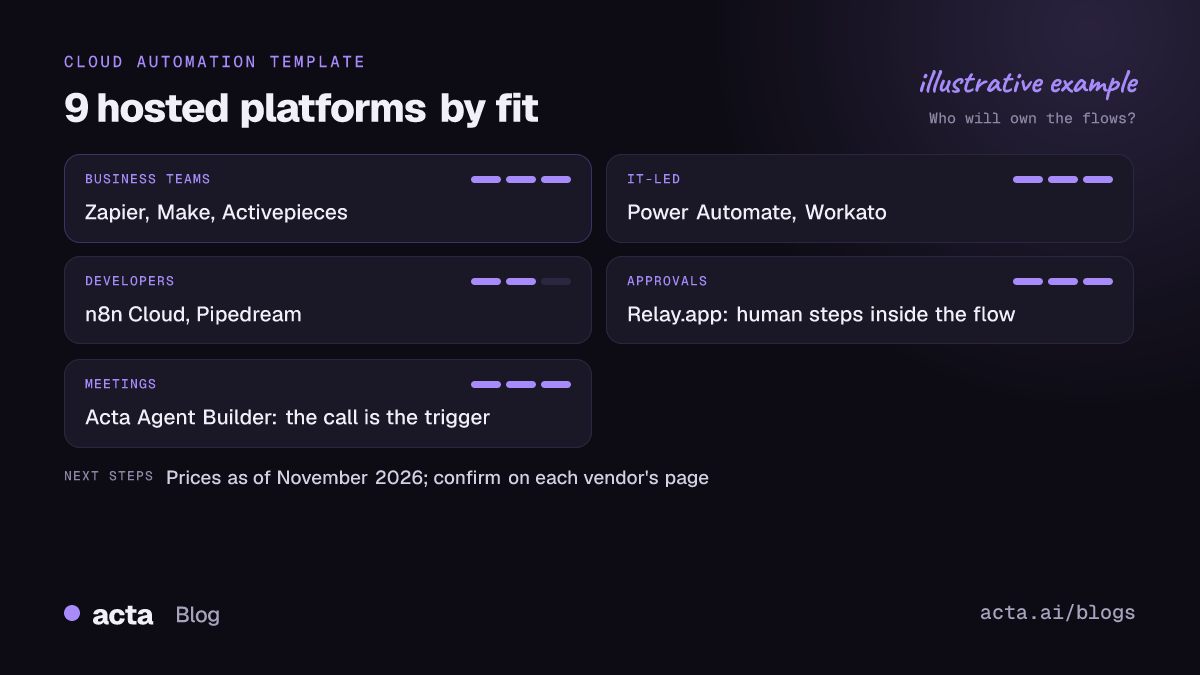
Cloud based workflow automation tools compared at a glance
The order below follows the groups in this article, not a ranking. The right tool depends on your apps and who will maintain the flows.
| Tool | Best for | Free plan | Starting paid price |
|---|---|---|---|
| Zapier | Widest app coverage | Yes, two-step Zaps | $19.99/mo billed yearly |
| Make | Complex branching on a budget | Yes, 1,000 credits/mo | Core $9/mo billed yearly |
| Activepieces | Simple flows, open-source option | Yes, 1,000 credits/mo | Plus $20/mo |
| Power Automate | Microsoft 365 teams | Standard connectors with M365 | Premium $15/user/mo |
| Workato | Enterprise, IT-governed | One-time credit grant | Pro from $75/mo (docs) |
| n8n Cloud | Technical teams, long flows | 14-day trial | Starter, 2,500 runs/mo |
| Pipedream | Developers, code steps | Development only | Startup $99/mo billed yearly |
| Relay.app | Human approvals in the flow | Yes, 200 steps/mo | $19/mo billed yearly |
| Acta Agent Builder | Workflows triggered by meetings | 15-day free trial | Acta Pro $8/seat/mo |
Checked on 12 November 2026; confirm on each vendor's pricing page, as prices and plans change often.
General-purpose platforms suit mixed SaaS stacks
If your workflow touches HubSpot, Slack, Typeform and Google Sheets, start here. These tools are built for business users and have ready-made connectors for most SaaS apps.
1. Zapier
- Best for: Teams that need a connector for almost every app and want the easiest editor.
- Pros: Huge app catalogue; simple step-by-step builder; filters, paths and formatter on paid plans.
- Cons: Every action step counts as a task, so long or busy flows get expensive; the free plan only runs two-step Zaps.
- Price (as of November 2026): Free plan with 100 tasks a month; Professional from $19.99 a month billed annually with 750 tasks, per Zapier's pricing pages.
2. Make
- Best for: Ops people who build branching, looping or data-heavy flows and watch the budget.
- Pros: Visual canvas shows the whole scenario; routers and iterators are built in; cheap entry tier.
- Cons: Steeper learning curve than Zapier; on the free plan scenarios can run at most every 15 minutes.
- Price (as of November 2026): Free with 1,000 credits a month; Core listed at $9 a month (annual billing) for 10,000 credits on the Make pricing page.
3. Activepieces
- Best for: Small teams who want something simple now and the option to self-host later.
- Pros: One credit per run regardless of steps; MIT-licensed Community Edition if you outgrow the cloud.
- Cons: Smaller connector catalogue than Zapier or Make; less community content to copy from.
- Price (as of November 2026): Free cloud tier with 1,000 credits a month; Plus at $20 a month for 10,000 credits, per Activepieces' own site.
Suite and enterprise platforms suit IT-led programmes
When IT will own security reviews, connector policies and audit, these platforms fit better than tools a single team signs up for on a card. If most of your automation lives inside Jira, start with our Jira workflow automation tools comparison instead.
4. Microsoft Power Automate
- Best for: Organisations on Microsoft 365 that automate Outlook, Teams, SharePoint and approvals.
- Pros: Deep Microsoft connectors; cloud flows with standard connectors come with many Microsoft 365 plans; desktop flows for legacy apps.
- Cons: Premium connectors such as Salesforce need a paid plan; licensing has several moving parts.
- Price (as of November 2026): Premium listed at $15 per user per month on the Power Automate pricing page.
5. Workato
- Best for: Enterprises running integrations across many systems with central governance.
- Pros: Built for IT-managed programmes; usage-based credits; option to cap the cost of a recipe.
- Cons: More platform than a small team needs; enterprise tier is quote-only.
- Price (as of November 2026): Free tier is a one-time credit grant; Workato's docs list Pro from $75 a month for 2,500 credits, while its marketing page has shown a different figure, so confirm before budgeting.
Developer-friendly clouds suit technical teams
If someone on the team writes JavaScript or Python and you want code steps without running servers, look here.
6. n8n Cloud
- Best for: Technical teams with long, multi-step workflows and AI steps.
- Pros: One execution is one whole workflow run, whatever the step count; code nodes when you need them; self-hosted version if you leave the cloud.
- Cons: Less beginner-friendly; the cloud trial is time-limited rather than a permanent free plan.
- Price (as of November 2026): 14-day cloud trial; Starter includes 2,500 executions a month, listed around 20 euros a month billed annually on n8n's pricing page.
7. Pipedream
- Best for: Developers building integrations and agent tools in code with managed hosting.
- Pros: Write code steps freely; usage priced by compute time rather than by step.
- Cons: The free plan is for development only; pricing is aimed at product teams more than at ops.
- Price (as of November 2026): Startup plan with 10,000 credits a month, listed at $99 a month billed annually.
Specialist tools cover approvals and meetings
These two aren't general replacements for Zapier. They do one thing the others treat as an add-on.
8. Relay.app
- Best for: Teams whose workflows need a person to approve, fill a gap or pick a path mid-run.
- Pros: Approvals, data requests and manual path choices are first-class steps, included on every plan; assignees can respond from Slack or email.
- Cons: Smaller catalogue than the big platforms; Relay's own pages quote different starting prices.
- Price (as of November 2026): Free with 200 steps and 500 AI credits a month; Professional from $19 a month billed annually, per Relay's comparison pages.
9. Acta Agent Builder
Acta is an AI meeting assistant, not a general integration platform, so it belongs on this list only for workflows that start in a call. Its Agent Builder runs after a meeting ends, using the transcript, decisions and action items to draft a follow-up email or update HubSpot, Salesforce or Jira, with an approval step if you want one. Pair it with Zapier or Make for everything that doesn't begin in a meeting.
- Best for: sales, CS and product teams whose follow-ups start from calls.
- Pros: the meeting itself is the trigger; works with bot, desktop app or Chrome extension capture.
- Cons: limited to meeting-driven workflows and its listed integrations.
- Price (as of November 2026): 15-day free trial; Acta Pro is $8 per seat a month billed monthly, or $72 a year.
Hosted automation trades control for convenience
With cloud based workflow automation, the vendor patches servers, scales capacity and keeps connectors working when an app changes its API. That's most of the hidden work, and it's why I'd default to hosted unless there's a specific reason not to.
The reasons that do hold up: a written policy says certain data can't leave your network, volumes are high enough that per-step pricing hurts, or you need a connector to an internal system nobody will expose to the internet. In those cases n8n and Activepieces both offer self-hosted versions. Our Zapier vs Make vs n8n comparison goes deeper on that trade-off, and the low-code automation resources list covers where to learn each tool.
Before moving anything sensitive into a hosted tool, check which accounts the connections run under. A flow tied to one employee's personal login stops working the day they leave.
Billing units decide what a workflow really costs
Headline prices mislead because every platform counts differently. Take one workflow: a new deal in the CRM triggers ten steps (lookup, format, Slack post, task creation and so on), 500 times a month.
- Zapier counts tasks. Each action step that runs is a task, so this flow uses thousands of tasks a month, well past the 750 on the entry plan.
- Make counts credits. Most module actions use one credit, so the same flow uses roughly 5,000 credits.
- n8n and Activepieces count runs. The whole workflow is one execution or credit, so it's 500.
- Power Automate is per user or per flow. You pay for the licence, then work within daily action limits.
Polling triggers add up too. A flow that checks for new rows every minute does work even when nothing happens. Use webhooks or instant triggers where the platform offers them.
Most automation failures come from setup, not the tool
In my experience, switching platforms rarely fixes a flaky workflow. The usual causes are the same everywhere.
- No approval before sending. A wrong merge field goes straight to a customer. See human approval in automation.
- Testing on live data. Build with the send or write step off, then run a sample.
- Personal connections. Use shared service accounts for anything in production.
- No owner. Every flow needs a named owner and a backup.
- Silent failures. Turn on error notifications and send them to a channel someone reads. Why automations break lists the usual culprits.
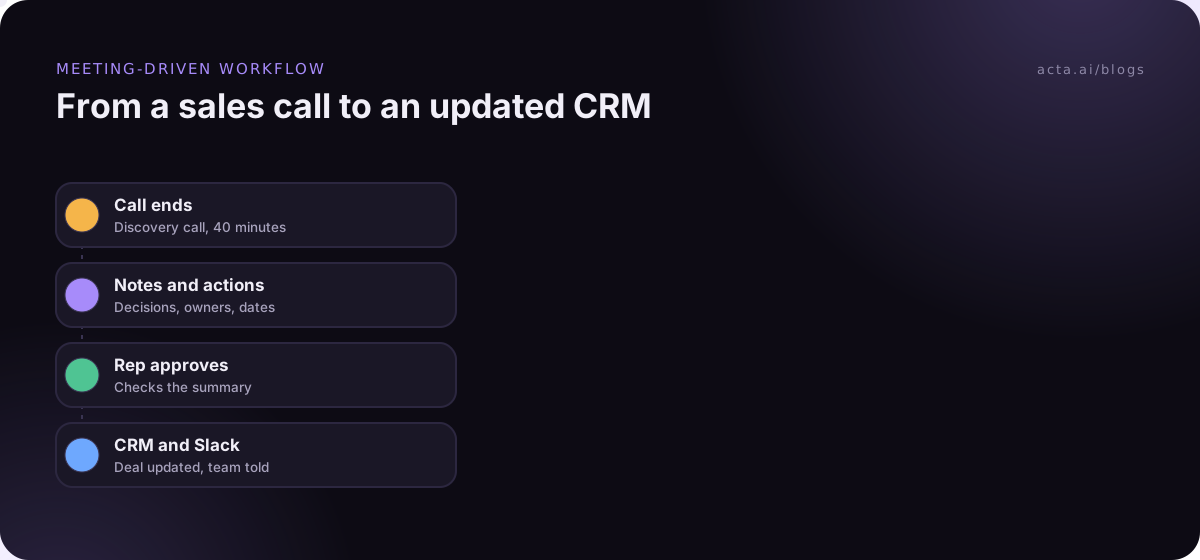
The flow above is a typical meeting-driven example. If you capture calls without a bot, check the rules on recording consent and tell participants first.
Frequently asked questions
What is cloud based workflow automation?
It's software that runs your workflows on the vendor's servers instead of yours. A trigger in one app, such as a new form entry, starts a sequence of steps that moves data between other apps. You build it in a browser, and the vendor handles hosting, scaling and connector updates. Zapier, Make and Power Automate are common examples.
Which workflow automation tool has the best free plan?
It depends on the flow. Make's 1,000 monthly credits and Activepieces' 1,000 monthly credits go further for multi-step flows than Zapier's free plan, which only runs two-step Zaps. Relay.app's free plan suits flows that need approvals. n8n Cloud offers a trial rather than a permanent free plan, as of November 2026.
Is Power Automate free with Microsoft 365?
Partly. Many Microsoft 365 plans include cloud flows that use standard connectors such as Outlook, SharePoint and Teams. Flows that use premium connectors, such as Salesforce or SQL Server, need a paid Power Automate plan; Microsoft listed Premium at $15 per user per month as of November 2026.
Should I choose cloud or self-hosted automation?
Choose cloud unless you have a concrete reason not to: a data policy, very high volume or an internal-only system. Self-hosting moves patching, uptime and security onto your team. n8n and Activepieces let you start in the cloud and move to self-hosted later if those reasons appear.
Can I automate tasks from meetings with these tools?
Yes, but general-purpose tools need the meeting notes to exist first, usually from a notetaker that sends data on. A meeting assistant with built-in automations, such as Acta's Agent Builder, starts from the transcript and action items directly, then hands off to your CRM or Jira.
Choose a platform with this checklist
Spend an hour on these before you commit, and run one real workflow on the free plan or trial.
- Map your apps: confirm native connectors exist for every app in your first three workflows.
- Price the real flow: multiply monthly runs by steps and compare tasks, credits or executions.
- Name the owner: decide whether IT or a business team will maintain flows, and pick accordingly.
- Plan approvals: list every step that contacts a customer or edits a record, and put a human check in front.
- Check data rules: confirm what data may go to a hosted vendor before connecting accounts.
If your first workflow starts in a sales or team call, capture it with the Acta desktop app and try the Agent Builder on the 15-day free trial.