LLM structured output is a model reply your code can parse without guessing, usually JSON that matches a schema. There are three ways to get it. JSON mode promises valid JSON but not your fields. Function calling puts the data in tool arguments. Schema-constrained decoding, such as OpenAI Structured Outputs, Anthropic strict tool use or llama.cpp grammars, blocks the model from sampling anything outside your schema. Use constrained decoding when it is available, and validate the result in code either way.
This guide is for developers wiring model output into databases, tickets, CRMs or other code. It compares the methods as documented by OpenAI, Anthropic, llama.cpp and vLLM as of November 2026, shows the schema rules that trip people up, and ends with a validation layer you can copy. It is not about prompting for nicer prose; if a human is the only reader, plain text is fine.
Key takeaways
- JSON mode gives valid JSON only. OpenAI's own guide says only Structured Outputs ensures schema adherence, and recommends it over JSON mode wherever supported.
- Use function calling when the model is choosing an action; use a response schema when you just want data back. Both can be strict.
- Constrained decoding guarantees shape, not truth. A perfectly valid object can still hold a wrong date or an invented owner.
- Each engine supports a subset of JSON Schema. llama.cpp silently skips unsupported keywords, so run its Python converter to see warnings.
- Always validate in code, check business rules, and retry once with the error message before you fail the task.
Table of contents
- LLM structured output comes in three strengths
- JSON mode guarantees syntax, not your schema
- Function calling is for actions, and it doubles as extraction
- Constrained decoding removes invalid tokens before sampling
- Each provider turns it on differently
- Schema design decides half the quality
- Valid JSON can still be wrong
- Validate every response in code anyway
- Frequently asked questions
- Pick a structured output method for your stack
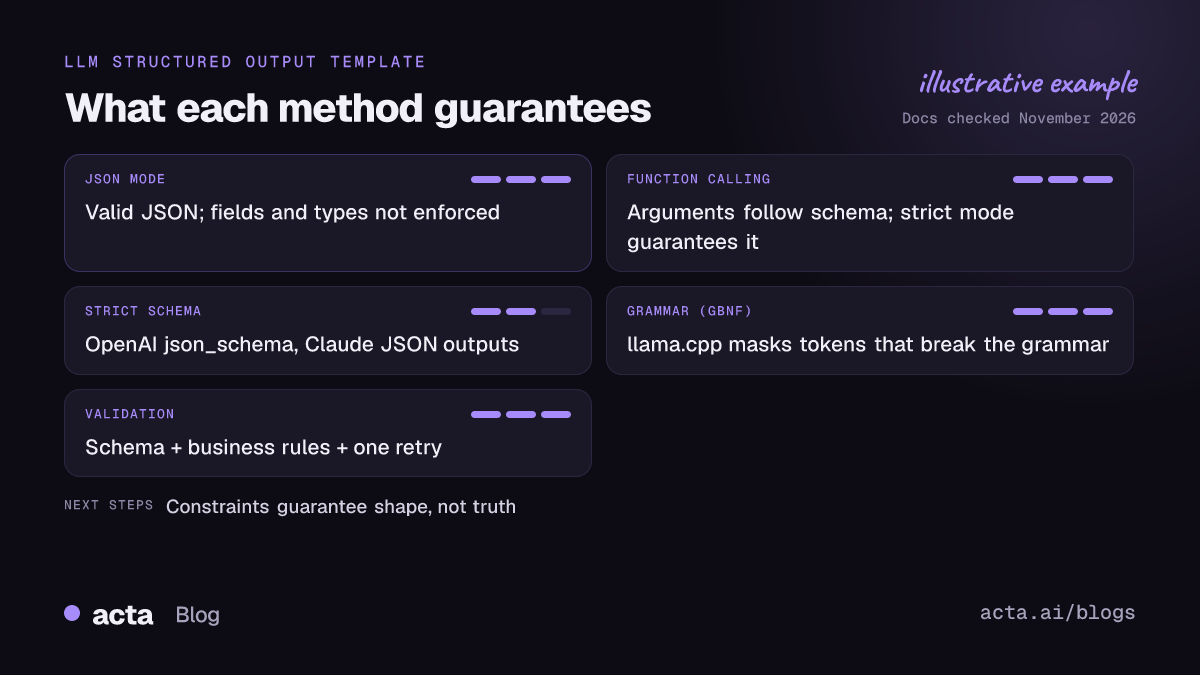
LLM structured output comes in three strengths
Think of structured output as a ladder of guarantees.
- Parses: the reply is valid JSON. JSON mode gets you here.
- Has the right shape: the JSON has the fields, types and enums you defined. Function calling usually gets you here, and strict modes guarantee it.
- Is correct: the values are true and make sense together. No decoding trick gets you here; only validation, checks against your data, and sometimes a human.
Most production bugs live between levels two and three. Teams adopt strict schemas, see parse errors drop to zero, and stop checking. Then an "owner" field fills with a name nobody said, or a due date lands in 2023. Keep the ladder in mind as you read the rest.
A worked example helps. Say you pull action items from a 40-minute meeting transcript. You want a list of objects with task, owner, due date or null, and a confidence enum. With prompting alone, the model mostly complies but sometimes wraps the JSON in prose or renames "owner" to "assignee". With JSON mode, it always parses, but the field names still drift. With a strict schema, the fields are always exactly right, and your remaining job is to check that each owner actually attended.
JSON mode guarantees syntax, not your schema
JSON mode was the first fix for "the model wrapped my JSON in a paragraph". On OpenAI it is the json_object response format. The OpenAI Structured Outputs guide puts the difference plainly: both produce valid JSON, but only Structured Outputs ensures schema adherence, and OpenAI recommends Structured Outputs instead of JSON mode when possible. JSON mode remains for older models that lack schema support.
Local servers offer it too. Ollama's OpenAI-compatible endpoint lists JSON mode among its chat completion features, and llama.cpp's server can constrain to JSON as well.
The json mode vs structured outputs choice is easy, then: use JSON mode only when your provider or model offers nothing stronger, and pair it with a schema in the prompt plus strict validation. Expect field-name drift, missing keys and extra keys, and handle each.
Function calling is for actions, and it doubles as extraction
Function calling (tool use) lets the model decide to call a function you described, with arguments as JSON matching the function's parameter schema. Its real purpose is action: search, create a ticket, send an email. Before strict response schemas existed, developers used it as an extraction trick: define a fake tool like save_action_items, force the model to call it, and read the arguments.
Strict modes now make those arguments reliable. On OpenAI, setting strict: true in a function definition makes the arguments follow the schema. Anthropic's strict tool use docs describe a strict: true flag at the top level of the tool definition, next to name, description and input_schema, that guarantees tool inputs match your JSON Schema by constraining token sampling.
So when does function calling vs structured output make sense? Use a tool when the model is choosing among actions, or when one turn may call several tools. Use a response schema when you always want the same object back and no action is involved. They also combine: Anthropic's docs say JSON outputs and strict tool use can run in the same request, which suits agents that call tools and then return a structured final answer. If you are weighing tools against a protocol, our sibling piece on MCP vs function calling covers that layer.

Constrained decoding removes invalid tokens before sampling
Constrained decoding is how strict modes work under the hood. At each step the model scores every possible next token. A constrained decoder compiles your schema or grammar into rules and masks out every token that would break them, so the model can only choose from tokens that keep the output valid. If the schema says the next thing must be the key "owner" or a closing brace, nothing else can be sampled.
This is why a strict mode can promise schema adherence while prompting cannot. It also explains two side effects. First, the model may be forced into a structure it would not have chosen, so a badly designed schema can push it toward worse answers. Second, constraints only cover what the schema expresses. A string field can still hold anything.
In open-source stacks, llama.cpp exposes this as a GBNF grammar, a small grammar language describing allowed output. Its grammars README shows passing a grammar file on the command line:
./llama-cli -m <model> --grammar-file grammars/some-grammar.gbnf -p 'Some prompt'
You rarely need to hand-write GBNF. llama.cpp converts a subset of JSON Schema to a grammar for you: the json_schema field on the server's completion endpoint, response_format on its chat completions endpoint, or the --json flag (-j) on llama-cli. Python libraries such as Outlines apply the same idea; I do not cover them in detail here.
vLLM ties constraints to tool calling. Its tool calling docs say that with tool_choice set to auto, structured constraints apply only when a tool sets strict: true or a server-side strictness floor is configured. Without either, the model's tool arguments are parsed, not constrained.
Each provider turns it on differently
As of November 2026, per each project's docs:
| Stack | JSON only | Schema-constrained output | Strict tool arguments |
|---|---|---|---|
| OpenAI | json_object format | json_schema format with strict: true | strict: true on the function |
| Anthropic | Use a schema instead | JSON outputs (output_config.format) | strict: true on the tool |
| llama.cpp | Use json_schema instead | json_schema field, response_format, GBNF | Tools via --jinja templates |
| vLLM | Not covered here | Not covered here | strict: true or a strictness floor |
OpenAI. In the Responses API the schema goes under text.format with type json_schema and strict: true. A trimmed example for the action-item case:
"text": {"format": {"type": "json_schema", "name": "action_items", "strict": true, "schema": {"type": "object", "properties": {"items": {"type": "array", "items": {"type": "object", "properties": {"task": {"type": "string"}, "owner": {"type": "string"}, "confidence": {"type": "string", "enum": ["stated", "implied"]}}, "required": ["task", "owner", "confidence"], "additionalProperties": false}}}, "required": ["items"], "additionalProperties": false}}}
Anthropic. The structured outputs docs describe two modes: JSON outputs for structured responses and strict tool use for tool inputs. The current docs name the request field output_config.format; older pages used a top-level output_format with a beta header, so match the field to your SDK version.
llama.cpp. Pass a JSON Schema per request or convert it ahead of time with the bundled examples/json_schema_to_grammar.py script, which prints warnings about parts of the schema it cannot express.
Schema design decides half the quality
Every engine supports a subset of JSON Schema, and the subset differs. Learn the rules for yours before you design.
OpenAI. The guide's "Supported schemas" section says the root must be an object and cannot be anyOf; unions are allowed inside the object. Its examples set additionalProperties to false and list every property in required. Read that section for how to express an optional field rather than guessing.
llama.cpp json schema support. The grammars README lists real gaps as of November 2026: min and max keywords only work for integers, nested $ref is broken, patternProperties is unsupported, and a pattern must start with ^ and end with $. additionalProperties defaults to false to keep grammars fast. Unsupported features are skipped silently, which is the dangerous part. The README also says the schema constrains output but is not added to the prompt, so describe the structure in your prompt too.
Design habits that help on any engine:
- Prefer enums to free text for anything you will branch on: status, priority, sentiment.
- Allow "unknown": a required field with no escape hatch forces the model to invent a value. Add null or an "unknown" enum member.
- Order fields deliberately: models generate left to right, so put a short evidence or quote field before the verdict it supports.
- Keep nesting shallow: two levels is easy to validate and to debug.
- Name fields the way you would explain them: due_date_iso tells the model more than dd.
Valid JSON can still be wrong
Strict modes fix syntax and shape. These problems remain:
- Invented values: a required owner field filled with a plausible name. Cross-check against known data such as the attendee list.
- Cut-off output: if generation stops at the token limit, you get half an object. Check the stop reason and raise the limit or shrink the task.
- Refusals and errors: safety refusals or API errors arrive in a different shape from your schema. Handle them as a separate path.
- Over-tight enums: if "blocked" is not an allowed status, blocked tasks get labelled something else. Review enums against real data.
- Silent schema drift: someone edits the schema, the converter drops an unsupported keyword, and constraints you think exist do not. Version schemas and test them.
Validate every response in code anyway
Treat model output as untrusted input, the same as a form submission; our post on why AI-generated output is untrusted input covers encoding and sandboxing. A simple validation layer you can copy:
- Parse: load the JSON; on failure, log the raw text.
- Schema check: validate with the same schema you sent (Pydantic or any JSON Schema validator), even in strict mode.
- Business rules: dates in a sane range, owners in the attendee list, totals that add up, IDs that exist.
- Retry once with the error: send the validation message back ("owner 'Sam' is not an attendee") and ask for a corrected object.
- Fail visibly: after one retry, route to a person or a dead-letter queue. Do not loop.
- Measure: track parse failures, rule failures and retries per prompt version; see LLM evaluation tools compared for tools that do this in CI.
Where the output triggers an action, add a human check for anything that cannot be undone. Acta's Agent Builder has a human approval step for that, and Acta itself turns meetings into the kind of structured data this post is about: summaries, decisions, and action items with owners. It is a hosted product, so read how it handles meeting data before sending sensitive calls.
Frequently asked questions
What is the difference between JSON mode and structured outputs?
JSON mode guarantees the reply is valid JSON but not that it matches your fields. Structured outputs constrain generation to a JSON Schema you supply, so fields, types and enums match. OpenAI's guide recommends Structured Outputs over JSON mode whenever the model supports it, as of November 2026.
Should I use function calling or a response schema for extraction?
Use a response schema when you always want the same object back and no action is involved. Use function calling when the model chooses among actions or may call several tools. Both can be strict on OpenAI and Anthropic, and they can be combined in one agent.
Does constrained decoding remove the need for validation?
No. Constrained decoding guarantees shape, not truth. A strict response can still contain an invented owner, an impossible date or a half-finished object if generation hit the token limit. Validate against the schema, check business rules against your own data, and retry once with the error message.
How do I get structured output from a local LLM?
With llama.cpp, send a JSON Schema in the json_schema field or response_format, or write a GBNF grammar; the server converts schemas to grammars. Check the README's list of unsupported schema keywords, and describe the structure in the prompt too, since the schema is not added to it automatically.
What is a GBNF grammar?
A GBNF grammar is llama.cpp's format for describing exactly which outputs are allowed. During generation, llama.cpp blocks any token that would break the grammar. You can write one by hand for custom formats or let llama.cpp generate one from a JSON Schema.
Pick a structured output method for your stack
Pick the strongest method your stack supports, then add the checks no method gives you.
- Use strict schemas first: OpenAI Structured Outputs, Anthropic JSON outputs or strict tools, llama.cpp json_schema.
- Use tools for actions: keep function calling for choosing what to do, not for every extraction.
- Read your engine's schema subset: know which keywords are enforced and which are ignored.
- Validate twice: schema in code, then business rules against real data.
- Version and test schemas: treat them like an API contract with fixtures.
If meetings are your input, the Acta Chrome extension captures Google Meet, Microsoft Teams in the browser and the Zoom web client without a bot (check what participants need to know when you record), so structured action items are ready after each call.