A regional ISP's week has five operations meetings
Most regional providers run the same rhythm with different names. A NOC stand-up each morning, 15 minutes on Teams, covers overnight alarms, open tickets, truck rolls and planned maintenance. A weekly outage review, sometimes called a post-incident review, takes the week's customer-affecting events and asks what happened and what changes. A weekly construction and locates meeting brings together outside plant, the locating contractor and anyone building new routes, and goes through 811 tickets, contractor schedules and road works. A monthly change and maintenance planning meeting agrees what gets touched in which window. And there are vendor calls with the middle-mile or transit provider.
Risks come up in all of them, in passing. "The county's starting ditch work on 14 next month." "Locates are running three days behind." "We're down to one reel of 288." Nobody is careless. The NOC is fighting today's alarms, and the outside-plant manager is already in his truck. A sentence like that becomes a risk only if someone writes it down with a name next to it.
The stakes are well documented. The Common Ground Alliance's telecom white paper says telecom facilities take an outsized share of excavation damage in the US, and a Cabling Installation & Maintenance report on the latest DIRT data says underground damage worsened in 2025, with telecom networks hit the most (as of November 2026). Your meetings are where those odds turn into a specific road, a specific date and a specific excavator.
A road widening mentioned in September cut four towns in October
An illustrative case. Prairie Line Broadband is a 160-person fiber provider in rural Kansas with about 18,000 subscribers. Four towns, roughly 4,100 subscribers, hang off a single backbone path that runs in the right-of-way along County Road 14. A ring closure to give them a second path is budgeted for next year.
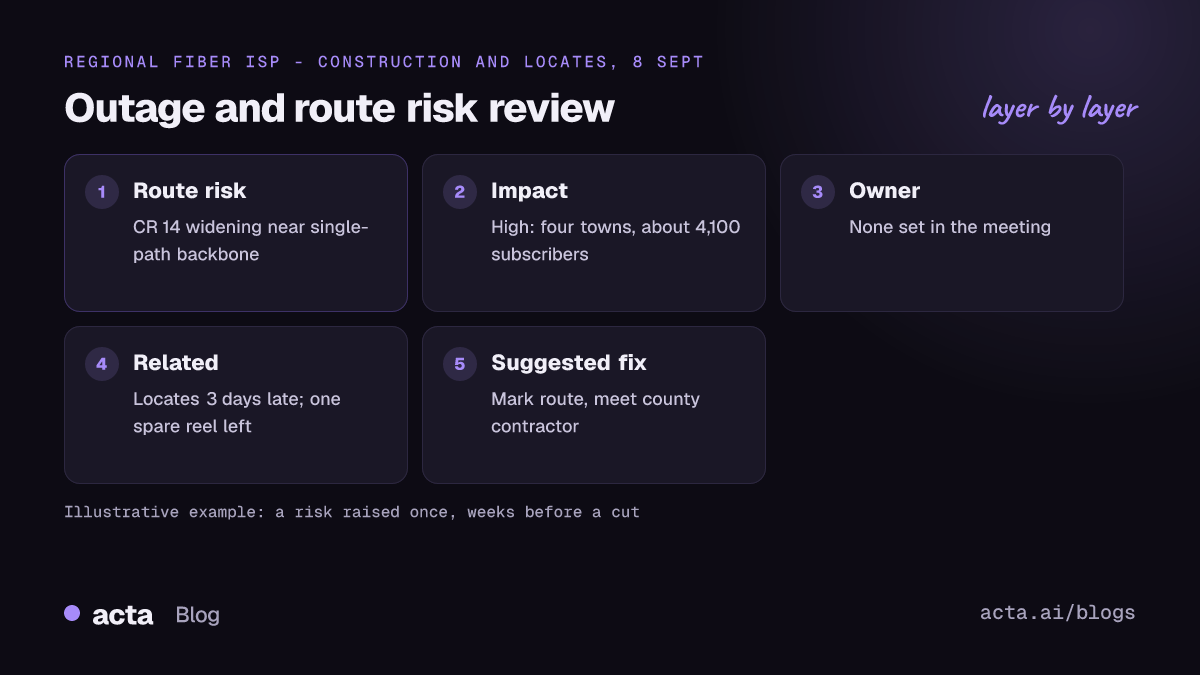
On 8 September, at the construction and locates meeting, outside-plant manager Dale Kuhn said the county would widen County Road 14 in October, with ditch work along the stretch carrying the backbone. "We should get the route marked and talk to whoever the county hires." Everyone agreed. No name, no date.
On 22 September, at the NOC stand-up, the locating contractor's lead said locate tickets were running three days late across the county. On 29 September, at the outage review for an unrelated aerial drop, field tech lead Marisol Vega mentioned that spare 288-count fiber was down to one reel and the next delivery was six weeks out. Three meetings, three pieces of one risk.
On 14 October an excavator working for the county's contractor cut the backbone near mile 6. Splicing took 11 hours, partly because the crew had to source cable from another depot. Four towns were dark for most of a working day, including a school district and a clinic. At the outage review on 16 October, NOC manager Ravi Shah asked the obvious question: had anyone raised this? Yes. Three times.
ISP network operations meeting notes belong in a risk register
Acta records each meeting, writes a transcript with speaker names, and reads it for risks. They collect in the Risk Registry tab under My meetings, updated after every meeting (the badge shows the last one read). The first time you open it, Acta reads your past meetings once, so an existing backlog of stand-ups and reviews is useful from day one.
It's a personal view. Ravi's Risk Registry is built from the meetings he recorded and those his colleagues shared with the workspace. If Dale records the construction meeting and doesn't share it, the County Road 14 risk exists only in Dale's registry. Most of this story's failure was a sharing failure, so fix that first.
What the registry would have shown on 30 September
Here's a risk register example with the rows Ravi's registry would have held after the 29 September review, in the columns Acta uses:
| Risk | Mitigation | Owner | Date | Impact | Status |
|---|
| County Road 14 widening, October ditch work along single-path backbone serving four towns | Suggested: mark route, meet county contractor before work starts | No owner | None | High | Open |
| Locate tickets running three days late county-wide | Agreed: daily escalation list to locating contractor | Ravi Shah | 26 Sept · overdue | Medium | Open |
| Spare 288-count fiber down to one reel; delivery six weeks out | None yet | No owner | None | Medium | Open |
| Aerial drops on Elm St poles sagging after storm | Agreed: re-tension during October window | Marisol Vega | 10 Oct | Low | Mitigating |
The first row would sit in the "High · no owner" card at the top of the page, with an Assign owner button. The second would be in "Fix is overdue". A mitigation marked Agreed was decided in a meeting and plays the moment it was said; one marked Suggested is Acta's idea and nobody has agreed to it yet, which is exactly how you should read it.
How it changes over time
When the same risk comes up again, it stays one row with the newest details, and the History shows how it changed. If the spare-fiber shortage were mentioned again with a later delivery date, it would pick up the "Getting worse" tag. When a meeting says a risk is solved, the status shows "suggested" for Closed until you confirm. Closed rows move to a "Closed (N)" list, solved in a meeting or closed by you.
Filters that suit a network team
Use the chips ("N high", "N no owner") as a morning check. Group by Project / customer sorts risks by route or build; Owner shows what each lead is carrying. The search box takes route names, so "CR 14" or "Hollis" pulls every related row. Edit owner and date in the "Owner and date" window; set status to Open, Mitigating or Closed.
Action items, decisions and OneChat close the loop after an outage
After the cut, the 16 October review produced work. In Outcomes > Action items, grouped by Person:
Meet county contractor on site, walk CR 14 route with locator before ditch work resumes · Owner: Dale Kuhn · Due 18 Oct · Due in 2 days
And in Outcomes > Decision log, the decision that matters most:
Bring CR 14 ring closure forward to Q1 · Status: Active · Decided by: Ravi Shah · Owner: Dale Kuhn · Discussed in 2 meetings · Actions 0 of 3 done
The Need follow-through tile will keep that decision in front of Ravi until permits, design and budget actions move. Both views are per person, built from the meetings each person can see.
OneChat answers the question the general manager asks after any big outage:
Q: Was the County Road 14 work discussed before the 14 October cut, and what did we agree?
A: Yes, three times. On 8 September Dale Kuhn said the county would widen CR 14 in October and the route should be marked; no owner or date was set. On 22 September the locating contractor reported a three-day backlog. On 29 September Marisol Vega reported one reel of spare 288-count fiber. Found in: Construction and locates, 8 Sept · NOC stand-up, 22 Sept · Outage review, 29 Sept.
Engineers who live in Claude or ChatGPT can ask the same through Acta's MCP connector, which has a risk tool that returns each risk with its level and mitigation. The OneChat guide covers scope and sources.
One outage review template makes every post-incident review comparable
Acta's built-in Incident post-mortem template is a good start for outage reviews, Vendor review fits calls with your transit provider or locating contractor, and Decisions & RACI suits change planning. To add route risk, write a custom template in Templates (paid plans; see building your own report templates):
Name: Outage and route risk review · When: Only matching meetings
What should this report do? For outage reviews and construction meetings at an internet provider: record each customer-affecting event, its timeline and cause, subscribers affected, contributing factors, new or growing risks to fiber routes and equipment, and agreed fixes.
Sections: 1. Events reviewed (Table: Event | Start | Restored | Area | Subscribers affected). 2. Timeline (Bullets). 3. Contributing factors (Bullets, no blame). 4. Route and plant risks raised (Table: Risk | Location | Impact | Owner). 5. Fixes agreed (Checklist: task, owner, due date). 6. Open questions (Bullets).
Extra instructions: Use route and pole names exactly as said. Write "Not discussed" rather than estimating subscriber counts.
Section 4 is what the stock post-mortem lacks. For the blameless side of the review itself, our guide to blameless post-mortems from the review meeting goes further.
An agent turns high-impact risks into approved Jira issues
A risk in a registry still needs work scheduled. If your outside-plant team runs on Jira, an agent can carry high-impact risks from each outage review into their backlog. Build it in Acta's Agent Builder; Agent Builder (beta) is part of the trial and Pro, and agents act as you.
- "New agent", then "Start from blank instead". Name: "Route risks to OSP backlog".
- Trigger: When a meeting ends, only when the title contains "Outage review" or "Construction".
- Acta data: the meeting's notes and action items.
- AI: "List each new or growing risk to fiber routes, equipment or spares. For each, give a one-line summary, location, impact High/Medium/Low and the person who raised it. Ignore risks already closed in the meeting."
- If / else: High impact goes on; Medium and Low stop here and stay in the Risk Registry.
- Human approval: the NOC manager approves each issue in Approvals, or by email if "Also email me Approve and Reject buttons" is ticked. Unanswered for 24 hours, nothing is created.
- Action: Jira, create issue in the OSP project. Then a Slack message to #noc with the issue summary.
- Test, Run test on the 29 September review. Nothing is created during a test. Then Turn on.
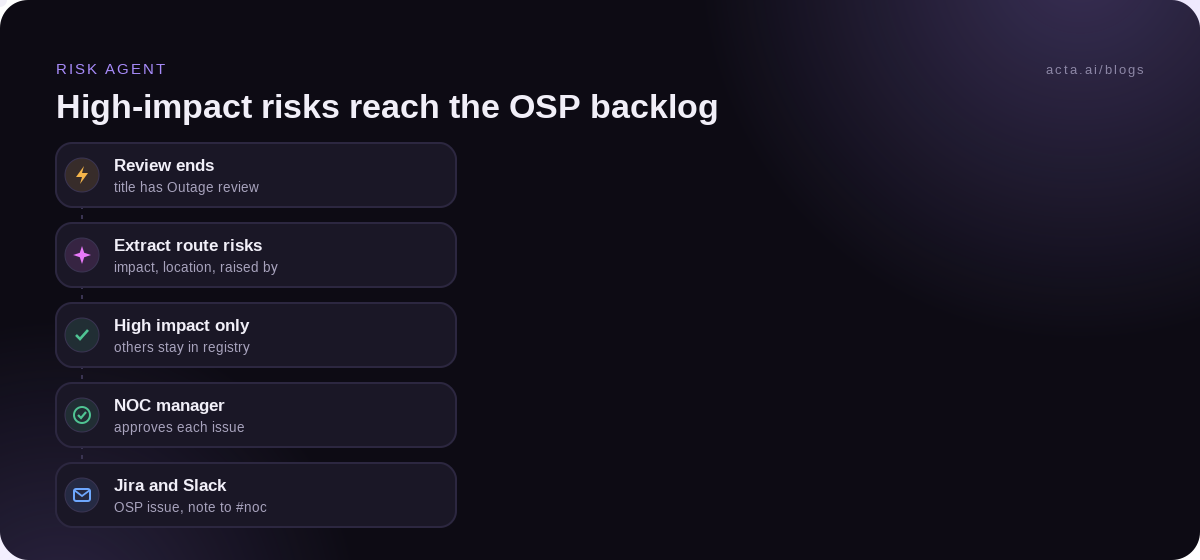
Run on 8 September, this would have put "CR 14 widening, single-path backbone, four towns" in front of Ravi as an approval that afternoon. The test and turn-on guide explains versions and what a test run shows.
Two weeks gets the NOC and outside plant on the same record
Who records which meetings
- NOC stand-up and outage reviews (Teams): the NOC manager, with the notetaker bot.
- Construction and locates meeting: the outside-plant manager. If it's held in the depot, the Acta mobile app on the table.
- Vendor and transit calls: the operations director, using the desktop app when the vendor's own conferencing tool is used, since it records any call without a bot.
Tell contractors and vendors you're recording at the start of each call. The guide to recording consent with AI notetakers covers what to say.
Plan
- Days 1-2: Owner sets up the workspace and invites the NOC manager, outside-plant manager, field tech leads and operations director.
- Days 3-7: Record every stand-up, the weekly outage review and the construction meeting. Share each with everyone in the workspace. Use titles with route names.
- Day 8: Open the Risk Registry together. Assign an owner to every High row.
- Days 9-11: Build and test the outage template on the week's review.
- Days 12-14: Build the Jira agent in test; turn it on for the next review. Start the NOC stand-up with the "High · no owner" card.
Mistakes
Treating Suggested mitigations as plans. Leaving the locating contractor out of the construction recording because the call is "informal". And recording only the outage review, not the construction meeting, which is where most route risks first appear. For more on risks that hide in ordinary talk, read seven project risks hiding in everyday conversations.
Frequently asked questions
What should an ISP outage review meeting record?
Each event's start and restore times, area and subscribers affected, the timeline, contributing factors without blame, risks to routes and equipment raised during the discussion, and fixes with owners and dates. The risks matter most, because they are what stops the next outage. Write them in a register, not only in the review document.
Is a risk register worth it for a small ISP?
Yes, if it fills itself. A spreadsheet register dies within a month because nobody updates it after meetings. A register built from the meetings themselves, with high-impact risks that have no owner flagged at the top, takes two minutes a day to check and is what a small team needs most.
Can the whole NOC share one risk register in Acta?
Not a single shared register. The Risk Registry is per person, built from the meetings each person recorded or that were shared with them. When everyone shares operations meetings with the workspace, each person's registry draws on the same meetings, and the NOC manager's becomes the reference for the morning check.
Will Acta create Jira tickets by itself?
Only if you build an agent to do so, and you should put a Human approval step before the Jira action. Separately, the Ticket suggestions template lists possible tickets after a meeting, and nothing is created in Jira until you tick and click. Either way, a person decides what reaches the backlog.
Does recording the NOC stand-up slow it down?
No. The bot or desktop app records in the background and the notes arrive after the call. The only change worth making is to say owners and dates out loud, which shortens the next day's stand-up because fewer items come back unresolved.
Close the gap between hearing a risk and owning it
Prairie Line's fiber cut wasn't a surprise; it was a sentence nobody owned. To close that gap:
- Record the construction meeting: it's where route risks are first said.
- Share everything operational: the NOC manager's registry is only as full as what's shared.
- Hunt one card daily: "High · no owner", at the start of the stand-up.
- Add a route risk section: to every outage review report.
- Approve, then ticket: high-impact risks go to Jira through an approval.
Set up the desktop app for vendor calls and run your next two weeks of operations meetings on the 15-day free trial. See Acta for internet service providers for more.