Dutch meeting notes break when the meeting switches to English
Anyone who has worked in a Dutch office knows the moment. The meeting runs in Dutch, someone who doesn't speak it joins, and the chair says: "Zullen we even in het Engels verder? Priya sluit aan." (Shall we carry on in English? Priya is joining.) From then on it's English, sometimes for the rest of the meeting, sometimes until Priya drops off.
That habit is a strength of Dutch business culture, and it fits a continent where switching is normal: the European Commission's Eurobarometer on languages lists English as the foreign language Europeans speak most. For a transcription tool it creates a problem. Acta transcribes one language per meeting. The only mix it supports inside a single meeting is Hindi with English, so a meeting that is half Dutch and half English will be transcribed well in one half and poorly in the other.
There's a second wrinkle: Dutch is a beta language. Acta detects English, Hindi, French, Spanish and German automatically; ten more languages, Dutch among them, can be chosen in Settings and are marked beta. Beta means it works and gives you usable Dutch transcripts and notes, but accuracy is still improving. Auto never selects a beta language, so a Dutch meeting recorded on Auto comes back wrong.
Neither problem is hard to manage once you decide, meeting by meeting, which language you're recording. The next section gives you a way to make that call quickly.
Choose the meeting language by where the decisions happen
Don't choose by who attends, and don't choose by the language of the invite. Choose by the language in which the decisions are made, because those are the lines the notes must get right.
| Meeting | What happens | Record as | Notes in |
|---|
| Monday planning, all Dutch speakers | Dutch throughout | Dutch (beta) | Dutch |
| Ops call, Indian IT lead joins after 15 minutes | Dutch, then English for good | Two parts: Dutch, then English | Dutch, then English |
| English stand-up with a short Dutch aside | English with one Dutch remark | English | English |
| Client call with a Flemish customer in Antwerp | Dutch, contract terms in Dutch | Dutch (beta) | Dutch or English |
| All-hands, half Dutch, half English | Both, in long blocks | The language of the decisions | English, plus a hand-written line for the other part |
Two rules cover most cases. If the English part is a short aside or a courtesy greeting, keep the meeting in Dutch. If the meeting moves to English and stays there, either split it or record it as English and accept that the Dutch opening won't transcribe well.
Splitting is easier than it sounds. With the Acta notetaker, the Dutch planning block and the English update can simply be two calendar meetings back to back. With the Chrome extension, you stop and save after the Dutch part, change the language, and record the English part as a new meeting. Many teams find the split also makes the meeting itself shorter, because the international colleagues no longer sit through the Dutch detail.
Set Dutch up as a beta language in five clicks
- Go to Settings in your Acta dashboard, then to the Meetings section.
- The Language card is the one directly under "Add Acta Notetaker to my meeting invites".
- Open Language spoken in meetings and pick Dutch (beta). English is preselected on new accounts.
- Open Language for my notes and choose Same as the meeting for Dutch notes, or English for readers outside the Dutch-speaking team.
- After the meeting, glance at the language chip next to the meeting tabs. If it shows the wrong language, Change language brings you back to the card for next time.
Changes apply to meetings recorded afterwards; anything already processed keeps its language, so set Dutch before the meeting, not after. The meeting-notes email shows the language as well. All recording methods work with Dutch: the notetaker in Zoom, Google Meet or Microsoft Teams, the desktop app, the Chrome extension, the mobile app and uploads. The meeting languages help article has the complete list.
Tell people you're recording, in the language of the meeting: "Ik neem de vergadering op voor de notulen, is dat goed?" (I'm recording the meeting for the minutes, is that all right?) The guide on recording consent and what to tell participants covers the general rules, and EU teams can find general reading in the GDPR checklist for AI note takers.
A notulen template with besluiten, actiepunten and rondvraag
Dutch meetings tend to follow a recognisable agenda, and the notulen (minutes) mirror it. Keep that shape and your Dutch colleagues will read the notes without friction. Here's a template to copy, with English glosses:
Notulen (minutes): [overleg], [datum] ([meeting], [date])
Aanwezig (present) / Afwezig (absent)
Besluiten (decisions): one line per decision
Actiepunten (action items): wie / wat / wanneer (who / what / when)
Rondvraag (round of questions at the end): anything raised by individuals
Volgend overleg (next meeting): date
The rondvraag deserves a word. It's the slot at the end where everyone gets a turn to raise anything, and it's where small but real commitments slip in: "Ik stuur die offerte nog even door" (I'll just forward that quote). Those belong in the actiepunten, not lost at the bottom. When you review the notes, read the last five minutes of the transcript and check that nothing from the rondvraag is missing.
You can build this as a custom report template, written in Dutch or English depending on your notes language. Acta's own report headings, such as "In short", stay in English, as does the dashboard. For general advice on minutes that get read, see meeting minutes best practices.
Netherlands Dutch and Flemish use the same setting
Dutch is one language across the Netherlands and Flanders, with a shared standard. The Dutch Language Union (Taalunie) is the policy body behind that standard: the Netherlands and Belgium set it up in 1980, and Suriname has taken part since 2004. There's one Dutch setting in Acta, and it's meant for both.
The differences you'll hear are in vocabulary, pronunciation and tone. A Flemish colleague says "gsm" where a Dutch one says "mobiel" (mobile phone), and may call a good meeting "plezant" (pleasant). Flemish business speech often uses the formal "u" where people in the Netherlands quickly move to "je" or "jij". Acta keeps what was said, so these show up in the transcript as spoken. Strong regional dialects, such as West Flemish or Limburgish, are harder for a beta language; test a typical meeting before you depend on it.
Belgian teams have one more thing to consider. A Brussels or Ghent office may hold some meetings in Dutch and others in French. French is one of Acta's automatic languages, Dutch isn't, so Auto will handle the French meetings but not the Dutch ones. The practical approach is to set Dutch (beta) if most of your meetings are Dutch and switch to French or Auto before French meetings, or the other way round if French dominates.
Worked example: a Rotterdam forwarder's Monday planning
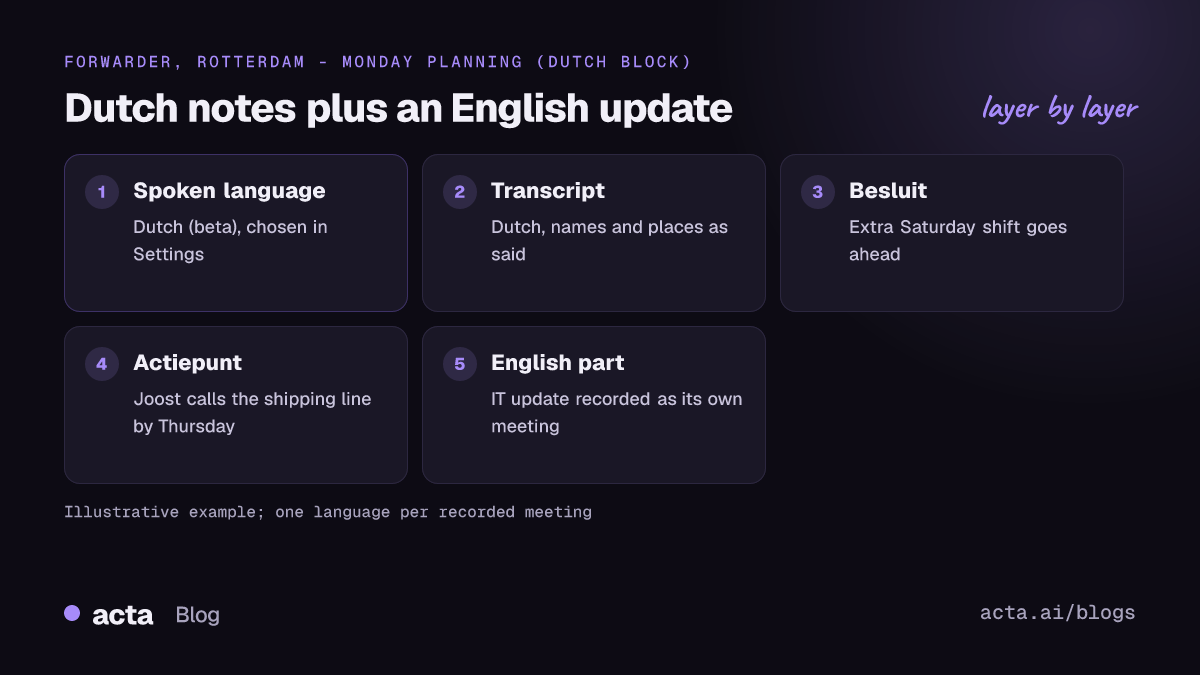
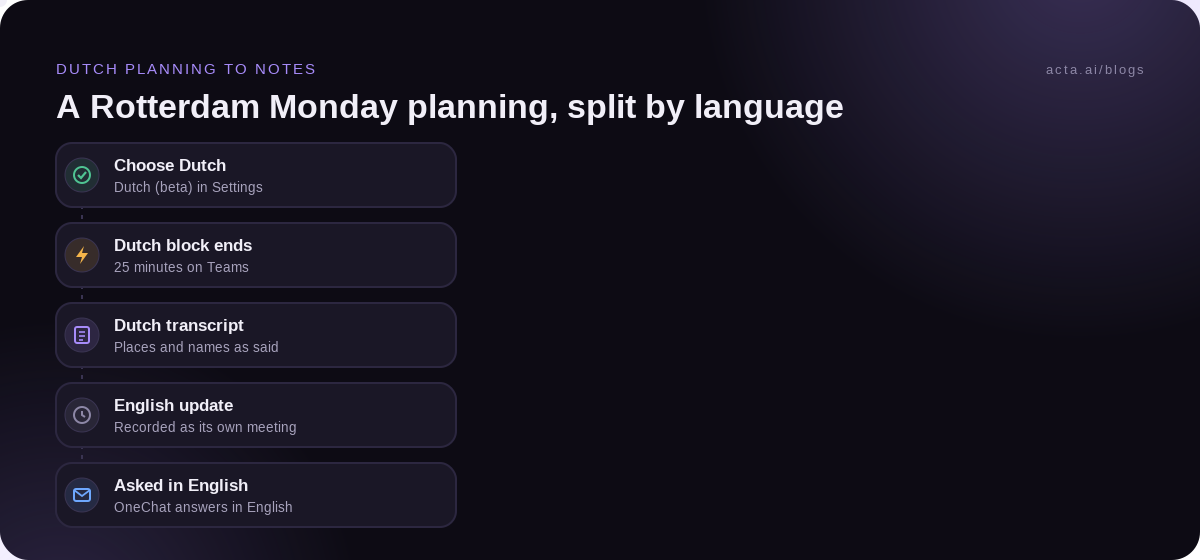
An illustrative example, not a customer story. A freight forwarder in Rotterdam holds its Monday planning meeting at 8:30 on Teams. The first 25 minutes are in Dutch: containers, customs, the weekend shift. Then the IT lead from the company's support centre in Pune joins for a ten-minute English update on the booking system. The operations manager now records these as two meetings: the Dutch block with Dutch (beta) and Dutch notes, and the English update with English.
Three lines from the Dutch transcript:
- "De container voor Duisburg staat nog bij de douane." (The container for Duisburg is still held at customs.)
- "Joost belt uiterlijk donderdag de rederij." (Joost will call the shipping line by Thursday at the latest.)
- "De extra zaterdagdienst gaat door." (The extra Saturday shift goes ahead.)
The Dutch notes, with glosses:
- Besluit (decision): extra zaterdagdienst gaat door (extra Saturday shift goes ahead).
- Actiepunt (action item): Joost, rederij bellen, uiterlijk donderdag (Joost, call the shipping line, by Thursday).
- Open punt (open point): container Duisburg nog bij de douane (Duisburg container still at customs).
The regional director in Antwerp prefers English. Rather than asking for a second set of notes, he asks OneChat in English, "what did Rotterdam decide about weekend shifts this month?", and gets an English answer drawn from the Dutch meetings, because Ask Acta and OneChat reply in the language of the question. Names, the Thursday deadline and the place names stay exactly as said. For teams that hand work across shifts, the shift handover notes template pairs well with this setup.
An Amsterdam scale-up sets languages per person
Settings in Acta are per person, which suits teams where different people meet in different languages. Take an Amsterdam software scale-up with 60 staff. Engineering, product and leadership meetings are in English, because half the team came from abroad. The sales team calls Dutch SMEs in Dutch, and customer success handles Flemish clients in Dutch too.
The engineers leave the default on English. The account executives set Dutch (beta), because most of their recorded calls are with Dutch prospects, and they switch to English before the weekly internal pipeline review. Because Auto doesn't cover Dutch, that switch is a habit worth building; the language chip on each meeting page catches the times someone forgets. Sales notes go into the CRM in Dutch or English depending on who reads them; Acta's sales call notes work the same way in either language.
One honest caveat: a meeting recorded with the wrong language stays that way after you change the setting, because the change applies only to new meetings. That's another reason to keep the setting matched to the bulk of your calendar.
The beta limits are worth planning around
- Accuracy is still improving. Clear audio and one speaker at a time make the biggest difference. Our guide to accents, noise and crosstalk applies directly.
- You must choose Dutch. Auto won't pick it, and the default is English.
- One language per meeting. Split meetings that really run in both Dutch and English.
- Speaker names can be missing. If speaker labels aren't available for a recording, the Dutch transcript still comes back, without names, rather than switching to English.
- No third language. Notes come in Dutch or English only, not French or German.
None of these is a reason to wait. They're reasons to set a clear rule and to have a Dutch speaker read the first few weeks of notes before they're shared widely.
Where Acta fits
Acta records the meeting, writes the Dutch transcript and produces notes, besluiten and actiepunten in Dutch or English, keeping names, figures and places as spoken. Dutch is in beta, so pair it with a simple language rule and a quick review. If you need a single record for colleagues abroad, English notes or an English question in OneChat cover that.
Frequently asked questions
Can AI take meeting notes in Dutch?
Yes. Acta supports Dutch as a beta language: choose Dutch (beta) in Settings and you get a Dutch transcript with notes, decisions and action items in Dutch or English. Beta means it works but accuracy is still improving, so have a Dutch speaker check the first meetings before notes are shared widely.
Does Acta detect Dutch automatically?
No. Auto detects English, Hindi, French, Spanish and German only. Dutch must be chosen under Settings, Meetings, Language, in "Language spoken in meetings". The default for new accounts is English, and the change applies to meetings recorded after you save it.
What happens when a Dutch meeting switches to English?
Acta transcribes one language per meeting, so the part in the other language won't transcribe well. If the English is a short aside, keep the meeting in Dutch. If the meeting moves to English for good, record the two parts as separate meetings, each with its own language setting.
Does it work for Flemish?
Yes, Flemish is Dutch, and the same Dutch (beta) setting covers meetings in Flanders and the Netherlands. Vocabulary such as "gsm" and the formal "u" are kept as spoken. Strong regional dialects are harder for a beta language, so test a typical meeting first.
Can I get English notes from a Dutch meeting?
Yes. Set "Language for my notes" to English. The transcript stays in Dutch, and the summary, decisions, action items, templates and follow-up email come in English, with quotes and names kept as said. You can also ask OneChat questions in English about Dutch meetings and get English answers.
Set your team's language rule this week
Write the rule down once and the switching problem mostly disappears:
- Set Dutch (beta): for everyone whose calendar is mostly Dutch meetings.
- Decide by decisions: record each meeting in the language its decisions are made in.
- Split mixed meetings: a Dutch block and an English block, recorded separately.
- Keep the structure: besluiten, actiepunten and the rondvraag, in a custom template.
- Review early: a Dutch speaker reads notes for the first few weeks.
Try it on your next Monday planning with the Acta desktop app for Teams or Zoom, during the 15-day free trial.