UAE construction meeting notes start with the crew's language
Stand in a site cabin on a mid-rise job in Al Furjan at 6:30 in the morning and you'll hear the real coordination meeting. The MEP foreman explains the sleeve clash in Hindi, the shuttering charge hand answers in Tamil, the safety officer says the permit rules in English and the client's Emirati representative, when he visits, speaks Arabic. Most construction meeting notes UAE contractors keep from that cabin are a page of handwritten bullets that someone types up on Thursday afternoon.
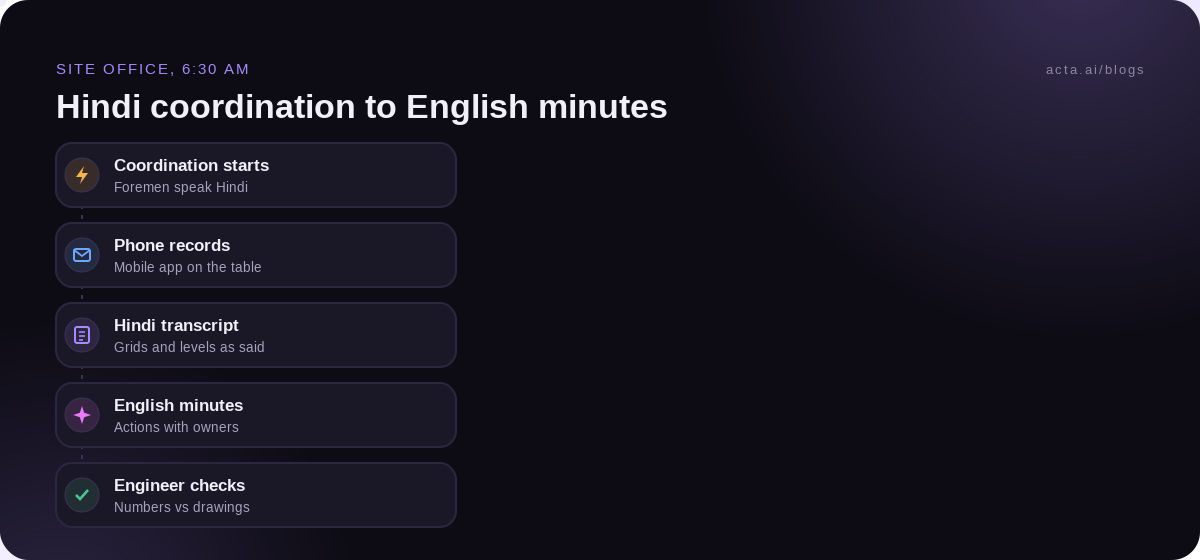
That gap matters. Consultants want minutes in English. Claims and delay analysis depend on who said what, and when. A foreman who agreed in Hindi to finish the blockwork on level 4 by Saturday shouldn't later read an English summary that turned "Saturday" into "next week". The point of recording is to keep the original words and still give the people outside the cabin a record they can read.
So the first decision isn't which app to use. It's which language each meeting is actually held in. A weekly progress meeting with the engineer is almost always English. A daily site coordination meeting between foremen is often Hindi or Hinglish. A toolbox talk might be in Bengali for a steel-fixing gang and in Tamil for a formwork crew. Write the list down once, because every setting later follows from it.
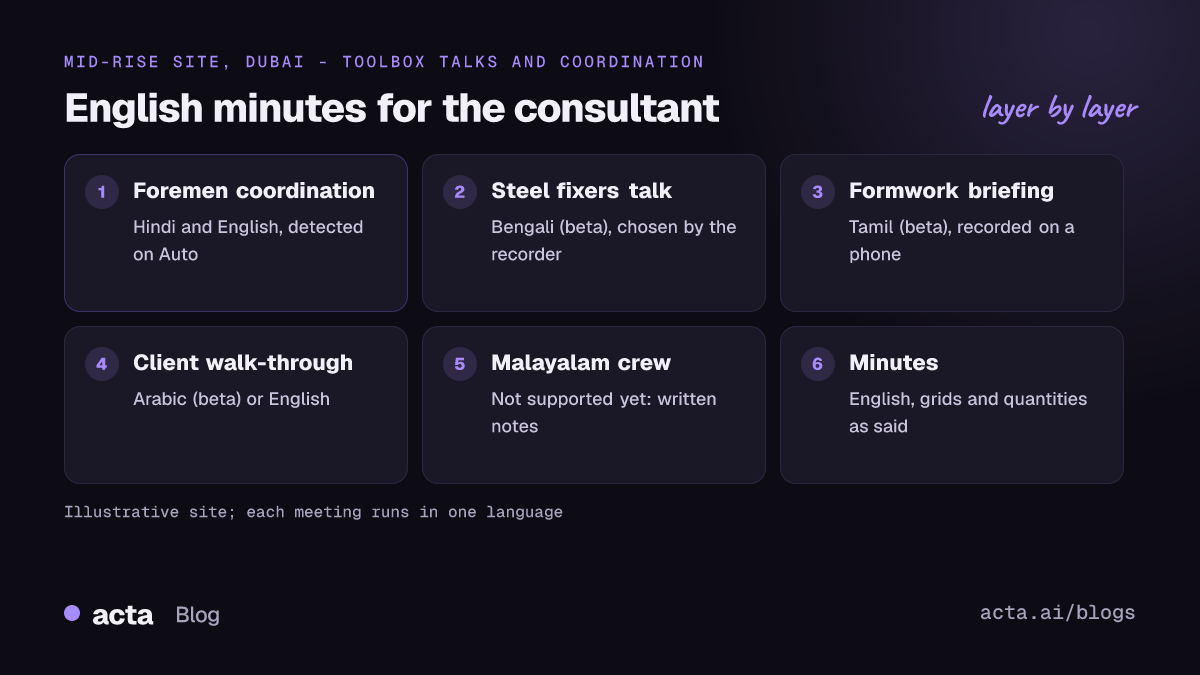
Six crew languages work today and two common ones don't
Acta handles 15 languages in total. On Auto it recognises five by itself: English, Hindi, French, Spanish and German. The other ten are beta languages that you pick by name in Settings: Italian, Portuguese, Dutch, Arabic, Japanese, Telugu, Tamil, Kannada, Marathi and Bengali. For a Gulf site, the ones that matter are usually English, Hindi, Arabic, Tamil, Telugu and Bengali.
Beta means the language works, but accuracy is still improving. That's especially true for Indian languages spoken fast, with regional accents, over a generator. Treat a beta transcript as a strong first draft that the site engineer reads before the minutes go out, not as a final record.
Two languages you'll hear on almost every UAE site are missing: Malayalam and Urdu are not supported yet. Punjabi isn't either, and nor are Tagalog or Nepali. Don't record a Malayalam-speaking crew's meeting with Tamil selected and hope for the best, and don't set an Urdu meeting to Hindi as a stand-in. The output will look like text and be wrong, which is worse than having no transcript. For those crews, the practical options are:
- Written notes by the foreman or supervisor, with decisions and owners in English.
- An English or Hindi recap at the end, if the crew is comfortable with it. Record only that recap with the matching language selected.
- A bilingual supervisor who restates the key points in a supported language for the record.
One more rule: each meeting is processed in one language. Hindi mixed with English is the supported mix, so a Hinglish coordination meeting is fine on Auto or Hindi. A meeting that swings between Tamil and Arabic is not. If a meeting genuinely splits, pick the language the decisions were made in. The meeting languages help article lists every option.
Set the meeting language before the toolbox talk
The language setting lives on the account of whoever records the meeting. On most sites that's the site engineer or the document controller, so their account is the one to set up. It takes a minute:
- Open the Acta dashboard and go to Settings, then Meetings.
- Find the Language card, just below "Add Acta Notetaker to my meeting invites".
- Under Language spoken in meetings, choose Auto for English and Hindi meetings, or pick the crew's language by name: Arabic, Tamil, Telugu or Bengali, each marked "(beta)".
- Under Language for my notes, choose English if the minutes go to the consultant or client, or Same as the meeting if they're for the crew.
- Record the meeting. Afterwards, check the small language chip next to the tabs on the meeting page. If it's wrong, the "Change language" link takes you back to the card.
The setting applies to new meetings only. Past recordings keep the language they were processed in, so change it before the toolbox talk, not after. If the same engineer records a Bengali toolbox talk at 7:00 and an English progress meeting at 10:00, they switch from Bengali to Auto in between. A sticky note on the cabin door that says "language?" helps.
With notes set to English, the summary, decisions, action items, report templates and the follow-up email draft come in English. The transcript stays in Devanagari for Hindi, Tamil script for Tamil, and so on. Quotes stay as spoken.
Record in the site office, not beside the concrete pump
Site meetings happen in three places: the site cabin, the work face and on calls. Each needs a different way to record. The Acta mobile app covers in-person meetings on a phone; the mobile apps guide shows the steps for iPhone and Android. For calls with suppliers and subcontractors on WhatsApp or any calling app, the desktop app records from the engineer's laptop with no bot in the call. For a consultant's Teams or Zoom progress meeting, the Acta meeting bot can join from the calendar.
| Meeting | Usual language | How to record | Notes language |
|---|
| Morning coordination, foremen | Hindi or Hinglish | Phone on the cabin table | English for the file |
| Toolbox talk, steel fixers | Bengali | Phone held by the safety officer | Bengali for the crew, or English |
| Formwork crew briefing | Tamil | Phone in the site office | English for the file |
| Progress meeting with the engineer | English | Meeting bot or desktop app | Same as the meeting |
| Client walk-through | Arabic or English | Phone, close to the speakers | English for the file |
Audio decides more than any setting. A phone on a cabin table with the door shut beats a phone in a shirt pocket at the slab edge with a pump running. If a toolbox talk has to happen outside, gather the crew in a quieter corner, keep the phone within a metre or two of whoever is talking, and ask people to speak one at a time. A five-minute indoor recap often gives better minutes than the outdoor talk itself. For more on noise and crosstalk, see the guide on accents, noise and crosstalk.
Grid lines, levels and quantities stay as they were said
Site minutes live or die on specifics. "Pour postponed" is useless; "level 3 slab pour between grids C/4 and C/7 moved to Tuesday, 120 cubic metres, pending the MEP sleeve inspection" is a record. Acta keeps names, numbers, dates, amounts and technical terms as they were said. They are not translated or converted. When a foreman says "C-4 se C-7 tak" (from C-4 to C-7) in a Hindi sentence, the grid references are kept as he said them rather than reinterpreted, and the English notes carry them through.
That has two practical consequences. First, say the numbers clearly. "One-twenty cube" and "one hundred and twenty cubic metres" will both come through as said, which is fine, but a mumbled number is still a mumbled number. Second, read the numbers in the draft against the drawings and the pour register. Beta languages can mishear a digit, and a wrong grid line causes more trouble than no minutes.
Product names and trade terms stay as spoken too: shuttering, BRC, MEP, NCR, RFI, rebar, screed. Many crews say these in English inside Hindi, Tamil or Bengali sentences anyway. Here's an illustrative line from a Hindi coordination meeting, as it would appear in the transcript:
कल सुबह सात बजे कंक्रीट डालेंगे।
Gloss: We'll pour the concrete tomorrow at seven in the morning.
With notes set to English, that becomes an action item along the lines of "Pour scheduled for 7:00 tomorrow; owner: Ramesh (formwork foreman)", and the Hindi line stays in the transcript for anyone who needs to check it.
Use a minutes template the consultant will accept
Consultants care that minutes follow the agreed format, list attendees, and carry actions with owners and dates. Acta's report templates and custom templates follow the notes language, so a custom site-minutes template set up once will fill in English for every meeting where notes are set to English. Section headings in reports stay in English regardless. For a set of ready formats covering site and OAC meetings, the construction meeting minutes templates post has eight.
Here's a compact template for daily coordination minutes you can copy into a custom template:
Project / plot: [name, plot number]
Meeting: Daily coordination, [date], [time], site office
Language spoken: [Hindi / Tamil / Bengali / Arabic / English]
Attendees: [names and trades]
Work completed since last meeting: [area, grid, level]
Today's activities: [area, grid, level, crew]
Inspections and permits: [type, time, who requested]
Safety points raised: [hazard, location, action]
Decisions: [what was agreed]
Actions: [task, owner, due date]
Open issues for the consultant: [RFI or NCR references]
And a filled, illustrative example from a Hindi-speaking coordination meeting on a residential block in Dubai South, with notes in English:
Meeting: Daily coordination, Tuesday, 6:30, site office. Language spoken: Hindi.
Attendees: Arvind (site engineer), Ramesh (formwork), Salim (MEP), Joseph (safety).
Today's activities: Level 3 slab, grids C/4 to C/7: rebar fixing to finish by 14:00. Blockwork level 2, east side.
Inspections: MEP sleeve inspection requested for 11:00. Pour depends on it.
Safety points: Edge protection missing at the level 3 stair core. Joseph to fix before work starts there.
Decisions: Pour of 120 cubic metres moved to Wednesday, 7:00, if the inspection passes.
Actions: Salim confirms sleeve positions by 10:30. Ramesh books the pump for Wednesday. Arvind informs the consultant.
Everything in that example came from the conversation: names, grids, the time and the quantity. The site engineer's job shifts from writing to checking.
Five mistakes that make site minutes useless
Most failures I've seen come from setup and habits. Watch for these:
- Leaving the account on English for a Hindi or Tamil meeting. English is the default. A Tamil toolbox talk processed as English gives you nonsense. Check the chip on the meeting page after every recording for the first few weeks.
- Using Auto for a beta language. Auto only chooses among English, Hindi, French, Spanish and German. A Bengali talk on Auto will come back wrong. Pick Bengali.
- Recording a Malayalam or Urdu meeting anyway. Neither is supported yet. Use written notes or an English recap.
- Sending minutes without reading the numbers. Grid lines, levels, quantities and dates need one human pass against the drawings, especially from beta-language meetings.
- Recording at the work face. Wind, plant and three people talking at once ruin any transcript. Move the important part of the conversation indoors.
When a transcript comes back poor, troubleshoot in this order: was the right language selected; was the audio clear; did people talk over each other; and was the meeting really in one language? If speaker labels are missing for a language, the transcript still comes back in that language, just without names. Add the attendee list to the minutes by hand in that case.
Tell the crew before you press record
A recorded toolbox talk changes the room. Tell people at the start that it's being recorded, why (to write the minutes and keep a record of safety points), and who will see the notes. Say it in the crew's language. On calls, the desktop app's "Copy notice" button pastes a recording notice into the chat. For a plain guide to what to say, read is it legal to record meetings with AI.
The UAE has a federal personal data protection law, Federal Decree-Law No. 45 of 2021, published on the UAE legislation portal, and the government's page on data protection laws is a sensible place to start reading. Projects inside free zones may fall under the zone's own rules. This is general information, not legal advice: check with your company's legal team before recording meetings with workers or clients as standard practice, and agree how long recordings are kept.
How Acta fits a site team
Acta records site meetings on a phone, calls on a laptop, and online progress meetings with a bot, then writes the transcript in the spoken language and minutes in that language or English. It suits teams whose meetings are in English, Hindi, Arabic, Tamil, Telugu or Bengali; it won't help with Malayalam or Urdu meetings yet. Acta does not use customer data to train AI models.
Frequently asked questions
Can AI transcribe construction site meetings held in Hindi?
Yes. Acta detects Hindi automatically on Auto, including Hindi mixed with English, which is how most coordination meetings sound. The transcript comes back in Devanagari, and you can get the summary, decisions and action items in Hindi or in English. Grid lines, quantities and names are kept as they were said. Record in a quiet room for the best result.
Does Acta support Malayalam or Urdu for site crews?
Not yet. Acta supports 15 languages: English, Hindi, French, Spanish and German on Auto, and Italian, Portuguese, Dutch, Arabic, Japanese, Telugu, Tamil, Kannada, Marathi and Bengali in beta. Malayalam and Urdu are not on the list, so keep written notes for those crews or record an English or Hindi recap.
Can I get English minutes from a Tamil or Bengali toolbox talk?
Yes. Select Tamil or Bengali as the spoken language and English as the notes language. The transcript stays in Tamil or Bengali script, and the summary, decisions, action items and templates come in English. Both are beta languages, so read the minutes once before they go to the consultant, especially numbers and names.
How do I record a toolbox talk on site?
Use a phone with the Acta mobile app. Gather the crew somewhere quieter, keep the phone close to whoever is speaking, ask people to talk one at a time, and say at the start that you're recording and why. If the talk must happen near plant or traffic, record a short indoor recap of the key points instead.
Are UAE construction meeting notes in Arabic shown right to left?
Not yet. Arabic is a beta language you select by name, and Arabic transcripts currently display left-aligned while right-to-left display is being fixed. Many site teams choose English notes for Arabic client meetings, so the minutes read normally while the Arabic transcript stays available for checking quotes.
Prepare your next site meeting
Better construction meeting notes UAE projects can rely on don't need a project-wide rollout. Pick one recurring meeting, set it up properly, and judge the minutes after a week.
- List the meetings: write down each recurring site meeting and the language it really runs in.
- Name the recorder: one person per meeting whose account holds the right language setting.
- Choose the notes language: English for anything that leaves the site office, the crew's language for the crew.
- Fix the audio: record indoors, phone close, one speaker at a time.
- Check before sending: grid lines, levels, quantities and dates against the drawings, every time.
To try it on your next coordination meeting, install the Acta desktop app for calls and the mobile app for the site office, and start the 15-day free trial from the pricing page.