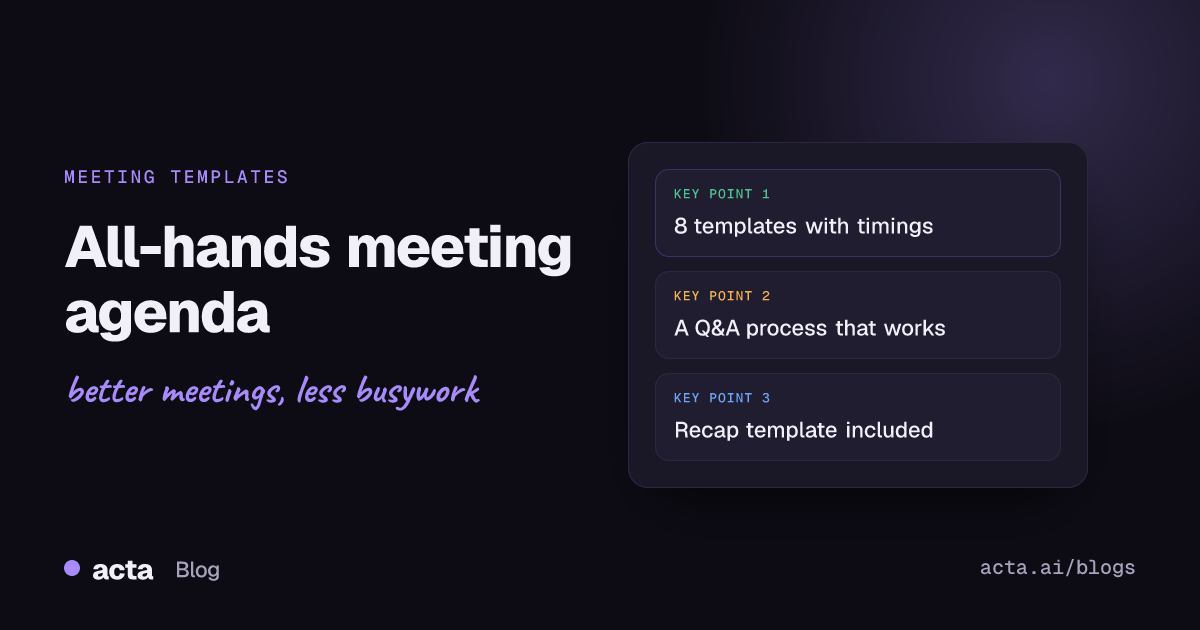
A solid all-hands meeting agenda runs 30 to 60 minutes and follows one order: a short opener, the headline numbers, two or three deep-dive updates, recognition, and a Q&A that takes at least a quarter of the time. Below are eight copy-ready versions, from a 20-minute weekly check-in to a quarterly business review, each with timings and notes on when to use it.
Meeting Productivity 11 min read
All-Hands Meeting Agenda: 8 Templates With Timings and Q&A Tips
Eight copy-ready all-hands agendas with minute-by-minute timings, a Q&A process people actually use, a filled-in example and a recap template for afterwards.
By Sarma BKP, Founder & CEO, Acta · Updated
This guide is for founders, chiefs of staff, internal comms leads and anyone who's been handed "sort out the all-hands." It covers what goes on the agenda, how to run questions so people actually ask them, and what to send afterwards. If what you need is a decision meeting with eight people, an all-hands is the wrong format; use a smaller meeting and share the outcome instead.
Key takeaways
- Give Q&A at least 25% of the slot: 15 minutes in a 60-minute meeting, 10 in a 45-minute one.
- Limit deep-dive updates to two or three per meeting, 8 to 10 minutes each, owned by named speakers.
- Collect questions in advance for at least two days and allow anonymous ones, then answer the most-upvoted first.
- Send a recap within 24 hours with the recording link, slides, the answers to questions you ran out of time for, and any decisions announced.
- Match the template to the cadence: weekly all-hands are short status checks; quarterly ones carry strategy and results.
Table of contents
- An all-hands meeting is for shared context, not decisions
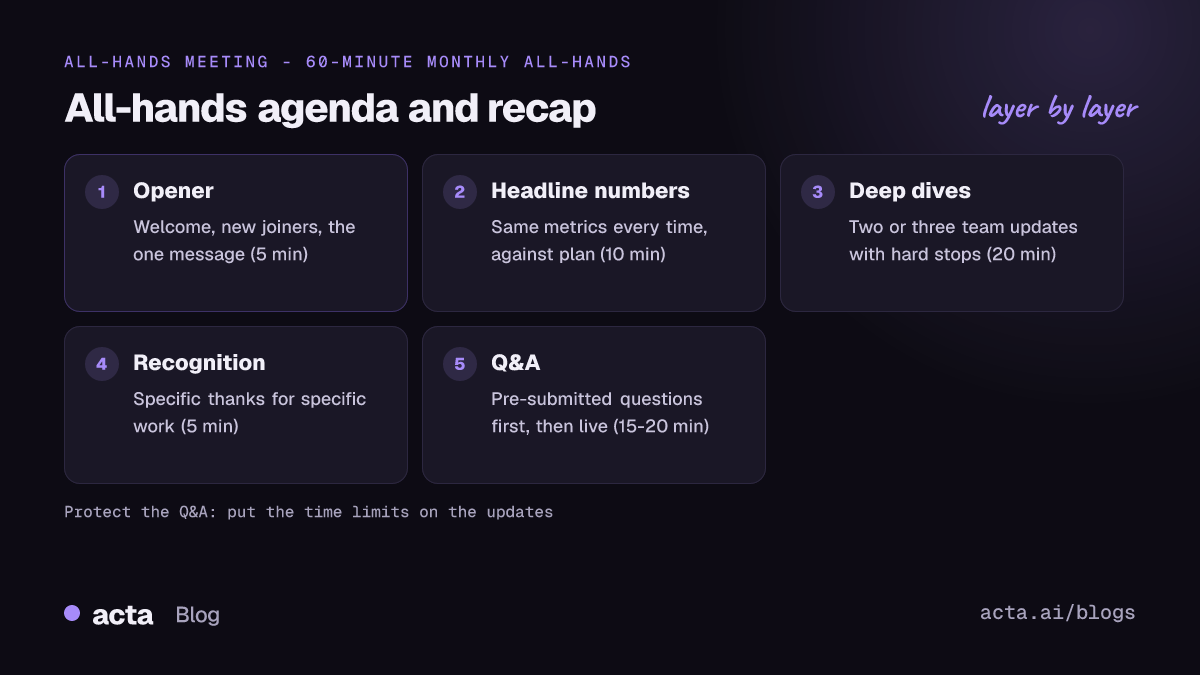
- Every all hands meeting agenda follows the same five blocks
- Eight all-hands agenda templates you can copy
- Q&A needs a process, not an open mic
- A filled-in monthly agenda shows the timings in practice
- Six habits make all-hands meetings feel like a chore
- The recap matters as much as the meeting
- How Acta helps with all-hands notes
- Frequently asked questions
- Plan your next all-hands with this checklist
An all-hands meeting is for shared context, not decisions
An all-hands meeting (often called a town hall) is a regular meeting where the whole company, or a whole department, hears the same update from leadership at the same time and gets to ask questions. Its job is shared context: everyone leaves knowing how the business is doing, what changed, what's coming and why. It's rarely the place where decisions get made, because 40 or 400 people can't deliberate together.
Companies run them at different rhythms. GitLab's handbook, for example, describes a quarterly all-company meeting called GitLab Assembly where team members hear from leaders and teams across the company. Smaller startups often hold a weekly or fortnightly all-hands that's closer to a company standup. Neither is right in general. Pick the cadence that matches how fast things change for you, and pick the template that matches the cadence.
A useful test: if you can't name the one thing you want people to remember from this month's all-hands, the agenda isn't ready.
Every all hands meeting agenda follows the same five blocks
Whatever the length, the same five blocks keep an all-hands moving. Here's the skeleton with suggested minutes for a 60-minute meeting:
- Opener (5 minutes): welcome, new joiners, and the one message for today.
- Headline numbers (10 minutes): the handful of metrics the company tracks, compared with the plan. Same metrics every time, so people learn to read them.
- Deep dives (20 minutes): two or three updates from teams, each with a named speaker and a hard stop.
- Recognition (5 minutes): specific thanks for specific work. "Ana rebuilt the billing export in a week" beats "great job, support team."
- Q&A (15-20 minutes): pre-submitted questions first, then live ones.
Run the clock from the front. Put the timings in the agenda itself and give every speaker a two-minute warning. The block that always gets squeezed is Q&A, and it's the one people value most, so protect it by putting the time limits on the updates instead.
Eight all-hands agenda templates you can copy
Copy the version that matches your situation and edit the names and minutes. Each all-hands meeting template lists the blocks in order.
1. Monthly all-hands (45 minutes)
Use it as the default for companies of roughly 20 to 300 people.
- 0:00 Welcome, new joiners, today's one message (CEO)
- 0:05 Last month in numbers vs plan (CEO or finance)
- 0:12 Deep dive 1: [team], what shipped and what we learned (10 min)
- 0:22 Deep dive 2: [team], what's coming and what we need (10 min)
- 0:32 Recognition (3 min)
- 0:35 Q&A: pre-submitted, then live (10 min)
2. Quarterly all-hands or business review (75 minutes)
Use it at the start of each quarter, when you're closing out results and introducing the next set of goals.
- 0:00 Opener and the quarter in one sentence
- 0:05 Results vs last quarter's goals: hit, missed, why (15 min)
- 0:20 Next quarter's goals and the reasoning behind them (15 min)
- 0:35 Two team spotlights (10 min each)
- 0:55 Recognition and anniversaries (5 min)
- 1:00 Q&A (15 min)
If the quarter's goals are OKRs, our quarterly planning meeting agenda covers the planning session that should happen before this one.
3. Weekly short all-hands (20 minutes)
Use it in small or fast-moving teams where a month is too long to wait for news.
- 0:00 Top three things that happened this week (lead, 5 min)
- 0:05 One team update (5 min, rotating)
- 0:10 Wins and shout-outs (3 min)
- 0:13 Questions (7 min)
4. Virtual all-hands across time zones (45 minutes, run twice)
Use it when no single slot works for everyone. Run the same agenda twice, or run it once live and give the other region a recorded version plus its own live Q&A.
- 0:00 Welcome; say where the recording and slides will be posted
- 0:03 Numbers and the one message (10 min)
- 0:13 Two deep dives, one from each region (8 min each)
- 0:29 Recognition (3 min)
- 0:32 Q&A: questions from both regions, collected in one place (13 min)
5. Early-stage startup all-hands (30 minutes)
Use it when the whole company fits in one room or one video grid.
- 0:00 Runway, revenue or users: the numbers you'd show an investor (5 min)
- 0:05 What we learned from customers this month (5 min)
- 0:10 Each team lead: one win, one problem (10 min)
- 0:20 Open floor: anything anyone wants to raise (10 min)
6. Change announcement all-hands (30 minutes)
Use it for a reorg, a leadership change or another announcement that affects people's work. Keep it short and leave most of the time for questions.
- 0:00 What is changing, said plainly in the first two minutes
- 0:03 Why, and what was considered (5 min)
- 0:08 What it means for teams and what stays the same (5 min)
- 0:13 What happens next and when people will hear more (2 min)
- 0:15 Q&A (15 min), with a promise to answer the rest in writing
7. Annual kickoff all-hands (90 minutes)
Use it once a year to close the old year and set the new one.
- 0:00 The year in review: results, milestones, lessons (20 min)
- 0:20 Strategy for the year and why (20 min)
- 0:40 Break (10 min)
- 0:50 Department plans, 5 minutes each
- 1:10 Awards and recognition (10 min)
- 1:20 Q&A (10 min, plus a written follow-up)
8. Department all-hands (40 minutes)
Use it for engineering, sales or operations groups that need their own detail on top of the company meeting.
- 0:00 Department lead: priorities and changes (8 min)
- 0:08 Metrics that matter to this group (7 min)
- 0:15 Two project demos or reviews (8 min each)
- 0:31 Process changes and announcements (3 min)
- 0:34 Q&A (6 min)
| Template | Length | Cadence | Q&A share |
|---|---|---|---|
| Monthly | 45 min | Monthly | 10 min |
| Quarterly review | 75 min | Quarterly | 15 min |
| Weekly short | 20 min | Weekly | 7 min |
| Virtual, two regions | 45 min x2 | Monthly | 13 min |
| Early-stage startup | 30 min | Weekly or fortnightly | 10 min |
| Change announcement | 30 min | As needed | 15 min |
| Annual kickoff | 90 min | Yearly | 10 min + written |
| Department | 40 min | Monthly | 6 min |
Q&A needs a process, not an open mic
"Any questions?" followed by silence is the most common all-hands failure. People hesitate to ask a hard question in front of the whole company, and the few who do tend to be the most senior. A process fixes that.
- Open a question form two or three days before. Allow anonymous questions and let people upvote.
- Answer the most-upvoted first, including the uncomfortable ones. Skipping a popular question does more damage than a weak answer.
- Use the built-in Q&A tool for live questions. As of November 2026, Microsoft Teams offers a Q&A panel with optional moderation for meetings, webinars and town halls, and organisers can download a Q&A report afterwards. Google Meet has Q&A with anonymous posting and a report for the moderator, available on some Workspace editions. Check each vendor's page before you rely on a feature, since plans change.
- Name a moderator who isn't presenting. They group similar questions and keep an eye on the clock.
- Close the loop in writing. Every question you didn't reach gets an answer in the recap.
Good all-hands Q&A sounds like this: "The top question this week, with 23 upvotes, asks whether the hiring freeze covers backfills. Short answer: no, and here's why." Read the question out, give the short answer first, then the reasoning.
A filled-in monthly agenda shows the timings in practice
Here's an illustrative company meeting agenda for a fictional 80-person software company. Names are made up.
October all-hands, Thursday 4:00-4:45 pm
One message: We're moving support to 24/5 coverage in January, and here's what that means.
- 4:00 Welcome and four new joiners (Priya, CEO)
- 4:05 September numbers: revenue vs plan, churn, open roles (Marco, finance)
- 4:12 Support coverage plan: why, the rota, hiring (Dana, head of support, 10 min)
- 4:22 Product: the new reporting screen and what customers said (Sam, product, 10 min)
- 4:32 Recognition: the team that fixed the invoice bug over a weekend
- 4:35 Q&A: 11 pre-submitted questions, top three answered first
After: Recap in #announcements by Friday noon, with recording, slides and written answers to the eight questions not reached.
Notice the single message at the top. Every block either supports it or is a fixed slot (numbers, recognition, questions).
Six habits make all-hands meetings feel like a chore
- Reading slides aloud. If the slide says it, don't. Talk about what the numbers mean.
- Too many speakers. Six five-minute updates is a parade. Two or three deeper ones are remembered.
- Changing metrics every month. People can't follow trends if the chart is different each time.
- Only good news. A missed target explained plainly builds more trust than a polished highlight reel.
- Q&A at the end, squeezed to two minutes. Put hard stops on the updates, not on the questions.
- No recap. Anyone who missed it, or zoned out for ten minutes, has nothing to go back to.
Our post on signs a meeting should have been an email is a useful filter for which updates belong in the all-hands and which belong in a written note.
The recap matters as much as the meeting
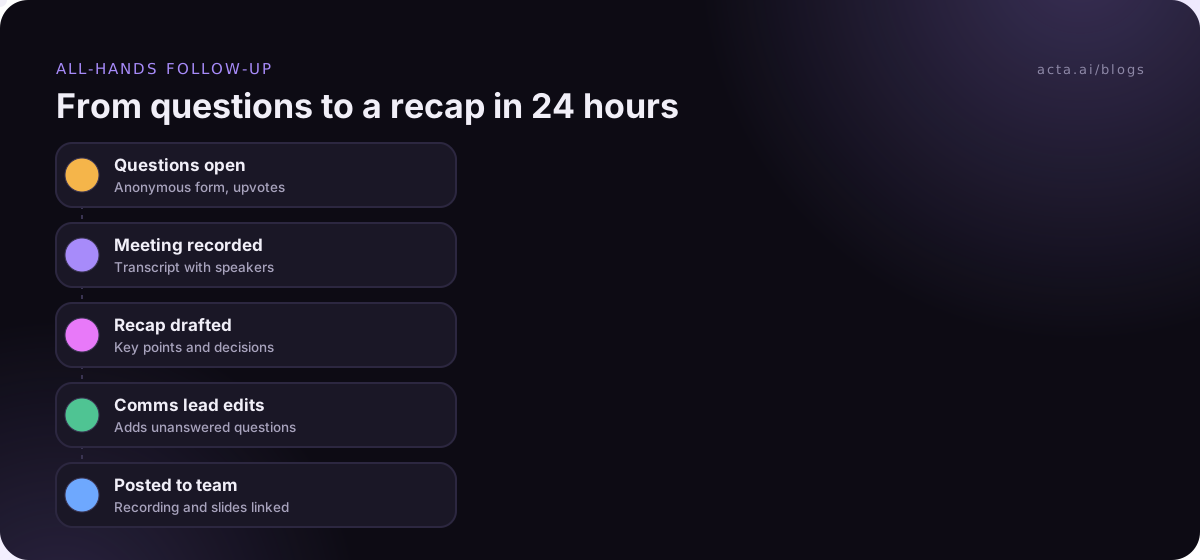
An all-hands reaches more people through its recap than through the live session, especially in a virtual all-hands with people in several time zones. Send it within 24 hours, in the channel people already read.
Subject: [Month] all-hands recap: [the one message]
Recording and slides: [links]
Three things to know: [bullets]
Decisions announced: [what, who owns it, when it takes effect]
Questions we didn't reach: [question and written answer, each]
Next all-hands: [date], questions open from [date]
If you record the meeting, say so at the start and tell people where the recording will live and who can see it. Our guide to recording consent and what to tell participants covers the general rules; it's general information, not legal advice. For people who couldn't attend, see how to share meeting notes with absent colleagues.
How Acta helps with all-hands notes
Acta records the meeting, writes a transcript with speaker names and drafts a summary with any decisions and action items, which gives you most of the recap to edit. If you're presenting from the Zoom or Teams desktop app and don't want a bot in the participant list, the Acta desktop app records from your own computer. Later, OneChat can answer "What did we say about the support rota?" across past meetings, with sources.
Frequently asked questions
How long should an all-hands meeting be?
Thirty to sixty minutes covers most companies. A weekly all-hands can be 20 minutes; a quarterly or annual one can run 75 to 90 minutes with a break. Past an hour, attention drops, so if you need more time, split the content into a meeting and a written update rather than adding slides.
What is the difference between an all-hands and a town hall?
Many companies use the terms interchangeably. When they differ, "all-hands" usually means a regular company update with Q&A, while "town hall" leans towards a session built around questions from employees, sometimes for a large or distributed audience. The town hall meeting agenda then gives Q&A half the time or more.
How often should you hold an all-hands meeting?
Monthly works for most companies of 20 to a few hundred people. Very small teams often go weekly or fortnightly because things change quickly. Larger organisations tend to hold quarterly company meetings plus monthly department all-hands. Whatever you pick, keep the date fixed so people can plan around it.
How do I get people to ask questions at an all-hands?
Collect questions in advance, allow anonymous submissions and upvoting, and answer the popular ones even when they're awkward. Name a moderator to read questions out. When people see a hard question answered honestly, more follow. Answer the rest in the written recap so nobody feels ignored.
Should all-hands meetings be recorded?
Usually yes, so people on leave, in other time zones or on shift can catch up. Tell attendees at the start, say who can access the recording, and consider not recording the live Q&A if that would stop people asking. Post a written recap alongside the recording, since few people watch an hour of video.
Plan your next all-hands with this checklist
A week before the meeting, check these off:
- Write the one message: a single sentence you want everyone to remember.
- Pick the template: match length and blocks to your cadence, and put the timings in the invite.
- Brief the speakers: two or three deep dives, each with a named owner and a hard stop.
- Open questions: launch the anonymous form two or three days ahead and name a moderator.
- Prepare the recap: draft the template now and send it within 24 hours of the meeting.
If you'd like the transcript and recap draft done for you, try the Acta Chrome extension or the desktop app on your next all-hands during the 15-day free trial.
Found this useful? Share it with your team.