Quick answer: The most common AI notetaker mistakes are rolling it out to everyone at once, recording every meeting by default, skipping the "this call is recorded" step, sending AI summaries without a human check, and letting notes land nowhere useful. Start with a small pilot, a short list of meetings you never record, and one named owner for every set of notes.
Buying an AI notetaker takes an afternoon. Getting a team to use it well takes a couple of months, and most of the problems I've seen have nothing to do with which tool was picked. They come from how it was switched on.
Below are the mistakes that come up most often in the first 90 days, roughly in the order teams hit them, and what to do instead. None of them will sink the project, but each one is easier to avoid up front than to unpick once a few hundred meetings have been recorded.
What are the most common AI notetaker mistakes?
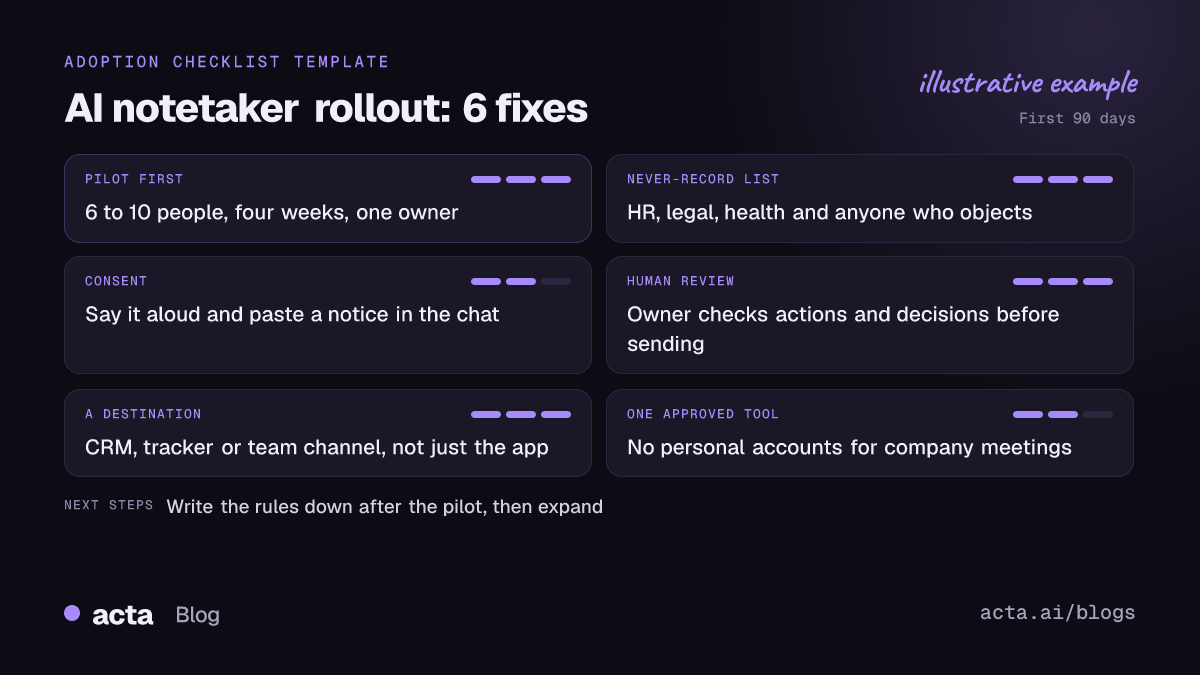
If you only read one section, read this one. These are the AI notetaker mistakes I'd watch for, in short form:
- Switching it on for the whole company on day one.
- Letting it join every meeting on everyone's calendar.
- Not telling people they're being recorded, or telling them badly.
- Treating the AI summary as the final minutes.
- Generating notes that never reach the CRM, tracker or the people who were absent.
- Letting five different tools creep in through personal accounts.
- Never deciding who can see what, or how long it's kept.
- Not measuring anything, so nobody can say if it's working.
The rest of the post goes through each one with what I'd do instead.
Why does a company-wide AI notetaker rollout fail?
Because nobody owns it. When a tool lands in everyone's lap at once, each team assumes someone else is setting the rules, and you end up with the defaults. Defaults are designed to get the tool into as many meetings as possible, which is rarely what you want.
There's also a people side. Stephan Meier at Columbia Business School has written that leaders often assume employees are excited about AI while many of them feel uneasy about it. A notetaker is about as personal as AI at work gets: it hears what people say. Announce it with a memo and some will simply stop speaking freely in meetings.
Run a short pilot instead
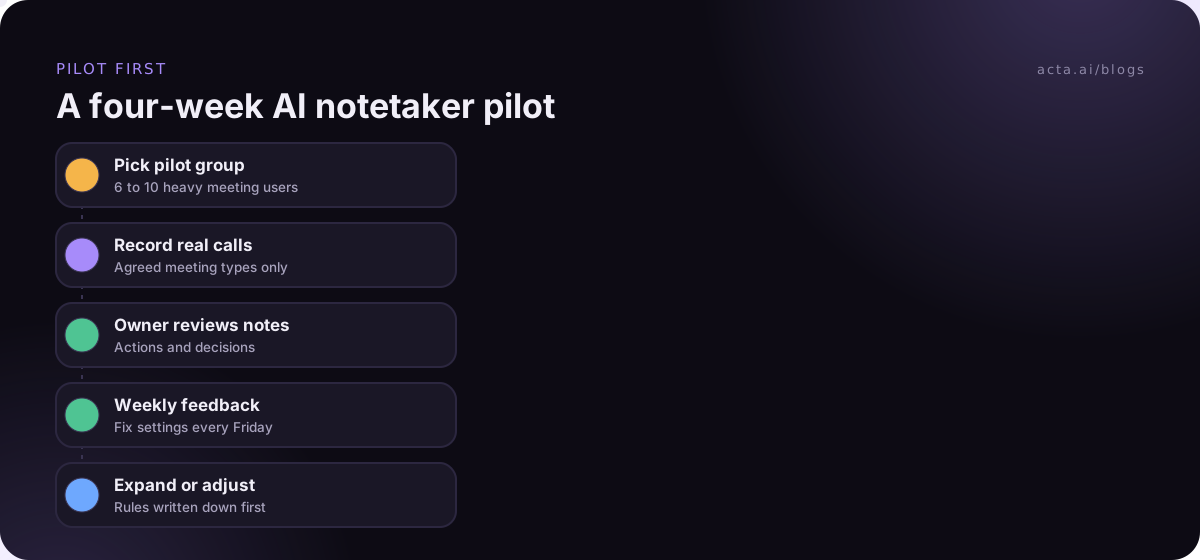
- Pick 6 to 10 people who run a lot of external or cross-team meetings, such as account managers and project leads.
- Agree what gets recorded for four weeks, and what doesn't.
- Name an owner who reads the feedback every Friday and changes settings.
- Write down what you learned before the next group joins: the rules, the settings, the templates that worked. That write-up is most of an AI notetaker policy.
A pilot also gives you a few internal fans, which does more for adoption than any training session.
Should an AI notetaker join every meeting?
No. Auto-join for everything is the default in many tools, and it's the mistake that causes the most awkward moments. A notetaker shows up in a performance review, a conversation with an employment lawyer or a medical disclosure, and now there's a transcript that should never have existed.
Make a short never-record list before anyone turns on auto-join. Mine usually includes HR investigations and disciplinary meetings, anything with legal counsel, health conversations, and any meeting where someone has asked not to be recorded. Platform admins can help: Microsoft explains in its guide to recording and transcription options for sensitive meetings how sensitivity labels can control who is able to record and transcribe.
A better default is to record the meeting types you chose on purpose, such as client calls, standups and project reviews, and leave everything else manual.
How should you tell people a meeting is recorded?
Say it out loud at the start and put it in writing. Something like: "We're recording this so I can send accurate notes afterwards. If you'd rather we didn't, say so and I'll switch it off." Then actually switch it off if someone objects.
Where it goes wrong:
- relying on a bot's name in the participant list as the only notice (with Teams bot detection, the bot may be waiting in the lobby anyway);
- recording external guests without checking the rules where they are;
- sending a bot into a client call without asking first (see our notes on client calls where bots aren't allowed);
- forgetting that bot-free recording still needs the same notice.
Recording consent rules differ by country and, in the US, by state. Our guide on what to tell participants about AI recording covers the basics; it's general information, not legal advice, so check with your own counsel for your locations. If you use a bot-free recorder, Acta's desktop app has a Copy notice button that pastes a recording notice into the meeting chat, which saves people from writing one each time.
Can you trust AI meeting summaries without checking them?
Mostly, for the gist. Not for the parts that matter: who agreed to what, numbers, dates and names. AI meeting summaries can attach an action item to the wrong person, flatten a "maybe" into a "yes", or miss a decision that was made in a single throwaway sentence.
The fix is cheap. The meeting owner spends two minutes reviewing the action items and decisions before anything goes to a client or into a ticket. Tools that link each summary point back to the transcript make this much faster, because you can check the exact words instead of rewatching the call. We wrote more about that in giving AI answers verifiable citations from transcripts.
A quick review checklist
- Is every action item assigned to the right person, with a date?
- Are decisions written as decisions, not as discussion?
- Did anything sensitive end up in the summary that shouldn't be shared?
- Would someone who missed the meeting understand it?
Why do teams stop reading AI meeting notes?
Because the notes sit in the notetaker's own app and nobody goes there. The second month of an AI notetaker rollout often looks like this: hundreds of tidy summaries, and the same "can someone remind me what we agreed?" messages as before.
Decide where notes go for each meeting type:
- Sales calls: the CRM record, plus a follow-up email draft.
- Engineering and product: tickets in Jira, or a page in Confluence or Notion.
- Internal team meetings: a short recap in the team channel, with owners named.
If the notes don't reach the place where work already happens, they won't change anything. That's also the honest answer to "is this worth the money?"; our post on the ROI of AI meeting tools shows how to measure it.
What's the risk of using several AI notetakers at once?
Sprawl. One person signs up for a free plan, a client brings their own bot, sales buys a different tool than product, and soon there are three bots in one meeting and customer conversations stored in accounts IT can't see or delete.
Pick one approved tool, make it easy to get a seat, and say plainly that personal accounts aren't for company meetings. Banning free tools without offering an alternative doesn't work; people just keep using them quietly. Setting up a shared workspace with invites and roles, like the one described in Acta's team setup guide, also gives IT one place to see who has access.
Who should see meeting transcripts, and for how long?
This gets skipped because it's boring, and then someone shares a link to a 1:1 transcript with the whole department. Settle three things early:
- Access: attendees by default, wider sharing on purpose.
- Retention: how long recordings, transcripts and summaries are kept. They don't need the same rule; summaries and decisions are usually worth keeping longer than raw audio.
- Deletion: who can delete a recording when someone asks.
Your existing platforms already make these choices for you, sometimes in ways people don't expect. Microsoft's page on Teams recording policies, for example, explains that new Teams meeting recordings expire automatically after a default period unless admins change it. Make sure your notetaker's retention settings line up with whatever your platform and policy say.
How do you know if your AI notetaker rollout is working?
Pick two or three signals at the start of the pilot and look at them monthly:
- How many people recorded at least a couple of meetings this month?
- How often are summaries opened or shared after the call?
- Are follow-up emails going out the same day more often?
- Do action items from meetings show up in the tracker with owners?
Skip vanity numbers like total hours transcribed. A team that records fewer meetings but acts on the notes is doing better than one that records everything and reads nothing.
A note on Acta
Acta records Zoom, Google Meet and Teams with a meeting bot or bot-free from the desktop app or Chrome extension, and turns calls into summaries, decisions and action items with owners. It can push notes to Salesforce, HubSpot, Zoho, Jira, Confluence, Notion and Google Drive, which helps with the "notes land nowhere" problem. Acta doesn't use customer data to train AI models.
Frequently asked questions
How long should an AI notetaker pilot last?
Four to six weeks is usually enough. You want a full month of real meetings, including a few awkward ones, before you write the rules for everyone else.
Which meetings should never be recorded by an AI notetaker?
HR investigations and disciplinary meetings, conversations with legal counsel, health disclosures, and any meeting where a participant has asked not to be recorded. Add anything your industry treats as sensitive.
Do we need consent to use an AI notetaker?
Rules vary by country and state, and some places require everyone's consent. Telling everyone at the start and stopping if anyone objects is a sensible baseline. This is general information, not legal advice.
Why do people stop using the AI notetaker after a few weeks?
Usually because the notes don't go anywhere useful, or because the summaries had errors early on and nobody fixed the review step. Sending notes to the CRM or tracker and having owners check action items solves most of it.
Is one AI notetaker for the whole company better than letting teams choose?
One approved tool is easier to secure, support and search across. Let teams pick their own templates and destinations within it, rather than their own tool.
If you're planning a pilot, you can see the features and settings on our features page before picking your first group.