The best AI meeting note takers in 2026 are Otter, Fathom, Fireflies, Acta and Granola. Otter is the safest all-round choice, Fathom has the most generous free plan for one person, Fireflies suits teams that want lots of integrations, Acta is built for decisions and follow-through across many meetings, and Granola is for people who never want a bot in the call.
This is the November 2026 update of our 2025 list. One tool is gone (Clari Copilot) and one is new (Granola), and every price below was checked again. The list is for people choosing a general meeting note taker for themselves or a team. If you run a sales org that needs forecasting and deal scoring, you want a revenue platform instead, and our guide to AI meeting assistants for sales teams is the better read.
Key takeaways
- All five can now record without a bot on at least one operating system, but the details differ: Fireflies' bot-free mode keeps no audio and labels speakers "Speaker 1" and "Speaker 2", and Fathom's bot-free capture is Mac-first.
- Fathom, Otter, Fireflies and Granola have free plans. Acta has a 15-day free trial, then Pro at $8 per seat a month ($6 billed annually).
- For a five-person team on annual billing, the cheapest paid tiers run from about $30 a month (Acta Pro) to $75 a month (Fathom Team).
- Pick on what you need after the call. Transcript and summary: Otter or Fathom. Integrations: Fireflies. Owners, decisions and follow-ups: Acta. Your own typed notes, improved: Granola.
Table of contents
- The top 5 AI meeting note takers compared
- Five tools made the cut, and Clari Copilot dropped out
- Each tool earns its place for a different job
- Bot or no bot is now the first decision
- Per-seat pricing changes the order for a team of five
- Acta fits teams that track what was agreed
- Frequently asked questions
- Choose the right AI meeting note taker for your team
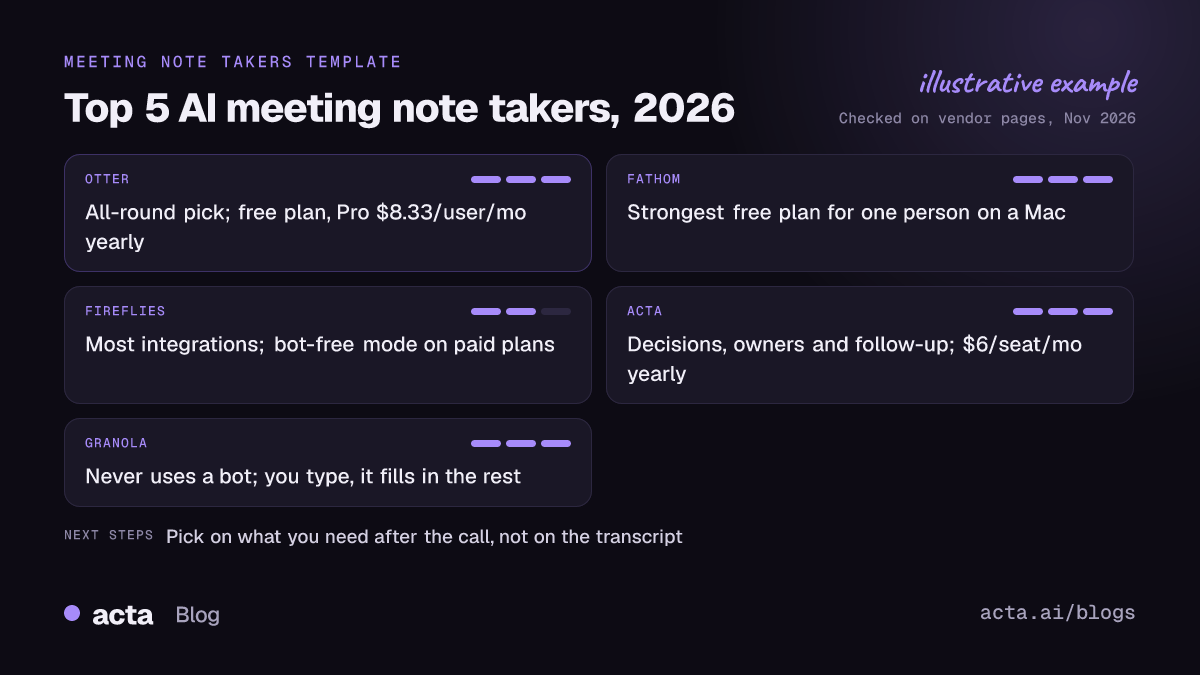
The top 5 AI meeting note takers compared
"Records without a bot" means the tool can capture the call from your own computer or phone, so no extra participant shows up.
| Tool | Best for | Records without a bot? | Platforms | Starting price |
|---|---|---|---|---|
| Otter | All-round notes for people and teams | Yes: Mac and Windows app, Chrome extension | Zoom, Meet, Teams; Mac, Windows, iOS, Android | Free plan; Pro $8.33/user/mo billed annually |
| Fathom | One person who wants a strong free plan | Yes on Mac; Windows in limited alpha | Zoom, Meet, Teams, Slack huddles | Free plan; Premium $16/mo billed annually |
| Fireflies | Teams that want many integrations | Yes, desktop app on Pro and up | Zoom, Meet, Teams and more; Mac, Windows, iOS, Android | Free plan; Pro $10/seat/mo billed annually |
| Acta | Decisions, owners and follow-up across meetings | Yes: Windows and Mac app, Chrome extension; bot optional | Zoom, Meet, Teams; Windows, Mac, Chrome, iOS, Android | 15-day free trial; Pro $6/seat/mo billed annually |
| Granola | People who never want a bot in the call | Yes, it never uses a bot | Mac, Windows, iPhone | Free plan; Business $14/user/mo |
Updated November 2026. Prices and plans change often; confirm on each vendor's pricing page.
Five tools made the cut, and Clari Copilot dropped out
We judged every tool on four things: how many ways it can capture a meeting (bot, desktop app, browser, phone), what you get once the call ends, the free plan or entry price as of November 2026, and how much setup it needs. Prices and platform details come from each vendor's own pricing page or help center.
The 2025 list had Clari Copilot at number five. It is a sales and revenue tool rather than a general meeting note taker, and it publishes no public price. Fine for a revenue team, but not what a team lead buys to take meeting notes.
Granola takes the spot. It reflects the biggest change since last year: people want notes without a visible bot, and Granola was built around that. Otter, Fathom and Fireflies stay because they still cover the common needs at a fair price, and all three have added bot-free options since.
Each tool earns its place for a different job
1. Otter
Otter is the tool most people have already heard of. It joins Zoom, Google Meet and Teams calls as a notetaker, or records without a bot from its desktop app, which according to Otter's help center runs on macOS 13 or later and Windows 10 or later. There are also iOS and Android apps for in-person meetings and a Chrome extension for browser calls. You get a transcript, a summary, action items and a chat that answers questions about your meetings.
As of November 2026, Otter's pricing page lists a free Basic plan with 300 minutes a month and a 30-minute cap per conversation. Pro is $8.33 per user a month billed annually ($16.99 monthly) with 1,200 minutes, and Business is $19.99 billed annually ($30 monthly). The catch on the free plan is that 30-minute cap.
Verdict: the default pick if you're not sure what you need yet. It does every basic job well, on every device. Look elsewhere if your main need is turning meetings into tracked tasks across a team. Our Acta vs Otter comparison goes into that difference.
2. Fathom
Fathom made its name with a generous free plan. Fathom's pricing page says the free plan includes unlimited recordings and transcripts. Premium for individuals is $16 a month billed annually ($20 monthly), Team is $15 per user billed annually with a two-user minimum, and Business is $25 per user billed annually. Paid plans come with a 90-day money-back guarantee.
It works with Zoom, Google Meet, Teams and Slack huddles. Bot-free capture runs through the desktop app on macOS 14.2 or later; Fathom's help center describes Windows support as a limited alpha for Teams. Free-plan AI summary limits have changed before, so check the current terms.
Verdict: the best free AI note taker for one person on a Mac. Teams get less out of it than from Otter or Fireflies, and Windows users who want no bot should wait or look elsewhere. If Fathom is close but not quite right, see our Fathom alternatives.
3. Fireflies
Fireflies is the integration-heavy option. Its bot joins your calls on Zoom, Meet, Teams and other platforms, and the notes flow into CRMs, project tools and chat apps. There are iOS and Android apps for in-person meetings and a Mac and Windows desktop app.
Two details matter. First, per the Fireflies pricing guide, Pro is $10 per seat a month billed annually ($18 monthly) and Business is $19 billed annually ($29 monthly); some advanced features run on AI credits, which are a separate allowance. Second, bot-free recording in the desktop app is a Pro-and-up feature, and the Fireflies guide says that mode doesn't save the audio or video and labels speakers as "Speaker 1", "Speaker 2". Fine for an internal sync, less so for a client call where you need to know who promised what.
Verdict: pick Fireflies if your notes need to land in five other tools automatically. Use the bot when speaker names matter. Our Acta vs Fireflies comparison covers the follow-up side.
4. Acta
Acta records Zoom, Google Meet and Teams with a meeting bot, or without one through its Windows and Mac desktop app or its Chrome extension. Mobile apps cover in-person meetings, and you can upload recordings. After the call you get a transcript with speaker names, a summary, decisions, action items with owners and a follow-up email draft, plus 40 report templates for things like 1:1s and sales calls.
What sets it apart happens after the meeting. OneChat answers questions across all your meetings with sources, Agent Builder runs automations when a meeting ends (for example, filing action items into Jira or updating a CRM record), and an MCP connector lets you ask Claude or ChatGPT about your meetings. There's no free plan: you get a 15-day free trial, then Pro at $8 per seat a month, or $72 a year ($6 a month) billed annually.
Verdict: a good fit for managers and teams whose real problem is follow-through, not note-taking. If you only want a free transcript now and then, Otter or Fathom costs less.
5. Granola
Granola works differently from the rest. It sits on your computer, listens to your system audio and microphone, and never joins the call. You type rough notes during the meeting, and Granola fills them out from the transcript afterwards. Granola's own posts say the desktop app runs on Mac and natively on Windows 10 and 11, and there's an iPhone app for in-person conversations.
According to Granola's pricing breakdown, the free Basic plan has unlimited meetings but only 30 days of meeting history. Business is $14 per user a month and adds unlimited history, integrations and MCP access; Enterprise is $35 per user.
Verdict: best for people who like taking their own notes and want them improved, not replaced. The 30-day history on the free plan is a real limit, and because it never uses a bot, it can't cover a meeting you don't attend.
Bot or no bot is now the first decision
A year ago most AI meeting note takers worked one way: a bot joined the call. Now all five tools here can record from your own device. A bot is reliable and can attend meetings you skip. A desktop app or extension is invisible in the participant list and works when a client's IT team blocks bots.
The quality of the bot-free mode is where the tools differ. Check three things: whether it keeps speaker names, whether it saves the audio so you can re-listen, and whether it works on the computers your team actually uses. If bots aren't welcome in your calls, a desktop recorder like Acta's desktop app captures Zoom and Teams from your own computer, and our list of the best AI notetakers without a bot compares seven options on this alone.
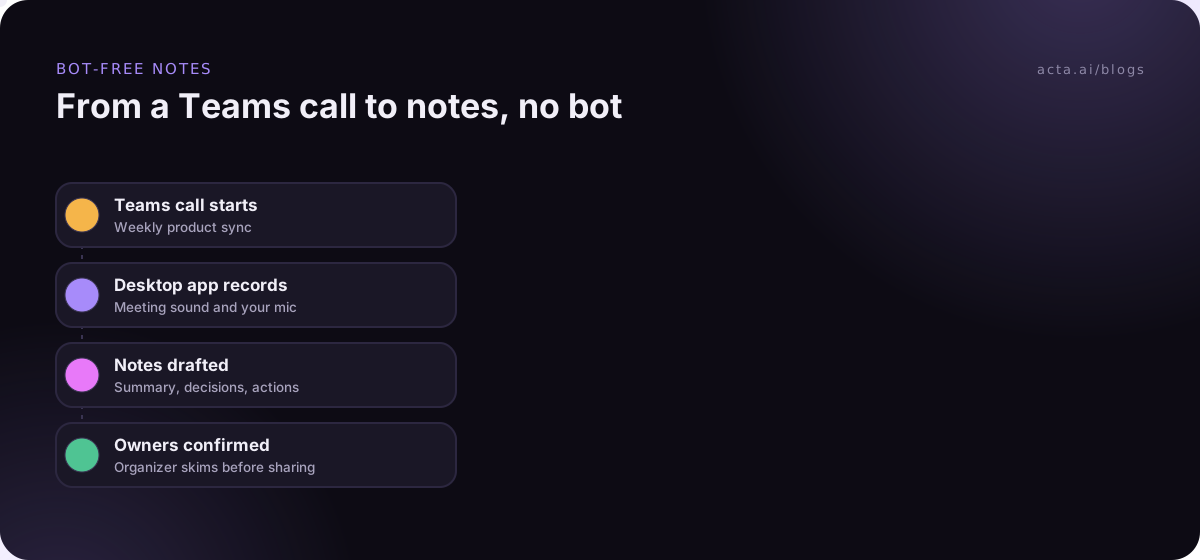
No bot doesn't mean no notice. Tell people you're recording, and get consent where the law requires it. Our guide on whether it's legal to record meetings with AI covers the basics (general information, not legal advice).
Per-seat pricing changes the order for a team of five
Sticker prices look close until you multiply them. Here is what the cheapest paid tier for a team costs for five people on annual billing, using the November 2026 prices above:
- Acta Pro: 5 x $6 = $30 a month.
- Otter Pro: 5 x $8.33 = about $42 a month.
- Fireflies Pro: 5 x $10 = $50 a month, before any extra AI credits.
- Granola Business: 5 x $14 = $70 a month.
- Fathom Team: 5 x $15 = $75 a month.
The cheapest tier isn't always the one a team needs: admin and storage features often sit in Business plans. Use the free tier for a week of real calls, then price the plan you'd actually run on. For the bigger picture, see our piece on AI notetaker pricing trends in 2026.
Acta fits teams that track what was agreed
Acta isn't the cheapest way to get a transcript. It makes the most sense when meetings produce decisions and tasks that someone has to chase later, and when you want those flowing into Jira, Notion or a CRM without retyping. If that's your situation, the 15-day trial is long enough to test it on two weeks of real meetings.
Frequently asked questions
What is the best AI meeting note taker for free?
For one person, Fathom's free plan is the strongest as of November 2026, with unlimited recordings and transcripts. Otter's free plan is good for short calls but caps each conversation at 30 minutes. Granola's free plan has unlimited meetings but keeps only 30 days of history. Fireflies also has a free plan with limited storage.
Which AI note taker records without a bot joining?
All five on this list can. Granola never uses a bot. Otter, Fireflies and Acta offer desktop apps for Mac and Windows, and Otter and Acta also have Chrome extensions. Fathom's bot-free mode works on Mac, with Windows in early testing. Fireflies' bot-free mode needs a paid plan and keeps no audio.
Are AI meeting note takers accurate enough to rely on?
For summaries and action items, usually yes, as long as someone skims the notes before sharing them. Names, numbers and product terms are where errors creep in. A decent headset and one person speaking at a time do more for accuracy than switching vendors.
Do I need to tell people an AI note taker is recording?
Yes. Even when no bot appears, tell everyone the meeting is recorded and why. In many places the law requires consent from some or all participants. A one-line notice in the chat at the start of the call is the simplest habit, and it avoids awkward questions later.
Can an AI meeting note taker work with ChatGPT or Claude?
Some can, through MCP connectors that let an AI assistant read your meeting notes. Acta has an MCP connector for Claude and ChatGPT, and Granola's Business plan includes MCP access. You can then ask your assistant what you promised a client last week without copying notes across.
Choose the right AI meeting note taker for your team
Run through this before you buy. It takes ten minutes.
- Count your meetings by type: list last week's calls by platform (Zoom app, Teams, Meet in a browser, in person) and check each tool covers them.
- Decide on bots: if clients or IT block bots, test the bot-free mode on both Mac and Windows, and check it keeps speaker names.
- Define the output: transcript and summary, or decisions and owners that land in your task tracker? That one answer narrows the list to two tools.
- Price the real plan: multiply the tier you'd actually need by your headcount, on annual and monthly billing.
- Run a one-week trial on real calls: compare the notes from the same meeting side by side before you commit.
If you want to test the bot-free route, install the Acta desktop app or the Chrome extension and record your next meeting during the 15-day trial, or compare plans on the pricing page.