Jewellery custom order meeting notes belong to people, not families
Most jewellers keep an order book or a job card for custom work: customer name, piece, design reference, karat, approximate weight, stones, advance paid, delivery date. That card is the instruction to the workshop, and it should be. The problem is everything that happens before it is written. Over several sittings, different family members ask for different things, and the salesperson writes the card from the version they remember best, usually the loudest voice at the last visit.
Good notes for a custom order sitting hold: who was present; each piece discussed, with style, metal, karat, target weight and stones; each request, tagged with the person who made it; budget, gold rate booking and old-gold exchange agreed; what changed since the previous visit; and next steps such as a CAD render, a wax model or a trial date. Keep the customer's own words for anything sensitive. "Isse halka chahiye, mujhe pura din pehenna hai" (it needs to be lighter, I have to wear it all day) is an instruction your karigar needs to hear in full.
Hallmarking details belong on the record too. As of November 2026, India's Bureau of Indian Standards explains in its hallmarking FAQ how each hallmarked piece carries a HUID, a unique identification code that customers can verify, and its page for hallmarking jewellers sets out registration for sellers. When a family asks about purity or the HUID at a sitting, note what you promised to show them at delivery.
Bridal orders unfold over showroom sittings and family calls
A bridal order at a family jeweller typically runs through:
- First selection visit: the family browses, the salesperson shows similar pieces, budget is sounded out.
- Design sitting with the in-house designer: sketches, CAD on a screen, stone choices, weights.
- Video calls with relatives abroad or in another city, often on WhatsApp or Google Meet, to show options.
- Workshop review: the owner or workshop head with the karigars, going through every open order.
- Trial fitting and final delivery, with hallmark, bill and care advice.
The showroom team hears the family; the workshop hears the showroom. Visits happen in Hindi, English or both, with three people talking at once and a cousin on speakerphone. The salesperson's diary gets a line or two, nothing anyone could search later. Generic templates for meeting minutes for small business don't help much either: they capture decisions, not which relative wanted what.
A rani haar made to the wrong person's brief
An illustrative example. Sethi & Sons (invented) is a third-generation jeweller in Jaipur with 45 people: a showroom, a small design team and a workshop of karigars. Pooja, a senior salesperson, is handling the bridal order for Riya, whose wedding is on 12 February.
Visit 1, late October. Riya, her mother Sunita and father Anil come in. Sunita wants a traditional kundan-polki rani haar "like my own, about 90-95 grams." Anil says the full bridal set must stay within ₹18 lakh. Gold rate is booked on the advance.
Visit 2, early November. Design sitting with Kavya, the designer. Sunita leads. CAD renders of a heavy haar, matching jhumkas and a matha patti.
Visit 3, mid-November. Riya comes alone with a friend. She tries a sample and says she wants the haar lighter, "under 60 grams," because she will wear it through a long day, and asks for meenakari on the reverse in the groom's family colours. Pooja nods and makes a note on her phone.
Video call, late November. Riya's aunt Meena in London asks for a pair of lighter jhumkas for herself in the same design. Pooja says, "Of course, we'll add them."
Order card, early December. Pooja writes the card from visits 1 and 2: rani haar about 92 g, no meenakari. Meena's jhumkas are not on it. The workshop starts.
Trial, late January. Riya lifts the haar and goes quiet. Sunita is delighted. Riya is not. Two weeks before the wedding, the workshop has to rebuild the haar lighter, and Meena asks where her earrings are. Nobody was careless; the requests were real, they just lived in different visits and different heads.
OneChat answers "who asked for what" across every visit
Record each sitting and the video call in Acta, and the order card can be checked against every request before the workshop starts. The tool for that is OneChat, the first item in the Acta sidebar. It answers across all the meetings you can see (the ones you recorded and the ones colleagues shared with the workspace), and every answer lists where it was found.
Before freezing the card, Pooja uses the scope button to pick only the four meetings about Riya's order, then asks:
Question: List everything each family member asked for on Riya's bridal order, by person, and flag any requests that conflict.
Answer (summarised):
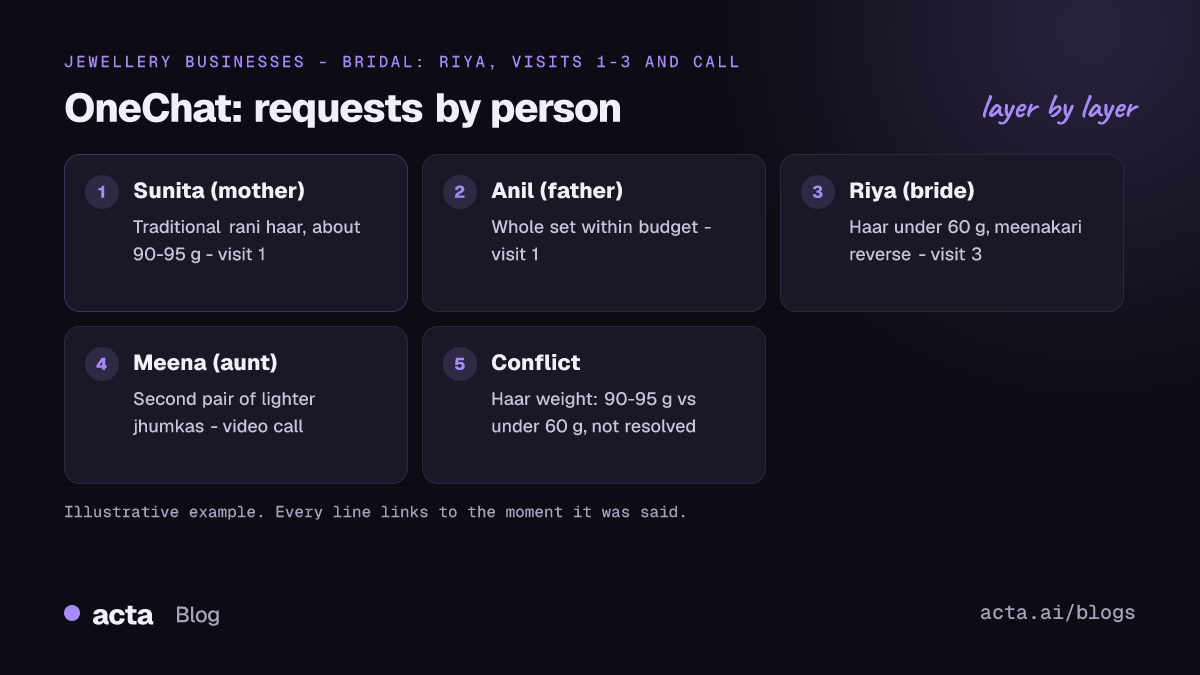
Sunita: traditional kundan-polki rani haar, about 90-95 g (Visit 1). Anil: whole set within ₹18 lakh (Visit 1). Riya: haar under 60 g; meenakari on the reverse in the groom's family colours (Visit 3). Meena: a second, lighter pair of jhumkas for herself, same design (video call).
Conflict: Sunita's 90-95 g and Riya's "under 60 grams" for the same haar. Not resolved in any later meeting.
Found in: "Bridal: Riya, visit 1" (14:20, 31:05), "Bridal: Riya, visit 3" (09:47, 22:10), "Bridal: Riya, call with Meena" (06:30).
Each source opens the recording at that minute, so Pooja can play Riya's words to Sunita gently, rather than saying "I think she said." The conflict gets settled in a five-minute call in December, not at the trial in January. Read more about how the scope and sources work in the OneChat guide.
Other questions jewellery teams find themselves asking:
- "What did we promise the Mehra family about delivery and hallmark certificates?" OneChat is also where promises are checked; Acta has no separate promises screen.
- "Which bridal orders this month have a trial less than two weeks before the wedding?"
- "What did Anil agree about old-gold exchange and making charges?"
Two touches make OneChat answers useful beyond the showroom. You can add files, such as the CAD PDF or quotation, up to 10 at a time, and ask whether they match what was said. And you can download an answer as a Word report, which Mohit, the workshop head, can print and pin next to the job card. For a question about one visit only, Ask Acta on that meeting's page is quicker.
The order card, decisions and risks stay in step
OneChat finds the conflict. Three more screens under My meetings keep the order on track. All three are per person: Pooja's views come from meetings she recorded plus any shared with her, so the designer and workshop head see the same order only when visits are shared with the workspace.
Action items (Outcomes then Action items). After visit 3, Pooja's list would show "Send Riya a CAD render of the haar at 55-60 g with meenakari reverse", owner Kavya, "Due in 3 days", and after the call, "Add Meena's jhumkas to the order card and quote", owner Pooja, "Due tomorrow". Filters (Open, Overdue, Due this week, Done) and Group by Person make the Monday workshop review quick.
Decision log (Outcomes then Decision log). The haar would appear as one decision card: "Rani haar for Riya: kundan-polki, about 60 g, meenakari reverse", status Changed, "Was: traditional rani haar, about 90-95 g", decided by Riya and Sunita, owner Kavya, with a history line for each visit and a play button for each quote. Budget and gold rate booking get their own cards. If a decision comes out of a OneChat answer, you can ask OneChat to add it to the Decision log.
Risk Registry (its own tab). Riya's long-day comment and the tight calendar together become a row: Risk "Trial on 28 January leaves 15 days for rework before 12 February", Impact High, Owner Mohit, Mitigation Agreed "move trial to 14 January", Status Mitigating. A high-impact risk with no owner shows up on the "High · no owner" card at the top.
A template for bridal sittings
None of the 40 built-in templates is written for jewellers. Contract negotiation (General) helps when making charges and old-gold exchange are being worked out, but the real work is a custom template (paid plans; see building your own template):
- Name: Bridal order sitting. Use: Only matching meetings ("showroom visits and calls about custom or bridal jewellery orders").
- Who was present (Bullets)
- Pieces discussed (Table: Piece | Style | Karat | Target weight | Stones)
- Requests by person (Table: Person | Request | Piece)
- Budget, rate booking and exchange (Paragraph)
- Changed since last visit (Bullets)
- Next steps (Checklist: task, owner, due date)
Add the instruction "Keep the customer's own words, in the language they used." Notes can come in English while quotes stay as spoken.
Agent Builder (beta) can confirm each visit with the family
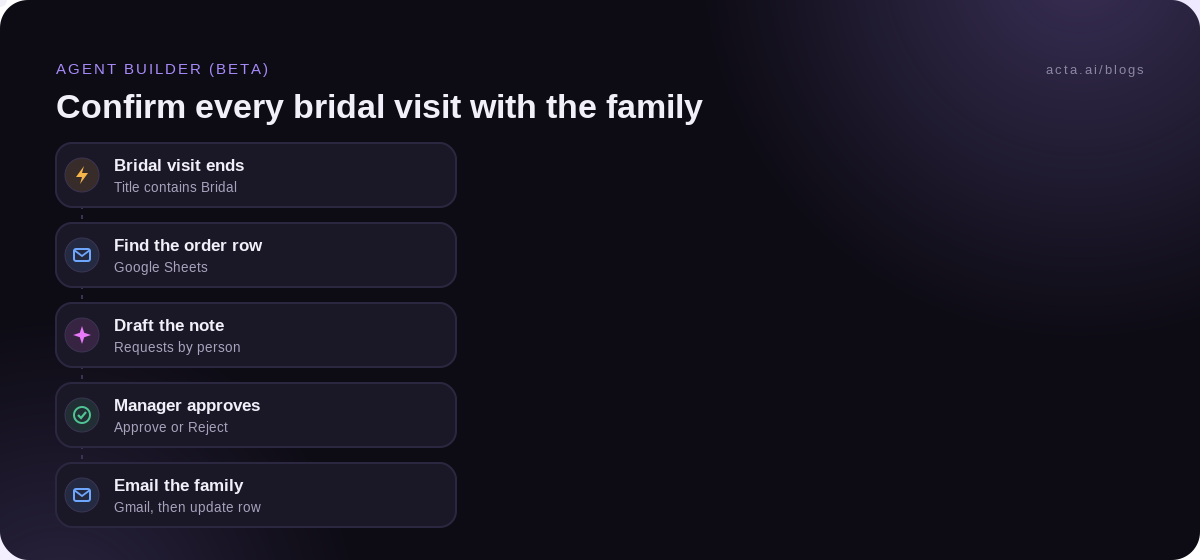
A short note after each sitting ("here's what we heard, please correct anything") catches conflicts while they are cheap. Agent Builder (beta) can draft it and update your order sheet, with the showroom manager approving every message. Allow an afternoon:
- In Agent Builder, click New agent and describe the job, or start from blank.
- Trigger: When a meeting ends, filtered to titles containing "Bridal".
- Google Sheets action: find the row for this order in your order book sheet.
- AI step: "Write a warm, short note to the family: pieces discussed, each person's requests by name, anything changed since last time, next step and date. Ask them to reply with corrections."
- Human approval: the showroom manager approves or rejects, in the Approvals tab or by email. No answer in 24 hours, nothing is sent.
- Gmail action: send the note to the family's contact email.
- Google Sheets action: update the order row with today's changes. Then Test, Run test and Turn on.
The three example agents in the help center show the same pattern step by step.
Two salespeople can trial it in a fortnight
Every invited member takes one seat, recording or not: Pro costs USD 8 per seat a month, or USD 72 per seat a year. OneChat, the Outcomes views and the Risk Registry are included in the 15-day trial and Pro.
Week 1. Set up a workspace and invite two senior salespeople, the designer and the workshop head. Salespeople record showroom sittings with the Acta mobile app on a phone on the table. Video calls with relatives on WhatsApp or Meet can be captured from a laptop with the Acta desktop app, no bot involved. Ask the family first, every time; a family heirloom conversation is personal. Our guide to consent and what to tell participants has wording, and our post on transcribing mixed-language meetings covers Hindi-English sittings.
Week 2. Share every bridal visit with "Everyone in" the workspace so the designer's and workshop head's views fill. Name meetings "Bridal: family name, visit N". Before any order card goes to the workshop, run the "who asked for what" question in OneChat. Turn on the confirmation agent.
Mistakes to avoid: recording visits but not the video calls (that is where relatives add pieces), letting the card be written before checking OneChat, and naming meetings after the salesperson rather than the family. Hindi and Hindi-English are detected automatically; Marathi and Bengali are available in beta in Settings.
Frequently asked questions
Will families be comfortable being recorded in the showroom?
Many are, if you ask plainly and explain why: "so we get every request right for the wedding." Some will say no, and that is fine; take notes by hand for them. Treat consent as general good practice rather than legal advice, and check local rules for your city or country.
Can OneChat tell apart what the bride and her mother said?
Yes, as long as the transcript knows who is speaking. Transcripts carry speaker names; at a busy sitting, have the salesperson use names naturally ("Riya, what do you think?") so requests attach to the right person. Every answer links back to the moment, so you can check.
Does it work for meetings in Hindi?
Yes. Hindi, including Hindi-English mixing, is detected automatically, as are English, French, Spanish and German. Ten more languages, including Marathi, Bengali, Telugu and Tamil, are in beta and chosen in Settings. Notes can be in English while quotes stay in the words used.
Can the workshop see orders without seeing every customer conversation?
Meetings are private by default. Share only the visits the workshop needs with the workspace, or send the workshop head a OneChat answer downloaded as a Word report. Admins can remove members, and departing staff's meetings go to an Archive that shows titles and dates, never what was said.
Is customer design information used to train AI?
No. Acta does not use customer data to train AI models, and recordings are shared only when you share them.
Get ready before the next wedding season
Set the habits now, while orders are fewer.
- Ask for consent: a simple line at the start of each sitting.
- Use names: say who is speaking so requests attach to people.
- Check before the card: run the "who asked for what" question on every bridal order.
- Book the trial early: two weeks of rework time, written as a risk with an owner.
- Confirm in writing: an approved note to the family after each visit.
Acta keeps each family member's requests findable and tied to the moment they were said; the craft is still your karigars'. See more for jewellery businesses, set up the desktop app for family video calls, and start the 15-day trial from the pricing page.