The daily HOD meeting runs the hotel, and leaks complaints
Most business hotels run on a morning HOD meeting, sometimes called the hotel morning briefing or the ops meeting. It usually starts around 9:15, after breakfast peaks. Around the table: the general manager, front office manager, executive housekeeper, chief engineer, F&B manager, sales manager and often the security supervisor or the duty manager coming off nights. They cover arrivals, VIPs, out-of-order rooms, yesterday's complaints and engineering jobs.
The meeting itself is usually good. The trouble starts at 9:40. The front office manager writes "412 AC noise, engg to check" in a notebook. The chief engineer remembers "check 412" but not that the guest was promised a move by 2 pm. Housekeeping hears "move guest" and waits for the front desk to assign a room. Nobody wrote down the same thing.
Research on hotel service recovery keeps coming back to the same point: what the guest experiences after the complaint matters as much as the original failure. A study of service failure and recovery in UK hotels looked at exactly how well hotels' recovery efforts worked; Cornell's Center for Hospitality Research has work on how complaint severity and recovery shape guest attitudes. A guest forgives a noisy fan. They don't forgive being told "someone will come up" and then waiting until checkout.
Classic meeting minutes for small business teams don't fix this, because they record the discussion, not the commitments. What you need from hotel department heads meeting notes is closer to a ticket list: each complaint, each owner, each promised time, and a way of knowing at 9:15 tomorrow which ones slipped.
One complaint, five promises: a week at a 90-room hotel
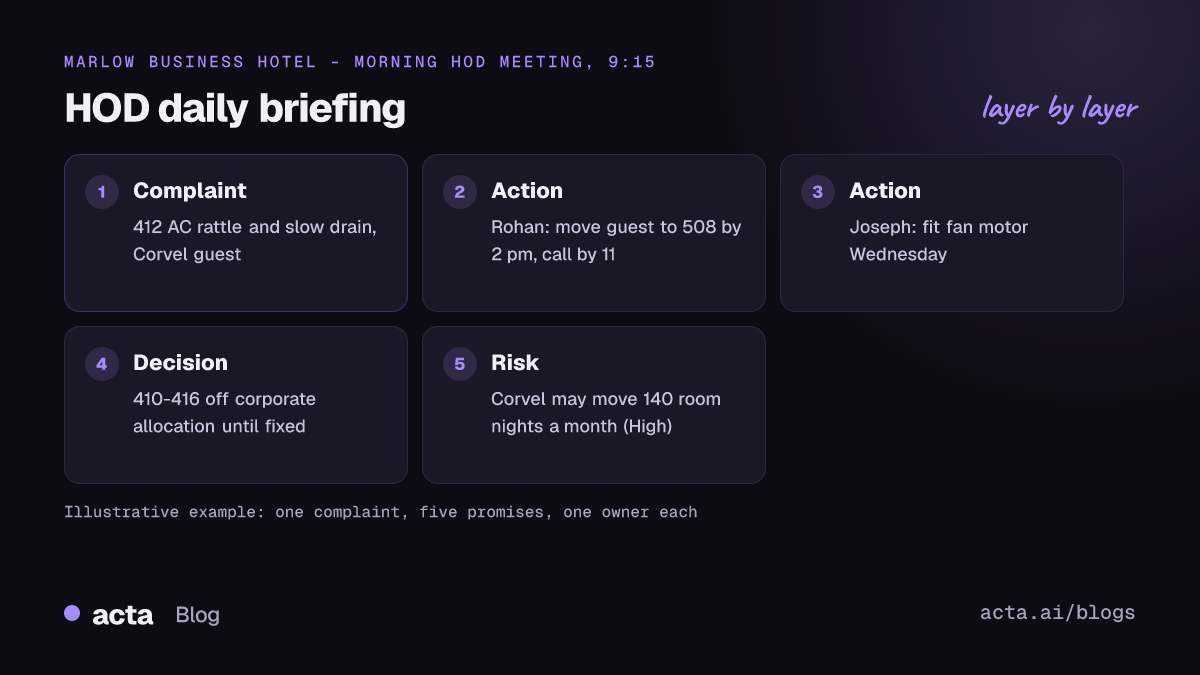
Here is an illustrative week at a fictional property, the Marlow Business Hotel: 90 rooms beside an IT park, around 70% of its weekday business from six corporate accounts. The cast: Anita (GM), Rohan (front office manager), Sunita (executive housekeeper), Joseph (chief engineer), Imran (F&B manager) and Neha (sales manager).
Monday. Rohan reports that Mr Desai in 412, a regular from Corvel Systems, the hotel's second-largest account, complained twice overnight: the AC fan rattles and the shower drains slowly. Joseph says the fan motor is on order and he'll fit it Wednesday. Anita says: move him to 508 today, Rohan to call him by 11, and Sunita to block 412 once he's out. Imran offers to send a breakfast voucher. Five promises in four minutes.
Tuesday. Nobody mentions 412. Mr Desai was moved, but to 410, because 508 had a late checkout. 410 shares the same riser and the same tired fan model. Nobody told Joseph.
Wednesday. Joseph fits the new motor in 412, now empty. Mr Desai still hears a rattle two doors down.
Thursday. Mr Desai checks out early. On Friday morning, Corvel's travel desk emails Neha asking whether the hotel "still suits our team". Corvel books about 140 room nights a month. Everyone did their part. The handover between parts failed.
With a recorded meeting and a per-person action list, Tuesday's meeting would have opened with two flags: "Move Mr Desai to 508, Rohan, due Monday 2 pm" marked done with a comment "moved to 410 instead", and "Fit fan motor in Mr Desai's room, Joseph, due Wednesday". Someone would have asked "which room?"
A template turns hotel department heads meeting notes into a complaint log
Acta writes standard notes for every meeting: a synopsis, decisions, action items with owners, next steps and topics. For a hotel, two of the 40 built-in report templates earn their place straight away. Use KPI review (Operations group) for the weekly revenue meeting where occupancy, ADR and RevPAR get discussed, and Vendor review for the monthly session with the laundry contractor or the AMC vendor for lifts and chillers. The full list of templates by role shows the rest.
The daily HOD meeting deserves its own template, one that doubles as a guest complaint log. Custom templates are part of Acta Pro: in Templates, click "Create template", choose "Describe it" or "Blank", and set it to run on "Only matching meetings" so it fires on the HOD meeting and not on a sales call. Here's the one Anita would write:
Template name: HOD daily briefing
What should this report do? For the hotel's morning heads of department meeting: list arrivals and VIPs, every guest complaint with room number, owner and promised fix, rooms out of order, and actions per department.
1. Arrivals and VIPs (Table: Room, Guest or company, Special request)
2. Guest complaints (Table: Room, Complaint, Owner, Promised fix, Guest informed by)
3. Rooms out of order (Bullets: room, reason, expected back)
4. Department actions (Checklist: task, owner, due date)
5. Repeats from earlier meetings (Paragraph: any complaint or room mentioned before)
Extra instructions: Use room numbers exactly as spoken. Write "Not discussed" for an empty section.
Run it with "Test on a past meeting" on Monday's recording before you switch it on. If the Guest complaints table comes back with "Unassigned" in the Owner column, that is useful information, not a bug: the meeting didn't name one. Tick "Share with my team" so the front office manager can switch the same template on for the evening handover he records.
The action tracker is where complaints actually close
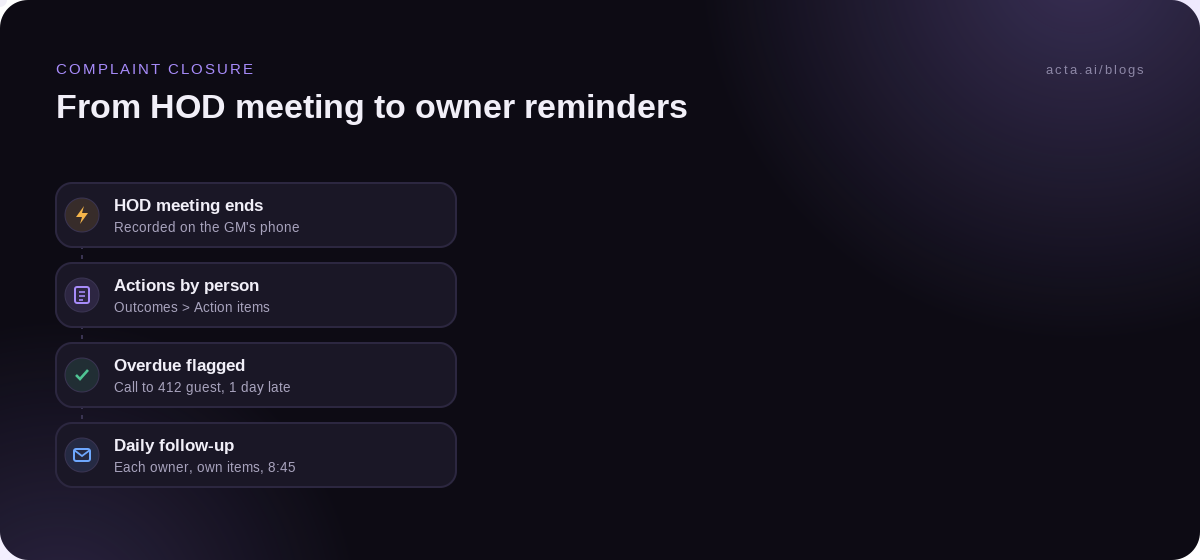
Every recorded meeting feeds a cross-meeting action item tracker for teams. In Acta it lives at My meetings > Outcomes > Action items. Four tiles across the top double as filters: Open, Overdue, Due this week and Done. Switch Group by from Meeting to Person and you get each HOD's list on one screen. Anita's Tuesday view, had she been recording:
| Action item | Owner | Status | Comment |
|---|
| Move Mr Desai (Corvel) from 412 to 508 | Rohan | Done | "508 late checkout, moved to 410" |
| Fit new AC fan motor in Mr Desai's room | Joseph | Due tomorrow | None |
| Call Mr Desai with fix time by 11 am | Rohan | Overdue 1 day | None |
| Block 412 until drain cleared | Sunita | Done | None |
| Breakfast voucher to 412 guest | Imran | No due date | None |
Note the overdue call, and the comment that should have changed Joseph's job. Anyone can add a comment to an item, and the "Mark as done" tick sits on every row, so the front office manager can close his own items from his phone between check-ins.
The piece that changes behaviour is Auto follow-up. Turn on "Send daily follow-ups" for the meetings Anita owns, set "When" to 8:45 on Every day (hotels don't stop at weekends), "Who gets it" to "Each owner, their own items" and "Which items" to Due or overdue. Each HOD then gets a short email of only their open complaint actions half an hour before the meeting. It stops once every item is done. For the GM, a second setting, "Me, a summary of everyone's items", is the better choice: one email, every department.
A tip from running these: make the HOD meeting open with the Overdue tile, not with arrivals. UC Berkeley's short guide to agendas and action items is a good refresher for HODs who chair their own department meetings. It takes two minutes, and it's the only part of the meeting that protects the guests already in the building. For more on why actions stall even when everyone means well, see our piece on why action items don't get done.
Decisions, risks and questions sit beside the actions
Actions are the day-to-day. Three other views catch what actions miss.
Decision log
Under Outcomes > Decision log, Acta lists the decisions from Anita's meetings, merges repeats, and tracks a status of Active, Changed, Reversed or Done. Hotels make more standing decisions than people think: comp limits, early check-in rules, which floor takes groups. Example entry:
"Rooms 410 to 416 out of order for guests on corporate accounts until fan motors replaced." Status: Active. Decided by: Anita. Owner: Joseph. Actions: 1 of 3 done. History: first raised Friday HOD meeting, with the quote "No Corvel guest goes on that riser again until it's fixed."
The Need follow-through tile shows decisions whose linked actions are slipping. This is the GM's log, built from the meetings she recorded or that were shared with her. The chief engineer has his own log from his own meetings.
Risk Registry
The Risk Registry tab pulls risks out of what people said and updates after every meeting. Each row has Risk, Mitigation, Owner, Date, Impact (High, Medium or Low) and Status (Open, Mitigating or Closed). Friday's row would read: Risk "Corvel Systems may move room nights after repeated complaints", Impact High, Owner Neha, Date next Tuesday, Mitigation Agreed "Anita to call Corvel travel desk and offer a site visit", Status Mitigating. If nobody had taken it, it would sit under the "High · no owner" card instead.
OneChat
OneChat answers questions across all your meetings and shows where each answer came from. Anita can ask: "Which guest complaints from this week's HOD meetings still have no confirmed fix?" A useful answer reads like: "Two: AC rattle for Mr Desai (now in 410), owner Joseph, no new date; slow drain in 305, owner Joseph, parts awaited." Under Found in it lists Tuesday's and Thursday's HOD meetings, and a click opens the recording at that moment. The OneChat help guide covers scope and files.
An Agent Builder recipe checks complaint closure every evening
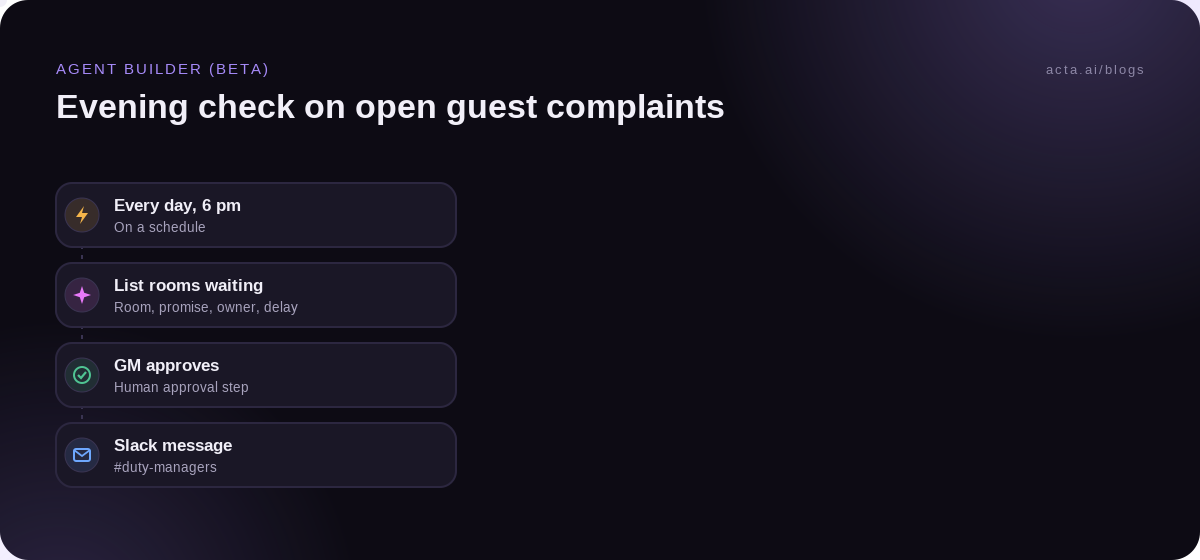
The evening duty manager needs a list of rooms where a guest is still waiting. Acta's Agent Builder (beta) can build that, and it never posts without a person approving it first. A manager can set this up in an afternoon:
- In Agent Builder, click "New agent" and choose "Start from blank instead".
- Set the trigger to On a schedule, daily at 6 pm.
- Add an Acta data step that reads open action items from meetings with "HOD" in the title over the last three days.
- Add an AI step: "Keep only items about a guest or a room. For each, write one line: room, guest, what was promised, owner, how late."
- Add If / else: if the list is empty, stop the run. Quiet evenings shouldn't produce messages.
- Add Human approval so the GM sees the list first, with "Also email me Approve and Reject buttons" ticked.
- Add an Action step: Slack, message to the #duty-managers channel. Optionally, Google Sheets: add rows to the monthly complaint sheet.
- Click Test, then Run test. Nothing is sent during a test. Then Turn on.
If the GM doesn't answer within 24 hours, nothing goes out, which is the right default for a hotel group chat. The approvals guide explains the Approvals tab.
Roll it out to department heads in two weeks
For a hotel with 60 to 150 staff, the people who record are few: the GM, the front office manager and perhaps the sales manager. Housekeeping and engineering get emails and open shared meetings on their phones.
The HOD meeting is in person, so record it on the GM's phone with Acta's mobile app or with "Record audio" in a browser on the office laptop. For the corporate client calls Neha takes on Teams or Zoom, the desktop app records from her own computer with no bot in the call. Tell your HODs once, clearly, that the morning meeting is recorded and why; the guide on recording consent and what to tell participants has wording you can adapt. Don't record conversations with guests at the desk.
Week 1. Day 1: Anita creates the workspace and records the HOD meeting. Day 2: she reads the action list against her own notes and fixes owner names. Day 3: builds the HOD daily briefing template and tests it on Monday's recording. Days 4 and 5: starts each meeting with the Overdue tile.
Week 2. Day 6: invites Rohan and Neha from Settings > Workspace. Day 7: shares each HOD meeting with "Everyone in" the workspace, since meetings are private by default. Day 8: turns on Auto follow-up. Day 10: sets up the evening agent. Day 12: a 15-minute review: which complaints closed faster, which owner names still come out wrong.
Mistakes to avoid: recording every shift briefing in week one, and forgetting that the Decision log and Risk Registry belong to the person who recorded, so the GM should be the one recording the meetings that matter most.
Acta fits this setup because it records in person and online, writes the action list per owner, and keeps decisions and risks alongside it. It won't replace your PMS. The Acta for hotels page shows the same setup in brief.
Frequently asked questions
What should a hotel HOD meeting cover each morning?
Arrivals and VIPs, group movements, rooms out of order, yesterday's guest complaints with their owners, engineering jobs, and anything from the night audit. Keep it to 15 or 20 minutes, and start with overdue actions, because those affect guests already in the hotel.
How do I track guest complaints until they are closed?
Treat each complaint as an action item with an owner, a promised fix and a time by which the guest is told. Close it only when the guest has been informed, not when the job is done. A per-person list with daily reminders of overdue items keeps closure visible without the GM chasing each department head by phone.
Can housekeeping and engineering see the notes without a laptop?
Yes. Owners can receive a daily email with only their own open items, and meetings shared with the workspace open on a phone. Each person you invite to the workspace holds a seat, so many hotels invite only the HODs who record or need to search meetings, and send everyone else the reminder emails.
Is it fine to record the daily HOD meeting?
Recording an internal staff meeting is common, but rules on consent differ by country and state, so tell everyone it is recorded, why, and who can see it. This is general information, not legal advice. Never record guests at the front desk or in rooms. Check your employment contracts and local law if unsure.
What does it cost for a hotel management team?
Acta Pro is $8 per seat per month billed monthly, or $72 per seat per year. Every HOD in the workspace uses one seat, whether they record or just read, and the hotel's workspace owner pays. The 15-day trial includes the Outcomes views, the Risk Registry and OneChat, so a GM can run the first week of the rollout before deciding how many seats to keep.
Start with tomorrow's HOD meeting
One recorded meeting and a habit of opening the next one with what slipped is enough.
- Record one meeting: the morning HOD meeting, on the GM's phone, starting tomorrow.
- Name every owner: say the person's name out loud when a complaint is assigned, so the action list can match it.
- Add the third field: every complaint gets a "guest informed by" time, not just a fix.
- Open with Overdue: the first two minutes of each HOD meeting go to the Overdue tile.
- Automate the chase: turn on daily follow-ups in week two and the evening closure agent once the list looks right.
Start a 15-day trial and record tomorrow's HOD meeting with the mobile app, or the Chrome extension for the client calls you take in a browser.