Guides & How-tos 9 min read
How to Build a Summarization App With Open Models (2026 Guide)
A practical guide to building a summarizer with open models: which LLMs to use, how to handle long documents, working Transformers and vLLM code, and how to evaluate it.
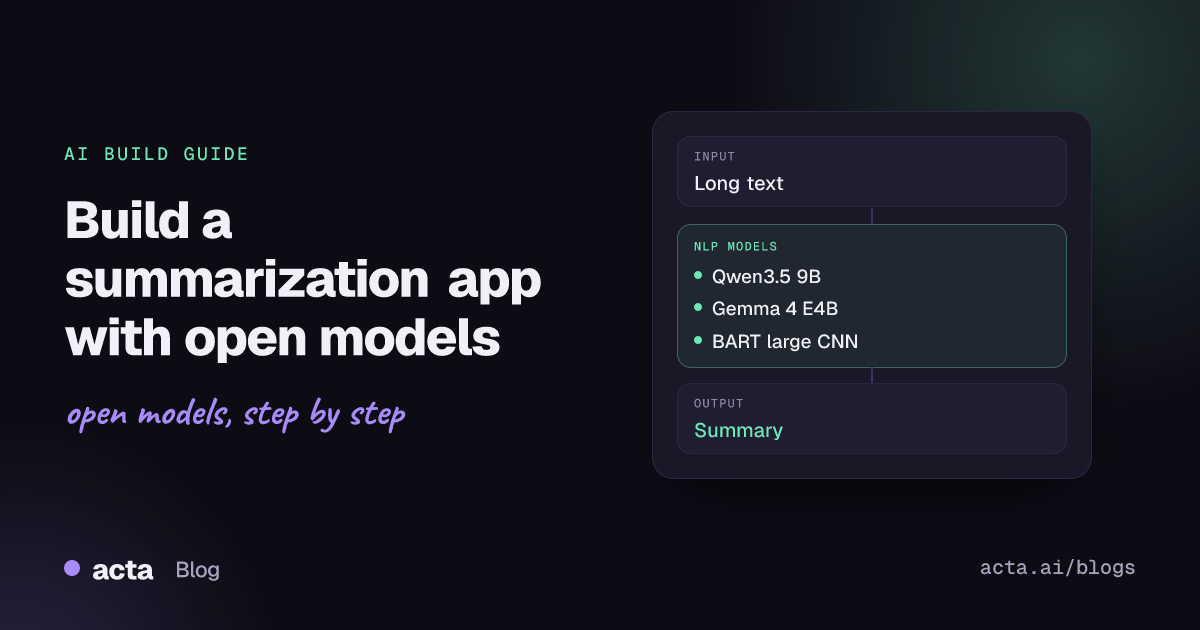
Quick answer: Summarization turns a long text into a short one that keeps the key facts. In 2026 the shortest path is an instruction-tuned open LLM such as Qwen3.5, Qwen3 or Gemma 4, prompted through the Transformers text-generation pipeline for prototypes and served with vLLM or llama.cpp in production. Classic seq2seq models like BART still work for short news-style text.
Teams build summarizers for meeting notes, support tickets, research papers, legal and financial filings, and long email threads. The common need is the same: read more than a person has time for, keep what matters, and never add facts that were not in the source.
This guide covers how the task works, which open models to pick, a step-by-step build with working code, deployment, evaluation and the mistakes that cost teams the most time.
What is summarization?
Summarization takes a document (or several) as input and returns a shorter text as output. The Hugging Face summarization task page describes two families: extractive methods copy the most important sentences from the source, while abstractive methods write new sentences that capture the main points.
For years abstractive summarization meant encoder-decoder (seq2seq) models fine-tuned on paired data, such as BART trained on CNN/DailyMail news. The BART paper reported gains of up to 6 ROUGE on summarization benchmarks over earlier work. These models are small and fast, but they have short input windows and they follow one fixed summary style.
Today most new summarization work uses decoder-only, instruction-tuned LLMs. You describe the summary you want in the prompt (length, format, audience, sections such as decisions and action items) and the same model handles meetings, contracts and code reviews. The shift is visible in the library itself: in Transformers v5 the old summarization pipeline sits in the list of removed tasks, with the message "Use the text-generation pipeline with a chat model instead."
What can you build with it?
- Meeting and call summaries: turn a speech-to-text transcript into a recap with decisions, owners and next steps.
- Support ticket digests: condense a long customer thread into the problem, what was tried and the current status before handing it to the next agent.
- Research and report briefs: one-paragraph abstracts of papers, analyst reports or internal docs, with a link back to the source.
- Inbox and chat catch-up: a daily digest of long email threads or busy team channels.
- Document review aids: clause-by-clause summaries of contracts or policies, flagged for human review.
- RAG answer compression: summarize retrieved passages before they reach a chat model, so more sources fit in its context window.
Which models should you use?
Pick by input length, hardware and licence. All of the instruction-tuned models below accept a prompt describing the summary format you want.
- Qwen3.5-9B: a 9B model with a hybrid Gated DeltaNet and attention design and a 262K-token native context, so hours of transcript text fit in one call. Apache 2.0 licence file in the repo.
- Gemma 4 E4B-it: about 4.5B effective parameters with a 128K context, built for laptops and on-device use; it also accepts audio and images. Apache 2.0.
- Qwen3-8B: an 8.2B text model with a 32,768-token native context (131,072 with YaRN) and a switch between thinking and non-thinking modes. Well supported by every serving stack. Apache 2.0.
- Qwen3.6-35B-A3B: a mixture-of-experts model with 35B total and about 3B active parameters, so it runs faster than its size suggests; 262,144-token context. Apache 2.0.
- Gemma 4 31B-it: the dense 31B Gemma 4 model with a 256K context, a strong choice when summary quality matters more than cost. Apache 2.0.
- gpt-oss-20b: 21B total and 3.6B active parameters, with weights quantized to fit in about 16GB of memory. Apache 2.0.
- BART large CNN: the classic seq2seq summarizer fine-tuned on CNN/DailyMail. Small and fast on CPU, but only suited to short, news-like English text. MIT licence.
There is no single summarization leaderboard for LLMs, but two public sources help. The Vectara hallucination leaderboard measures how often models add unsupported content when summarizing documents, and the LMArena leaderboard changelog shows which open models (Gemma 4 among them) have entered the Text Arena for general quality comparisons.
How do you build it, step by step?
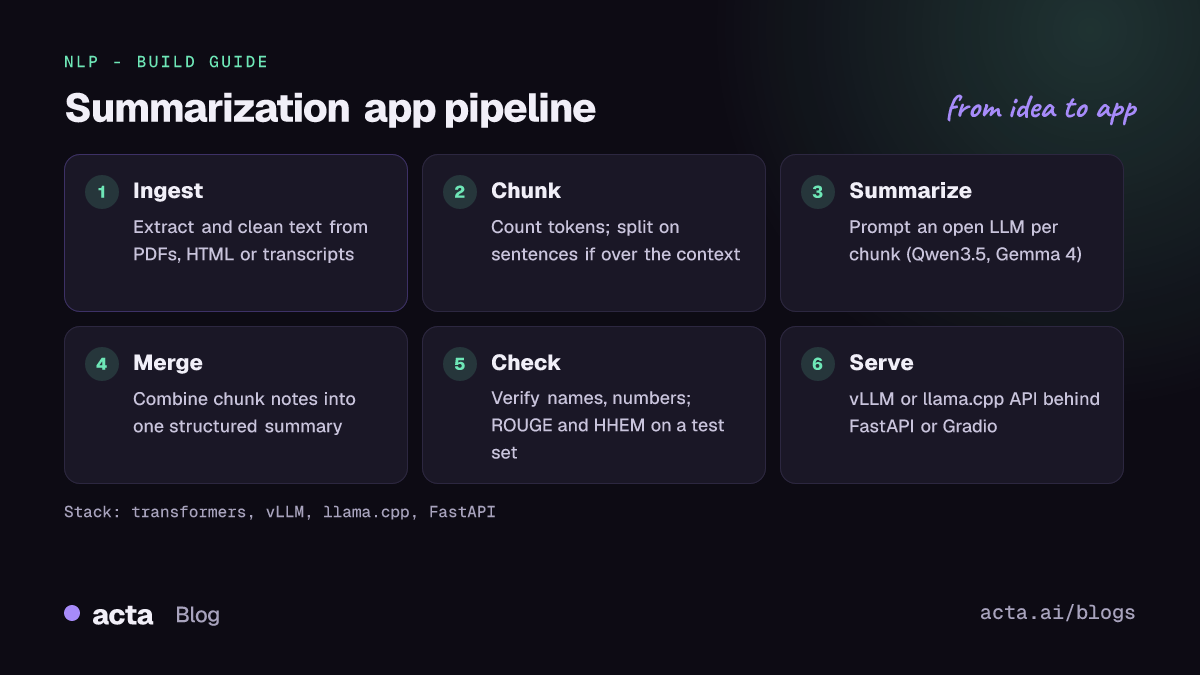
- Collect and clean input. Extract text from PDFs, HTML or transcripts. Strip boilerplate, keep speaker names and timestamps if your summary needs them.
- Define the output. Write the summary spec as a prompt: length, sections, bullet or prose, audience, and an explicit rule to use only facts from the text.
- Check the length. Count tokens with the model tokenizer. If the text fits the context window with room for the answer, send it in one call.
- Chunk long inputs. Otherwise split on sentence or section boundaries, summarize each chunk, then merge the partial summaries (map-reduce). The long-document thread on the Hugging Face forum covers sentence-aware chunking and recursive summaries.
- Validate the result. Check names, numbers and dates against the source, and run a factual-consistency check on a sample.
- Serve it. Put the model behind an OpenAI-compatible server and expose a small API or UI.
The first example follows the chat example in the Transformers docs and the /no_think instruction from the Qwen3 README, which turns off the reasoning trace for a direct answer:
# Follows the TextGenerationPipeline chat example in the Transformers docs
# ("Chat basics") and the /no_think switch described in the Qwen3 README.
from transformers import pipeline

summarizer = pipeline(task="text-generation", model="Qwen/Qwen3-8B",
                      dtype="auto", device_map="auto")

document = open("meeting_transcript.txt").read()
chat = [
    {"role": "system", "content": "You summarize documents. Use only facts stated in the text."},
    {"role": "user", "content": "Summarize in 5 bullet points, then list decisions "
                                "and action items with owners.\n\n" + document + "\n/no_think"},
]
response = summarizer(chat, max_new_tokens=512)
summary = response[0]["generated_text"][-1]["content"]
print(summary.split("</think>")[-1].strip())  # drop the empty think block
For inputs longer than the context window, a simple map-reduce loop against a vLLM server works well. The serve command is the one in the Qwen3 README; the client uses the server's OpenAI-compatible chat route:
# Server (command from the Qwen3 README): vllm serve Qwen/Qwen3-8B --port 8000
import requests

URL = "http://localhost:8000/v1/chat/completions"  # OpenAI-compatible route

def ask(prompt):
    r = requests.post(URL, json={
        "model": "Qwen/Qwen3-8B",
        "messages": [{"role": "user", "content": prompt + "\n/no_think"}],
        "max_tokens": 600, "temperature": 0.3})
    text = r.json()["choices"][0]["message"]["content"]
    return text.split("</think>")[-1].strip()

def summarize_long(text, chunk_chars=24000):
    chunks = [text[i:i + chunk_chars] for i in range(0, len(text), chunk_chars)]
    notes = [ask("Summarize this section as bullet points:\n\n" + c) for c in chunks]
    return ask("Merge these section notes into one summary with decisions "
               "and action items. Do not add facts:\n\n" + "\n\n".join(notes))
If you only need short news-style summaries on CPU, BART is still useful. Since Transformers v5 dropped the summarization pipeline, load it with AutoModelForSeq2SeqLM as the Transformers summarization guide does:
# Transformers v5 removed the "summarization" pipeline, so load the seq2seq
# model directly (same pattern as the Transformers summarization guide).
from transformers import AutoTokenizer, AutoModelForSeq2SeqLM

model_id = "facebook/bart-large-cnn"
tokenizer = AutoTokenizer.from_pretrained(model_id)
model = AutoModelForSeq2SeqLM.from_pretrained(model_id)

article = open("article.txt").read()
inputs = tokenizer(article, return_tensors="pt", truncation=True).input_ids
outputs = model.generate(inputs, max_new_tokens=130, do_sample=False)
print(tokenizer.decode(outputs[0], skip_special_tokens=True))
How do you serve and deploy it?
GPU servers: vLLM is the default choice for throughput. It gives you an OpenAI-compatible API, continuous batching and support for GPTQ, AWQ and FP8 quantized weights. The Qwen3.8 repository also lists transformers serve for quick tests and moderate load.
CPU, laptops and edge: llama.cpp runs GGUF builds of Qwen and Gemma models and can download them straight from the Hub with -hf. Its server also exposes an OpenAI-compatible API, so the client code above works unchanged.
Quantization: 4-bit and 8-bit weights cut memory use enough to run an 8B to 9B model on a single consumer GPU. Test summary quality after quantizing, because small numeric drifts show up as missed details.
Front end: wrap the summarize function in a FastAPI endpoint for other services, or a Gradio app for internal testing. Run long jobs (hour-long transcripts, big PDFs) as background tasks and return a job ID instead of holding an HTTP request open.
Managed options: Hugging Face Inference Endpoints or Spaces can host the same models if you do not want to run GPUs yourself. Check data residency before sending sensitive documents to any hosted service.
How do you evaluate it?
- ROUGE: n-gram overlap with reference summaries (ROUGE-1, ROUGE-2, ROUGE-L). Load it with
evaluate.load("rouge")from the evaluate library; the ROUGE metric Space has the implementation. Useful for regression tests, weak at judging LLM summaries that paraphrase well. - Factual consistency: the share of summary claims supported by the source. Vectara's HHEM model, used for its leaderboard, is one open option; an LLM judge with a strict rubric is another.
- Coverage: did the summary keep every decision, number and action item from a checklist you write per document type?
- Human ratings: a small, regular sample scored by the people who read the summaries is still the best signal.
Build a test set of 50 to 200 real documents from your own domain. Public summarization datasets on the Hub such as CNN/DailyMail or meeting-focused sets are good for smoke tests, but they rarely match your format.
Pitfalls and tips
- Hallucinated details: LLMs can invent owners, dates or numbers. Tell the model to use only the source, keep temperature low, and check entities against the input.
- Silent truncation: seq2seq models such as BART cut off input at their maximum length without an error. Read
tokenizer.model_max_lengthand chunk, as forum users recommend. - Lost in the middle: even long-context models can skim the middle of a long input. Section-by-section summaries often beat one giant prompt.
- Thinking modes: reasoning traces from hybrid models add latency and tokens. Turn them off for routine summaries and strip any leftover think tags.
- Licences: most models above are Apache 2.0 or MIT, but always read the licence on the model page before shipping.
- Privacy: transcripts and contracts often contain personal data. Self-hosting open weights keeps that data inside your own infrastructure.
Where can you get help?
- The Hugging Face forum has long-running threads on chunking and long inputs.
- Model discussion tabs, such as the BART large CNN discussions, collect questions on input limits, speed and odd outputs.
- The GitHub issue trackers of vLLM, llama.cpp and the Qwen repositories are the right place for serving bugs.
- The Vectara leaderboard and LMArena are where to compare new releases before you switch models.
Frequently asked questions
Should I use an LLM or a fine-tuned seq2seq model for summarization?
Use an instruction-tuned LLM unless you have strict CPU or latency limits and short, uniform inputs. LLMs handle long inputs and custom formats without retraining; a model like BART is cheaper but tied to its training style.
How do I summarize text longer than the context window?
Split it on sentence or section boundaries, summarize each chunk, then summarize the combined notes. Keep chunk summaries structured (bullets with names and numbers) so the merge step has clean input.
Why does the Transformers summarization pipeline no longer work?
Transformers v5 removed the summarization, translation and text2text-generation pipelines. Use the text-generation pipeline with a chat model, or load a seq2seq model with AutoModelForSeq2SeqLM, or pin a v4 release.
How small can a summarization model be?
Models in the 4B to 9B range, such as Gemma 4 E4B-it and Qwen3.5-9B, give useful summaries on a single consumer GPU or a recent laptop, especially with 4-bit quantization. Test on your own documents before deciding.
Acta uses these kinds of models to turn meeting transcripts into summaries, decisions and action items; see Acta features or read how we handled multi-meeting RAG. Related guides: speech recognition with VAD and text generation with open LLMs.