The morning meeting is where a dealership makes its promises
Most stores run some version of the same day. At 8:30 the sales manager walks through yesterday's ups, test drives, write-ups and deliveries, the BDC manager reads out internet leads and appointments, and the desk calls out deals that need a "save" today. On Tuesdays there may be a used-car meeting about recon and aged units; once a week the GM holds a pipeline review against the month's target. Service and parts join when a delivery depends on a PDI or an accessory install.
In those 20 minutes, people make dozens of small commitments. "Luis, call the couple from the weekend back before noon." "Get the roof rails fitted on stock 4417 by Thursday." "Somebody check whether the dealer trade with the other store is confirmed." Most land in someone's head, a few land in the CRM, and the rest disappear by lunch, when the floor fills up.
The ones that disappear are often promises to customers. The FTC's advice to used-car buyers is blunt: spoken promises are difficult to enforce, so buyers should get every promise in writing, and its guidance on dealer ads and promotions tells shoppers to ask for confirmation that a vehicle is actually on the lot. Your customers are being taught to hold you to what you say. Your own team should hold itself to it first. Our page for auto dealerships covers the other meetings where this matters.
One week at a two-showroom store shows how a delivery date slips
The store and people below are invented for illustration. Harlan Motors runs two rooftops in Ohio: a franchised new-car showroom in Dayton and a pre-owned store in Springfield, 85 people in all. Marcus is the general sales manager, Tasha runs the BDC, Luis is a senior salesperson in Dayton and Renee manages the Springfield lot.
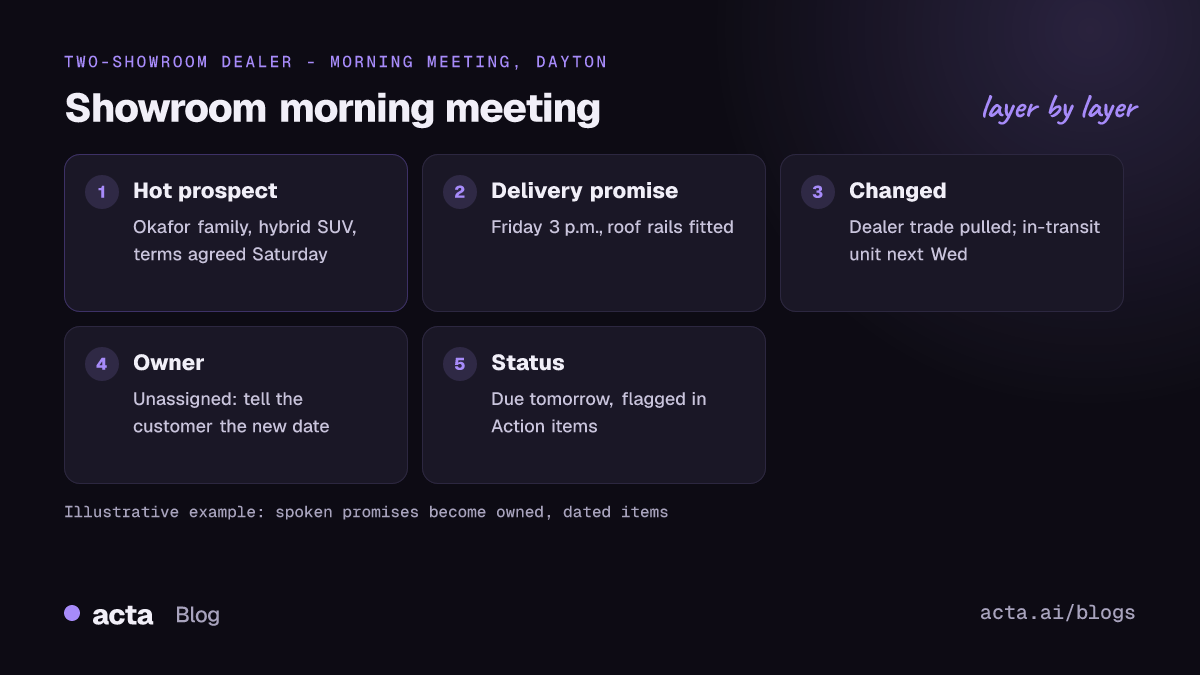
Saturday. The Okafors test-drive a hybrid SUV in the trim they want and agree terms. They are leaving on a family trip the following Saturday. Luis tells them the car will be ready Friday afternoon, roof rails fitted, because a matching unit is coming in on a dealer trade.
Monday, 8:30. Marcus runs the morning meeting. Tasha reports 14 test-drive leads from the weekend, each needing a test drive follow-up call by Tuesday. Marcus says, "Luis, confirm the dealer trade for the Okafors today, and get parts to order the rails." Luis nods.
Tuesday, 8:30. Marcus mentions, almost in passing, that the other dealer pulled the trade unit; the nearest match is an in-transit car due next Wednesday. Someone says "we'll need to let the Okafors know." Nobody is named.
Wednesday and Thursday. Month-end pressure. Luis assumes Marcus called. Marcus assumes Luis did. Parts has rails on order for a car that is not coming.
Friday, 3 p.m. The Okafors arrive with their luggage already in the old car. There is no SUV. They leave, cancel the deal on Monday and post a two-star review that names Luis. Nine other follow-ups from that week's meetings also slipped, though none as visibly.
The store did not lack a CRM. It lacked a list that held Tuesday's unassigned sentence and showed it as overdue by Wednesday morning.
A dealership morning meeting tracker holds owners, dates and customers
Whatever tool you use, whether a whiteboard, a spreadsheet or an action item tracker for teams, it needs the same fields: the task in plain words, the customer or stock number it concerns, the owner, the due date, and a status. Keep delivery promises and we-owes (the items a store still owes a buyer after the sale, like a second key or an accessory install) visibly separate from routine call-backs. For a fuller treatment of closing out a meeting properly, read how to end a meeting with owners and deadlines.
In Acta, the built-in KPI review template handles the weekly numbers meeting. For the daily huddle, a custom template works better. Custom templates are on paid plans; you can create up to 10, each with up to 12 sections. Marcus's version would look like this:
Template name: Showroom morning meeting
What should this report do? For the daily sales meeting at either showroom: yesterday's numbers, hot prospects, delivery promises and we-owes, and who does what today.
Yesterday's numbers (Table: Showroom | Ups | Test drives | Write-ups | Deliveries)
Hot prospects (Table: Customer | Vehicle or stock no. | Salesperson | Next step | Date)
Delivery promises (Checklist: task, owner, due date; include the date the customer was told)
Open we-owes (Checklist)
Inventory, dealer trades and in-transit units (Bullets)
Extra instructions: Name the customer in every follow-up. If a promised date changed, say who must tell the customer.
When should Acta use it? Only matching meetings
Try it with "Test on a past meeting" first. If a section was not covered, the report says "Not discussed" instead of inventing something, and an item with no owner shows as "Unassigned", which is exactly the flag Tuesday's meeting needed.
The Action items view does the chasing for you
Each recorded meeting gets its own Action items card alongside the usual sales meeting notes. The cross-meeting tracker lives in My meetings, under Outcomes, on the Action items tab, and that is where a sales manager should start each day. The tiles across the top, Open, Overdue, Due this week and Done, double as filters, and the search box finds items by word ("Okafor", "rails", "4417").
Group by Person and you get one block per salesperson, which is the view to bring into the morning meeting. Group by Meeting and you see each huddle with an "X of Y done" bar and a count of overdue items. Here is what Marcus's screen would have shown on Wednesday morning:
| Action item | Owner | From meeting | Status |
|---|
| Confirm dealer trade for Okafor SUV; order roof rails | Luis | Morning meeting, Dayton, Mon | Due today |
| Tell the Okafors the new date (in-transit unit, next Wed) | Unassigned | Morning meeting, Dayton, Tue | Due tomorrow |
| Call back 6 weekend test-drive leads not yet reached | Tasha | Morning meeting, Dayton, Mon | Overdue 1 day |
| Frontline-ready on trade-in 2209 (recon, detail) | Renee | Used-car meeting, Springfield, Tue | Due in 2 days |
The "Unassigned" line is the one that cost the deal. Reassign it, add a comment ("Okafors prefer text, not calls"), and it is no longer a sentence in the air. Ticking "Mark as done" closes it; if Luis later says he already called, a comment on the item keeps the record straight.
Then switch on Auto follow-up for the meetings you own. Acta emails a reminder of open items each day until they are done. Set "Who gets it" to "Each owner, their own items", "Which items" to "Due or overdue", and "When" to weekdays at 7:45, before people reach the floor. It stops after 7, 14, 21 or 30 days, whichever you choose, and the bell on a meeting card pauses it for that meeting. The "Follow-up email" button on a meeting writes a draft you can send to the whole team instead.
One thing to be clear about with your managers: this view is personal. Marcus sees items from the meetings he recorded and those shared with him. Renee sees hers. If you want the GM to see both rooftops, both morning meetings must be shared with the workspace. For why follow-ups stall even when they are written down, see why action items don't get done.
Decisions, risks and questions complete the picture
A tracker catches tasks. Three other views catch what sits behind them.
Decision log. Under Outcomes, the Decision log turns Monday's "use the dealer trade" and Tuesday's "use the in-transit unit instead" into one decision card with status Changed, "Was: dealer trade from partner store" and a History showing both mornings with the quotes. The banner "No action items yet" would have been a second warning that nobody owned the customer call.
Risk Registry. This tab lists risks heard in meetings. A typical month-end row: Risk "Six deliveries this week depend on two in-transit units", Mitigation "Confirm ETAs daily with the factory rep" tagged Agreed, Owner Marcus, Impact High, Status Mitigating. A "Fix is overdue" card appears if the date passes.
OneChat. Ask "What did we tell the Okafors about delivery, and has anyone told them about the change?" and the answer quotes Monday's and Tuesday's meetings, with a Found in list linking to "Morning meeting, Dayton, Tue" at the minute it came up. It answers only from meetings you recorded or were shared with you, plus files you add.
Like the Action items view, the Decision log and the Risk Registry belong to each user. All three, and OneChat, are included in the 15-day trial and in Pro.
A pre-meeting agent puts yesterday's slips on the board
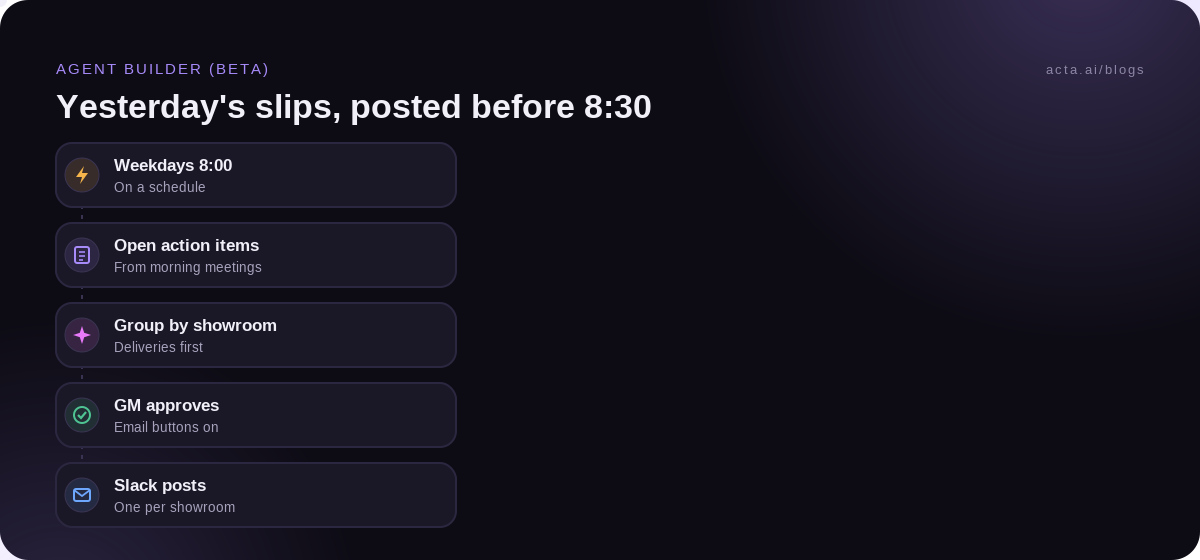
Agent Builder (beta) can prepare the first two minutes of each meeting for you. The idea: every weekday at 8:00, collect what slipped from previous morning meetings, group it by showroom and salesperson, let the GM approve it, then post it to each showroom's Slack channel. See the Agent Builder overview and the approvals guide before you start.
- Open Agent Builder, click "New agent" and pick the trigger On a schedule: weekdays, 8:00.
- Add an Acta data step that fetches open action items from meetings whose title contains "morning meeting".
- Add an AI step with the instruction: "Group by showroom, then by owner. Put delivery promises and anything Unassigned first. One line per item with the customer name and due status."
- Add an If / else step: if there are no overdue or unassigned items, stop; nobody needs an empty post.
- Add a Human approval step for the GM, with email Approve and Reject buttons turned on.
- Add two Slack actions: a message to #dayton-floor and one to #springfield-lot, each with its own section.
- Run Test. In a test nothing is sent and approvals pass by themselves, so you can read exactly what would be posted. Then click Turn on.
If the GM does not answer within 24 hours, the post is not sent. A variant worth adding later uses the trigger "Event in a connected app" with Acta's "action item overdue" event, sending a Slack message to the owner the moment a delivery item slips.
Roll out across both rooftops in two weeks
Who records: the sales manager at each showroom records the morning meeting, the used-car manager records the recon meeting, and the GM records the weekly pipeline review. The huddle happens standing in the showroom, so the Acta mobile app on the manager's phone is the practical choice; for the weekly video call with the group's other store, the desktop app records Teams or Zoom without a bot. Each manager you invite takes a seat whether they record or not; salespeople who only get their own items through the reminder emails stay outside the workspace and need no seat.
Set up the workspace from Settings, then Workspace, and invite the managers. Give the GM the Admin role. After each meeting, the manager clicks the share icon and picks "Everyone in" the workspace, so the GM and the other rooftop can open it. Tell the team the huddle is recorded and why; read what to tell participants before recording with AI, which is general information, not legal advice. Customer conversations on the floor are a separate question: do not record those without consent.
- Week 1, Monday to Wednesday: Dayton only. Record the huddle, read the Action items list together the next morning, fix owner names that came out wrong.
- Week 1, Thursday and Friday: turn on the Showroom morning meeting template and Auto follow-up for "Due or overdue" items.
- Week 2: add Springfield and the used-car meeting; share every meeting with the workspace.
- End of week 2: build and test the 8:00 agent; turn it on after three good test runs.
Avoid three mistakes. Do not let "we" own anything; say a name. Do not turn reminders on for every participant on day one, or people will unsubscribe. And do not skip the two-minute review of the Overdue tile; the tracker only works if the meeting looks at it.
Frequently asked questions
What is a dealership morning meeting tracker?
It is a list of every follow-up assigned in the daily sales meeting, each with an owner, a due date, a status and the customer or stock number it concerns. It covers test-drive call-backs, delivery promises, we-owes and inventory checks, and it is reviewed at the start of the next meeting so slips surface within a day.
How is this different from tasks in our dealership CRM?
The CRM holds tasks someone typed in. The tracker starts from what was said in the meeting, including commitments nobody typed, like a manager telling a salesperson to call a customer. Many stores use both: the meeting tracker catches spoken promises, and the salesperson logs customer contact in the CRM.
Can each salesperson get a reminder of their own follow-ups?
Yes. Acta's Auto follow-up can email each owner only their own open items every weekday at a time you choose, until the items are done or the stop-after period ends. Recipients can unsubscribe, so keep the list short and focused on items that are due or overdue.
Does the general manager see both showrooms in one place?
Only if both showrooms' meetings are shared with the workspace or recorded by the GM. Acta's Action items view, Decision log and Risk Registry are built per person from the meetings they recorded or that were shared with them. Sharing every morning meeting with the workspace gives the GM the full list.
Should we record conversations with customers on the floor?
Not by default. The morning meeting is internal, and recording it is a team decision you can explain. Customer conversations involve consent rules that vary by state and country; if you ever record one, ask first and check the rules where you operate. This is general information, not legal advice.
Run tomorrow's meeting with a tracker in place
You can start with one rooftop and one meeting. What matters is that every spoken promise leaves the room with a name and a date.
- Record one huddle: the Dayton-style morning meeting, on the sales manager's phone.
- Name every owner: before the meeting moves on, nothing stays with "we".
- Split out delivery promises: with the customer's name and the date they were told.
- Review the Overdue tile first: two minutes at the top of each meeting.
- Automate the board: once the habit holds, let the 8:00 agent post the slips for approval.
Try it on your own morning meetings with the 15-day trial on the pricing page, or record the group's video calls with the Chrome extension.