Use Cases 5 min read
Campaign Review Reports From Your Marketing Meetings, Written for You
Acta turns your weekly marketing sync into a campaign review: KPIs by channel, creative and targeting feedback, strategy changes, budget calls and owners with deadlines.

Quick answer: A campaign review report is the written record of a marketing performance meeting: the KPIs and channel results discussed, feedback on targeting, messaging and creative, strategy changes, budget and resource calls, and the decisions with owners and deadlines. Acta writes it from the meeting recording, so the team leaves with one shared summary instead of five different sets of notes.
Most marketing teams meet weekly to look at how campaigns are doing. Someone shares a dashboard, the paid lead explains a drop in click-through rate, the content lead proposes a new angle, and the group agrees to move some budget. Ten days later nobody is sure whether that budget move was approved or only floated.
The write-up is the part that slips. The person running the meeting is also presenting numbers, and the decisions are scattered across a 40-minute discussion. Acta's Campaign review template captures the outcome so that the next meeting starts from what was agreed, not from memory.
What is a campaign review?
A campaign review is a structured look back at how a campaign or set of channels performed against its goals, followed by decisions about what to change. It usually covers three layers: the numbers (traffic, leads, conversion rate, cost per lead, return on spend), the reasons behind them (audience, message, creative, timing), and the plan going forward.
The review is only as good as the measurement behind it. Teams that tag their links consistently can compare channels properly; Google's guide to collecting campaign data with UTM parameters explains how source, medium and campaign values show up in Analytics reports. Smartsheet's overview of how to measure marketing campaign effectiveness is a useful primer on choosing metrics that match the campaign's goal. The meeting is where those numbers turn into decisions, and the campaign review is the record of that step.
What does Acta's Campaign review report include?
The report has five parts, in the order a marketing lead would scan them:
- KPIs and campaign outcomes. All key performance indicators, analytics and results discussed, including successes, problems and trends across channels.
- Targeting, messaging and creative feedback. Feedback and suggestions on audience targeting, messaging, creative assets and campaign content.
- Strategy. Strategies proposed or refined in the meeting, including plans for SEO, SEM, content, social media and other digital channels.
- Budget and resources. Any discussion of budget allocation, resource planning or bottlenecks that are slowing execution.
- Decisions and actions. Every decision made, each action step with its owner, and the deadlines set.
Here is the template in Acta's Templates page, with the preview of what the report covers:

And an illustrative example of a finished report:
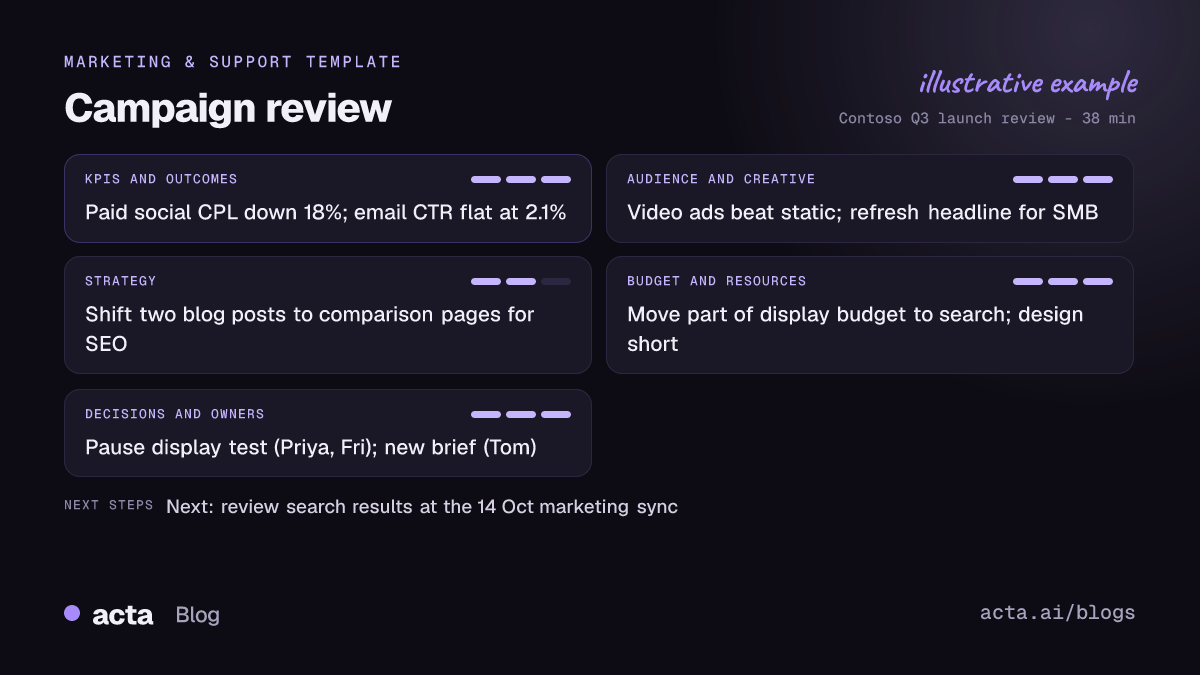
Acta also writes its usual meeting outputs alongside the report: a summary, action items with owners and due dates, and a list of decisions. The report only contains what was said, so if a number was shown on screen but never spoken, it will not appear.
Who is the campaign review for?
- Marketing managers and heads of marketing who need a clean weekly record to share upward without rewriting the meeting.
- Channel owners in paid, SEO, email or social, who want their results and next steps captured accurately.
- Agencies and freelancers who join client reviews and need to know exactly which creative changes were approved.
- Founders and sales leaders who did not attend but want to know where pipeline from marketing is heading.
Some situations where it helps: a budget shift was agreed verbally and finance asks when it was approved; a creative refresh stalls because nobody owned the brief; or a quarter-end retrospective needs the story of what was tried and why. Because Acta keeps every meeting searchable, you can also ask OneChat "what did we decide about the display budget in September?" and get an answer with sources.
How does Acta pick this template automatically?
Acta reads each conversation and picks a template that fits, even if you have not turned it on. For the campaign review, the signals are marketing performance talk: channel metrics such as click-through, cost per lead or conversion rate, discussion of audiences and creative, plans for SEO, paid search or social, and decisions about budget or launch dates.
When Acta picks it for you, the report is labelled "Auto" and Acta explains the choice, for example that the meeting reviewed channel KPIs and agreed budget changes. Click "Turn on for future meetings" to keep it.
If you have turned it on yourself, the template first checks that the meeting is a campaign discussion. A hiring debrief or a one-on-one about career goals will not get a forced campaign report; it shows under "Not relevant" with the reason.

How do you use the Campaign review in Acta?
- Record the meeting. Acta records Zoom, Google Meet and Microsoft Teams through a meeting bot, the bot-free desktop app, the Chrome extension or the mobile apps. You can also upload a recording of an in-person review.
- Turn on the template. In Templates, open the Marketing & Support group, preview Campaign review and switch it on, or let Acta pick it.
- Open the Templates tab. After the meeting, the report sits in the meeting's Templates tab beside the summary and transcript.
- Share it. Copy it into your team channel, or download it as PDF, Word or Markdown for the monthly deck.

Tips for a sharper campaign review
- Say the numbers out loud. "Cost per lead on LinkedIn is down 18 percent" makes it into the report; a chart nobody describes does not.
- Name the owner and the date. "Priya pauses the display test by Friday" gives the report a clean action line.
- State the decision. End each topic with "so we're agreed" and the outcome.
Related reading: how marketing teams use Acta, the KPI review meeting report for operations metrics, the support case summary from the same template group, and tracking action items across meetings.
Frequently asked questions
What should a marketing campaign review include?
It should include the KPIs and results by channel, feedback on targeting and creative, any strategy changes, budget and resource decisions, and clear actions with owners and deadlines.
Can Acta read numbers from my dashboard?
No. The report is built from the conversation, so it includes the figures people said in the meeting. Reading key numbers aloud keeps the report complete.
Does it work for agency client meetings?
Yes. Any meeting that reviews campaign performance and agrees next steps fits the template, whether it is internal or with a client.
What happens if the meeting was not about campaigns?
The template's relevance check lists it under "Not relevant" with the reason, rather than producing an empty report.
Try it on your next marketing sync with a free 15-day Acta trial.


