Skills, MCP servers and plugins solve three different problems
Most confusion comes from treating these as competing formats. They answer three separate questions.
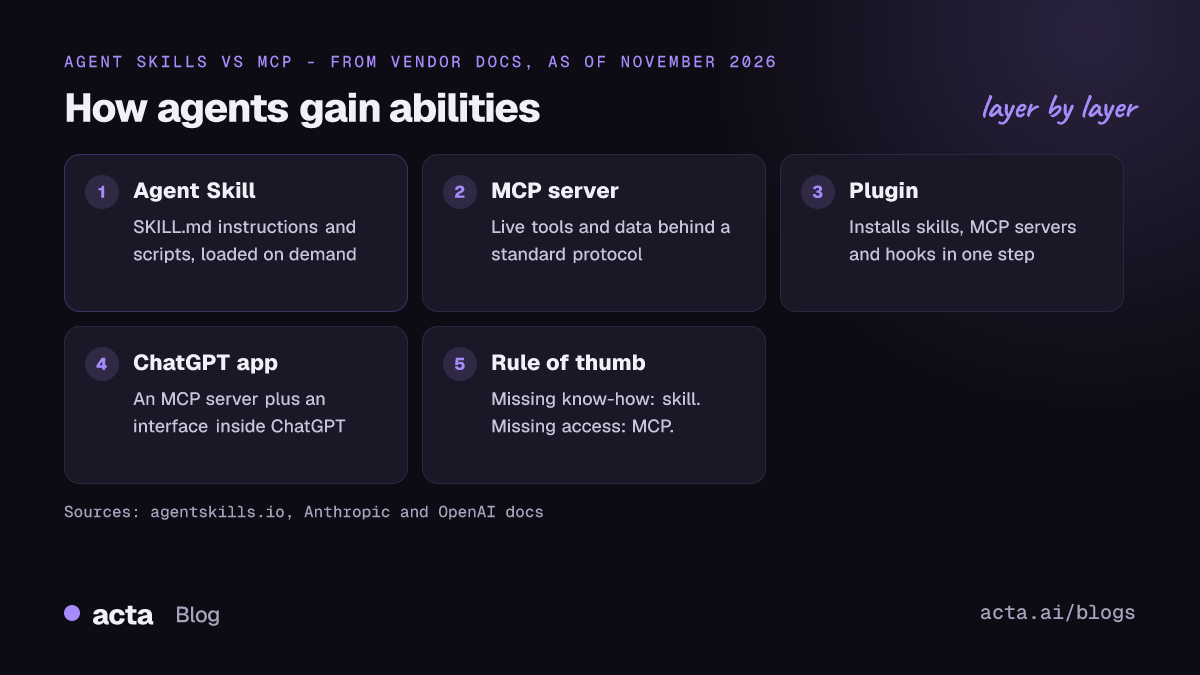
- How should the agent do this job? That's a skill. It holds the steps, conventions, templates and helper scripts a competent colleague would hand a new hire.
- What can the agent reach? That's an MCP server. It exposes tools and data from a live system, with its own credentials and permissions.
- How do we hand all of this to fifty people? That's a plugin (or, inside ChatGPT, an app or plugin from the directory). It packages the first two so installation is one step.
A useful test: if you could write the ability down as a document plus a script that runs on the agent's own machine, it's a skill. If it needs a login to someone else's system and fresh data every time, it's an MCP server. If you're asking how to distribute either, it's a plugin.
Claude's documentation adds a fourth piece people mix in: subagents. A subagent is a separate worker with its own context window and tool permissions. Use one when a task needs isolation or parallel work, not when it just needs different instructions; that's still a skill.
Agent Skills are folders of know-how loaded on demand
What are agent skills, concretely? Per the Agent Skills open format, a skill is a folder containing a SKILL.md file: YAML frontmatter followed by Markdown instructions. Two frontmatter fields are required, name and description; optional fields include license, compatibility and metadata. The folder can also hold scripts, reference documents and assets. A reference validator, skills-ref, checks a skill against the spec.
The design trick is progressive disclosure, which Anthropic's Agent Skills overview describes as loading information in stages instead of all at once. At startup the agent reads only each skill's name and description. When a request matches a description, it reads the SKILL.md body. Bundled files such as a long style guide or a Python script are read or run only if the instructions point to them. You can install dozens of skills and pay for a few lines of context each until one is used.
Here is a minimal SKILL.md you can adapt (the team and steps are illustrative):
---
name: weekly-status
description: Writes the Friday status update for the platform team. Use when asked for a weekly status, project update or Friday summary.
---
# Weekly status
1. List each active project with owner, status (on track, at risk, slipped) and one line of evidence.
2. Put slipped items first. Name the blocker and who is unblocking it.
3. Keep it under 200 words. No adjectives about progress; state facts and dates.
4. Use the format in reference/example.md.
Notice what decides whether the agent ever uses it: the description. Write it as "what it does" plus "when to use it", with the words people actually type. A description like "Status helper" will sit unused.
OpenAI's Codex reads the same format. Its skills docs (as of November 2026) say Codex starts with each skill's name, description and path, and loads the full instructions only when it decides to use one. You can call a skill explicitly by typing $ or running /skills, or let Codex pick it when the task matches. In a repository, Codex looks in .agents/skills folders from the working directory up to the repo root, and a built-in $skill-creator drafts new ones.
ChatGPT has skills too. OpenAI's help article on skills in ChatGPT describes them as reusable, shareable workflows that can bundle instructions, examples and code, available on Business, Enterprise, Healthcare and Edu plans subject to workspace settings (check the page; availability changes). Uploaded skills are scanned and can be marked Needs Review or Blocked, admins control sharing through a workspace library, and because they follow the open standard you can move a skill from one product to another.
MCP servers give an agent live access to systems
An MCP server is a process or hosted service that speaks the Model Context Protocol. It lists tools, resources and prompts; the client hands the tool definitions to the model; the model calls them; the server runs them with its own credentials. Local servers talk over stdio, hosted ones over Streamable HTTP with OAuth-based sign-in. We compare that with plain tool calls in MCP vs function calling.
The strengths are the opposite of a skill's. An MCP server can reach data that changes by the minute, act as the signed-in user, and enforce permissions on its own side. One server works in every MCP-capable client: Claude, ChatGPT, Cursor, Codex and others.
The cost is context and trust. Every tool a connected server lists is described to the model, so a server with 40 tools puts 40 descriptions in front of it whether or not they're needed. And a server you didn't write is code with access to your accounts; review it as you would any dependency. Our post on AI supply chain security for plugins and connectors covers that review.
Where the line blurs: a skill can bundle a script that calls an API. That works for a quick personal tool, but the script runs with whatever credentials sit on that machine, and every user maintains their own copy. Once several people need the same authenticated access, move it to an MCP server and let the skill describe how to use it.
Plugins and ChatGPT apps are packaging
Claude Code plugins. The Claude Code plugin docs describe a plugin as a bundle that can contain skills, subagents, hooks, MCP servers, LSP servers and monitors. The manifest lives at .claude-plugin/plugin.json; everything else sits at the plugin root, and MCP servers are declared in a .mcp.json file there. Plugins are installed from marketplaces, which are catalogs listing plugins and where to fetch them. Every component also works without a plugin; the plugin just makes it one install.
Codex plugins. OpenAI's Codex docs describe plugins as bundles of skills, app integrations (such as GitHub, Slack or Google Drive) and MCP servers. Bundled skills work as soon as the plugin is installed; apps and MCP servers may ask you to sign in or finish setup first. The skills docs recommend plugins as the way to share skills.
ChatGPT apps. Apps in ChatGPT are built with the Apps SDK, which sits on MCP. OpenAI's MCP Apps in ChatGPT page says ChatGPT implements the open MCP Apps standard for interfaces returned by an MCP server, with ChatGPT-only extensions for anything the shared spec doesn't cover. So a ChatGPT app is an MCP server plus UI. If you already run an MCP server, you're most of the way to an app.
The original ChatGPT plugins from 2023 were wound down in 2024. Advice written for them, including the ai-plugin.json manifest, is history; target MCP instead.
Where each one works as of November 2026
Here's where each mechanism runs, from each vendor's docs. Plans and availability shift, so check the linked pages before you roll something out.
| Mechanism | Adds | Runs in | Shared via |
|---|
| Agent Skill (SKILL.md) | Instructions, templates, scripts | Claude apps and Claude Code, Codex, ChatGPT (business plans) | Repo folder, plugin, ChatGPT workspace library |
| MCP server | Live tools and data with auth | Any MCP client: Claude, ChatGPT, Cursor, Codex and more | A URL (remote) or a config entry (local) |
| Claude Code plugin | Bundle: skills, subagents, hooks, MCP | Claude Code | Plugin marketplaces |
| Codex plugin | Bundle: skills, apps, MCP | Codex | Plugin install |
| ChatGPT app | MCP server plus an interface | ChatGPT | App directory |
Agent skills vs MCP: pick by what is missing
When the agent fails a task, ask why before you build anything.
Pick a skill if
- The agent could do the job but does it your way only when you explain it every time.
- The ability is a process: a review checklist, a release procedure, a report format, a brand voice.
- It needs a helper script that runs locally, such as converting a spreadsheet or validating a file.
- You want it portable across Claude, Codex and ChatGPT without running anything.
Pick an MCP server if
- The agent lacks access: it can't see the tickets, the CRM record or the latest numbers.
- Actions must run as the signed-in user, with that user's permissions and an audit trail.
- Several clients or teams need the same live access.
Pick a plugin if
- You've got a working set of skills and servers and need everyone on the team to have the same setup.
- You want hooks (Claude Code) to run checks automatically around the agent's actions.
Claude skills vs MCP is rarely either-or in practice. The common pattern is a server for access plus a skill that explains how your team uses it: which project keys matter, what a good ticket looks like, which fields never to touch.
A skill on top of an MCP server, worked through
Say an engineering manager, Priya, wants a Friday update built from the week's meetings. The facts (decisions, action items, owners) live in a meeting tool. The format lives in her head.
The split is clean. The meeting data comes through an MCP server; Acta's MCP connector, for example, lets Claude, ChatGPT or Cursor read your meetings, action items and Decision log once you paste the Connector URL from Acta's settings (how it works). The format is the weekly-status skill above. Priya asks "write my Friday update"; the skill's description matches, the agent reads the instructions, calls the server for this week's decisions and overdue items, and writes the update in her format. When the format changes, she edits one Markdown file. When the data source changes, the skill doesn't care.
The meetings have to be captured somewhere first. If a bot in the call isn't welcome, the Acta Chrome extension works in Google Meet, Microsoft Teams in the browser and the Zoom web client; check what to tell participants before you record anyone.

Five mistakes that waste an agent's context
- Turning a process into an MCP server. If the "tool" just returns a fixed checklist, it's a skill. A server adds deployment and auth for text that never changes.
- Vague skill descriptions. The agent picks skills from the description alone. "Helps with docs" never triggers; "Writes release notes from merged PRs; use when asked for release notes or a changelog" does.
- Connecting every server you find. Each connected server adds its tool descriptions to the model's context. Connect what the current project needs and disconnect the rest.
- One giant SKILL.md. Put the core steps in SKILL.md and move long references into separate files the instructions point to. That's what progressive disclosure is for.
- Skipping review of third-party skills. A skill can include scripts the agent runs. Read them first, the same way you'd read a shell script from the internet.

Frequently asked questions
What is the difference between agent skills vs MCP?
Agent Skills are folders of instructions and optional scripts (a SKILL.md file) that an agent loads when a task matches; they teach a process. MCP servers expose live tools and data from external systems with their own authentication; they grant access. Most setups use both: a server to reach a system and a skill describing how your team uses it.
Are Claude skills and Codex skills the same format?
Both follow the open Agent Skills format: a folder with a SKILL.md file containing YAML frontmatter (name and description required) and Markdown instructions, plus optional scripts and references. As of November 2026, OpenAI says ChatGPT skills also follow the standard, so a skill can be moved between products, though product-specific extras may not carry over.
Skills vs plugins: which should I build first?
Build the skill first. A plugin is packaging: in Claude Code it bundles skills, subagents, hooks and MCP servers; in Codex it bundles skills, apps and MCP servers. Get one skill working in your own setup, then wrap it in a plugin when teammates need the same thing installed in one step.
Can a skill replace an MCP server?
For personal, low-stakes use, sometimes: a skill can bundle a script that calls an API with credentials on your machine. It stops working well when several people need the same access, when actions must run as each user, or when you need central revocation. At that point, put the access behind an MCP server.
Do ChatGPT apps use MCP?
Yes. Apps in ChatGPT are built with OpenAI's Apps SDK on top of MCP, and as of November 2026 ChatGPT implements the open MCP Apps standard for interfaces returned by an MCP server. If you already run an MCP server, building an app mostly means adding the interface layer.
Set up your team's agent abilities
Start from the failures you see, not from the formats. Every repeated correction is a skill waiting to be written; every "I can't access that" is a server.
- Log the misses: for a week, note each time the agent did a task wrong or couldn't reach something.
- Write one skill: take the most repeated correction and turn it into a SKILL.md with a precise description.
- Connect one server: add the MCP server for the system people ask about most, and nothing else yet.
- Review before installing: read third-party skill scripts and check what each server can do as you.
- Package last: once it works for you, bundle it as a plugin for the team.
If your team's decisions and action items are part of what agents should know, capture the calls with the Acta Chrome extension and connect them through the AI assistants connector.