Use Cases 6 min read
BANT Qualification Reports From Every Discovery Call, Written for You
What BANT qualification is, what Acta's BANT report covers, and how it is written automatically from your discovery calls with gaps to ask about next time.
Quick answer: A BANT qualification report scores a sales opportunity on Budget, Authority, Need and Timeline. Acta writes it for you after a discovery call: it reads the transcript, fills in what the prospect said about each of the four criteria, adds objections, procurement details, upsell potential and next steps, and flags what is still unknown so you can ask on the next call.
Discovery calls create a qualification job that rarely gets done properly. The rep has to remember who controls the money, whether the person on the call can actually sign, and what deadline was mentioned in passing, then type it all into the CRM before the next call starts.
In practice the notes end up thin: "good call, budget TBD, follow up next week." The pipeline review then runs on gut feel, and deals that were never qualified sit in forecast for months.
What is BANT qualification?
BANT is a lead qualification framework built on four questions. It is widely credited to IBM's sales organisation, and it remains one of the most common ways to decide whether a prospect is worth deeper discovery.
- Budget: can the buyer pay for a solution, and is money already set aside or does it need to be found?
- Authority: is the person you are talking to the decision-maker, and if not, who else signs off?
- Need: is there a real, shared problem that your product solves, and what does it cost them to leave it unsolved?
- Timeline: when will they decide and buy, and is there a trigger event or deadline driving that date?
HubSpot's guide to using BANT to qualify prospects gives sample questions for each criterion. BANT works best as a fast first filter. For complex enterprise deals with large buying committees, many teams pair it with a deeper framework such as MEDDPICC once the opportunity is past first qualification.
What does Acta's BANT qualification report include?
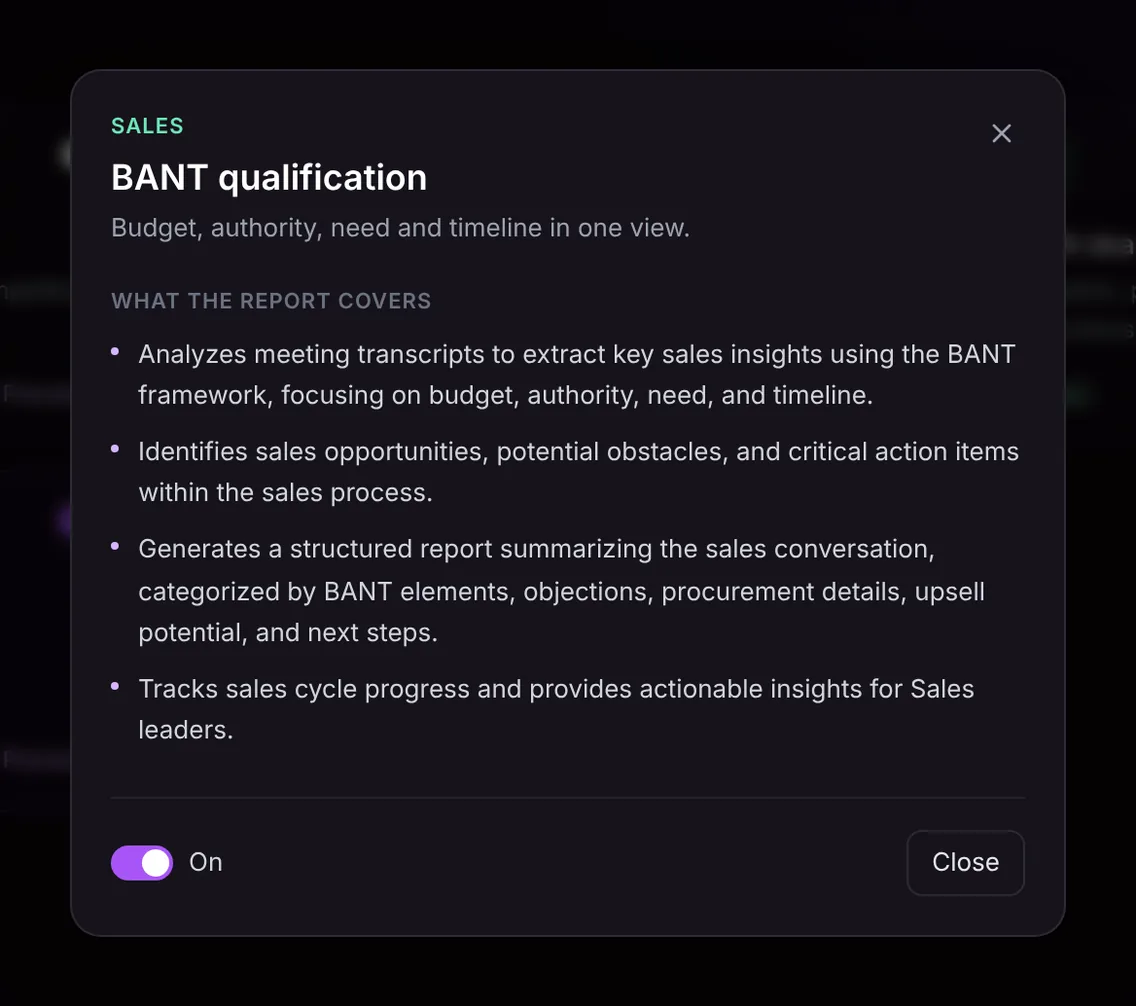
The report is built from the conversation itself, so it reflects what the prospect actually said rather than what the rep remembers. It covers:
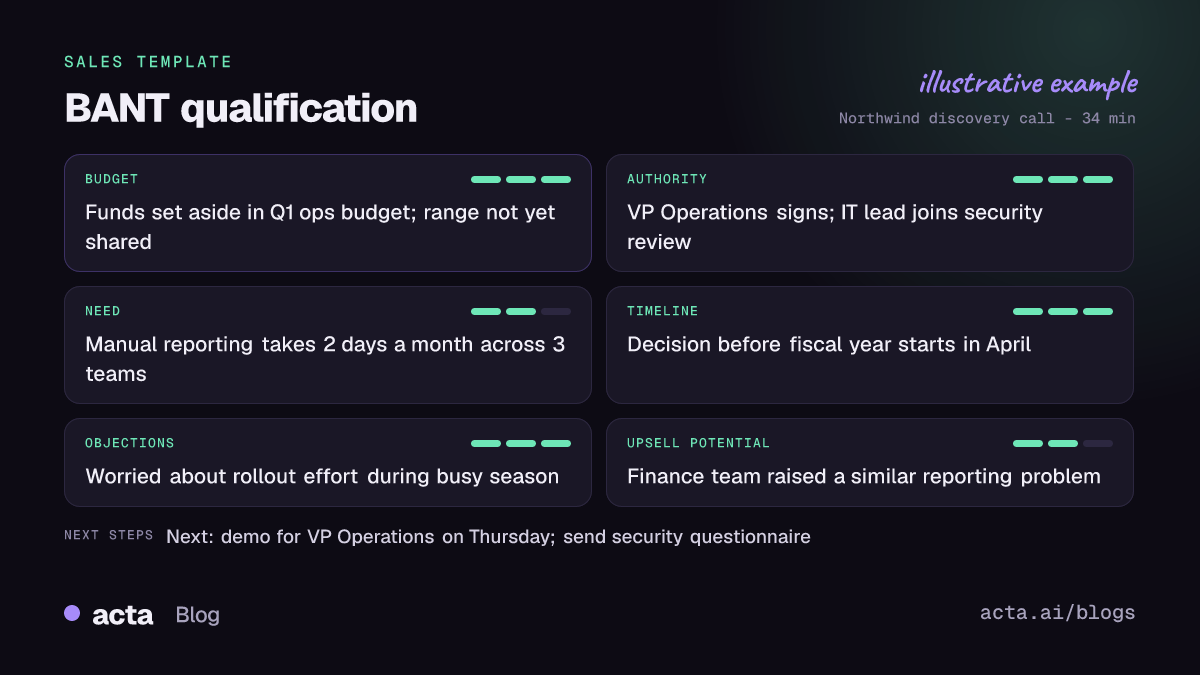
- BANT breakdown: budget, authority, need and timeline, each with the evidence from the call and how well it was covered on a three-point scale.
- Opportunities and obstacles: where the deal can grow and what could stall it, such as a competing project or a budget freeze.
- Objections: pushback on price, timing or fit, in the prospect's words.
- Procurement details: security review, legal, vendor onboarding or purchasing steps that were mentioned.
- Upsell potential: other teams, use cases or seats that came up.
- Next steps and action items: who does what, by when.
- Sales cycle progress: an "In short" summary, a qualification status, a confidence level that says what was missing, "Ask on the next call" questions for the gaps, and key quotes with the speaker.
Here is the template in Acta's Templates page, with the preview of what the report covers:
And an illustrative example of a finished report:
Why is a BANT report useful, and who is it for?
It is built for SDRs, account executives and the sales leaders who review their pipelines. The value is consistency: every discovery call is written up against the same four criteria, so deals can be compared side by side.
- SDR to AE handoff: the AE receives a structured report instead of a one-line note, and does not re-ask questions the prospect already answered.
- Pipeline reviews: a manager can see at a glance that a deal has a strong need and a firm timeline but no confirmed economic buyer, and coach on that gap.
- Disqualifying early: when the report shows no budget and no deadline, the rep can park the deal and spend the week on better ones.
- CRM hygiene: pushing the report to the contact record means the qualification evidence lives where forecasting happens.
How does Acta pick the BANT template automatically?
You do not have to turn the template on before your first call. Acta reads each conversation and picks a template that fits, even one you have not enabled. On a discovery call, the signals for BANT are questions about budget or current spend, who else is involved in the decision, the problem the prospect is trying to solve and when they need it solved.
When Acta picks BANT this way, the report is labelled "Auto" and Acta explains why, for example that the call covered budget, the decision-maker and timing. If you like the result, one click on "Turn on for future meetings" keeps the template on.
The reverse also holds. If you have BANT turned on and the meeting is an internal sprint planning session, Acta does not force a sales report out of it. The template is listed under "Not relevant" with the reason, so you never get an empty BANT scorecard for a meeting that had no buyer in it.

How do you use the BANT report in Acta?
- Record the call. Acta records Zoom, Google Meet and Microsoft Teams through a meeting bot, or without one using the bot-free desktop app, the Chrome extension or the mobile apps. You can also upload a recording.
- Turn on BANT qualification. Open the Templates page at Acta's templates, find it in the Sales group, preview what it covers and toggle it on. Or let Acta pick it.
- Open the meeting's Templates tab. The report sits next to the summary and transcript.
- Share it. Copy it, download it as PDF, Word or Markdown, or use Push to CRM to add it as a note on the contact in Salesforce, HubSpot or Zoho (paid plan, CRM connected).

Tips for a complete BANT report
The report only contains what was said on the call, so the gaps it shows are gaps in discovery. A few habits help:
- Ask about budget indirectly: "How have you funded similar projects before?" usually gets a more honest answer than "What's your budget?"
- Name the buying group out loud: "Who else would need to agree before this moves forward?"
- Tie the timeline to an event, such as a renewal date, a board meeting or a fiscal year start, so it is more than a guess.
- Read the "Ask on the next call" list before your follow-up and work through it.
For later-stage deals, Acta's other sales templates go deeper: the MEDDPICC deal report maps metrics, the economic buyer and the champion, while the SPICED deal report centres on pain, impact and critical events. See how sales teams use Acta across the cycle on the Acta for sales page.
Frequently asked questions
What does BANT stand for?
Budget, Authority, Need and Timeline. They are the four things a rep checks to decide whether a prospect is qualified for deeper sales effort.
Is BANT still relevant for B2B sales?
Yes, as a first-pass filter. It quickly separates real opportunities from early research. For complex deals with many stakeholders, teams often add a framework like MEDDPICC after initial qualification.
Does Acta fill in BANT fields it did not hear?
No. The report only contains what was said in the meeting. Missing elements show as gaps, with a confidence level and suggested questions to ask on the next call.
Can I send the BANT report to my CRM?
Yes. Push to CRM adds the report as a note on the customer's contact in Salesforce, HubSpot or Zoho on a paid plan with that CRM connected. You can also copy it or download it.
Do I need to turn the template on before every call?
No. Turn it on once, or let Acta pick it automatically when a call covers budget, decision-makers and timing.
Want qualified deals without the typing? Start a free 15-day Acta trial and record your next discovery call.


