Guides & How-tos 7 min read
How to Build Extractive Question Answering With Open Models (2026 Guide)
A practical guide to extractive question answering: which SQuAD 2.0 models to use, how to add retrieval, handle unanswerable questions, deploy and evaluate.
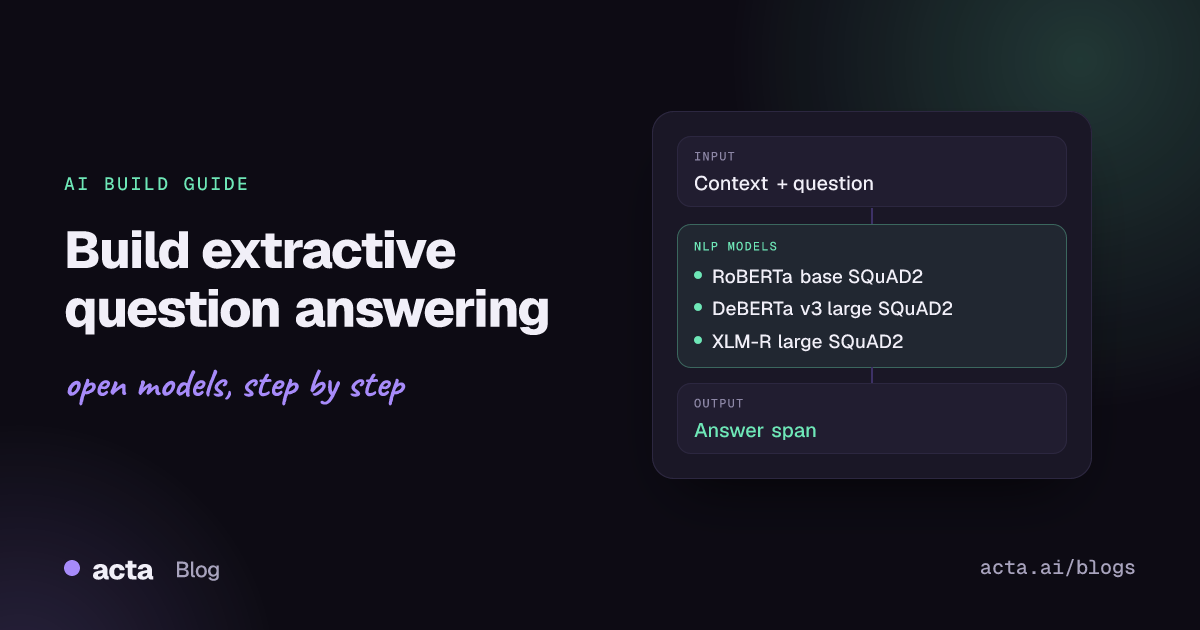
Quick answer: Extractive question answering finds the exact span in a given text that answers a question, and returns it with a score and character offsets. The shortest path is a SQuAD 2.0 fine-tuned encoder such as deepset/roberta-base-squad2 or deepset/deberta-v3-large-squad2, run through the Hugging Face transformers question-answering pipeline, with a retriever in front when you have many documents.
Extractive QA is the reliable, low-cost choice when answers must be copied word for word from a source: policy lookups, contract clauses, product specs, support articles. Because the answer is always a substring of the input, the user can see exactly where it came from.
This guide covers how the task works, which open models to use, a working pipeline, deployment, evaluation with exact match and F1, and the pitfalls that show up in production.
What is extractive question answering?
The input is a question plus a context passage; the output is an answer span, its start and end offsets and a confidence score. The Hugging Face question answering task page separates three variants: extractive QA (copy a span from the context, usually with BERT-like models), open generative QA (write an answer from the context) and closed generative QA (answer with no context at all).
An extractive model is an encoder with two output heads that score each token as a possible answer start and end. The best-scoring valid span wins. Models fine-tuned on SQuAD 2.0 also learn to predict "no answer", because that dataset adds over 50,000 unanswerable questions (SQuAD 2.0 paper). The Hugging Face course chapter on question answering and the transformers question answering guide walk through training one.
What can you build with it?
- Help-centre answer boxes: highlight the sentence in a support article that answers the customer's question.
- Contract and policy lookup: "What is the notice period?" returns the clause text, not a paraphrase.
- Form and record filling: ask fixed questions ("policy number?", "start date?") over each document to fill structured fields.
- Internal search with answers: combine a search index with a reader so results show the answer, not only the page.
- Grounding checks for LLM apps: verify that a generated answer is supported by a span in the retrieved text.
Which models should you use?
- RoBERTa base SQuAD2 (deepset/roberta-base-squad2): the common default. The card reports 79.9 exact match and 82.95 F1 on the SQuAD 2.0 validation set; licence CC BY 4.0.
- DeBERTa v3 large SQuAD2 (deepset/deberta-v3-large-squad2): higher accuracy at a higher compute cost; the card lists about 88.1 exact match and 91.2 F1 on SQuAD 2.0 validation; licence CC BY 4.0.
- XLM-RoBERTa large SQuAD2 (deepset/xlm-roberta-large-squad2): multilingual reader, with German MLQA and XQuAD evaluations on the card; licence CC BY 4.0.
- DistilBERT base cased SQuAD (distilbert/distilbert-base-cased-distilled-squad): small and fast, fine-tuned on SQuAD v1.1 (87.1 F1 on the dev set per the card). It was not trained on unanswerable questions, so it always returns some span.
- Qwen3 8B (Qwen/Qwen3-8B): an Apache-2.0 LLM for when you need generative answers that combine several passages. Ask it to quote the source, and check the quote against the text.
The SQuAD explorer and leaderboard is the standard public comparison for extractive readers. Treat it as a guide only and test on your own documents.
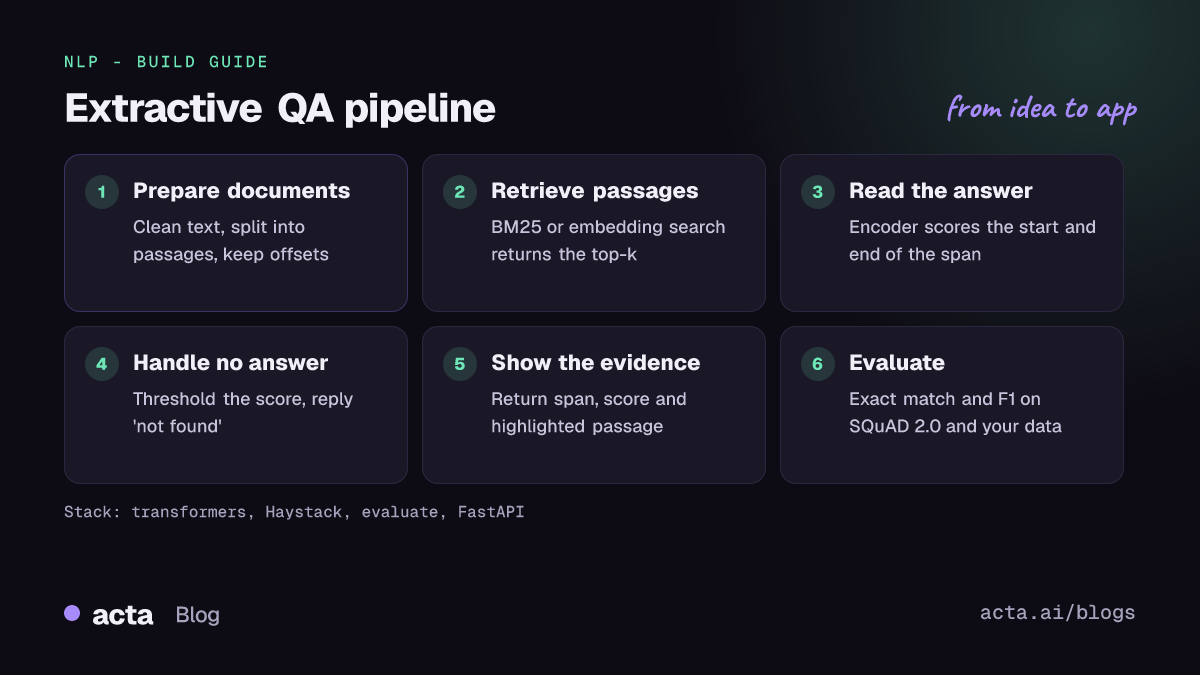
How do you build it, step by step?
- Prepare documents. Extract clean text and split it into passages of a few hundred words, keeping the document ID and offsets.
- Add a retriever. Readers only see one passage at a time, so first find the top 3-10 passages with BM25 or an embedding index.
- Run the reader. Pass each question-passage pair to the QA pipeline. Long passages are split into overlapping windows controlled by
max_seq_lenanddoc_stride. - Handle no-answer cases. Enable
handle_impossible_answerand set a score threshold below which you reply "not found in the documents". - Show the evidence. Return the span, the score and the passage with the answer highlighted, plus a link to the source document.
- Measure and fine-tune. Label a few hundred question-answer pairs from your domain, measure exact match and F1, and fine-tune if the gap is large.
This example follows the usage on the deepset/roberta-base-squad2 model card, with standard pipeline options for long contexts and unanswerable questions:
# pip install transformers torch   (pattern from the deepset/roberta-base-squad2 model card)
from transformers import pipeline

model_name = "deepset/roberta-base-squad2"
nlp = pipeline("question-answering", model=model_name, tokenizer=model_name)

QA_input = {
    "question": "Why is model conversion important?",
    "context": "The option to convert models between FARM and transformers gives freedom "
               "to the user and let people easily switch between frameworks.",
}
res = nlp(QA_input, handle_impossible_answer=True, doc_stride=128, max_seq_len=384)
print(res)  # {'score': ..., 'start': ..., 'end': ..., 'answer': ...}
For a full retrieve-then-read system, Haystack (Apache-2.0) has document stores, retrievers and an extractive reader component. Note that the reader moved packages in Haystack 3.0: the migration guide says the Hugging Face reader now lives in the transformers-haystack integration as TransformersExtractiveReader.
How do you serve and deploy it?
- CPU first: base-size readers run on CPU for interactive use. Load the pipeline once in a FastAPI app and batch requests.
- Quantization: INT8 versions cut size and latency; for example, Intel's INT8 DistilBERT SQuAD model is listed at 71.2 MB versus 249 MB for FP32. ONNX Runtime export is another option.
- GPU: use a GPU for large readers such as DeBERTa v3 large, or when you score many passages per question.
- Hosting: Hugging Face Inference Endpoints and Spaces both support transformers models; a Gradio demo with question, context and highlighted answer is a quick way to get feedback.
- Caching: cache retriever results and reader outputs for frequent questions, and keep the model and index versions in your logs.
The pipeline code lives in huggingface/transformers; pin versions, since defaults for QA post-processing can change between releases.
How do you evaluate it?
Extractive QA uses two metrics: exact match (the prediction equals a gold answer after normalisation) and token-level F1 (partial overlap). On SQuAD 2.0 you also get separate scores for answerable and unanswerable questions. The squad_v2 metric in huggingface/evaluate computes all of them:
# pip install evaluate   (usage from the squad_v2 metric README in huggingface/evaluate)
from evaluate import load

squad_metric = load("squad_v2")
predictions = [{"prediction_text": "1976", "id": "56e10a3be3433e1400422b22",
                "no_answer_probability": 0.0}]
references = [{"answers": {"answer_start": [97], "text": ["1976"]},
               "id": "56e10a3be3433e1400422b22"}]

results = squad_metric.compute(predictions=predictions, references=references)
print(results["exact"], results["f1"], results["HasAns_f1"])
For a full system, also measure retrieval recall (is the answer in the top-k passages at all?) and end-to-end accuracy. Most production errors come from retrieval, not from the reader.
Pitfalls and tips
- Long documents. Encoders read around 512 tokens at a time. Use
doc_strideoverlap so answers are not cut in half; this forum thread on long text explains the windowing. - Tokenizer support. Windowing needs a fast tokenizer with offset mapping. A DeBERTa v3 thread shows the error you get without one.
- No-answer handling. Hosted endpoints may not let you change
handle_impossible_answer; see this discussion. Self-hosting gives you full control. - Scores are not probabilities. Calibrate the threshold on your own labelled data rather than picking 0.5.
- Licences. The deepset readers above are CC BY 4.0, which requires attribution; check the base model and dataset terms too.
- Extractive vs generative. If users need summaries or answers that combine facts, use an LLM over retrieved passages, as discussed in this forum thread on generative QA with context.
Where to get help
- The Hugging Face forum, where most of the threads above live; search for your error message first.
- Haystack GitHub Discussions for retrieve-then-read pipelines and reader issues.
- Model card discussion tabs on the Hub for questions about a specific checkpoint.
- The SQuAD explorer for dataset details and the official evaluation script.
Frequently asked questions
When should I use extractive QA instead of an LLM?
Use extractive QA when answers must be verbatim and traceable, when latency and cost matter, or when you need to run on CPU. Use an LLM when answers require combining several passages or rephrasing.
Why does my model always return an answer?
Models trained only on SQuAD v1.1 never learned to abstain. Use a SQuAD 2.0 model, enable handle_impossible_answer and tune a score threshold.
Can extractive QA work in languages other than English?
Yes, with a multilingual reader such as deepset/xlm-roberta-large-squad2. Test in each target language, since evaluation on the card is limited.
How many labelled examples do I need to fine-tune?
Start from a SQuAD 2.0 checkpoint and add a few hundred to a few thousand in-domain pairs. Measure on a held-out set to see whether more data still helps.
Related guides: rerankers for search and RAG, semantic search with embeddings and table question answering. Acta applies the same retrieve-then-answer idea to meetings, so you can ask questions across all your meetings.